
 Sign in to Mod The Sims
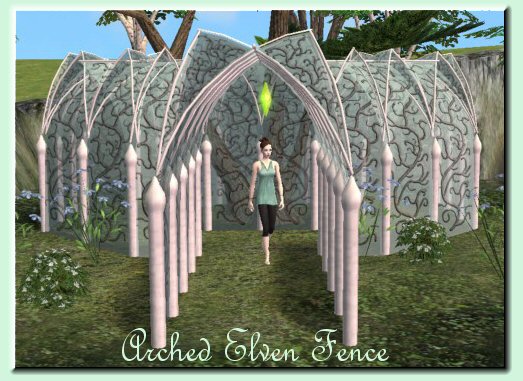
 Elven arched fence
 Elven arched fence
MTS has all free content, all the time. Donate to help keep it running.
SCREENSHOTS

fence3.jpg - width=523 height=381
fencesmisc2.jpg - width=627 height=557
Featured Upload!
This is a featured upload! It showcases the best talent and creativity available on MTS and in the community. 



Hi,
here's another item to add variety to your building.
This arched fence allows you to build 'hallways' through gardens etc.
my thanks to Numenor, Tiggy, Delphy and the rest of the staff for their inspiration and help.
How it works
This does not work in the base game. You will need at least one ep!!
Doesn't matter which one. Maxis fixed fences so they can be cloned and remeshed.
Fences are pretty much like objects. Just unrar and put in your Downloads folder. You'll find them in Build items under 'Fences'
The rar file has four different fences, both with straight and diagonal versions.
You'll need to fiddle with the different pieces to get the effect you want.
Some bits WILL overlap. I don't personally mind this, so I didn't make four more versions to stop it from doing that
Policy
This is a build item, so you're allowed to use it in your houses and upload it with them. I do appreciate credit and a link to this thread.
Since it's necessary to clone these in order to recolour them, you're allowed to do so. However, you must give me credit for the mesh and a link to this thread. I literally spent months on it, so don't go claiming it as yours.
here's another item to add variety to your building.
This arched fence allows you to build 'hallways' through gardens etc.
my thanks to Numenor, Tiggy, Delphy and the rest of the staff for their inspiration and help.
How it works
This does not work in the base game. You will need at least one ep!!
Doesn't matter which one. Maxis fixed fences so they can be cloned and remeshed.
Fences are pretty much like objects. Just unrar and put in your Downloads folder. You'll find them in Build items under 'Fences'
The rar file has four different fences, both with straight and diagonal versions.
You'll need to fiddle with the different pieces to get the effect you want.
Some bits WILL overlap. I don't personally mind this, so I didn't make four more versions to stop it from doing that

Policy
This is a build item, so you're allowed to use it in your houses and upload it with them. I do appreciate credit and a link to this thread.
Since it's necessary to clone these in order to recolour them, you're allowed to do so. However, you must give me credit for the mesh and a link to this thread. I literally spent months on it, so don't go claiming it as yours.
This is a new mesh, and means that it's a brand new self contained object that usually does not require a specific Pack (although this is possible depending on the type). It may have Recolours hosted on MTS - check below for more information.
| Filename | Size | Downloads | Date | |||||
|
lethes-archedfence.rar
Size: 574.4 KB · Downloads: 57,918 · 8th Oct 2006 |
574.4 KB | 57,918 | 8th Oct 2006 | |||||
| For a detailed look at individual files, see the Information tab. | ||||||||
Key:
- - File was updated after upload was posted
Install Instructions
Basic Download and Install Instructions:
1. Download: Click the download link to save the .rar or .zip file(s) to your computer.
2. Extract the zip, rar, or 7z file.
3. Place in Downloads Folder: Cut and paste the .package file(s) into your Downloads folder:
1. Download: Click the download link to save the .rar or .zip file(s) to your computer.
2. Extract the zip, rar, or 7z file.
3. Place in Downloads Folder: Cut and paste the .package file(s) into your Downloads folder:
- Origin (Ultimate Collection): Users\(Current User Account)\Documents\EA Games\The Sims™ 2 Ultimate Collection\Downloads\
- Non-Origin, Windows Vista/7/8/10: Users\(Current User Account)\Documents\EA Games\The Sims 2\Downloads\
- Non-Origin, Windows XP: Documents and Settings\(Current User Account)\My Documents\EA Games\The Sims 2\Downloads\
- Mac: Users\(Current User Account)\Documents\EA Games\The Sims 2\Downloads
- Mac x64: /Library/Containers/com.aspyr.sims2.appstore/Data/Library/Application Support/Aspyr/The Sims 2/Downloads
- For a full, complete guide to downloading complete with pictures and more information, see: Game Help: Downloading for Fracking Idiots.
- Custom content not showing up in the game? See: Game Help: Getting Custom Content to Show Up.
- If you don't have a Downloads folder, just make one. See instructions at: Game Help: No Downloads Folder.
Recolours of this mesh
There are 1 recolours of this mesh on MTS:
Also Thanked - Users who thanked this download also thanked:
Terms of use *even newer*
Hi there,
since I'm officially sorta retired as a modder, feel free to derive from my work to make new stuff!
You may use textures and meshes (a link or credit is appreciated) for movies, redo's, new creations, whatever.
You can also upload my meshes on other sites with your new creation, if you want. Again, a link to MTS is always appreciated, and a general cool thing to do.
Have fun,
Lethey
since I'm officially sorta retired as a modder, feel free to derive from my work to make new stuff!
You may use textures and meshes (a link or credit is appreciated) for movies, redo's, new creations, whatever.
You can also upload my meshes on other sites with your new creation, if you want. Again, a link to MTS is always appreciated, and a general cool thing to do.
Have fun,
Lethey
More Downloads BETA
Here are some more of my downloads: