
 Sign in to Mod The Sims
 Simple Kitchen – Counters, Islands, Cabinets
 Simple Kitchen – Counters, Islands, Cabinets
MTS has all free content, all the time. Donate to help keep it running.
SCREENSHOTS
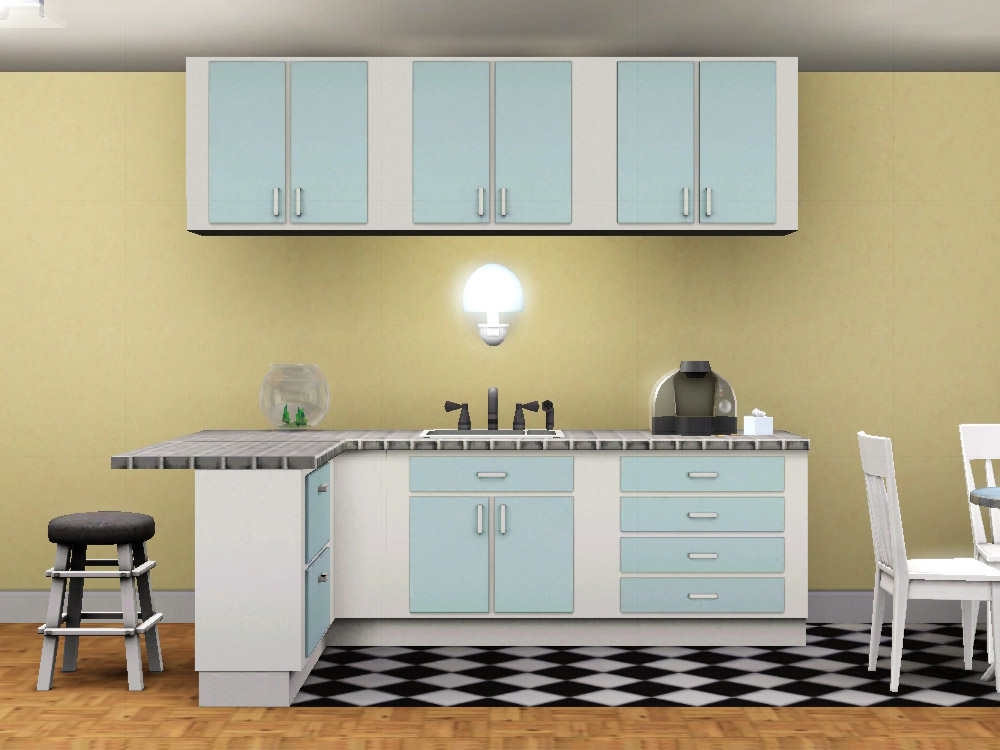
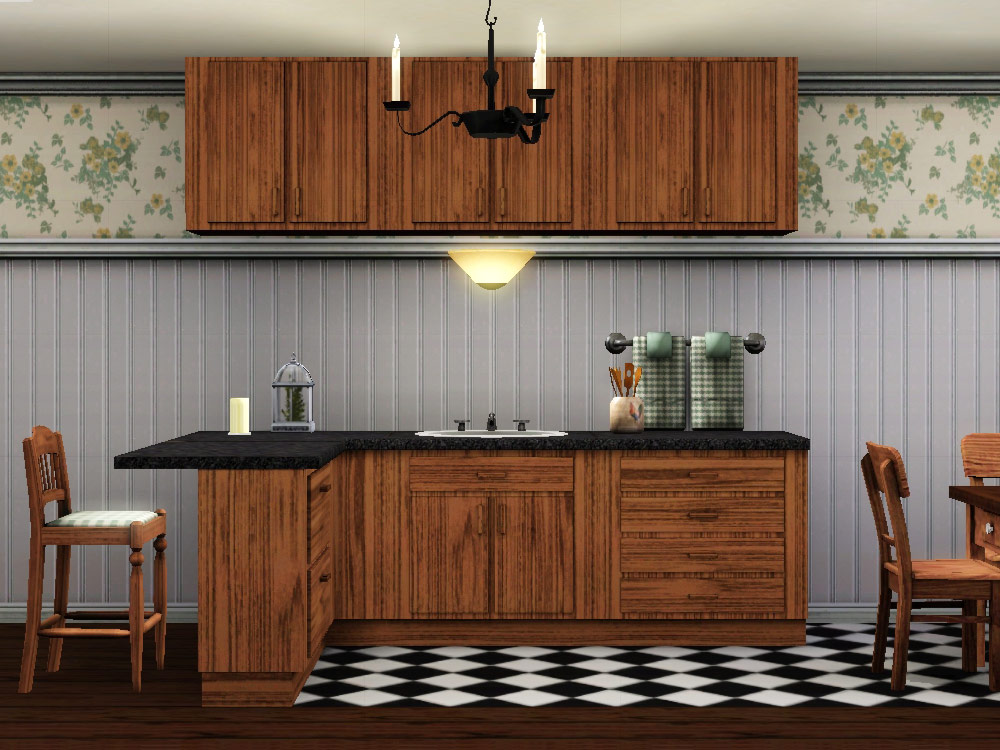
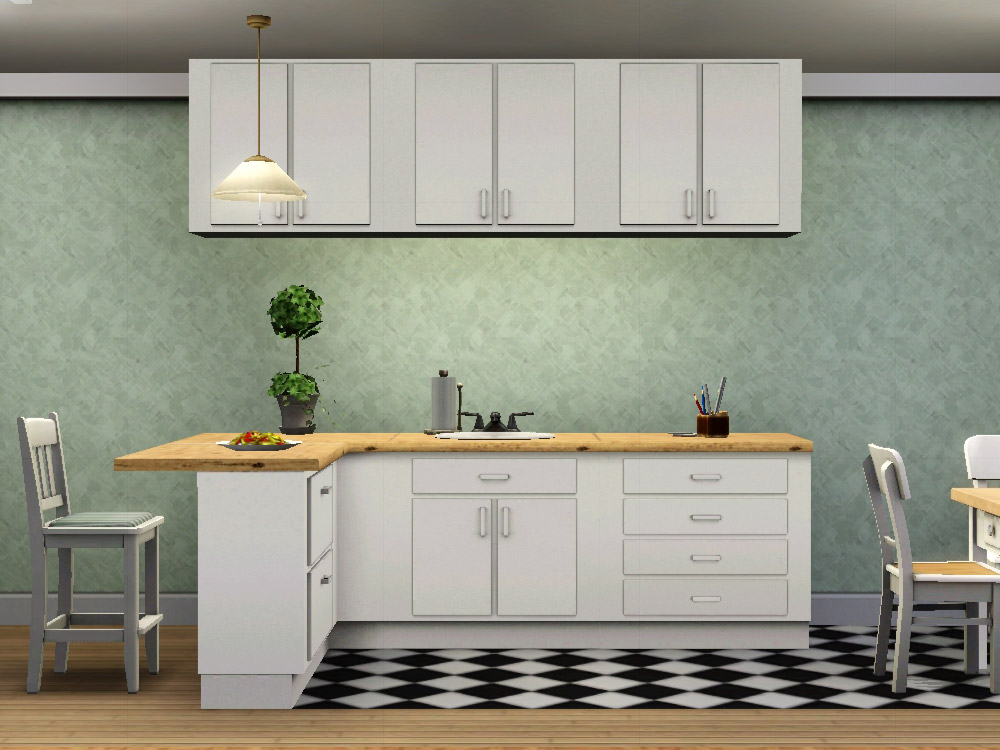
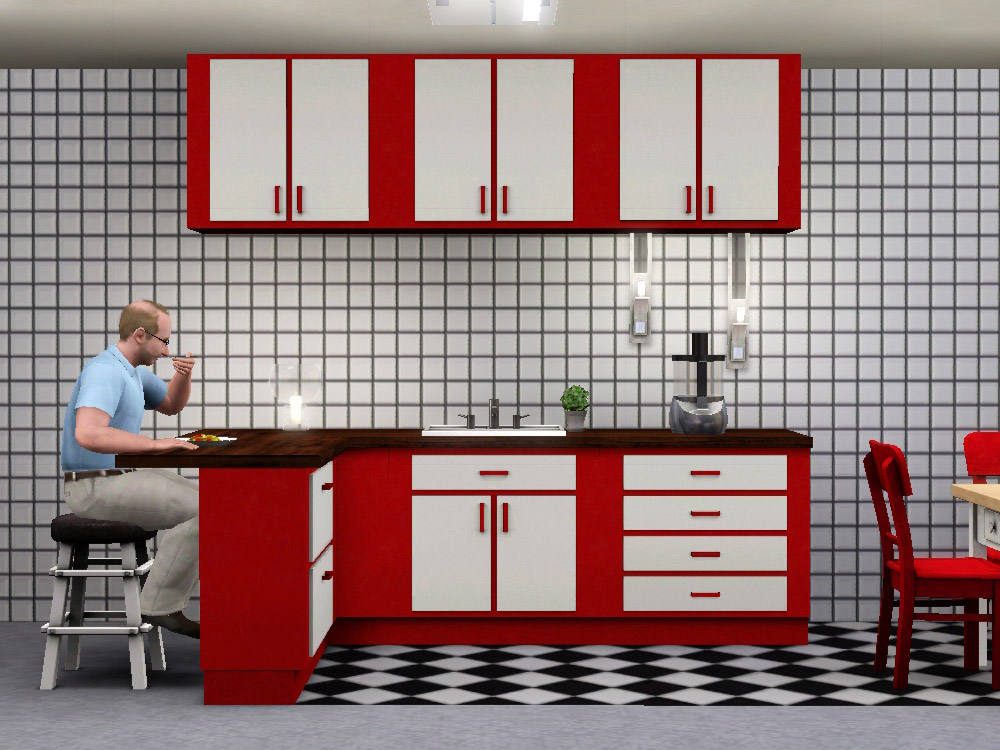
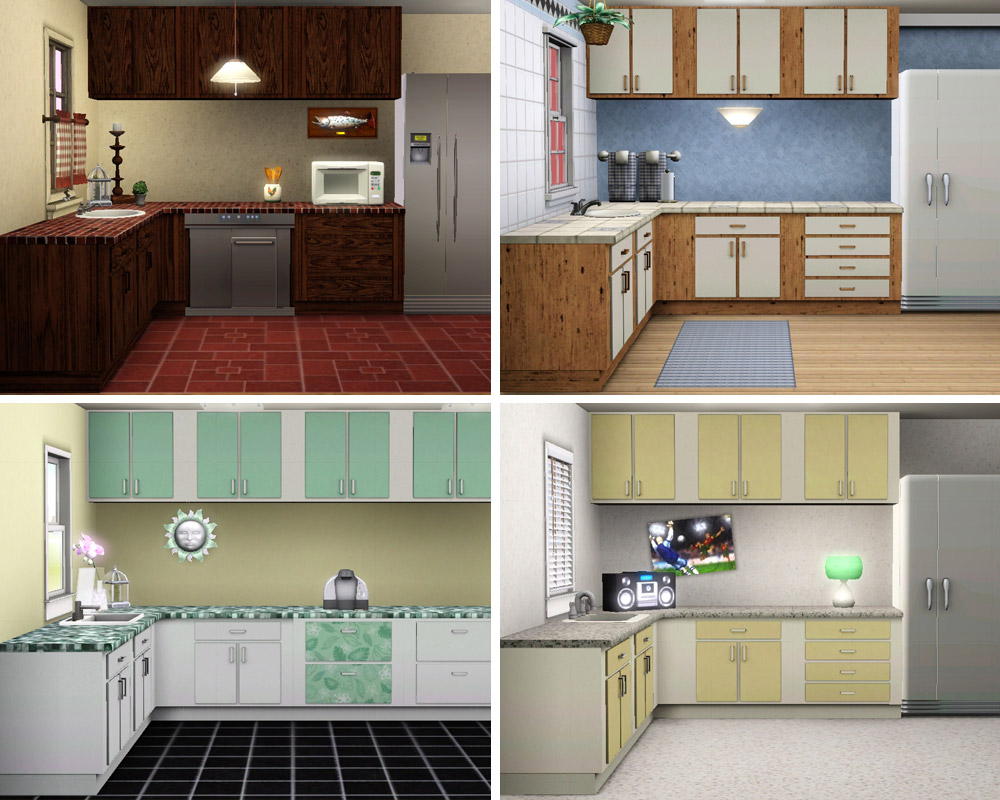


simplekitchen_01.jpg - width=1000 height=750
simplekitchen_02.jpg - width=1000 height=750
simplekitchen_03.jpg - width=1000 height=750
simplekitchen_04.jpg - width=1000 height=750
simplekitchen_05.jpg - width=1000 height=800
simplekitchen_mapping_01.jpg - width=1000 height=750
simplekitchen_mapping_bragging.jpg - width=620 height=800
simplekitchen_cabinets.jpg - width=540 height=800
Picked Upload!
This is a picked upload! It showcases some of the best talent and creativity available on MTS and in the community.
Created by plasticbox
Uploaded: 1st Mar 2010 at 12:04 AM
Updated: 13th Jan 2015 at 4:15 AM - added some grammar
Updated: 13th Jan 2015 at 4:15 AM - added some grammar
This is a simple, cheap kitchen – along the lines of the TS2 "Krampft" one, only better. It consists of a counter, a counter island, and a cabinet, plus end and corner elements.
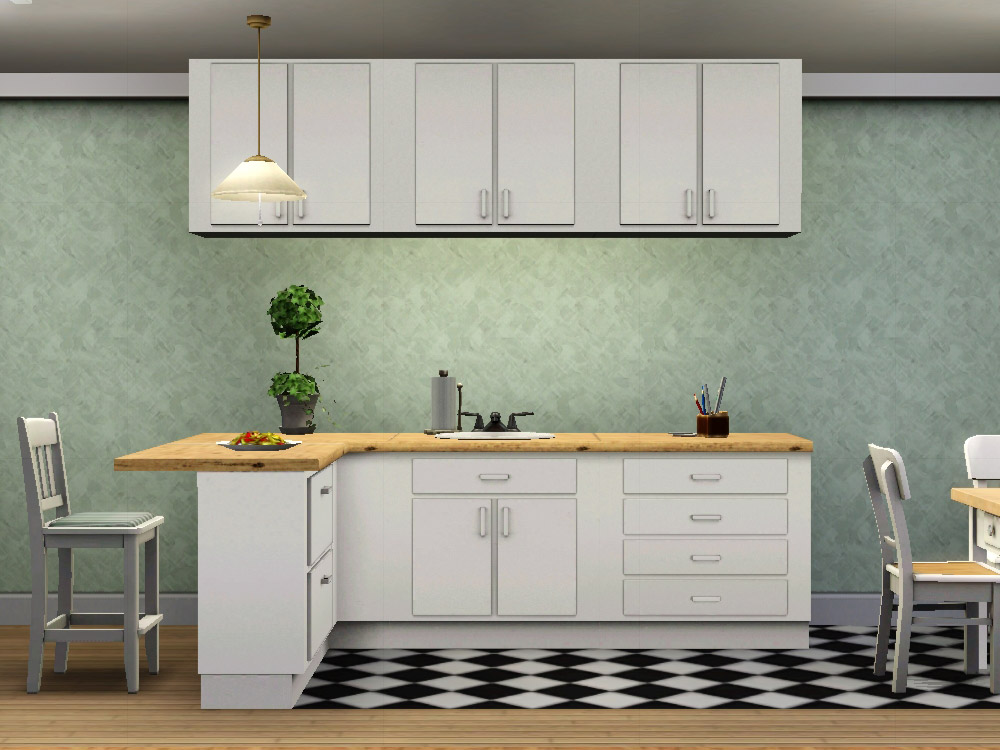
The counter is the one with doors + drawer, the island has four drawers on the base mesh and two on the ends.
Three recolourable channels: top, body and handles, doors and drawers.
One preset for all elements, shown above. In 1.8.25 games, you need to wait for the swirly preview to appear for it to work right away, since it's included as an XML, in WA games it won't show up (see below). Sorry – but after I spent a day making four presets for all nine meshes and *then* discovered the entire thing was fubar, I'm not going to do it a second time.
They're in the catalogue in Surfaces > Counters/Islands/Cabinets. The counter costs 100§, the island 120§, the cabinet 85§.
Features:
The counter and island packages are large since they each contain a full set of custom dirt overlays – this was necessary because they are mapped differently from the EA counters, so I couldn't just link to those textures. There should be no unnecessary cruft in the packages apart from that.
Known issues:
The sunshadows of the corner island are a bit too narrow on one axis .. not sure if I can muster the patience to fix that. It would only matter when they're actually used outdoors, like for a beach bar, and I guess there are more appropriate counter islands for that sort of thing.
For WA (or equivalent base game version) users, the objects initially show up solid black instead of with my preset – to me it looks like this has been fixed in one of the later patches. Workaround for those who want to stick with an old version of the game: make your own preset in CAST, and use that. Unfortunately I don't know of a way to provide my own presets – exporting as .sims3pack doesn't work in my game (I believe that's an OS X issue), and various ways of packaging them haven't worked out so far.
Seams between counters: please take a close look at the thumbnail picture of this post (white/blue kitchen with yellow wall) – see the seams in the EA wallpaper (and in the counter to the left of the sink)? If that's what you see, then you most probably have a lame graphics card like me, and there's no need to post about it .. it's just the way the game renders things (I believe it becomes very apparent on these counters since they're so plain otherwise – on a heavily decorated one, I wouldn't see it either). If you see something else, please post with a screenshot.
Known nonissue:
On most of the screenshots there is a dropshadow missing on the counter island ends – this is already fixed (I only didn't want to re-take all of the screens just because of that). I also moved the cabinet down a tiny amount so that it now lines up properly with small tiles and the high EA panelling (on the screenshots it does not, that's still the old mesh).
Made in blender with the help of this script, s3oc_1002-13-1333 and s3pe_1002-24-1519 (note that these are QA versions – use at your own risk), objtool 1.1, Milkshape, Photoshop, Aorta, Postal, BBEdit.
Made from base game 1.8.25 files. It seems like it doesn't work in 1.0 games, see post #98 in this thread (hadadelasnieves).
I don't take requests. Please respect that and do not post here or PM me with requests. People of the "plz make stuff for me" mindset, see this thread.
Feel free to recycle any and all parts of this if you want to do stuff like add-ons, different versions, more channels, etc – I can upload original PNGs of my textures (uncompressed) if there's any demand for it. All I require is 1. a direct link to this thread if (and only if) you include recognisable parts of my version in something you upload, and 2. you must upload to a free, accessible, noncommercial site with no strings attached (I guess this would amount to a non-commercial, share-alike CC license).
Polygon Counts:
Counter base, high detail: 208F/292V
Counter base, low detail: 98F/176V
Counter top, high detail: 18F/30V
Counter top, low detail: 18F/30V
Counter corner, high detail: 92F/138V
Counter corner, low detail: 58F/106V
Island base, high detail: 246F/354V
Island base, low detail: 102F/98V
Island end E, high detail: 145F/226V
Island end E, low detail: 70F/134V
Island end W, high detail: 145F/226V
Island end W, low detail: 70F/134V
Island corner, high detail: 104F/158V
Island corner, low detail: 62F/110V
Cabinet, high detail: 106F/148V
Cabinet, low detail: 46F/84V
Cabinet corner, high detail: 106F/148V
Cabinet corner, low detail: 46F/84V
The counter is the one with doors + drawer, the island has four drawers on the base mesh and two on the ends.
Three recolourable channels: top, body and handles, doors and drawers.
One preset for all elements, shown above. In 1.8.25 games, you need to wait for the swirly preview to appear for it to work right away, since it's included as an XML, in WA games it won't show up (see below). Sorry – but after I spent a day making four presets for all nine meshes and *then* discovered the entire thing was fubar, I'm not going to do it a second time.
They're in the catalogue in Surfaces > Counters/Islands/Cabinets. The counter costs 100§, the island 120§, the cabinet 85§.
Features:
- No backsplash on the counter, which means you can use any window without clipping (and it can seamlessly be combined with islands, as well).
- Both the counters and the cabinet are exactly one tile deep, so they clip into the wall – this is deliberate: that way one can put them back to back seamlessly without having to battle the game's terminally annoying "sticky counter" behaviour. It is also nicer for open kitchens (when the counters form an L shape in the room), because that way the kitchen flooring will stop short at exactly the back side of the counter and not 0.16 tiles behind it.
- The front and top of the island counters are the same depth as the regular ones, so you can use them in their place to give your kitchen more variety. This also makes it a lot easier to create goodlooking counters for shops and bars and the like.
- The corners and the cabinet have three channels like everything else (the first/last one isn't used, as the cabinet has no top and the corners no drawers/doors) – this is on purpose, so that one can drag and drop CAST presets between counters and cabinets. The way EA do this never works for me.
- The cabinet will ZOMFG FADE OUT!!1! when seen from the back side. To me that's a major advantage over the EA cabinets (and the reason I basically never use those). This is done by setting "Unknown8" in the OBJD to 0x00000040.
- The cabinet sits higher than the EA ones, so 1. it doesn't look like sims will inevitably bang their heads on it; 2. you can fit low-hanging wall lights and pictures and such underneath (most of them with moveobjects on, probably). You can also hide lights inside them, of course, to create the illusion of built-in lights.
- The cabinet has no corner mesh (technically it does, but that's identical to the regular one) – this is deliberate, because I hate being forced to place corners when I don't want them. You can still create corners with "moveobjects on" which don't look too bad. The cabinets will fit seamlessly back to back to make double sided ones (e.g. over an island); you can also place them overlapping so that the doors show on both sides – for that the body should be a solid colour or it will flicker when the camera moves.
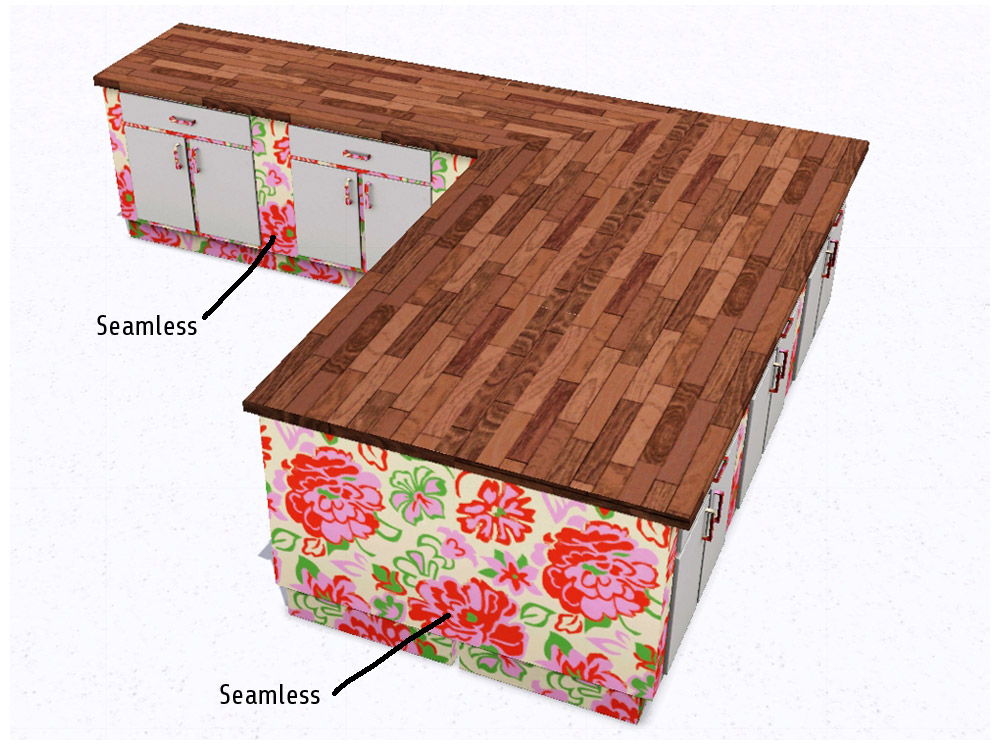
- Everything is mapped seamlessly and with no repetition or mirroring, so you can commit all sorts of atrocities with flower patterns and zebra stripes and the like. See the "mapping" screenshots for that.
The counter and island packages are large since they each contain a full set of custom dirt overlays – this was necessary because they are mapped differently from the EA counters, so I couldn't just link to those textures. There should be no unnecessary cruft in the packages apart from that.
Known issues:
The sunshadows of the corner island are a bit too narrow on one axis .. not sure if I can muster the patience to fix that. It would only matter when they're actually used outdoors, like for a beach bar, and I guess there are more appropriate counter islands for that sort of thing.
For WA (or equivalent base game version) users, the objects initially show up solid black instead of with my preset – to me it looks like this has been fixed in one of the later patches. Workaround for those who want to stick with an old version of the game: make your own preset in CAST, and use that. Unfortunately I don't know of a way to provide my own presets – exporting as .sims3pack doesn't work in my game (I believe that's an OS X issue), and various ways of packaging them haven't worked out so far.
Seams between counters: please take a close look at the thumbnail picture of this post (white/blue kitchen with yellow wall) – see the seams in the EA wallpaper (and in the counter to the left of the sink)? If that's what you see, then you most probably have a lame graphics card like me, and there's no need to post about it .. it's just the way the game renders things (I believe it becomes very apparent on these counters since they're so plain otherwise – on a heavily decorated one, I wouldn't see it either). If you see something else, please post with a screenshot.
Known nonissue:
On most of the screenshots there is a dropshadow missing on the counter island ends – this is already fixed (I only didn't want to re-take all of the screens just because of that). I also moved the cabinet down a tiny amount so that it now lines up properly with small tiles and the high EA panelling (on the screenshots it does not, that's still the old mesh).
Made in blender with the help of this script, s3oc_1002-13-1333 and s3pe_1002-24-1519 (note that these are QA versions – use at your own risk), objtool 1.1, Milkshape, Photoshop, Aorta, Postal, BBEdit.
Made from base game 1.8.25 files. It seems like it doesn't work in 1.0 games, see post #98 in this thread (hadadelasnieves).
I don't take requests. Please respect that and do not post here or PM me with requests. People of the "plz make stuff for me" mindset, see this thread.
Feel free to recycle any and all parts of this if you want to do stuff like add-ons, different versions, more channels, etc – I can upload original PNGs of my textures (uncompressed) if there's any demand for it. All I require is 1. a direct link to this thread if (and only if) you include recognisable parts of my version in something you upload, and 2. you must upload to a free, accessible, noncommercial site with no strings attached (I guess this would amount to a non-commercial, share-alike CC license).
Polygon Counts:
Counter base, high detail: 208F/292V
Counter base, low detail: 98F/176V
Counter top, high detail: 18F/30V
Counter top, low detail: 18F/30V
Counter corner, high detail: 92F/138V
Counter corner, low detail: 58F/106V
Island base, high detail: 246F/354V
Island base, low detail: 102F/98V
Island end E, high detail: 145F/226V
Island end E, low detail: 70F/134V
Island end W, high detail: 145F/226V
Island end W, low detail: 70F/134V
Island corner, high detail: 104F/158V
Island corner, low detail: 62F/110V
Cabinet, high detail: 106F/148V
Cabinet, low detail: 46F/84V
Cabinet corner, high detail: 106F/148V
Cabinet corner, low detail: 46F/84V
This is a new mesh, and means that it's a brand new self contained object that usually does not require a specific Pack (although this is possible depending on the type). It may have Recolours hosted on MTS - check below for more information.
| Filename | Size | Downloads | Date | |||||
|
pbox_SimpleKitchen.zip
Size: 2.72 MB · Downloads: 82,082 · 1st Mar 2010 |
2.72 MB | 82,082 | 1st Mar 2010 | |||||
| For a detailed look at individual files, see the Information tab. | ||||||||
Key:
- - File was updated after upload was posted
Install Instructions
Quick Guide:
1. Click the file listed on the Files tab to download the file to your computer.
2. Extract the zip, rar, or 7z file. Now you will have either a .package or a .sims3pack file.
For Package files:
1. Cut and paste the file into your Documents\Electronic Arts\The Sims 3\Mods\Packages folder. If you do not already have this folder, you should read the full guide to Package files first: Sims 3:Installing Package Fileswiki, so you can make sure your game is fully patched and you have the correct Resource.cfg file.
2. Run the game, and find your content where the creator said it would be (build mode, buy mode, Create-a-Sim, etc.).
For Sims3Pack files:
1. Cut and paste it into your Documents\Electronic Arts\The Sims 3\Downloads folder. If you do not have this folder yet, it is recommended that you open the game and then close it again so that this folder will be automatically created. Then you can place the .sims3pack into your Downloads folder.
2. Load the game's Launcher, and click on the Downloads tab. Find the item in the list and tick the box beside it. Then press the Install button below the list.
3. Wait for the installer to load, and it will install the content to the game. You will get a message letting you know when it's done.
4. Run the game, and find your content where the creator said it would be (build mode, buy mode, Create-a-Sim, etc.).
Extracting from RAR, ZIP, or 7z: You will need a special program for this. For Windows, we recommend 7-Zip and for Mac OSX, we recommend Keka. Both are free and safe to use.
Need more help?
If you need more info, see:
1. Click the file listed on the Files tab to download the file to your computer.
2. Extract the zip, rar, or 7z file. Now you will have either a .package or a .sims3pack file.
For Package files:
1. Cut and paste the file into your Documents\Electronic Arts\The Sims 3\Mods\Packages folder. If you do not already have this folder, you should read the full guide to Package files first: Sims 3:Installing Package Fileswiki, so you can make sure your game is fully patched and you have the correct Resource.cfg file.
2. Run the game, and find your content where the creator said it would be (build mode, buy mode, Create-a-Sim, etc.).
For Sims3Pack files:
1. Cut and paste it into your Documents\Electronic Arts\The Sims 3\Downloads folder. If you do not have this folder yet, it is recommended that you open the game and then close it again so that this folder will be automatically created. Then you can place the .sims3pack into your Downloads folder.
2. Load the game's Launcher, and click on the Downloads tab. Find the item in the list and tick the box beside it. Then press the Install button below the list.
3. Wait for the installer to load, and it will install the content to the game. You will get a message letting you know when it's done.
4. Run the game, and find your content where the creator said it would be (build mode, buy mode, Create-a-Sim, etc.).
Extracting from RAR, ZIP, or 7z: You will need a special program for this. For Windows, we recommend 7-Zip and for Mac OSX, we recommend Keka. Both are free and safe to use.
Need more help?
If you need more info, see:
- For package files: Sims 3:Installing Package Fileswiki
- For Sims3pack files: Game Help:Installing TS3 Packswiki
Also Thanked - Users who thanked this download also thanked:
Packs Needed
None, this is Sims 3 base game compatible!
Sharing and recycling:
Everything I upload here is published under the current BY-NC-SA Creative Commons license (Attribution, Non-Commercial, Share-Alike). In practical terms:
– Feel free to recycle, you don’t need to ask.
– For the attribution, please link to the upload you’re using wherever possible (instead of my profile). This is particularly important with edits made for/with different games or game versions.
– If you use my stuff in something you make, please upload the result to a free, accessible, noncommercial site with no more restrictions than these. Code must remain open source; meshes and other material must remain re-usable.
Please do not redistribute any unmodified files – link to the upload post instead.
– Feel free to recycle, you don’t need to ask.
– For the attribution, please link to the upload you’re using wherever possible (instead of my profile). This is particularly important with edits made for/with different games or game versions.
– If you use my stuff in something you make, please upload the result to a free, accessible, noncommercial site with no more restrictions than these. Code must remain open source; meshes and other material must remain re-usable.
Please do not redistribute any unmodified files – link to the upload post instead.
More Downloads BETA
Here are some more of my downloads: