
 Sign in to Mod The Sims
 Nook Seating Living Room Set
 Nook Seating Living Room Set
MTS has all free content, all the time. Donate to help keep it running.
SCREENSHOTS

newAN01.jpg - width=800 height=452
newAN02.jpg - width=800 height=730
newAN03a.jpg - width=800 height=439
newAN04.jpg - width=800 height=724
newAN05.jpg - width=800 height=472
Picked Upload!
This is a picked upload! It showcases some of the best talent and creativity available on MTS and in the community.

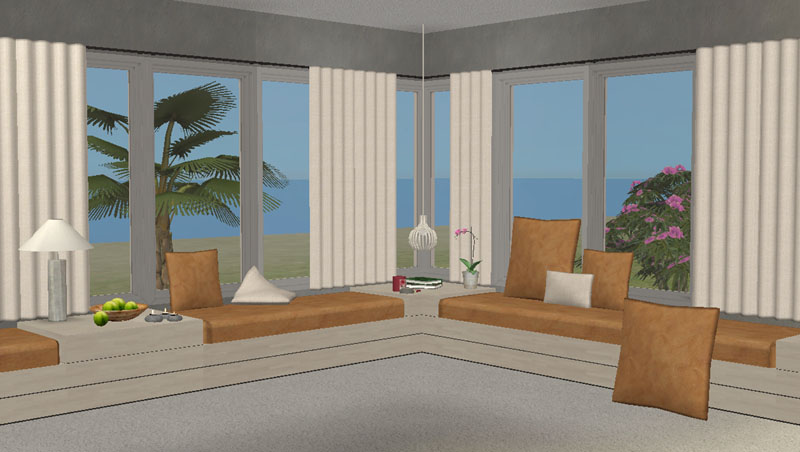
This set is inspired by the Sims 3 nook seating set from Awesims. (See the original version HERE).
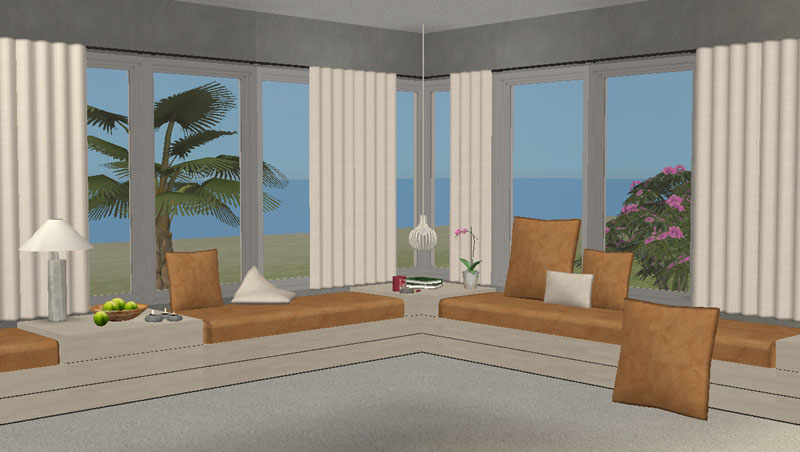
While adapting the set to Sims 2 I’ve also expanded it and added new items to it, so that it now consists of four different parts:
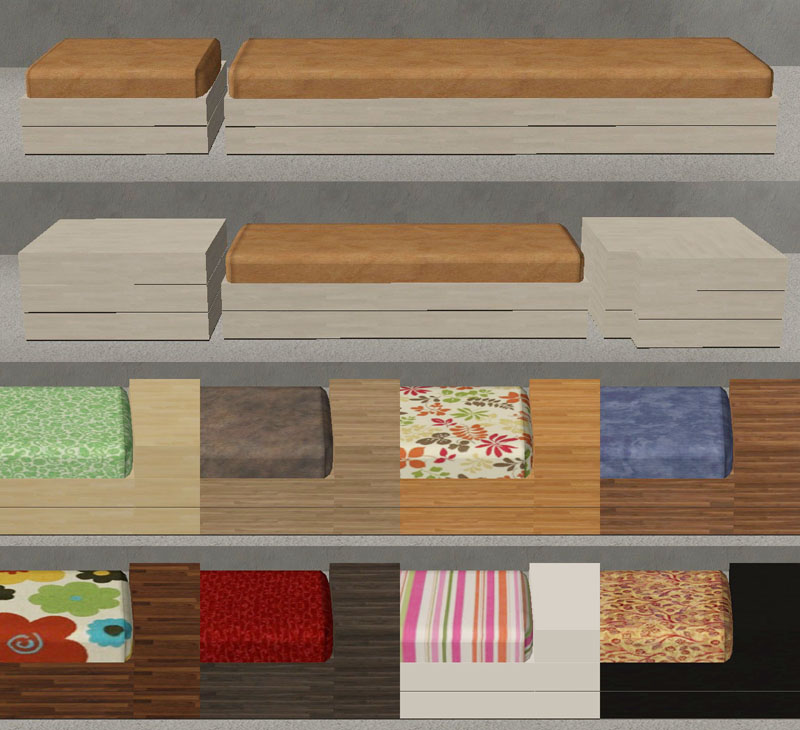
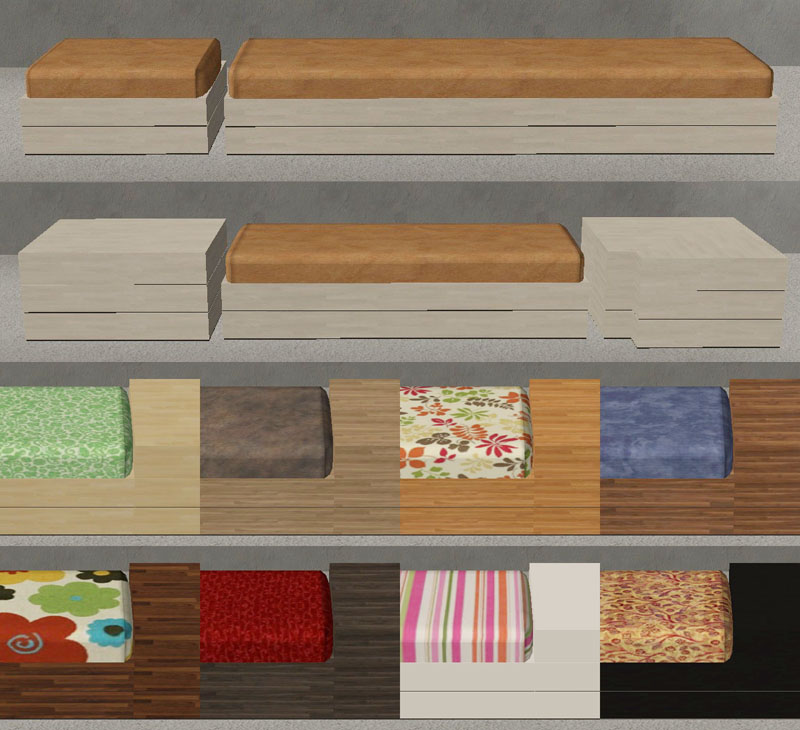
1) The nook
5 meshes – 1-seater, 2-seater and 3-seater couches. Connecting table and connecting corner table. Both tables have extra placement slots added in the corners. The cushions and the couch bases/tables are separate subsets, and each have 8 recolors that you can mix and match from. The nook meshes are repository with the 3-seater as master.
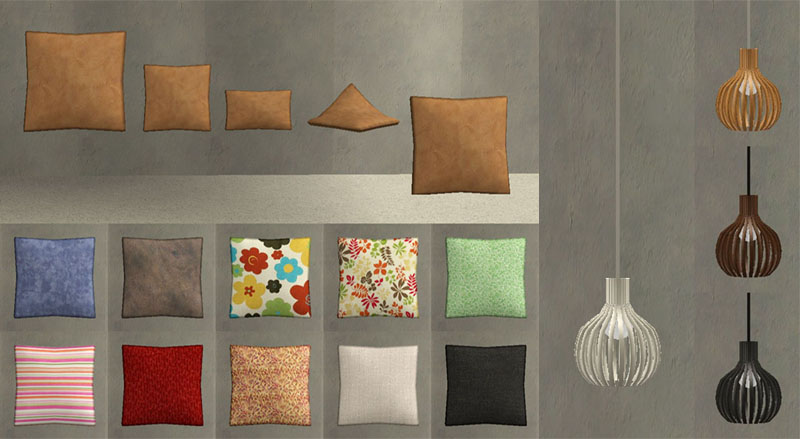
2) The pillows
5 meshes – 4 in seating height and one on the floor. You need to use the cheat ‘boolProp snapObjectsToGrid false’ to place them as shown in the top picture. There are 10 recolors – 8 that match the nook cushions and a black and a white. The pillows are repository with the middle seating height pillow as master.
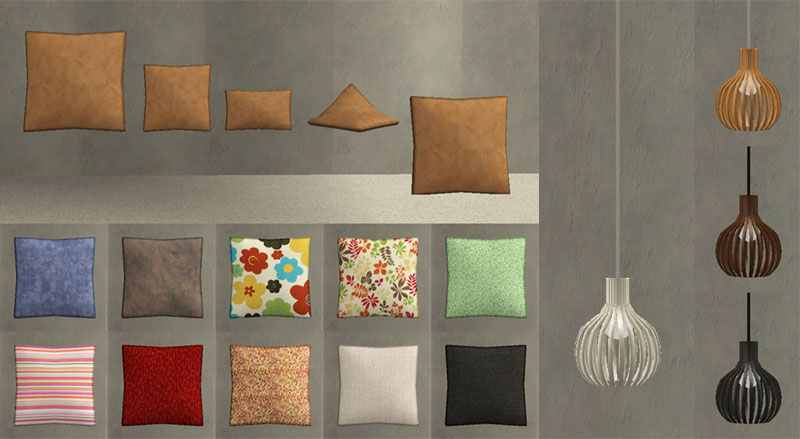
3) The lamp (shown in the picture above)
The lamp has a high poly count, which is why it is separate. Beware that this may cause problems to very old or slow systems. 1 mesh and 3 recolors.
4) The curtains
4 sectional meshes that will allow you to place curtains over pretty much any window design. To place in a corner, you need to turn ‘moveobjects on’ before you can place the second curtain. 10 different recolors of the curtains – some that match the nook cushions and 3 sheer ones. Also three recolors (white, aluminium, brass) of the rod (not shown). All four curtain sections have diagonal versions.
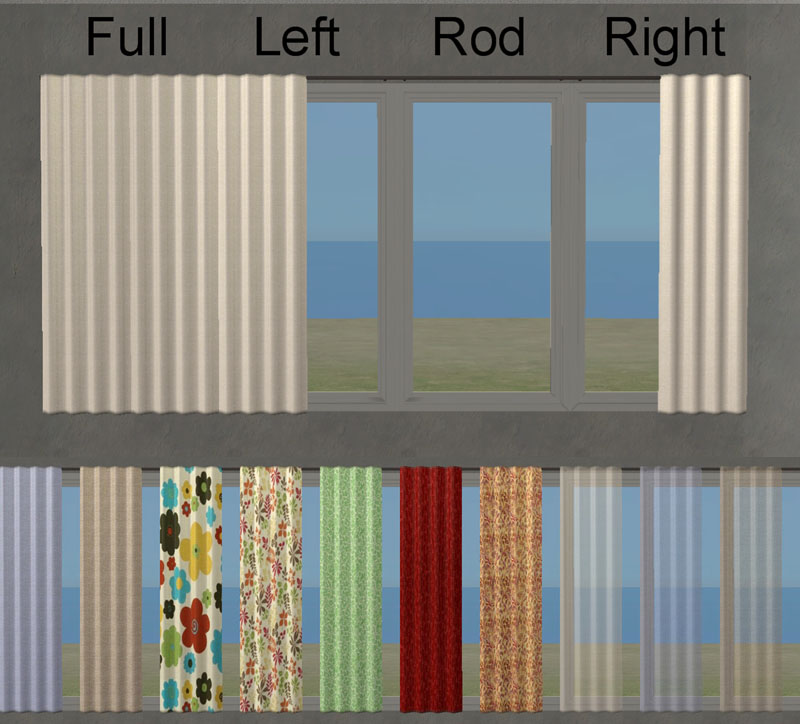
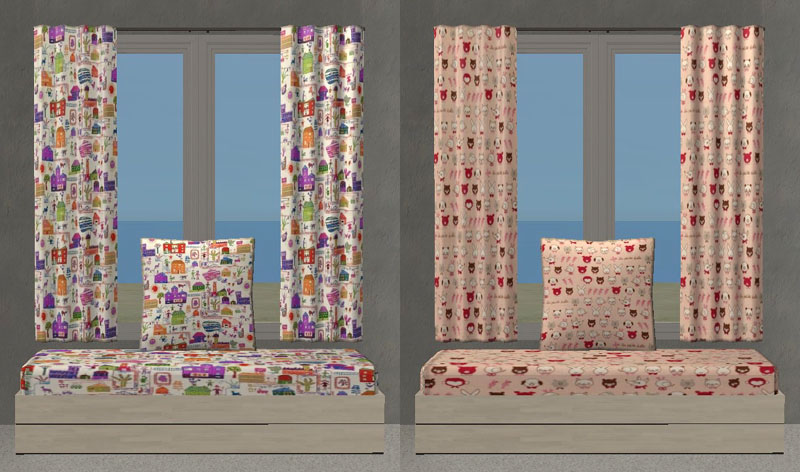
By request there are also two sets of ‘kids-friendly’ recolors. Each set contains couch cushion, pillow and curtain recolors. See screenshot of these below.
NOTE!
The window shown in the top picture is specially made to fit this set. It is part of a whole Maxis Match build set that I made based on the ‘Function of Plate Glass’ window and is found in this thread . The window for this nook can be downloaded separately for those who don’t want the rest of the build set.
A big thanks to Witchboy, Paden, Mustluvcatz and HugeLunatic for lending me textures. Without those I would never have found the right look for this set.
Thanks also to Sarah from Awesims for letting me recreate her nook set.
Catalogue placement:
1-seater in Seating - Living Chairs at 446 simoleons
2-seater and 3-seater in Seating - Sofas at 646 and 846
Tables in Seating - Endtables at 246
Pillows in Decorative – Misc at 146
Lamp in Lighting – Ceiling lamps at 146
Curtains in Decorative – Curtains at 146
But don’t worry, there’s also a collection file to make everything easier to find. ;-)
Polygon Counts:
Seating units – 564
End table – 48
Corner table – 96
Pillows – 256
Lamp – 2400 (high!)
Curtains – 316, 188 and 60
Additional Credits:
SimPE, MilkShape, UV Mapper, PhotoShop, Awesims, Witchboy, Paden, Mustluvcatz, HugeLunatic
While adapting the set to Sims 2 I’ve also expanded it and added new items to it, so that it now consists of four different parts:
1) The nook
5 meshes – 1-seater, 2-seater and 3-seater couches. Connecting table and connecting corner table. Both tables have extra placement slots added in the corners. The cushions and the couch bases/tables are separate subsets, and each have 8 recolors that you can mix and match from. The nook meshes are repository with the 3-seater as master.
2) The pillows
5 meshes – 4 in seating height and one on the floor. You need to use the cheat ‘boolProp snapObjectsToGrid false’ to place them as shown in the top picture. There are 10 recolors – 8 that match the nook cushions and a black and a white. The pillows are repository with the middle seating height pillow as master.
3) The lamp (shown in the picture above)
The lamp has a high poly count, which is why it is separate. Beware that this may cause problems to very old or slow systems. 1 mesh and 3 recolors.
4) The curtains
4 sectional meshes that will allow you to place curtains over pretty much any window design. To place in a corner, you need to turn ‘moveobjects on’ before you can place the second curtain. 10 different recolors of the curtains – some that match the nook cushions and 3 sheer ones. Also three recolors (white, aluminium, brass) of the rod (not shown). All four curtain sections have diagonal versions.
By request there are also two sets of ‘kids-friendly’ recolors. Each set contains couch cushion, pillow and curtain recolors. See screenshot of these below.
NOTE!
The window shown in the top picture is specially made to fit this set. It is part of a whole Maxis Match build set that I made based on the ‘Function of Plate Glass’ window and is found in this thread . The window for this nook can be downloaded separately for those who don’t want the rest of the build set.
A big thanks to Witchboy, Paden, Mustluvcatz and HugeLunatic for lending me textures. Without those I would never have found the right look for this set.

Thanks also to Sarah from Awesims for letting me recreate her nook set.
Catalogue placement:
1-seater in Seating - Living Chairs at 446 simoleons
2-seater and 3-seater in Seating - Sofas at 646 and 846
Tables in Seating - Endtables at 246
Pillows in Decorative – Misc at 146
Lamp in Lighting – Ceiling lamps at 146
Curtains in Decorative – Curtains at 146
But don’t worry, there’s also a collection file to make everything easier to find. ;-)
Polygon Counts:
Seating units – 564
End table – 48
Corner table – 96
Pillows – 256
Lamp – 2400 (high!)
Curtains – 316, 188 and 60
Additional Credits:
SimPE, MilkShape, UV Mapper, PhotoShop, Awesims, Witchboy, Paden, Mustluvcatz, HugeLunatic
This is a new mesh, and means that it's a brand new self contained object that usually does not require a specific Pack (although this is possible depending on the type). It may have Recolours hosted on MTS - check below for more information.
| Filename | Size | Downloads | Date | |||||
|
Moune_NookLiving_CollectionFile.rar
Size: 2.7 KB · Downloads: 44,446 · 25th May 2010 |
2.7 KB | 44,446 | 25th May 2010 | |||||
|
Moune_NookLiving_KidsRecols.rar
Size: 495.0 KB · Downloads: 38,836 · 25th May 2010 |
495.0 KB | 38,836 | 25th May 2010 | |||||
|
Moune_NookLiving_CurtainsMeshesAndRecols.rar
Size: 441.6 KB · Downloads: 43,109 · 25th May 2010 |
441.6 KB | 43,109 | 25th May 2010 | |||||
|
Moune_NookLiving_LampMeshAndRecols.rar
Size: 56.4 KB · Downloads: 40,966 · 25th May 2010 |
56.4 KB | 40,966 | 25th May 2010 | |||||
|
Moune_NookLiving_PillowsMeshesAndRecols.rar
Size: 406.3 KB · Downloads: 43,932 · 25th May 2010 |
406.3 KB | 43,932 | 25th May 2010 | |||||
|
Moune_NookLiving_MainMeshesAndRecols.rar
Size: 1.14 MB · Downloads: 50,496 · 25th May 2010 |
1.14 MB | 50,496 | 25th May 2010 | |||||
| For a detailed look at individual files, see the Information tab. | ||||||||
Key:
- - File was updated after upload was posted
Install Instructions
Basic Download and Install Instructions:
1. Download: Click the download link to save the .rar or .zip file(s) to your computer.
2. Extract the zip, rar, or 7z file.
3. Place in Downloads Folder: Cut and paste the .package file(s) into your Downloads folder:
1. Download: Click the download link to save the .rar or .zip file(s) to your computer.
2. Extract the zip, rar, or 7z file.
3. Place in Downloads Folder: Cut and paste the .package file(s) into your Downloads folder:
- Origin (Ultimate Collection): Users\(Current User Account)\Documents\EA Games\The Sims™ 2 Ultimate Collection\Downloads\
- Non-Origin, Windows Vista/7/8/10: Users\(Current User Account)\Documents\EA Games\The Sims 2\Downloads\
- Non-Origin, Windows XP: Documents and Settings\(Current User Account)\My Documents\EA Games\The Sims 2\Downloads\
- Mac: Users\(Current User Account)\Documents\EA Games\The Sims 2\Downloads
- Mac x64: /Library/Containers/com.aspyr.sims2.appstore/Data/Library/Application Support/Aspyr/The Sims 2/Downloads
- For a full, complete guide to downloading complete with pictures and more information, see: Game Help: Downloading for Fracking Idiots.
- Custom content not showing up in the game? See: Game Help: Getting Custom Content to Show Up.
- If you don't have a Downloads folder, just make one. See instructions at: Game Help: No Downloads Folder.
Recommended
The creator also recommends the following uploads:
Also Thanked - Users who thanked this download also thanked:
Terms of use
Feel free to do pretty much anything with my stuff. This includes using my meshes and textures for your own creations. I only ask 3 things:
1) That none of my files are used as pay or donation items or as part of pay or donation items. This also includes recolors and clones of my meshes. Anything that has anything of mine in it, really.
2) If you upload any of my files to your own or another site, or use textures or meshes for your own creations, please credit Moune999 as the original creator. The same goes for recolors or clones of my meshes.
3) If you make your own slightly altered version of any of my meshes, please replace the GUID in the package and give the file a new name. Otherwise your package will overwrite mine, and I won't be happy about that.
1) That none of my files are used as pay or donation items or as part of pay or donation items. This also includes recolors and clones of my meshes. Anything that has anything of mine in it, really.
2) If you upload any of my files to your own or another site, or use textures or meshes for your own creations, please credit Moune999 as the original creator. The same goes for recolors or clones of my meshes.
3) If you make your own slightly altered version of any of my meshes, please replace the GUID in the package and give the file a new name. Otherwise your package will overwrite mine, and I won't be happy about that.
More Downloads BETA
Here are some more of my downloads: