
 Sign in to Mod The Sims
 No CAS Room! (Also Works With Pets)
 No CAS Room! (Also Works With Pets)
MTS has all free content, all the time. Donate to help keep it running.
SCREENSHOTS
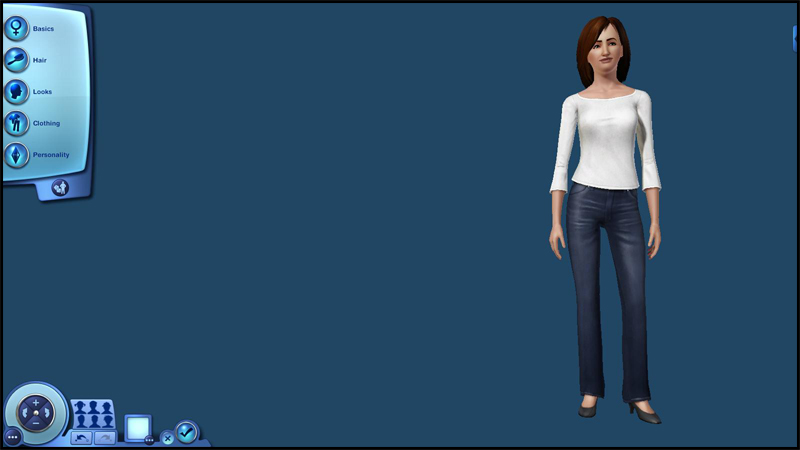
Preview1.jpg - width=800 height=450
Yay! No distractions!
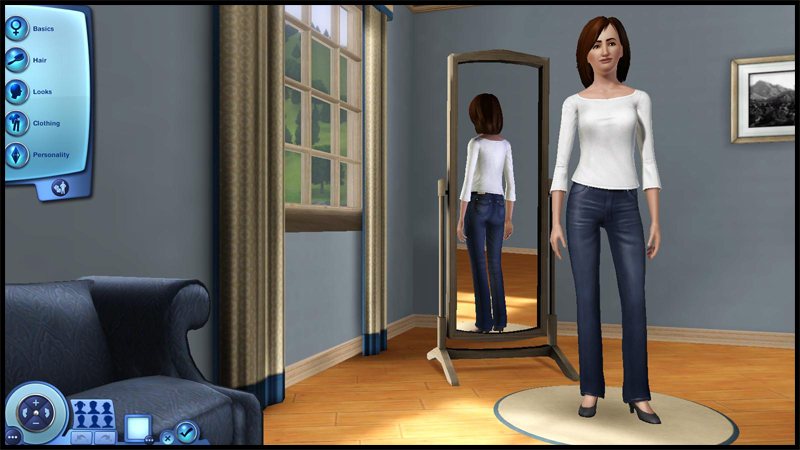
Comparison.jpg - width=800 height=450
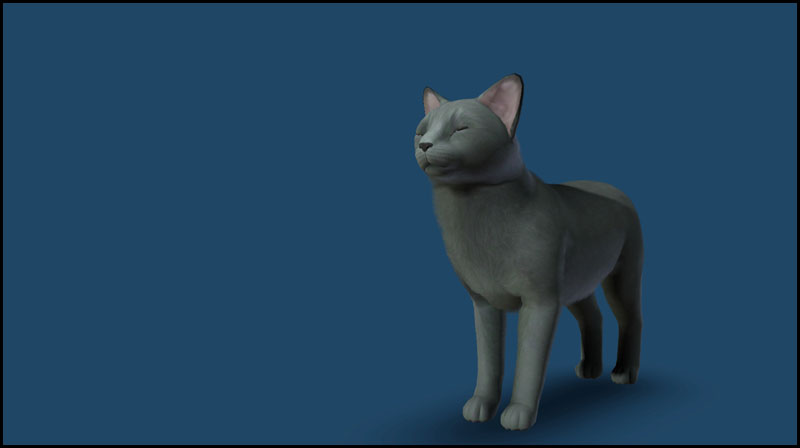
Preview-Pets.jpg - width=800 height=448

Created by fway
Uploaded: 22nd Jul 2011 at 9:11 PM
Updated: 3rd Sep 2012 at 10:05 AM - Updated Description
Updated: 3rd Sep 2012 at 10:05 AM - Updated Description
Yes, it's true! You can modify the CAS screens beyond the point of recoloring them. I wanted to see how the CAS room worked. I was surprised that the room was actually a mesh. So I spent my time removing objects from the "room," however the importing process into S3PE caused problems no matter how I tried to fix it. I will say however it is probable that truly custom CAS rooms can be made, like if you wanted a giant sphere room, it's possible that may work, but I wouldn't advise using EA's original room. It stinks! If anything use the empty room as a base. I'll explain the parts later in the post.
This mod in particular is perfect for anyone who gets distracted by the objects in CAS and want to concentrate on making Sims.
Just a REALLLLY late edit: This mod also works with Pets surprisingly. I hadn't put the replacement back in my game for a while and was surprised that I didn't have to change anything. So no need to re-download anything.
Technical Info/Issues
Place in your "~Documents\Electronic Arts\The Sims 3\Mods\Overrides\" folder.
fway-NoCASRoom.package - No CAS room, just hidden "placeholder" groups behind the camera. Perfect for making brand new types of CAS screens.
MODL: 18 polys
MLOD: 2 polys
This is a mesh override and should be compatible with any game version. EA decided that when creating the room is to overlook how the map looks. Please bear in mind that I did attempt to fix the map for the flooring, but the results looked the same. I have decided not to include the rooms, just a bare and empty screen. The lighting does look fine with the CAS room gone. Please note that when I had tested my "old" rooms with recolors, some recolors had the MLOD/MODL files within them be sure to take these out just in case. I have a tutorial that's a WIP, it should be coming out soon, unless anyone else wants to take a whack at making one, be my guest!

I'd also like to point out that the background is blue by default, not sure why it is, and I am unsure if that can be changed at all, but it's better than looking at an ugly room.
Heads Up!
The original meshes had come without any "tiling" whatsoever which may be the cause of the wonky looking floors/walls, so if anyone decides to make a custom CAS screen, they should keep this in the back of their mind.
CAS Room Parts
Group00 - Anything glass
Group01 - Reflective glass (Inside Mirror)
Group02 - The (sad excuse for a) floor
Group03 - Furniture group 1
Group04 - Furniture group 2
Group05 - A second glass pane?
Group06 - The outdoor scene.
Group07 - The (sad excuse for a) wall
Group08 - Shiny bits
Additional Credits:
Inge and Peter Jones for S3PE.
Inge again for detecting what the problem was when using "From s3asc."
Peter for updating S3PE even though I figured out what the problem with importing was.
#Create!
| Filename | Size | Downloads | Date | |||||
|
fway-NoCASRoom.7z
Size: 2.9 KB · Downloads: 6,091 · 22nd Jul 2011 |
2.9 KB | 6,091 | 22nd Jul 2011 | |||||
| For a detailed look at individual files, see the Information tab. | ||||||||
Key:
- - File was updated after upload was posted
Install Instructions
Quick Guide:
1. Click the file listed on the Files tab to download the file to your computer.
2. Extract the zip, rar, or 7z file. Now you will have either a .package or a .sims3pack file.
For Package files:
1. Cut and paste the file into your Documents\Electronic Arts\The Sims 3\Mods\Packages folder. If you do not already have this folder, you should read the full guide to Package files first: Sims 3:Installing Package Fileswiki, so you can make sure your game is fully patched and you have the correct Resource.cfg file.
2. Run the game, and find your content where the creator said it would be (build mode, buy mode, Create-a-Sim, etc.).
For Sims3Pack files:
1. Cut and paste it into your Documents\Electronic Arts\The Sims 3\Downloads folder. If you do not have this folder yet, it is recommended that you open the game and then close it again so that this folder will be automatically created. Then you can place the .sims3pack into your Downloads folder.
2. Load the game's Launcher, and click on the Downloads tab. Find the item in the list and tick the box beside it. Then press the Install button below the list.
3. Wait for the installer to load, and it will install the content to the game. You will get a message letting you know when it's done.
4. Run the game, and find your content where the creator said it would be (build mode, buy mode, Create-a-Sim, etc.).
Extracting from RAR, ZIP, or 7z: You will need a special program for this. For Windows, we recommend 7-Zip and for Mac OSX, we recommend Keka. Both are free and safe to use.
Need more help?
If you need more info, see:
1. Click the file listed on the Files tab to download the file to your computer.
2. Extract the zip, rar, or 7z file. Now you will have either a .package or a .sims3pack file.
For Package files:
1. Cut and paste the file into your Documents\Electronic Arts\The Sims 3\Mods\Packages folder. If you do not already have this folder, you should read the full guide to Package files first: Sims 3:Installing Package Fileswiki, so you can make sure your game is fully patched and you have the correct Resource.cfg file.
2. Run the game, and find your content where the creator said it would be (build mode, buy mode, Create-a-Sim, etc.).
For Sims3Pack files:
1. Cut and paste it into your Documents\Electronic Arts\The Sims 3\Downloads folder. If you do not have this folder yet, it is recommended that you open the game and then close it again so that this folder will be automatically created. Then you can place the .sims3pack into your Downloads folder.
2. Load the game's Launcher, and click on the Downloads tab. Find the item in the list and tick the box beside it. Then press the Install button below the list.
3. Wait for the installer to load, and it will install the content to the game. You will get a message letting you know when it's done.
4. Run the game, and find your content where the creator said it would be (build mode, buy mode, Create-a-Sim, etc.).
Extracting from RAR, ZIP, or 7z: You will need a special program for this. For Windows, we recommend 7-Zip and for Mac OSX, we recommend Keka. Both are free and safe to use.
Need more help?
If you need more info, see:
- For package files: Sims 3:Installing Package Fileswiki
- For Sims3pack files: Game Help:Installing TS3 Packswiki
Also Thanked - Users who thanked this download also thanked:
Packs Needed
None, this is Sims 3 base game compatible!
Tags
#empty, #CAS, #screens, #empty cas screens, #fway, #empty cas screens by fway, #empty cas screen, #screen, #bacon
My Policy
Policy:
Anything that I have made, whether it be a mod or a piece of CC to plop in your Sims' homes, my policy is that you may do whatever you'd like with the stuff I post as long as it remains free. I no longer consider the things I make to be mine, they now belong to the community! I don't own EA code. lol So if you'd like to see how I did something with these mods or CC, feel free to poke and prod away.
Anything that I have made, whether it be a mod or a piece of CC to plop in your Sims' homes, my policy is that you may do whatever you'd like with the stuff I post as long as it remains free. I no longer consider the things I make to be mine, they now belong to the community! I don't own EA code. lol So if you'd like to see how I did something with these mods or CC, feel free to poke and prod away.
More Downloads BETA
Here are some more of my downloads: