
 Sign in to Mod The Sims
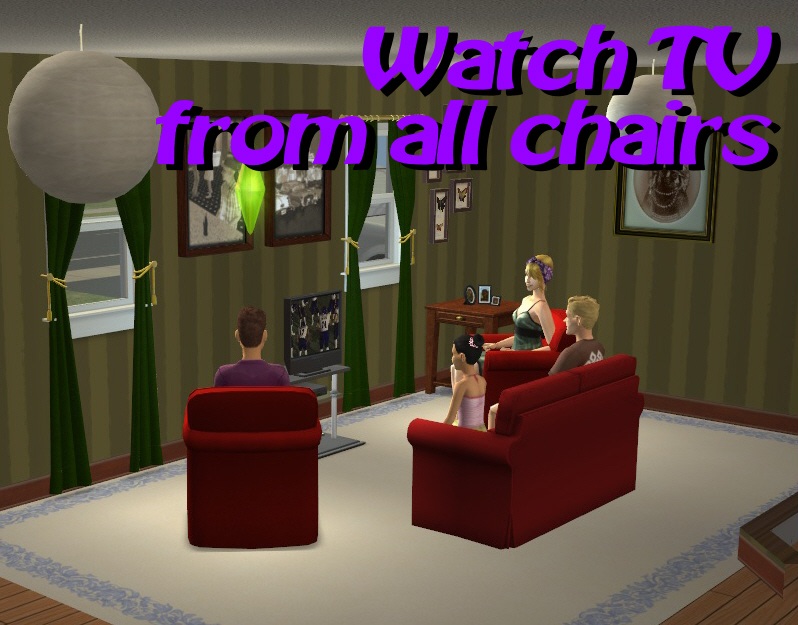
 Watch TV from all chairs
 Watch TV from all chairs
MTS has all free content, all the time. Donate to help keep it running.
SCREENSHOTS
Title.jpg - width=798 height=625
Watch TV from all chairs
AngledArmChairsCollage.jpg - width=944 height=399
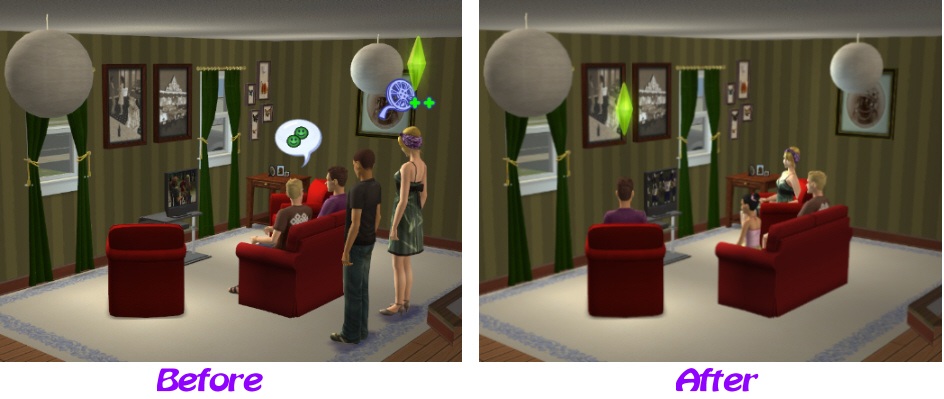
Before and After view of using Angled Arm Chairs to watch TV
SectionalSofaCollage.jpg - width=944 height=399
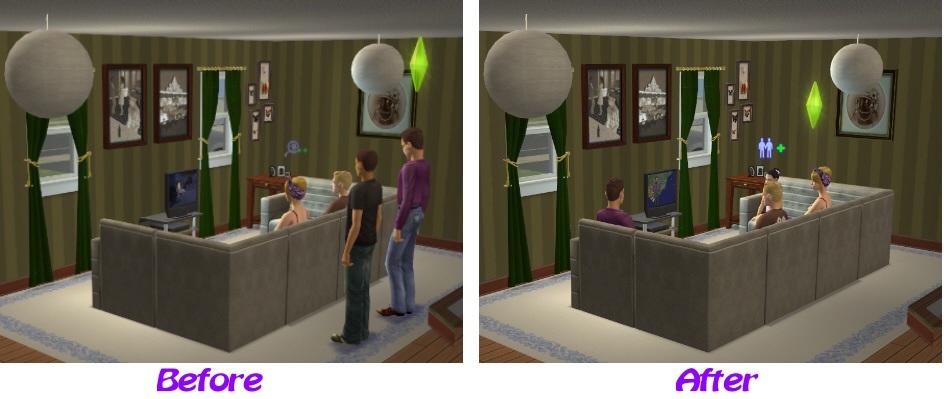
Before and After view of using a Sectional Sofa to watch TV
AnnotatedChairDirection.jpg - width=608 height=470
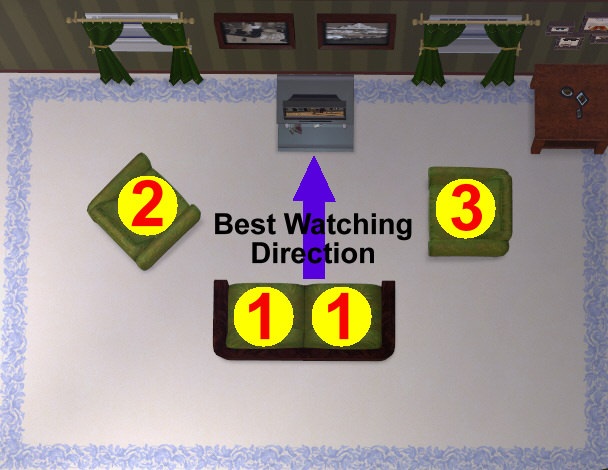
The best chairs for watching TV are chosen first
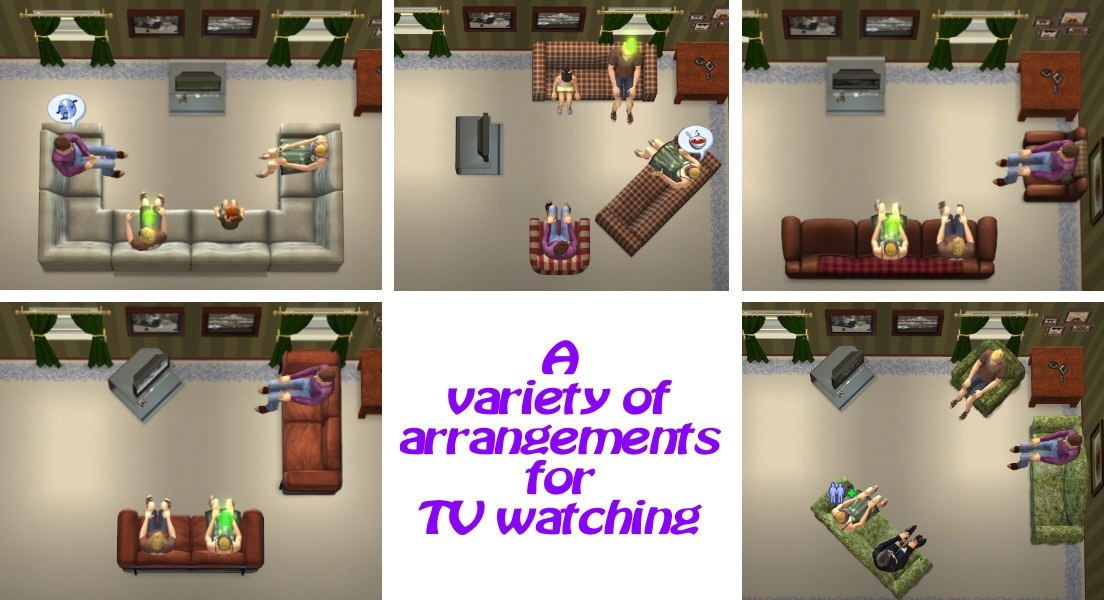
VarietyLayouts.jpg - width=1104 height=600
A variety of layouts that you can now watch TV with
Picked Upload!
This is a picked upload! It showcases some of the best talent and creativity available on MTS and in the community.
I like to make living rooms which use 45-degree angle positioned chairs or sectional sofas that turn a corner. However, these realistically positioned chairs are no use for your Sims to watch TV from which has always annoyed me.
So this is a mod that allows the watching of TV from those sorts of chairs. Since a picture is worth a thousand words, have a look at the pictures for more information. This mod also allows the watching of TV from much further back making large cinema rooms usable. From my testing, a Sim can watch TV sitting in a chair that is 10 squares back from the TV, and probably much further too.
A variety of arrangements of seating can be used now to watch TV. The picture shows a selection that I tested out, but you can no doubt find many more. Any issues with particular arrangements, let me know and provide a picture of your layout (indicating where the Front of the Lot is).
Sims will endeavour to choose the nearest chair that has a clear view of the TV. When there are a selection of chairs at the same distance to the TV they will try to pick the best viewing position first.
Quirks
This mod does not work with the Base Game. You require an EP (any EP) to use it. It would seem the function that determines whether you have a clear view of the TV only works some times in the Base Game which may explain why Maxis didn't do this to start with. I have also seen it not be perfect when determining whether chairs that are not facing the TV (for example a dining chair around a dining table in the same room as the TV) with Uni as well, but the same layout works perfectly with later EPs. It seems that the function by which you determine whether you have a clear view of something - Ray Trace (0x0078wiki) - has been gradually improved by Maxis over the later EPs. Even at Uni this mod should give you benefits because you can at least use chairs that are not looking straight on at the TV, i.e. those around the sides or at angles. You may just have to watch out a little in open plan houses in early EPs for TV watching with a lot of neck craning.
While developing this I had to deal with the fact that Sims sometimes both go for the same chair, and so then the second one to arrive would go back to standing - that should now be fixed. There may be other cases that I haven't seen where Sims will revert to the old behaviour of standing to watch TV (I have kept that behaviour as a catch all) - if you see any, let me know. If you do see this, you can cancel the action of watching the TV and re-do it, to redrive looking for a decent chair to sit in. Of course, if there aren't any chairs to sit on, then standing to watch TV is by design.
A quirk I'm going to try to do something about
Have been asked why a computer desk chair, which was close to the TV, was chosen for TV watching instead of a sofa which was further away but face on. As per the current mod, this is correct - however, it is a quirk that is not perfect, so I am going to enhance this mod to make chairs that are at a desk/table less preferential unless all other chairs in the room are taken. Watch this space.
I don't know of any mods this clashes with. There is always the possibility of course, so the pertinent information for the owner of the other object is here.
Possible hack clashes
This package updates the following BHAV resources in Television_Globals (Group 0x7F92832C)
Additional Credits
Quaxi for SimPEwiki.
Numenor for the AnyGameStarter.
So this is a mod that allows the watching of TV from those sorts of chairs. Since a picture is worth a thousand words, have a look at the pictures for more information. This mod also allows the watching of TV from much further back making large cinema rooms usable. From my testing, a Sim can watch TV sitting in a chair that is 10 squares back from the TV, and probably much further too.
A variety of arrangements of seating can be used now to watch TV. The picture shows a selection that I tested out, but you can no doubt find many more. Any issues with particular arrangements, let me know and provide a picture of your layout (indicating where the Front of the Lot is).
Sims will endeavour to choose the nearest chair that has a clear view of the TV. When there are a selection of chairs at the same distance to the TV they will try to pick the best viewing position first.
Quirks
This mod does not work with the Base Game. You require an EP (any EP) to use it. It would seem the function that determines whether you have a clear view of the TV only works some times in the Base Game which may explain why Maxis didn't do this to start with. I have also seen it not be perfect when determining whether chairs that are not facing the TV (for example a dining chair around a dining table in the same room as the TV) with Uni as well, but the same layout works perfectly with later EPs. It seems that the function by which you determine whether you have a clear view of something - Ray Trace (0x0078wiki) - has been gradually improved by Maxis over the later EPs. Even at Uni this mod should give you benefits because you can at least use chairs that are not looking straight on at the TV, i.e. those around the sides or at angles. You may just have to watch out a little in open plan houses in early EPs for TV watching with a lot of neck craning.
While developing this I had to deal with the fact that Sims sometimes both go for the same chair, and so then the second one to arrive would go back to standing - that should now be fixed. There may be other cases that I haven't seen where Sims will revert to the old behaviour of standing to watch TV (I have kept that behaviour as a catch all) - if you see any, let me know. If you do see this, you can cancel the action of watching the TV and re-do it, to redrive looking for a decent chair to sit in. Of course, if there aren't any chairs to sit on, then standing to watch TV is by design.
A quirk I'm going to try to do something about
Have been asked why a computer desk chair, which was close to the TV, was chosen for TV watching instead of a sofa which was further away but face on. As per the current mod, this is correct - however, it is a quirk that is not perfect, so I am going to enhance this mod to make chairs that are at a desk/table less preferential unless all other chairs in the room are taken. Watch this space.
I don't know of any mods this clashes with. There is always the possibility of course, so the pertinent information for the owner of the other object is here.
Possible hack clashes
This package updates the following BHAV resources in Television_Globals (Group 0x7F92832C)
- TV - Route to Watch (0x204D)
- Adds four new BHAVs at 0x2094, 0x2095, 0x2096 and 0x2098
Additional Credits
Quaxi for SimPEwiki.
Numenor for the AnyGameStarter.
| Filename | Size | Downloads | Date | |||||
|
tv-watching-Mog-20111028.rar
| Mod to allow TV watching from all chairs
Size: 1.4 KB · Downloads: 103,778 · 29th Nov 2011 |
1.4 KB | 103,778 | 29th Nov 2011 | |||||
| For a detailed look at individual files, see the Information tab. | ||||||||
Key:
- - File was updated after upload was posted
Install Instructions
Basic Download and Install Instructions:
1. Download: Click the download link to save the .rar or .zip file(s) to your computer.
2. Extract the zip, rar, or 7z file.
3. Place in Downloads Folder: Cut and paste the .package file(s) into your Downloads folder:
1. Download: Click the download link to save the .rar or .zip file(s) to your computer.
2. Extract the zip, rar, or 7z file.
3. Place in Downloads Folder: Cut and paste the .package file(s) into your Downloads folder:
- Origin (Ultimate Collection): Users\(Current User Account)\Documents\EA Games\The Sims™ 2 Ultimate Collection\Downloads\
- Non-Origin, Windows Vista/7/8/10: Users\(Current User Account)\Documents\EA Games\The Sims 2\Downloads\
- Non-Origin, Windows XP: Documents and Settings\(Current User Account)\My Documents\EA Games\The Sims 2\Downloads\
- Mac: Users\(Current User Account)\Documents\EA Games\The Sims 2\Downloads
- Mac x64: /Library/Containers/com.aspyr.sims2.appstore/Data/Library/Application Support/Aspyr/The Sims 2/Downloads
- For a full, complete guide to downloading complete with pictures and more information, see: Game Help: Downloading for Fracking Idiots.
- Custom content not showing up in the game? See: Game Help: Getting Custom Content to Show Up.
- If you don't have a Downloads folder, just make one. See instructions at: Game Help: No Downloads Folder.
Also Thanked - Users who thanked this download also thanked:
by Nopke
Packs Needed
Other Information
Type:
– Global Mods
: Mods that change the way the game works without requiring any user intervention.
Tags
#gameplay annoyances, #TV, #chairs
Packs Needed
| Base Game | |
|---|---|
 | Sims 2 |
| Expansion Pack | |
|---|---|
 | University |
More Downloads BETA
Here are some more of my downloads: