
 Sign in to Mod The Sims
 Secret Door - Sliding bookcase
 Secret Door - Sliding bookcase
MTS has all free content, all the time. Donate to help keep it running.
SCREENSHOTS
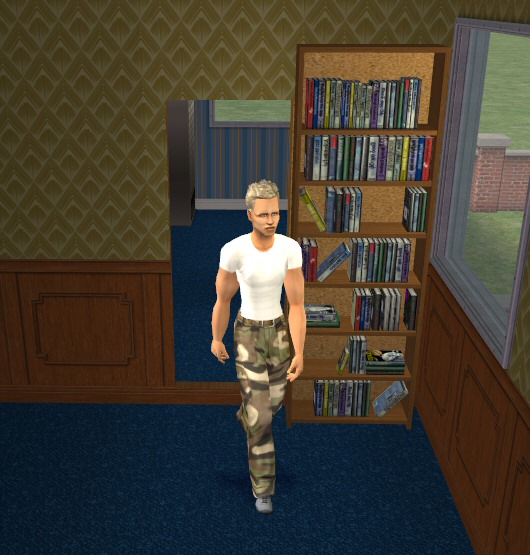
open.jpg - width=530 height=555
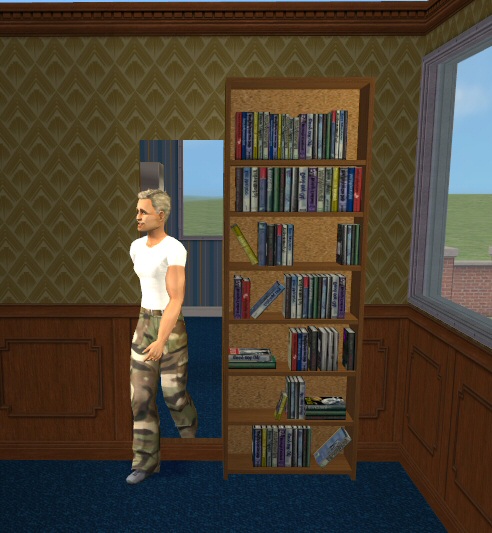
half open.jpg - width=492 height=533
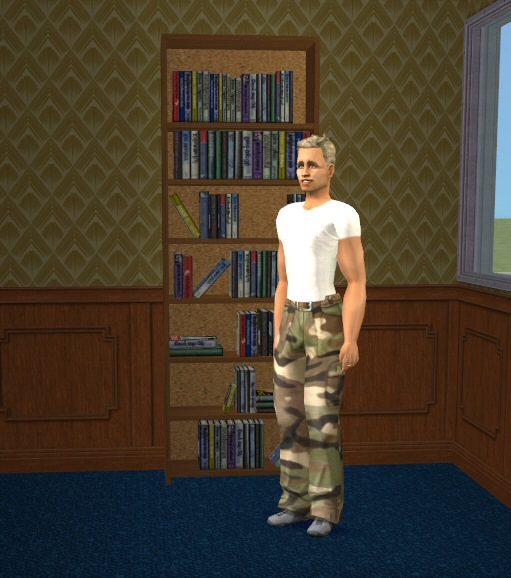
closed.jpg - width=511 height=578
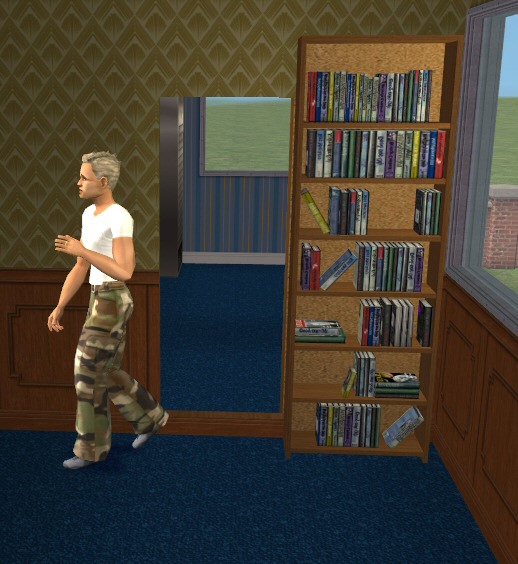
fully open.jpg - width=518 height=564
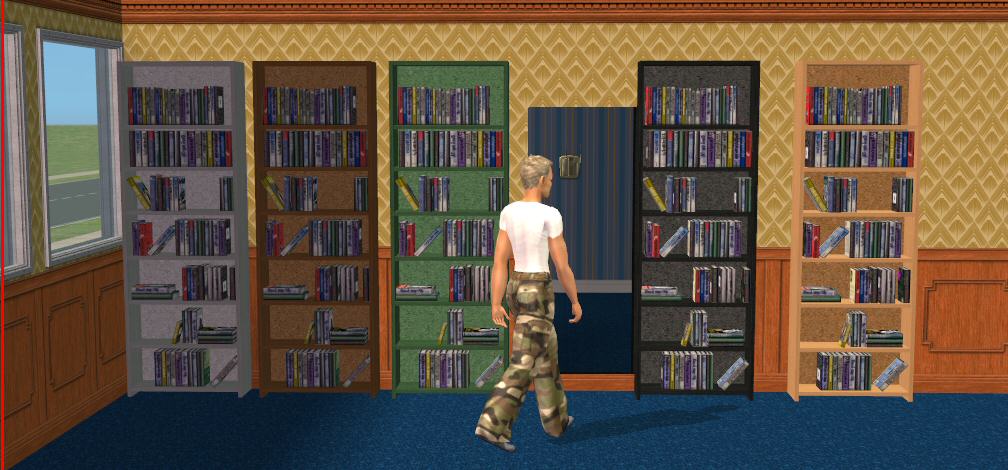
colours.jpg - width=1008 height=470
Featured Upload!
This is a featured upload! It showcases the best talent and creativity available on MTS and in the community. 

Hi Guys,
Would you test this for me please?
Made with Milkshape, SimPE v.50 it has its own unique (registered) GUID so it wont overwrite anything in your game, it is compatable with ALL games and is colour enabled.
Polygon count 1298 (= GOOD! )
)
This is based on the recently released Griffindor Entrance: The (animated) Fat Lady painting Door created by myself and Numenor.
It works in the same way. This object is comprised of TWO package files (one for straight walls and one for diagonal walls). Please put BOTH in your downloads folder. The zip file also contains some recolours (see pics)
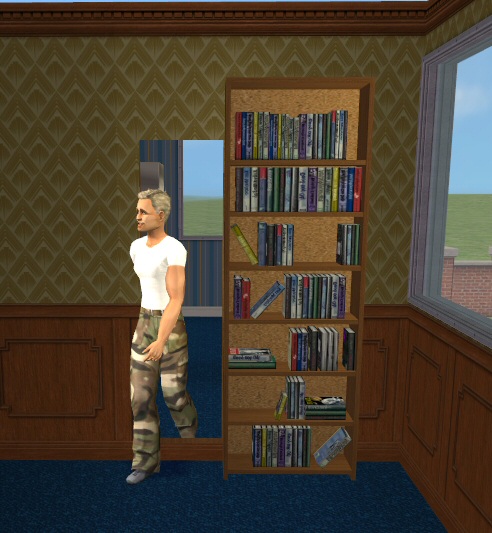
This is a sliding 'secret' door hidden behind a bookcase. The bookcases slide open to reveal the entrance that you Sims will walk through....then the bookcases slide back into postiion afterwards. (It does NOT function as a bookcase as well .... it's just a door that LOOKS like a bookcase, so there are no other actions available.)
Although this appears to be a single tile door, it is in fact a TWO tile door, so you will need TWO empty tiles/wall panels (on each side) to use it. The usual green 'placement squares' will show you the tiles needed for it.) The bookcase appears on BOTH sides of the wall.
Known issues:
1. Depending of the direction of your Sim, the movement of the bookcase is sometimes slow and your Sim may walk though the edge of the painting whilst it is still opening. This does not effect gameplay in any way (it's purely asthetic).
2. Only when placed on diaginal walls: very occasionally the bookcase 'hiccups' and opens and closes twice. There seems to be no specific pattern as to when it does this, and it is quite rare. It does not affect gameplay in any way. (I suggest you use it on straight walls to completely avoid this problem)
Thanks for testing this and please report any issues.
Bob
Recolours:This object is fully recolourable. Should you wish to create recolours please feel free to post them here at MTS2 but do NOT include the original files which contains the meshes. Please put a link back to here so that downloaders may obtain the latest (and possibly modified/updated) files. Recolouring the straight package will automatically recolour the diagonal one (which takes it's textures from the straight package.)
Lots: Please do NOT include in uploaded lots. This is very much a BETA object still in development. Should you wish to include it as part of a LOT, please remove it after you have made your screenshots and include a LINK back to this thread for people to be able to download the latest version to add to your downloaded lot. They will then be in possession of the lates files and be aware of any known issues
Would you test this for me please?
Made with Milkshape, SimPE v.50 it has its own unique (registered) GUID so it wont overwrite anything in your game, it is compatable with ALL games and is colour enabled.
Polygon count 1298 (= GOOD!
 )
) This is based on the recently released Griffindor Entrance: The (animated) Fat Lady painting Door created by myself and Numenor.
It works in the same way. This object is comprised of TWO package files (one for straight walls and one for diagonal walls). Please put BOTH in your downloads folder. The zip file also contains some recolours (see pics)
This is a sliding 'secret' door hidden behind a bookcase. The bookcases slide open to reveal the entrance that you Sims will walk through....then the bookcases slide back into postiion afterwards. (It does NOT function as a bookcase as well .... it's just a door that LOOKS like a bookcase, so there are no other actions available.)
Although this appears to be a single tile door, it is in fact a TWO tile door, so you will need TWO empty tiles/wall panels (on each side) to use it. The usual green 'placement squares' will show you the tiles needed for it.) The bookcase appears on BOTH sides of the wall.
Known issues:
1. Depending of the direction of your Sim, the movement of the bookcase is sometimes slow and your Sim may walk though the edge of the painting whilst it is still opening. This does not effect gameplay in any way (it's purely asthetic).
2. Only when placed on diaginal walls: very occasionally the bookcase 'hiccups' and opens and closes twice. There seems to be no specific pattern as to when it does this, and it is quite rare. It does not affect gameplay in any way. (I suggest you use it on straight walls to completely avoid this problem)
Thanks for testing this
 and please report any issues.
Bob
Recolours:This object is fully recolourable. Should you wish to create recolours please feel free to post them here at MTS2 but do NOT include the original files which contains the meshes. Please put a link back to here so that downloaders may obtain the latest (and possibly modified/updated) files. Recolouring the straight package will automatically recolour the diagonal one (which takes it's textures from the straight package.)
Lots: Please do NOT include in uploaded lots. This is very much a BETA object still in development. Should you wish to include it as part of a LOT, please remove it after you have made your screenshots and include a LINK back to this thread for people to be able to download the latest version to add to your downloaded lot. They will then be in possession of the lates files and be aware of any known issues
This is a new mesh, and means that it's a brand new self contained object that usually does not require a specific Pack (although this is possible depending on the type). It may have Recolours hosted on MTS - check below for more information.
| Filename | Size | Downloads | Date | |||||
|
BobL_SlidingBookcaseDoor_AllGames_col_en.zip
Size: 237.4 KB · Downloads: 93,655 · 18th Nov 2005 |
237.4 KB | 93,655 | 18th Nov 2005 | |||||
| For a detailed look at individual files, see the Information tab. | ||||||||
Key:
- - File was updated after upload was posted
Install Instructions
Basic Download and Install Instructions:
1. Download: Click the download link to save the .rar or .zip file(s) to your computer.
2. Extract the zip, rar, or 7z file.
3. Place in Downloads Folder: Cut and paste the .package file(s) into your Downloads folder:
1. Download: Click the download link to save the .rar or .zip file(s) to your computer.
2. Extract the zip, rar, or 7z file.
3. Place in Downloads Folder: Cut and paste the .package file(s) into your Downloads folder:
- Origin (Ultimate Collection): Users\(Current User Account)\Documents\EA Games\The Sims™ 2 Ultimate Collection\Downloads\
- Non-Origin, Windows Vista/7/8/10: Users\(Current User Account)\Documents\EA Games\The Sims 2\Downloads\
- Non-Origin, Windows XP: Documents and Settings\(Current User Account)\My Documents\EA Games\The Sims 2\Downloads\
- Mac: Users\(Current User Account)\Documents\EA Games\The Sims 2\Downloads
- Mac x64: /Library/Containers/com.aspyr.sims2.appstore/Data/Library/Application Support/Aspyr/The Sims 2/Downloads
- For a full, complete guide to downloading complete with pictures and more information, see: Game Help: Downloading for Fracking Idiots.
- Custom content not showing up in the game? See: Game Help: Getting Custom Content to Show Up.
- If you don't have a Downloads folder, just make one. See instructions at: Game Help: No Downloads Folder.
Also Thanked - Users who thanked this download also thanked:
Packs Needed
None, this is Sims 2 base game compatible!
More Downloads BETA
Here are some more of my downloads: