
 Sign in to Mod The Sims
 Majors Made Easier
 Majors Made Easier
MTS has all free content, all the time. Donate to help keep it running.
SCREENSHOTS
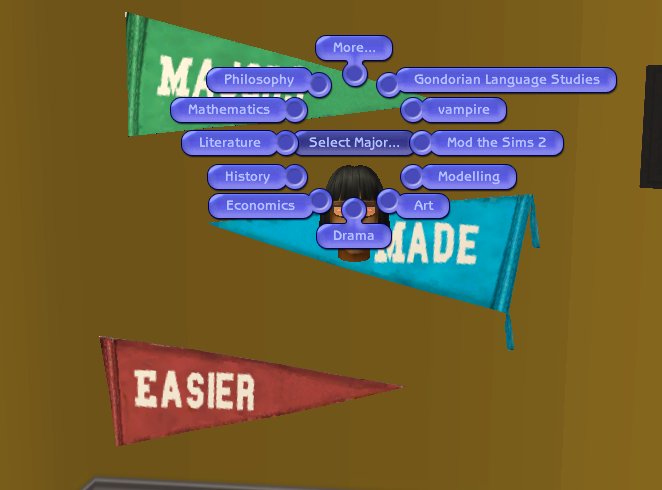
mmeasier.jpg - width=662 height=490
Featured Upload!
This is a featured upload! It showcases the best talent and creativity available on MTS and in the community. 


Created by FrikaC
Uploaded: 1st Dec 2005 at 10:49 AM
Updated: 29th Sep 2011 at 6:32 AM - Clarified some of the text
Updated: 29th Sep 2011 at 6:32 AM - Clarified some of the text
MajorsMadeEasier by FrikaC version 02.00.00
===========================================
What is this?
-------------
This is new game object that allows you to select custom majors. It's not meant to be a cheat object in any way: because the major select screen included in the University expansion pack is more or less hard coded by the game, this is a work around that lets you select custom majors without exiting the game.
Expansion Pack Compatibility
----------------------------
First off, as always, to use this object you need the University Expansion. MajorsMadeEasier now uses a cloned standalone file, and has been tested to be compatible with Nightlife. Being standalone, it should also be compatible with all the expansion packs.
Compatibility with other objects
------------------------------
The pennant should not conflict with any other game objects, all it does is change one variable on your Sim's data - the pointer value for the major. If you experience any sort of odd problems, please investigate other hacks you may have installed.
Sounds okay. Where does the file go?
-------------------------------------
In your downloads folder, \My Documents\EA Games\The Sims 2\Downloads. For more details check out this handy guide.
And how do I use custom Majors now?
------------------------------------
Start the game, place the MajorsMadeEasier Pennant (it is found under Decorative->Misc in the original University and Decorative->Wall Hangings under newer versions of the game and costs 1 simolean) on any University lot. Go to Live Mode (make sure walls are visible, it hides when walls are down), select the sim who wants to change major, click on the pennant and choose Select Major... from the pie menu and the name of the sim's desired major.
Why Is It So Ugly?!
-------------------
Sorry, I'm not an artist, nor do I even play one on TV. I'm a mere program writer for a respectable software company. I pay my bills and help my land lady carry out her garbage. Fortunately this is a utility item and after you're done using it you can dispose of it.
What are these custom majors you mentioned?
-------------------------------------------
At ModTheSims2.com there's an entire section for custom University Majors. Look here:
http://www.modthesims2.com/download.php?f=253
Many majors have been created, but prior to this hack you needed to use SimPE to edit your sims to use them.
Can I use your code in something else?
--------------------------------------
Sure! Feel free to hack, smash, beat, deform, mangle or spindle my code any way you see fit. If you improve the art of this object, let me know, I'd love to link to any improvements.
Comments and suggestions welcome. Email me at {SEE README} if you feel like it.
===========================================
What is this?
-------------
This is new game object that allows you to select custom majors. It's not meant to be a cheat object in any way: because the major select screen included in the University expansion pack is more or less hard coded by the game, this is a work around that lets you select custom majors without exiting the game.
Expansion Pack Compatibility
----------------------------
First off, as always, to use this object you need the University Expansion. MajorsMadeEasier now uses a cloned standalone file, and has been tested to be compatible with Nightlife. Being standalone, it should also be compatible with all the expansion packs.
Compatibility with other objects
------------------------------
The pennant should not conflict with any other game objects, all it does is change one variable on your Sim's data - the pointer value for the major. If you experience any sort of odd problems, please investigate other hacks you may have installed.
Sounds okay. Where does the file go?
-------------------------------------
In your downloads folder, \My Documents\EA Games\The Sims 2\Downloads. For more details check out this handy guide.
And how do I use custom Majors now?
------------------------------------
Start the game, place the MajorsMadeEasier Pennant (it is found under Decorative->Misc in the original University and Decorative->Wall Hangings under newer versions of the game and costs 1 simolean) on any University lot. Go to Live Mode (make sure walls are visible, it hides when walls are down), select the sim who wants to change major, click on the pennant and choose Select Major... from the pie menu and the name of the sim's desired major.
Why Is It So Ugly?!
-------------------
Sorry, I'm not an artist, nor do I even play one on TV. I'm a mere program writer for a respectable software company. I pay my bills and help my land lady carry out her garbage. Fortunately this is a utility item and after you're done using it you can dispose of it.
What are these custom majors you mentioned?
-------------------------------------------
At ModTheSims2.com there's an entire section for custom University Majors. Look here:
http://www.modthesims2.com/download.php?f=253
Many majors have been created, but prior to this hack you needed to use SimPE to edit your sims to use them.
Can I use your code in something else?
--------------------------------------
Sure! Feel free to hack, smash, beat, deform, mangle or spindle my code any way you see fit. If you improve the art of this object, let me know, I'd love to link to any improvements.
Comments and suggestions welcome. Email me at {SEE README} if you feel like it.
| Filename | Size | Downloads | Date | |||||
|
majors_made_easier.zip
Size: 48.8 KB · Downloads: 112,956 · 1st Dec 2005 |
48.8 KB | 112,956 | 1st Dec 2005 | |||||
| For a detailed look at individual files, see the Information tab. | ||||||||
Key:
- - File was updated after upload was posted
Install Instructions
Basic Download and Install Instructions:
1. Download: Click the download link to save the .rar or .zip file(s) to your computer.
2. Extract the zip, rar, or 7z file.
3. Place in Downloads Folder: Cut and paste the .package file(s) into your Downloads folder:
1. Download: Click the download link to save the .rar or .zip file(s) to your computer.
2. Extract the zip, rar, or 7z file.
3. Place in Downloads Folder: Cut and paste the .package file(s) into your Downloads folder:
- Origin (Ultimate Collection): Users\(Current User Account)\Documents\EA Games\The Sims™ 2 Ultimate Collection\Downloads\
- Non-Origin, Windows Vista/7/8/10: Users\(Current User Account)\Documents\EA Games\The Sims 2\Downloads\
- Non-Origin, Windows XP: Documents and Settings\(Current User Account)\My Documents\EA Games\The Sims 2\Downloads\
- Mac: Users\(Current User Account)\Documents\EA Games\The Sims 2\Downloads
- Mac x64: /Library/Containers/com.aspyr.sims2.appstore/Data/Library/Application Support/Aspyr/The Sims 2/Downloads
- For a full, complete guide to downloading complete with pictures and more information, see: Game Help: Downloading for Fracking Idiots.
- Custom content not showing up in the game? See: Game Help: Getting Custom Content to Show Up.
- If you don't have a Downloads folder, just make one. See instructions at: Game Help: No Downloads Folder.
Also Thanked - Users who thanked this download also thanked:
Packs Needed
Packs Needed
| Base Game | |
|---|---|
 | Sims 2 |
| Expansion Pack | |
|---|---|
 | University |
More Downloads BETA
Here are some more of my downloads: