
 Sign in to Mod The Sims
 The Xanathonian CrystalSphere Personal Conjurer (PC)
 The Xanathonian CrystalSphere Personal Conjurer (PC)
MTS has all free content, all the time. Donate to help keep it running.
SCREENSHOTS
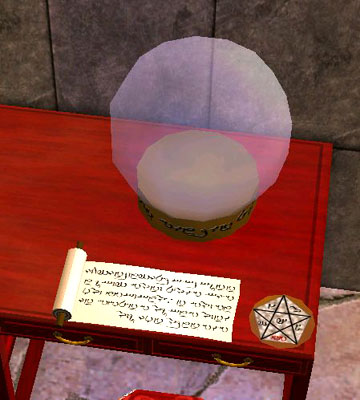


xanathon_crystalspherepc01.jpg - width=360 height=400
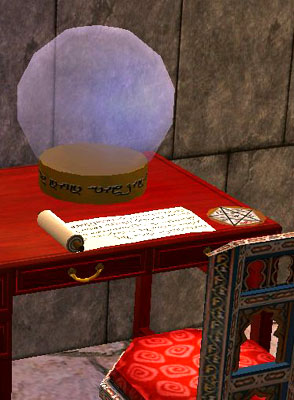
xanathon_crystalspherepc02.jpg - width=294 height=400
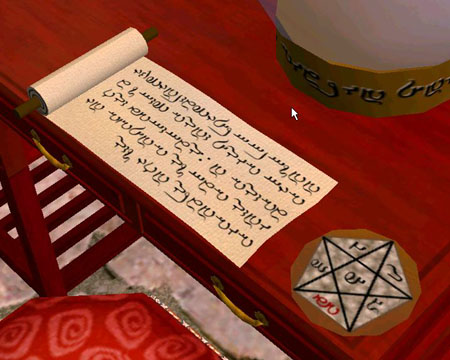
xanathon_crystalspherepc04.jpg - width=450 height=360
xanathon_crystalspherepc05.jpg - width=500 height=487
xanathon_crystalspherepc03.jpg - width=400 height=337
Picked Upload!
This is a picked upload! It showcases some of the best talent and creativity available on MTS and in the community.


Created by xanathon
Uploaded: 29th Mar 2006 at 3:20 PM
Updated: 29th Jan 2009 at 4:58 PM by -Maylin-
Updated: 29th Jan 2009 at 4:58 PM by -Maylin-
My girlfriend plays a Hogwarts-style dorm and was complaining that there are no stylish computers for that kind of lot.
So I decided to create something more in style with castle walls and robes to make your sorcering Sims happy, be it witch or wizard:
The Xanathonian CrystalSphere Personal Conjurer (PC)
Your studies in Thaumathurgy and Applied Hermetics will be much easier with this device, a must have for every student of the secret arts. Comes with an enchanted parchment, an orichalcum stand and a clairvoyance control mat. Potions not included.
by Xanathon, Master of the Dark Arts and Potions :o)
This was of course cloned from a PC. When in it's inactive state you see only the crystal ball, the parchment and the control mat. If it is activated you get the "normal" computer screens inside the globe. I carried over the mousemotion to the pad and the object will be turned in case of a repair attempt. Has every function a standard PC has and should work with basic Sims and all EPs.
Mesh and textures are by me, the poly- and vertexcounts are lower than in the original PC (310 vertices, 388 polys).
One warning: If you attempt to hack your grades, don't let Snape catch you... :D
Have fun!
So I decided to create something more in style with castle walls and robes to make your sorcering Sims happy, be it witch or wizard:
The Xanathonian CrystalSphere Personal Conjurer (PC)
Your studies in Thaumathurgy and Applied Hermetics will be much easier with this device, a must have for every student of the secret arts. Comes with an enchanted parchment, an orichalcum stand and a clairvoyance control mat. Potions not included.
by Xanathon, Master of the Dark Arts and Potions :o)
This was of course cloned from a PC. When in it's inactive state you see only the crystal ball, the parchment and the control mat. If it is activated you get the "normal" computer screens inside the globe. I carried over the mousemotion to the pad and the object will be turned in case of a repair attempt. Has every function a standard PC has and should work with basic Sims and all EPs.
Mesh and textures are by me, the poly- and vertexcounts are lower than in the original PC (310 vertices, 388 polys).
One warning: If you attempt to hack your grades, don't let Snape catch you... :D
Have fun!
This is a new mesh, and means that it's a brand new self contained object that usually does not require a specific Pack (although this is possible depending on the type). It may have Recolours hosted on MTS - check below for more information.
| Filename | Size | Downloads | Date | |||||
|
xanathon_crystalpc.rar
Size: 158.2 KB · Downloads: 34,678 · 29th Mar 2006 |
158.2 KB | 34,678 | 29th Mar 2006 | |||||
| For a detailed look at individual files, see the Information tab. | ||||||||
Key:
- - File was updated after upload was posted
Install Instructions
Basic Download and Install Instructions:
1. Download: Click the download link to save the .rar or .zip file(s) to your computer.
2. Extract the zip, rar, or 7z file.
3. Place in Downloads Folder: Cut and paste the .package file(s) into your Downloads folder:
1. Download: Click the download link to save the .rar or .zip file(s) to your computer.
2. Extract the zip, rar, or 7z file.
3. Place in Downloads Folder: Cut and paste the .package file(s) into your Downloads folder:
- Origin (Ultimate Collection): Users\(Current User Account)\Documents\EA Games\The Sims™ 2 Ultimate Collection\Downloads\
- Non-Origin, Windows Vista/7/8/10: Users\(Current User Account)\Documents\EA Games\The Sims 2\Downloads\
- Non-Origin, Windows XP: Documents and Settings\(Current User Account)\My Documents\EA Games\The Sims 2\Downloads\
- Mac: Users\(Current User Account)\Documents\EA Games\The Sims 2\Downloads
- Mac x64: /Library/Containers/com.aspyr.sims2.appstore/Data/Library/Application Support/Aspyr/The Sims 2/Downloads
- For a full, complete guide to downloading complete with pictures and more information, see: Game Help: Downloading for Fracking Idiots.
- Custom content not showing up in the game? See: Game Help: Getting Custom Content to Show Up.
- If you don't have a Downloads folder, just make one. See instructions at: Game Help: No Downloads Folder.
Also Thanked - Users who thanked this download also thanked:
Conditions
My objects and other downloads are free to download for everyone. If you want to re-use something you have to follow this rules:
It is allowed to create recolors but you have to link to this page if you offer the recolor to the public. Additionally you have to give me credit on your page.
You are allowed to clone and alter my objects. If you got permission and offer the derivative work to the public, you have to give me credit for the original object and link to this page.
You are allowed to include my objects in your lots if you give me credit and link to the original thread of the object(s).
You are not allowed to offer anything from this page or deriative work on paysites. If you want to, ask me, I will decide the individual case. But in general I will decline.
You are of course not allowed to post my creations or derivative work on the Exchange.
It is allowed to create recolors but you have to link to this page if you offer the recolor to the public. Additionally you have to give me credit on your page.
You are allowed to clone and alter my objects. If you got permission and offer the derivative work to the public, you have to give me credit for the original object and link to this page.
You are allowed to include my objects in your lots if you give me credit and link to the original thread of the object(s).
You are not allowed to offer anything from this page or deriative work on paysites. If you want to, ask me, I will decide the individual case. But in general I will decline.
You are of course not allowed to post my creations or derivative work on the Exchange.