
 Sign in to Mod The Sims
 Le Petit Trianon Collection
 Le Petit Trianon Collection
MTS has all free content, all the time. Donate to help keep it running.
SCREENSHOTS
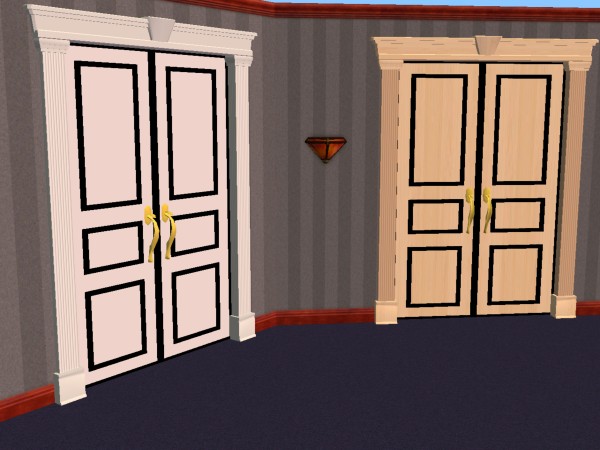

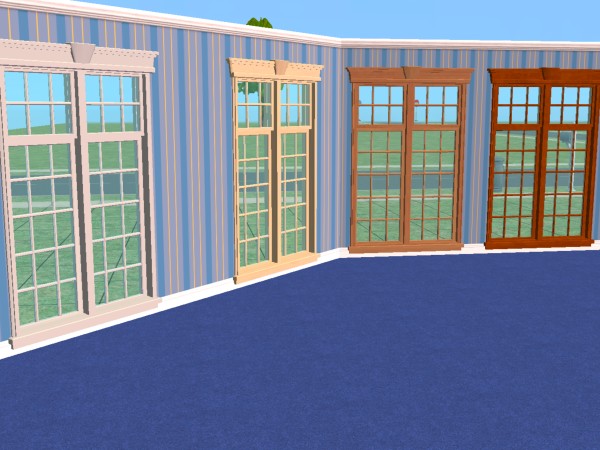
01.jpg - width=600 height=450
02.jpg - width=600 height=450
03.jpg - width=600 height=450
04.jpg - width=600 height=450
05.jpg - width=600 height=450
06.jpg - width=600 height=450
snapshot_00000004_1141bd88.jpg - width=600 height=450
Featured Upload!
This is a featured upload! It showcases the best talent and creativity available on MTS and in the community. 


Created by simnuts101
Uploaded: 7th Apr 2006 at 6:03 AM
Updated: 16th Dec 2013 at 9:54 AM by leefish
Updated: 16th Dec 2013 at 9:54 AM by leefish
Hi everyone:
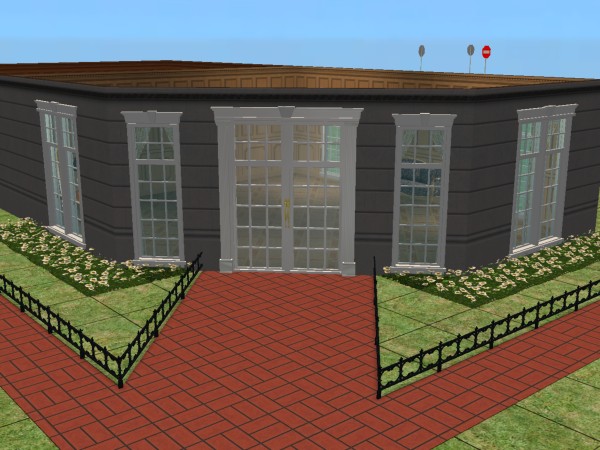
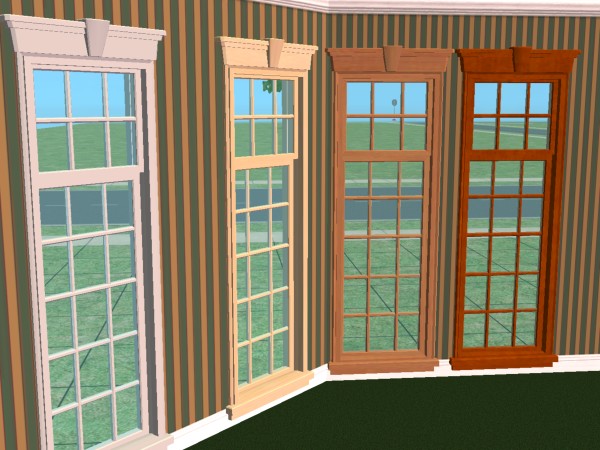
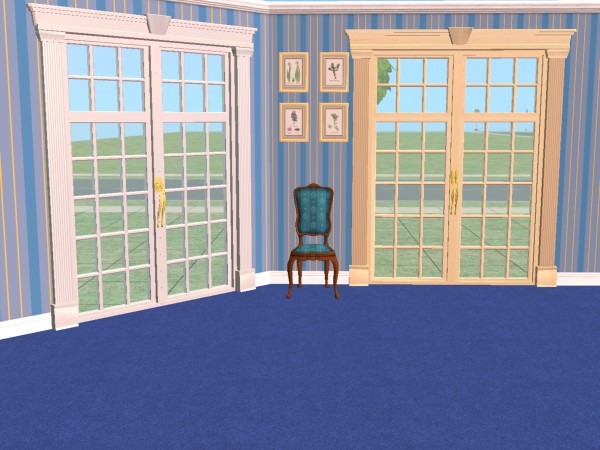
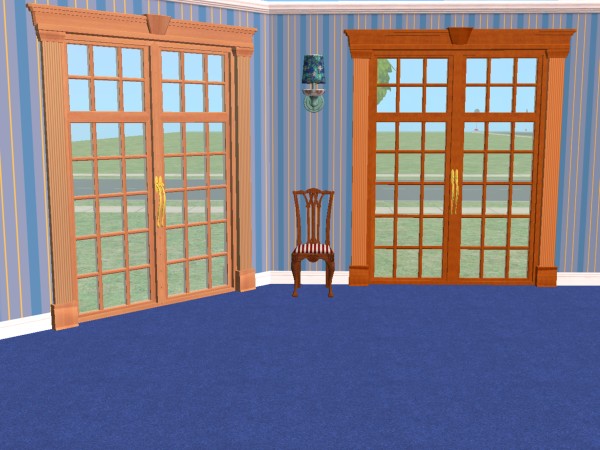
Here is a new, small door and window set for you. I call this “Le Petit Trianon Collection”. It is made up of a one and two tile window, a two tile glass door and solid door. These are also one story meshes.
Le Petit Trianon is a small pavilion on the grounds of Versailles that Louis XV built for himself as a small getaway. Although small, the architectural details of the pavilion are truly amazing, and I guess this is what inspired me to make this small collection.
The windows and doors CAN be placed on diagonal walls, but you have to download the diagonal meshes too. I have also added a recolor package if you like. The textures and quality are much better in the game than the picture shows.
Please feel free to recolor these if you like, remember that if you do, you only need to recolor the mesh, NOT the diagonal mesh as the diagonal mesh borrows the textures from the original mesh. The mesh may not be uploaded to another website, group, or forum. Please link back to this thread with proper credits.
Counts:
One tile window = 190 polys
Two tile window = 471 polys
Two tile door = 1,666 polys
Two tile glass door = 1,208 polys
These work fine in my game, but if you have any problems with them, please let me know, and I will do my best to correct them.
Enjoy!!
Here is a new, small door and window set for you. I call this “Le Petit Trianon Collection”. It is made up of a one and two tile window, a two tile glass door and solid door. These are also one story meshes.
Le Petit Trianon is a small pavilion on the grounds of Versailles that Louis XV built for himself as a small getaway. Although small, the architectural details of the pavilion are truly amazing, and I guess this is what inspired me to make this small collection.
The windows and doors CAN be placed on diagonal walls, but you have to download the diagonal meshes too. I have also added a recolor package if you like. The textures and quality are much better in the game than the picture shows.
Please feel free to recolor these if you like, remember that if you do, you only need to recolor the mesh, NOT the diagonal mesh as the diagonal mesh borrows the textures from the original mesh. The mesh may not be uploaded to another website, group, or forum. Please link back to this thread with proper credits.
Counts:
One tile window = 190 polys
Two tile window = 471 polys
Two tile door = 1,666 polys
Two tile glass door = 1,208 polys
These work fine in my game, but if you have any problems with them, please let me know, and I will do my best to correct them.
Enjoy!!
This is a new mesh, and means that it's a brand new self contained object that usually does not require a specific Pack (although this is possible depending on the type). It may have Recolours hosted on MTS - check below for more information.
| Filename | Size | Downloads | Date | |||||
|
Le Petit Trianon Window and Door Collection.zip
Size: 342.4 KB · Downloads: 60,697 · 8th Apr 2006 |
342.4 KB | 60,697 | 8th Apr 2006 | |||||
|
Le Petit Trianon - Recolor Collection.zip
Size: 365.2 KB · Downloads: 59,659 · 7th Apr 2006 |
365.2 KB | 59,659 | 7th Apr 2006 | |||||
| For a detailed look at individual files, see the Information tab. | ||||||||
Key:
- - File was updated after upload was posted
Install Instructions
Basic Download and Install Instructions:
1. Download: Click the download link to save the .rar or .zip file(s) to your computer.
2. Extract the zip, rar, or 7z file.
3. Place in Downloads Folder: Cut and paste the .package file(s) into your Downloads folder:
1. Download: Click the download link to save the .rar or .zip file(s) to your computer.
2. Extract the zip, rar, or 7z file.
3. Place in Downloads Folder: Cut and paste the .package file(s) into your Downloads folder:
- Origin (Ultimate Collection): Users\(Current User Account)\Documents\EA Games\The Sims™ 2 Ultimate Collection\Downloads\
- Non-Origin, Windows Vista/7/8/10: Users\(Current User Account)\Documents\EA Games\The Sims 2\Downloads\
- Non-Origin, Windows XP: Documents and Settings\(Current User Account)\My Documents\EA Games\The Sims 2\Downloads\
- Mac: Users\(Current User Account)\Documents\EA Games\The Sims 2\Downloads
- Mac x64: /Library/Containers/com.aspyr.sims2.appstore/Data/Library/Application Support/Aspyr/The Sims 2/Downloads
- For a full, complete guide to downloading complete with pictures and more information, see: Game Help: Downloading for Fracking Idiots.
- Custom content not showing up in the game? See: Game Help: Getting Custom Content to Show Up.
- If you don't have a Downloads folder, just make one. See instructions at: Game Help: No Downloads Folder.
Also Thanked - Users who thanked this download also thanked:
Packs Needed
None, this is Sims 2 base game compatible!
More Downloads BETA
Here are some more of my downloads: