
 Sign in to Mod The Sims
 Fanseefem Casuals - Untuckable Shirts + Slouchy Jeans... for the Laydeez
 Fanseefem Casuals - Untuckable Shirts + Slouchy Jeans... for the Laydeez
MTS has all free content, all the time. Donate to help keep it running.
SCREENSHOTS
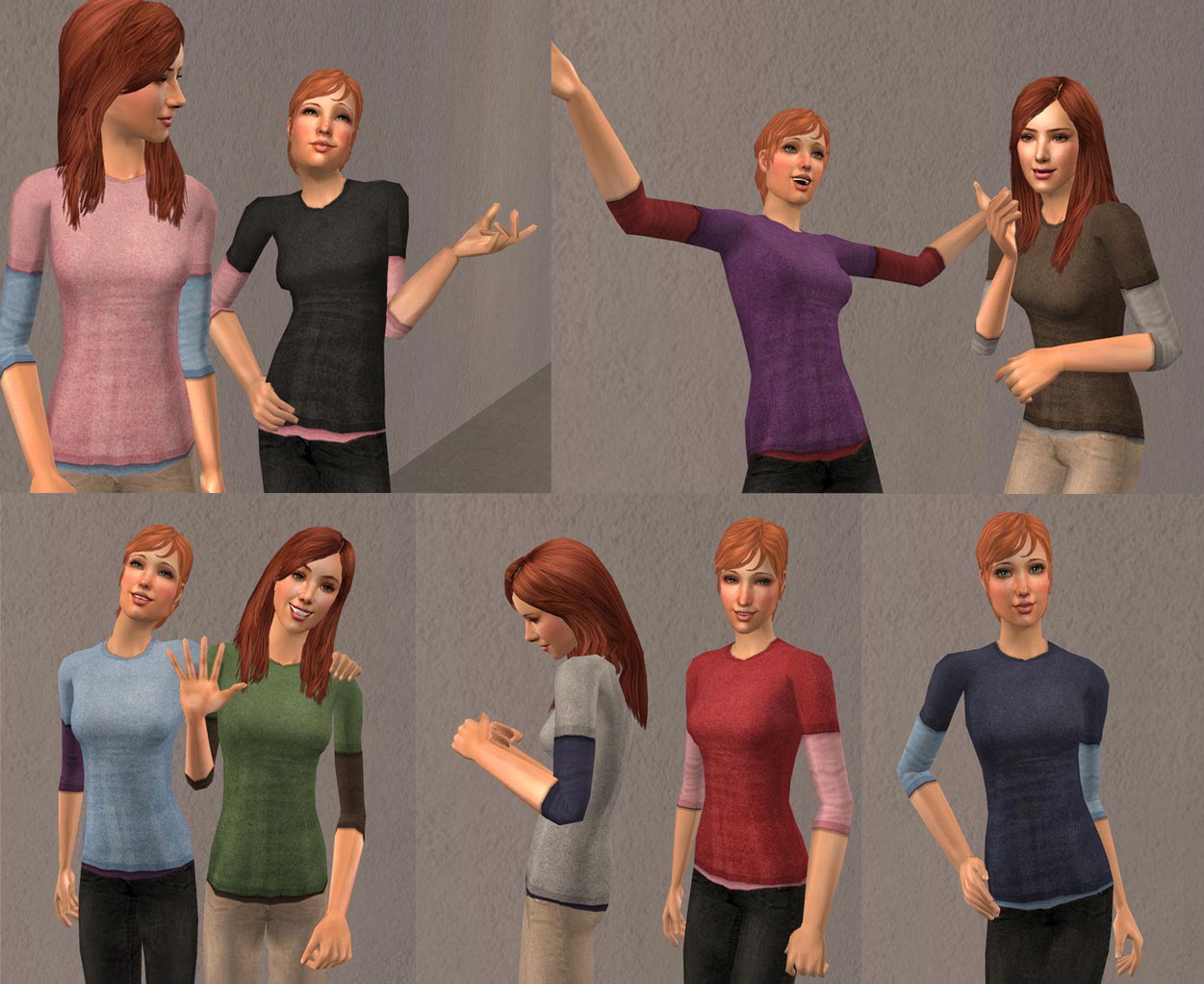
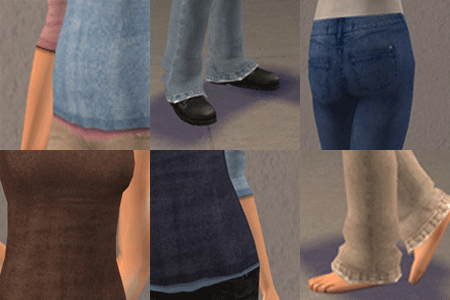
UntuckableLayeredTees.jpg - width=1251 height=1022
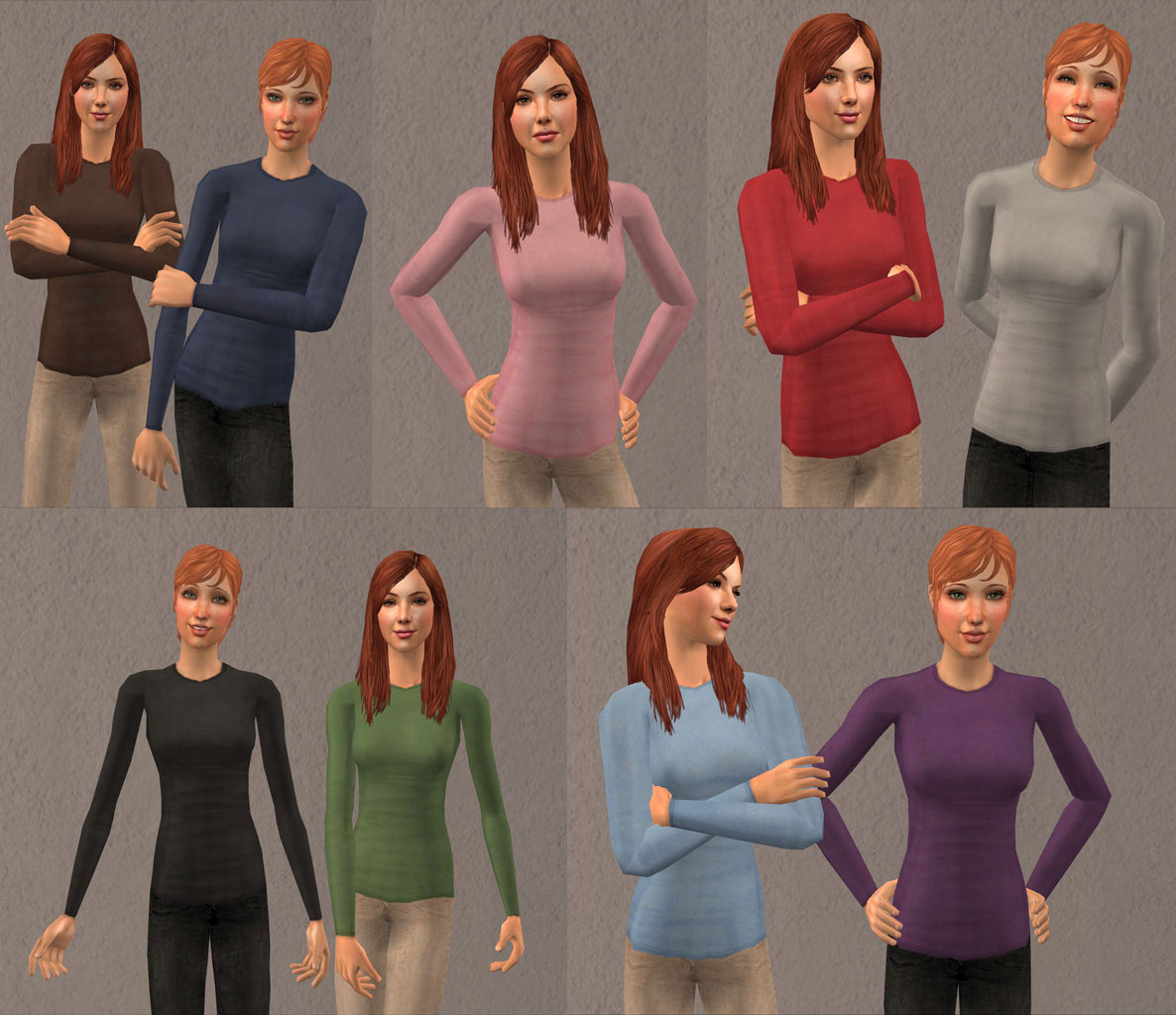
UntuckableLongSleeve.jpg - width=1186 height=1024
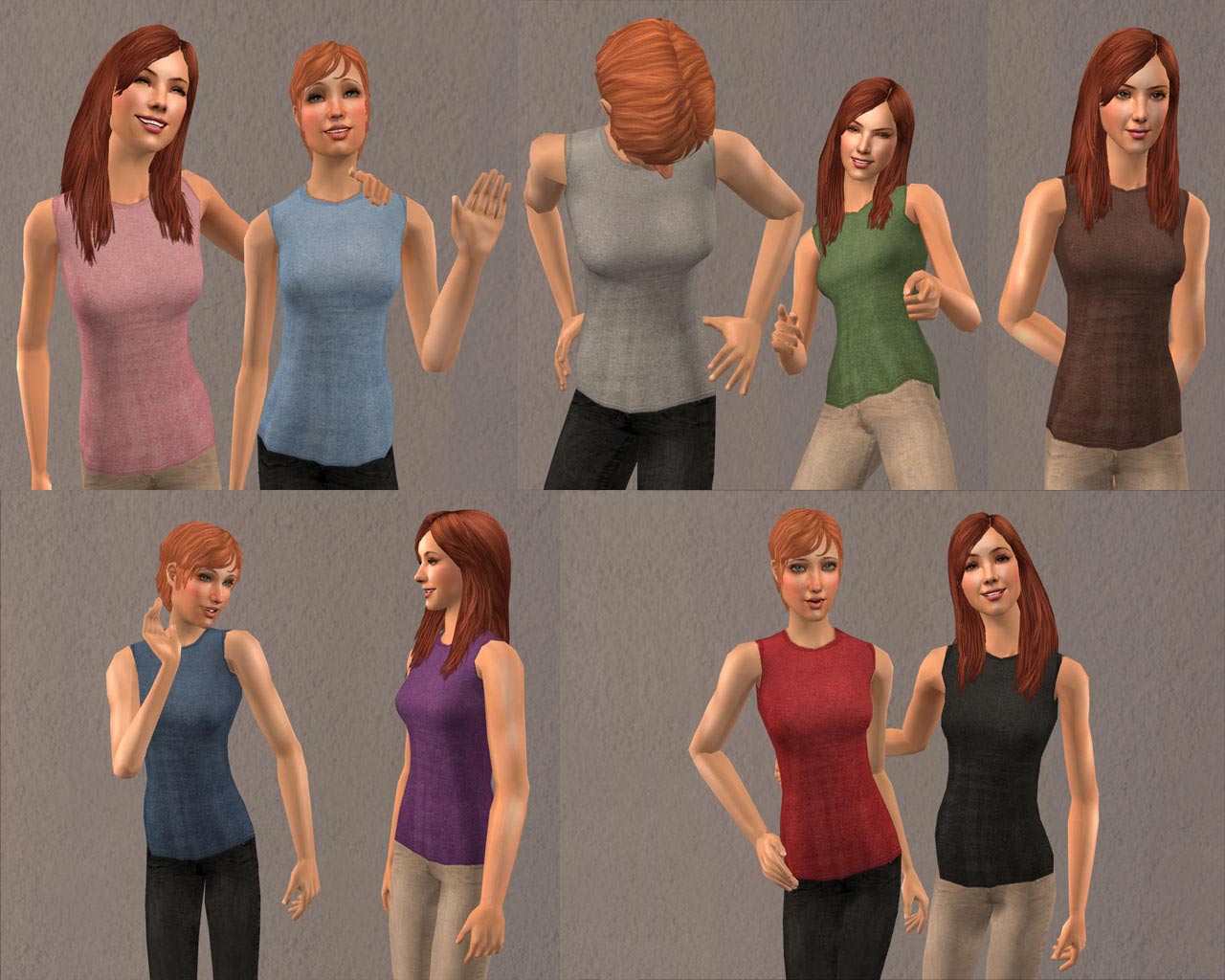
UntuckableTanks.jpg - width=1280 height=1024
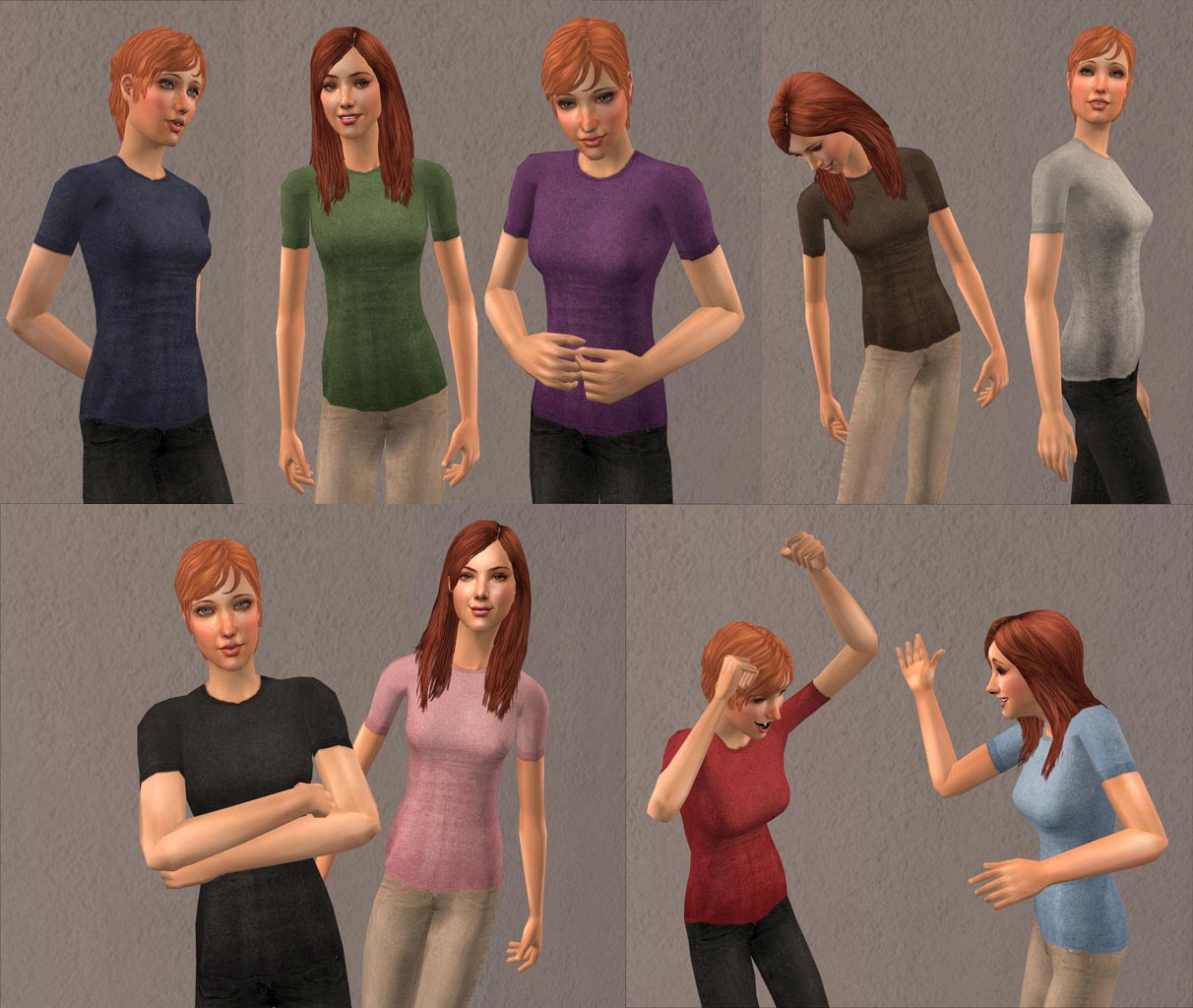
UntuckableTees.jpg - width=1212 height=1024
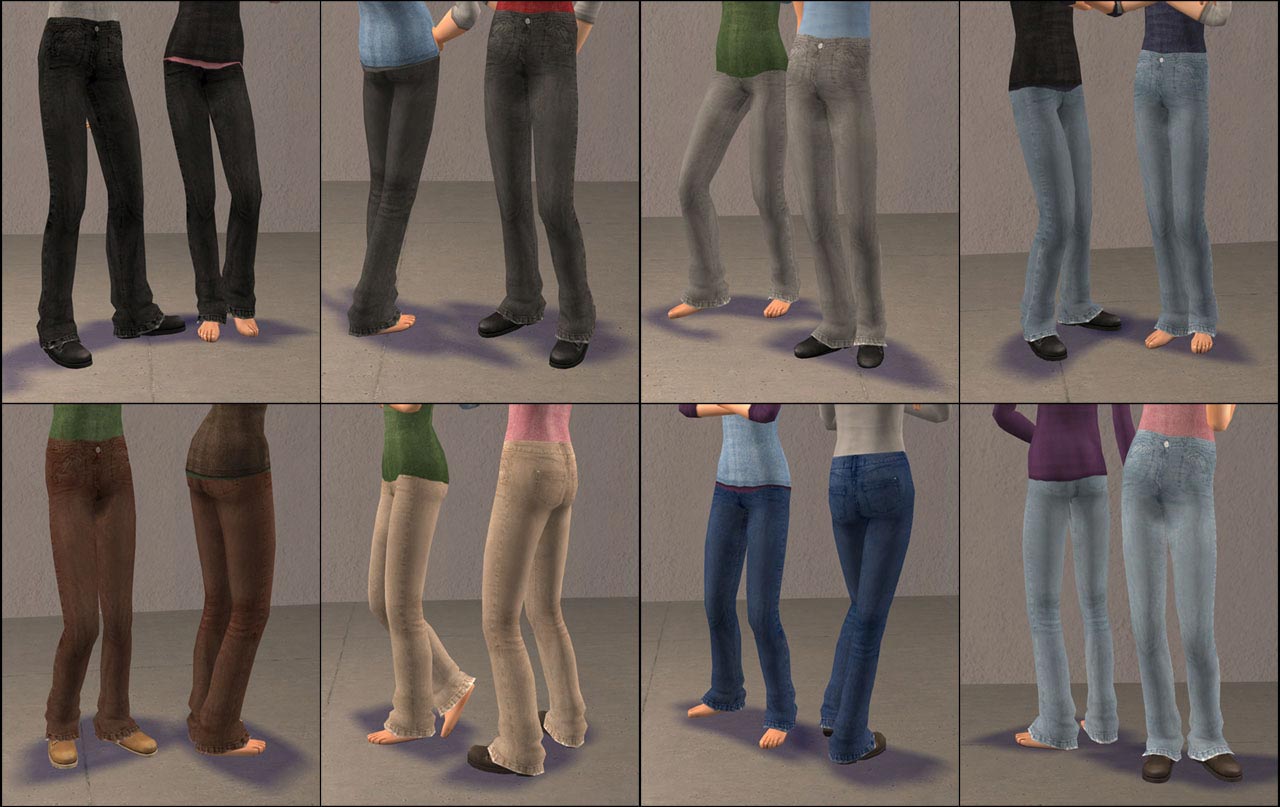
SlouchyJeans.jpg - width=1280 height=807
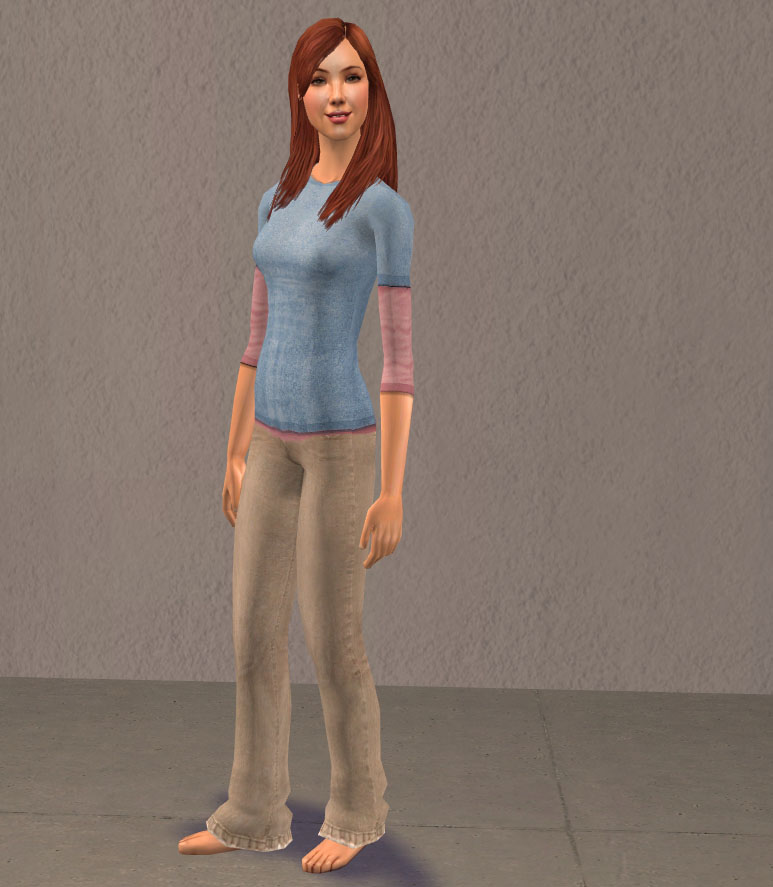
CasualOutfit.jpg - width=773 height=887
Featured Upload!
This is a featured upload! It showcases the best talent and creativity available on MTS and in the community. 


Uploaded: 17th Apr 2007 at 1:48 PM
Updated: 9th Jul 2014 at 10:26 AM by leefish - fix bust images
Updated: 9th Jul 2014 at 10:26 AM by leefish - fix bust images
The Fanseefem Project:
The Fanseefem project is my effort to bring normal clothes to our adult female sims. Sick of high heels, dressy clothing dripping with jewelry, and a lack of nice, sensible, basic clothes for females to putter about in the garden, I've gone a bit crazy.
This is the first installment in hopefully what should be a multi-part series, attempting to provide some simple stuff that normal girls can wear every day.
Because of the scope and grandeur of this project, I do not have any plans at this time to do the same for teens. Please don't ask - I may if the mood strikes me, but I hate doing stuff over, and doing the same huge pile of stuff again is enough to drive me batty.
What's Included:
This set includes three new meshes:
All meshes include a fat morph that is the same size and basic shape as Maxis fat.
Updated 19 Mar 08: All meshes now include pregnant morphs so they can be used for maternity wear. You will need a hack (like Pregnancy Wear Any Outfit by Squinge) to use these as maternity wear. You only need to redownload the meshes themselves and replace your existing files in your Downloads folder with them - all recolours (mine and those made by others) will still work on these meshes without needing updates. The files have the same names as before, so just extract them to the same folder and allow them to overwrite.
This set also includes a grand total of 113 (!) recolours:
81 Untuckable Shirts (All require my Untuckable Top Mesh): These will work with any Maxis bottoms and will look as if they are tucked in - even on pants that normally show the midriff/belly with Maxis shirts. This means no more bellies showing no matter which bottoms you choose to pair them with! However, if you use them with the special untuckable recolours of the pants that I've made, you'll get a cool effect that the sim's shirt is untucked.
The three sets of 9 shirts listed above each come in one each of these colours:
Not all of the colour combinations of the layered tees are pictured - they're just different combinations of the same sleeve/shirt. Here are all the combinations I did:
32 Slouchy Jeans: Each of the colours of jeans comes in an untuckable and tucked version - the untuckable versions are meant to be worn with my untuckable shirts - without them they will look... well, utterly awful (takes plumber's crack to a whole new level), but the tucked versions can be worn with any shirt.
Both sets of jeans come in these colours:
Absolutely everything is clearly labeled so you can remove any recolours you may not want.
It's all separates (top and bottom) so these will only show up in the everyday category. Everything works for adults and young adults.
Credits:
First and foremost, a HUGE thanks to the incredible fanseelamb. I have used her textures for the tops, in some places with a bit of recolouring/editing, but in most places taken directly from her untucked tops (and the alpha for the untucked pants from her untucked pants). And the whole idea for the untucking stuffs in the first place. Go see her profile for similar stuff for males. She was the inspiration for this project and deserves thanks and cookies. And beenz.
Big thanks also to Nouk, for talking me down when I realized I'd accidentally imported two skeletons into my main mesh file, and to Tiggerypum for everything she's taught me about meshing. And also a big thank you to the rest of the MTS2 staff (especially Delphy) for making a place where I can learn how to do cool stuff like this, and share it with all of you.
Major adoration and thanks furthermore (and especially) to Wes_H the Unimesh plugin and his new Fist of Frankensteining - it made this project doable and enjoyable. Thank you, Wes!
Model Credits:
Both models are my sims. You can get full details on all of their skins, makeup, etc., as well as download them here at MTS2:
Recolours:
I'll probably be doing more kinds of shirts for the untuckable top, and maybe more kinds of pants. I won't be doing more recolours of these particular textures. You are welcome to do so yourself, though.
If you recolour the tops or use the alpha from the pants please credit fanseelamb with a link and her name. If you recolour the jeans please credit me for the textures, and fansee for the alphas if you do more untucked colours.
Make sure to link back here to this post so people can get the mesh - do not include my mesh with your recolours.
My other normal policies still otherwise apply. Please see my profile for details on using with sim uploads and suchlike.
Meshes Required!!
Please make sure you download the meshes! Get my top mesh if you're getting ANY of the tops here, and the proper mesh for whichever set(s) of bottoms you choose - either barefoot or with boots. The meshes are separate from the recolour files (clearly labelled) and you will need to get them too for these to work in your game!
Polygon Counts:
Untuckable Shirt Top Mesh: 1204 polygons, 789 vertices (normal)
Slouchypants with Boots Bottom Mesh: 968 polygons, 758 vertices (normal)
Slouchypants Barefoot Bottom Mesh: 916 polys, 653 vertices (normal)
Additional Credits:
SimPE, Milkshape, Unimesh, and Fanseelamb!
The Fanseefem project is my effort to bring normal clothes to our adult female sims. Sick of high heels, dressy clothing dripping with jewelry, and a lack of nice, sensible, basic clothes for females to putter about in the garden, I've gone a bit crazy.
This is the first installment in hopefully what should be a multi-part series, attempting to provide some simple stuff that normal girls can wear every day.
Because of the scope and grandeur of this project, I do not have any plans at this time to do the same for teens. Please don't ask - I may if the mood strikes me, but I hate doing stuff over, and doing the same huge pile of stuff again is enough to drive me batty.
What's Included:
This set includes three new meshes:
- Untuckable Top Mesh: - Close-fitting top mesh with a smooth shirt front (no underboob crease) and a smooth waistline to allow for untuckable tops.
- Slouchypants Bottom Mesh with Boots: - Slim but comfortable fit jeans mesh with slouchy bottoms at the ankles, with nice sensible boots.
- Slouchypants Bottom Mesh Barefoot: - Same shape as the boots version, but without the boots, so your sims can go barefoot in their new jeans.
All meshes include a fat morph that is the same size and basic shape as Maxis fat.
Updated 19 Mar 08: All meshes now include pregnant morphs so they can be used for maternity wear. You will need a hack (like Pregnancy Wear Any Outfit by Squinge) to use these as maternity wear. You only need to redownload the meshes themselves and replace your existing files in your Downloads folder with them - all recolours (mine and those made by others) will still work on these meshes without needing updates. The files have the same names as before, so just extract them to the same folder and allow them to overwrite.
This set also includes a grand total of 113 (!) recolours:
81 Untuckable Shirts (All require my Untuckable Top Mesh): These will work with any Maxis bottoms and will look as if they are tucked in - even on pants that normally show the midriff/belly with Maxis shirts. This means no more bellies showing no matter which bottoms you choose to pair them with! However, if you use them with the special untuckable recolours of the pants that I've made, you'll get a cool effect that the sim's shirt is untucked.
- 9 Tank Tops: Well, maybe not actual tank tops. They're more like sleeveless tees.
- 9 Tee Shirts: Like the layered tees, only with no 3/4 sleeve tee underneath.
- 9 Longsleeve Shirts: Full wrist-length tees.
The three sets of 9 shirts listed above each come in one each of these colours:
- 54 Layered Tees: 3/4 sleeve tee under a regular close-fitting tee in a ton of combinations of shirt and sleeve colours. See the attached pic with the many many swatches for a full list of all the combinations I did. Yeah, I know, 54 is a ton, but I -really- like layered tees.
Not all of the colour combinations of the layered tees are pictured - they're just different combinations of the same sleeve/shirt. Here are all the combinations I did:
32 Slouchy Jeans: Each of the colours of jeans comes in an untuckable and tucked version - the untuckable versions are meant to be worn with my untuckable shirts - without them they will look... well, utterly awful (takes plumber's crack to a whole new level), but the tucked versions can be worn with any shirt.
- 16 Slouchy Jeans with Boots (Require my Slouchypants Bottom Mesh with Boots): Features a smooth waistline for proper untucking, and handmade textures - the blue-grey version is taken from pictures of my favourite set of real jeans I own. They are paired with nice comfy boots that will be great for digging in the garden or having a barbecue - see the pic for the colour of boots each set has.
- 16 Slouchy Jeans with Bare Feet (Requires my Slouchypants Bottom Mesh Barefoot): Same shape and texture as the above, but without shoes.
Both sets of jeans come in these colours:
Absolutely everything is clearly labeled so you can remove any recolours you may not want.
It's all separates (top and bottom) so these will only show up in the everyday category. Everything works for adults and young adults.
Credits:
First and foremost, a HUGE thanks to the incredible fanseelamb. I have used her textures for the tops, in some places with a bit of recolouring/editing, but in most places taken directly from her untucked tops (and the alpha for the untucked pants from her untucked pants). And the whole idea for the untucking stuffs in the first place. Go see her profile for similar stuff for males. She was the inspiration for this project and deserves thanks and cookies. And beenz.
Big thanks also to Nouk, for talking me down when I realized I'd accidentally imported two skeletons into my main mesh file, and to Tiggerypum for everything she's taught me about meshing. And also a big thank you to the rest of the MTS2 staff (especially Delphy) for making a place where I can learn how to do cool stuff like this, and share it with all of you.
Major adoration and thanks furthermore (and especially) to Wes_H the Unimesh plugin and his new Fist of Frankensteining - it made this project doable and enjoyable. Thank you, Wes!
Model Credits:
Both models are my sims. You can get full details on all of their skins, makeup, etc., as well as download them here at MTS2:
- Rhiannon de Muse (longer, darker hair)
- Rebecca de Muse (shorter, lighter hair)
Recolours:
I'll probably be doing more kinds of shirts for the untuckable top, and maybe more kinds of pants. I won't be doing more recolours of these particular textures. You are welcome to do so yourself, though.
If you recolour the tops or use the alpha from the pants please credit fanseelamb with a link and her name. If you recolour the jeans please credit me for the textures, and fansee for the alphas if you do more untucked colours.
Make sure to link back here to this post so people can get the mesh - do not include my mesh with your recolours.
My other normal policies still otherwise apply. Please see my profile for details on using with sim uploads and suchlike.
Meshes Required!!
Please make sure you download the meshes! Get my top mesh if you're getting ANY of the tops here, and the proper mesh for whichever set(s) of bottoms you choose - either barefoot or with boots. The meshes are separate from the recolour files (clearly labelled) and you will need to get them too for these to work in your game!
Polygon Counts:
Untuckable Shirt Top Mesh: 1204 polygons, 789 vertices (normal)
Slouchypants with Boots Bottom Mesh: 968 polygons, 758 vertices (normal)
Slouchypants Barefoot Bottom Mesh: 916 polys, 653 vertices (normal)
Additional Credits:
SimPE, Milkshape, Unimesh, and Fanseelamb!
This is a new mesh, and means that it's a brand new self contained object that usually does not require a specific Pack (although this is possible depending on the type). It may have Recolours hosted on MTS - check below for more information.
| Filename | Size | Downloads | Date | |||||
|
MESH_AF_B_SlouchypantsBarefoot.rar
Size: 44.2 KB · Downloads: 156,343 · 17th Apr 2007 |
44.2 KB | 156,343 | 17th Apr 2007 | |||||
|
MESH_AF_B_SlouchypantsBoots.rar
Size: 46.2 KB · Downloads: 186,926 · 17th Apr 2007 |
46.2 KB | 186,926 | 17th Apr 2007 | |||||
|
MESH_AF_T_UntuckableTop.rar
Size: 63.2 KB · Downloads: 297,260 · 17th Apr 2007 |
63.2 KB | 297,260 | 17th Apr 2007 | |||||
|
Bottoms-SlouchypantsBarefoot-Untucked.rar
Size: 3.38 MB · Downloads: 107,938 · 17th Apr 2007 |
3.38 MB | 107,938 | 17th Apr 2007 | |||||
|
Bottoms-SlouchypantsBarefoot-Tucked.rar
Size: 3.38 MB · Downloads: 95,992 · 17th Apr 2007 |
3.38 MB | 95,992 | 17th Apr 2007 | |||||
|
Bottoms-SlouchypantsBoots-Untucked.rar
Size: 3.38 MB · Downloads: 138,604 · 17th Apr 2007 |
3.38 MB | 138,604 | 17th Apr 2007 | |||||
|
Bottoms-SlouchypantsBoots-Tucked.rar
Size: 3.38 MB · Downloads: 116,728 · 17th Apr 2007 |
3.38 MB | 116,728 | 17th Apr 2007 | |||||
|
Tops-UntuckableLayeredTees.rar
Size: 9.82 MB · Downloads: 134,547 · 17th Apr 2007 |
9.82 MB | 134,547 | 17th Apr 2007 | |||||
|
Tops-UntuckableLongSleeve.rar
Size: 1.52 MB · Downloads: 125,374 · 17th Apr 2007 |
1.52 MB | 125,374 | 17th Apr 2007 | |||||
|
Tops-UntuckableTanks.rar
Size: 1.84 MB · Downloads: 121,994 · 17th Apr 2007 |
1.84 MB | 121,994 | 17th Apr 2007 | |||||
|
Tops-UntuckableTees.rar
Size: 1.43 MB · Downloads: 147,319 · 17th Apr 2007 |
1.43 MB | 147,319 | 17th Apr 2007 | |||||
| For a detailed look at individual files, see the Information tab. | ||||||||
Key:
- - File was updated after upload was posted
Install Instructions
Basic Download and Install Instructions:
1. Download: Click the download link to save the .rar or .zip file(s) to your computer.
2. Extract the zip, rar, or 7z file.
3. Place in Downloads Folder: Cut and paste the .package file(s) into your Downloads folder:
1. Download: Click the download link to save the .rar or .zip file(s) to your computer.
2. Extract the zip, rar, or 7z file.
3. Place in Downloads Folder: Cut and paste the .package file(s) into your Downloads folder:
- Origin (Ultimate Collection): Users\(Current User Account)\Documents\EA Games\The Sims™ 2 Ultimate Collection\Downloads\
- Non-Origin, Windows Vista/7/8/10: Users\(Current User Account)\Documents\EA Games\The Sims 2\Downloads\
- Non-Origin, Windows XP: Documents and Settings\(Current User Account)\My Documents\EA Games\The Sims 2\Downloads\
- Mac: Users\(Current User Account)\Documents\EA Games\The Sims 2\Downloads
- Mac x64: /Library/Containers/com.aspyr.sims2.appstore/Data/Library/Application Support/Aspyr/The Sims 2/Downloads
- For a full, complete guide to downloading complete with pictures and more information, see: Game Help: Downloading for Fracking Idiots.
- Custom content not showing up in the game? See: Game Help: Getting Custom Content to Show Up.
- If you don't have a Downloads folder, just make one. See instructions at: Game Help: No Downloads Folder.
Recolours of this mesh
There are 130 recolours of this mesh on MTS:
Also Thanked - Users who thanked this download also thanked:
Packs Needed
None, this is Sims 2 base game compatible!
Other Information
Age:
– Adult
Gender:
– Female
Clothing Type:
– Everyday
Clothing Style:
– No Style
: None of the below styles
– Modern
Other Type:
– Maternity
– Untuckables
Maxis Flags:
– Not Applicable
Outfit Type:
– Top
– Bottom
Tags
#fanseefem, #untuckable top, #untuckable top, #untucked, #slouchypants, #jeans, #basics, #simple, #casual
About Me
Whatever.
More Downloads BETA
Here are some more of my downloads: