
 Sign in to Mod The Sims
 Baskerville -- Neighbourhood complete with lots
 Baskerville -- Neighbourhood complete with lots
MTS has all free content, all the time. Donate to help keep it running.
SCREENSHOTS

baskerville_map.jpg - width=567 height=385
baskerville_overview.jpg - width=600 height=450
baskerville_zoomedout-01.jpg - width=600 height=450
baskerville_zoomedout-02.jpg - width=600 height=450
baskerville_residential.jpg - width=605 height=455
baskerville_community01.jpg - width=605 height=455
baskerville_community02.jpg - width=605 height=455
baskerville_shirts.jpg - width=472 height=354
Featured Upload!
This is a featured upload! It showcases the best talent and creativity available on MTS and in the community. 

Created by plasticbox
Uploaded: 21st Jul 2007 at 12:27 AM
Updated: 13th Jan 2015 at 4:15 AM
Updated: 13th Jan 2015 at 4:15 AM
Baskerville is a small town in the desert, complete with lots but no sims.
Requires Nightlife, OfB, and Seasons.
Non-NL users: It is safe to give this a try; see post #113 of this thread (duckman768): "Obviously the objects that came with NL don't show up but I have had no problems playing this neighborhood so far." Non-OfB users would have to rebuild quite a bit, but as long as you have Seasons installed, this is compatible.
Please be aware that this download has at least two parts:
baskerville_neighbourhood_N513.rar and baskerville_customcontent.rar

Baskerville will install as N513. Made with the Empty and Cleaned-up Templates by SaraMK and Argon @ MATY -- to the best of my knowledge it contains no playable sims, townies, NPCs, or other traces of sim life.
Pets users: If you don't want your game to generate random pets when you start playing, the thread on MATY has an empty Pets template too. Thanks to Juliejaz1 for reminding me!
This is a seaside location with ample opportunities to build beach lots, small street layout (no cameramod needed) but still with room to expand. The neighbourhood is 100% flat in the buildable areas -- I flattened it out as far as I could reach with the default camera --, the sc4 terrain is flat in the central part but may have very slight slopes elsewhere. Street level is 15 clicks above sea level, so you can have basements everywhere with no danger of flooding.
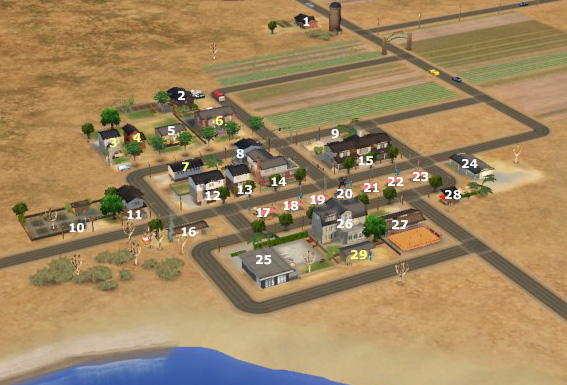
Map of Baskerville:
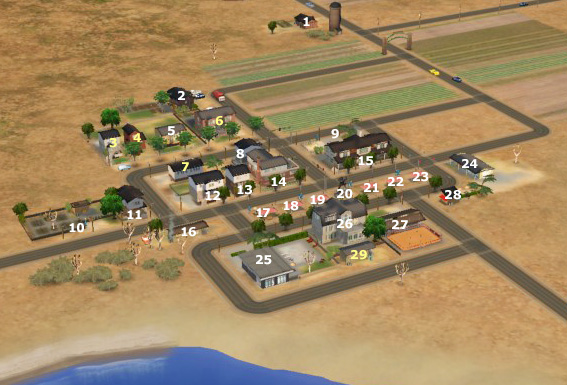
Baskerville includes 15 community and 14 residential lots, 7 of them starters; see follow-up posts for tons of pictures and detailed descriptions of each one. Five of the residential lots (marked in yellow) didn't make it into the main download due to the 10MB size limit; those are available below as separate files.
R = Residential
C = Community
yellow numbers = not in main download
1 R - 1 Way Out Starter farmhouse, 1BR 1BA + spare room, with garden
2 R - 1 Blackoak Lane, 2BR 1BA with basement, garden and greenhouse
3 R - 4 Birch Alley 2BR 2BA + spare room, with garden and pool
4 R - 5 Birch Alley Starter house, 1BR 1BA + spare room, with garden
5 R - 6 Birch Alley Starter house, 1BR 1BA + spare room
6 R - 7 Birch Alley - School, with 1BR 1BA apartment + spare room
7 R - 3 Birch Alley Starter house, 2BR 2BA
8 R - 1 Short Way Starter house, 1BR 1BA
9 C - Playground
10 C - Cemetary
11 R - 1 Birch Alley Home business (Flower store), 1BR 2BA
12 R - 1 Main Street Starter house, 3BR 2BA + 2 spare rooms
13 R - 2 Main Street Starter house, usable as home business, 1BR 1BA + 1 spare room
14 R - 3 Main Street Two apartments: 3BR 2BA furnished / 2BR 1BA unfurnished
15 C - 4 Main Street - Hotel Baskerville 5 rooms, restaurant, pub
16 R - 1 Road to Norway Starter shack with home business (Yard sale), 1BR 1BA
17 C - Market #1 Garden supplies
18 C - Market #2 Empty booth
19 C - Market #3 Empty booth
20 C - Silly Monument
21 C - Market #4 Clothes + Gifts
22 C - Market #5 Fish
23 C - Market #6 Empty booth
24 C - Shops: Groceries / Cars / Electronics
25 C - Public Bath
26 C - Community Center Library, Chess Club, Art Club
27 C - Roller Skating Rink with Café
28 C - Mini Grill
29 R - 1 Bay Drive Budget starter, 1BR 1BA
The lots are small in general, between 1x1 and 2x4; the only larger ones are the public bath and the car retailer (both 3x3). The empty block on the right side of the map is 5x3.
All houses are furnished for at least 2 sims, except for the upstairs apartment in 3 Main Street which is unfurnished. Every house includes as a minimum the usual starter equipment (double bed, table and seating for two, bookshelf, lights in all furnished rooms and outside, toilet, bathtub or shower, fridge, kitchen sink, phone, trash can, smoke detector, burglar alarm) and one or more driveways. Most of the houses include more than that.
All lots are playtested between 2 and 8 sim days (residential) or at least one long visit (community), except for the empty market booths (they make excellent cheap starter businesses, that's why I've left some of them empty), Birch Alley 4 and Bay Drive 1. Community lots are tested only as regular visitable lots, not as owned businesses. Of the school I've only tested the residential part, not actually running a school. All lots are tested for adequate lighting at night.
The houses on Main Street are using the same grid as Backdoor Lane.
How to install:
1. Download Baskerville_CustomContent.rar, expand and put in My Documents\EA Games\The Sims 2\Downloads
2. Download Baskerville_Neighbourhood.rar, expand and put in My Documents\EA Games\The Sims 2\Neighbourhoods
3. If you want, download the extra lots and install them the usual way
4. Start your game: Baskerville should appear as last entry in your Neighbourhoods menu (unless you already have one that has a higher number).
Baskerville will be N513. In case you already have a N513 hood, rename the folder you downloaded from here and all files inside it that start with "N513_" (the ones in the Lots and Thumbnails subdirectories too) with a number that you don't already use. Anything up to "N999_" works, in my experience.
Alternatively, if you want this to be a subhood for example, or if you want your default townies in it, you can also install the hood as above, then use the sc4 terrain to make a new (sub)hood, move the houses over to that one and delete Baskerville.
Recommended hacks:
I can heavily recommend all of MaryLou's window fixes, for this neighbourhood one of them is especially important: her global light fix for the OpenMe 2-tile window that Maxis broke and never repaired. Since I have used this window in one or two houses, you should install this or they will be pitch dark inside.
Also, if you want to get the most out of the farm houses and the market, you should try the Produce Packing Station by Paladin available at SimWardrobe (Sims 2 > Objects > Business Facilitators) -- it allows you to put produce in crates and sell them in bulk, thus making it possible to actually feed a neighbourhood with your farmers' products (sims won't stand there and ponder forever whether they should buy this or that single tomato).
Have fun!
Pictures below:
- baskerville_map.jpg -- the map above
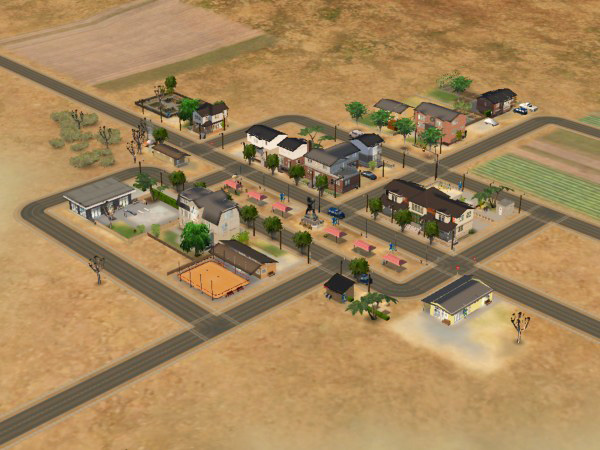
- baskerville_overview.jpg -- View from the other side, without the extra lots (but including the school which I had to take out last minute)
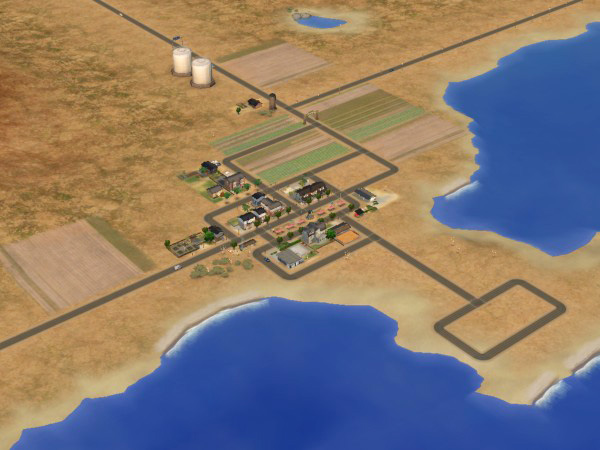
- baskerville_zoomedout-01.jpg -- Zoomed out view
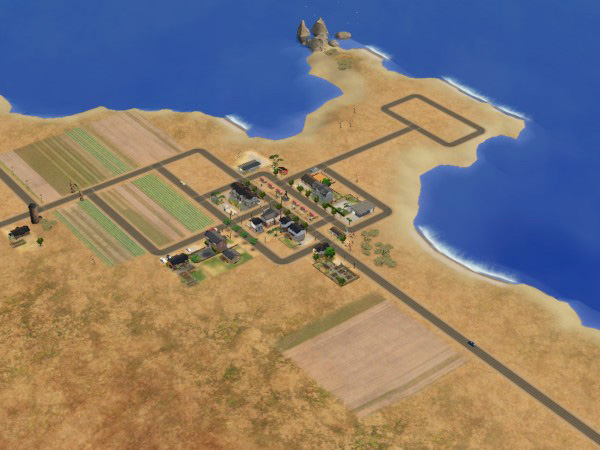
- baskerville_zoomedout-02.jpg -- Zoomed out view
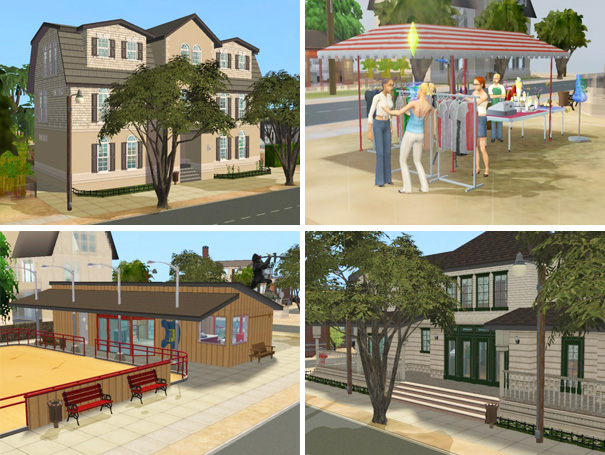
- baskerville_residential.jpg -- Four of the residential lots in Baskerville
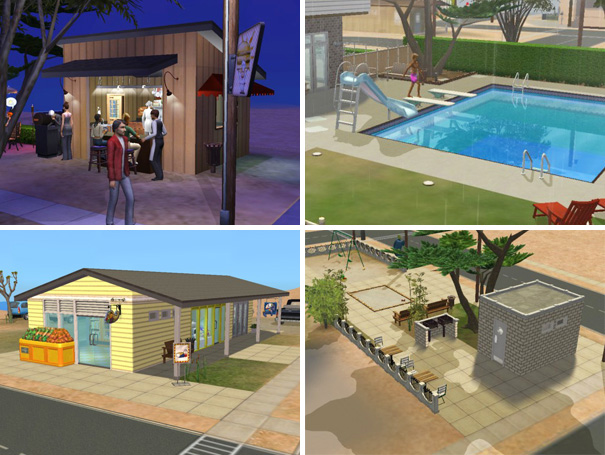
- baskerville_community01.jpg -- Town hall, market, roller skating rink, hotel
- baskerville_community02.jpg -- Mini grill, public bath, shops, and playground
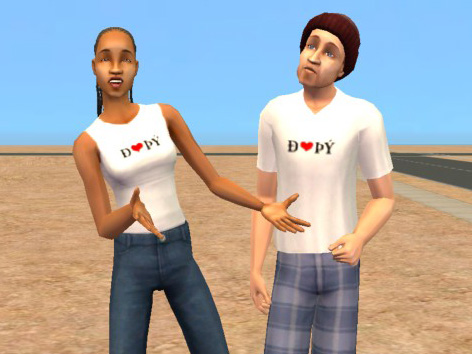
- baskerville_shirts.jpg -- Extra bonus: two fashionable t-shirts (AF and AM) with "I *heart* BV" print in simlish on the front, set in Baskerville
Files below:
- baskerville_neighbourhood_N513.rar -- the compressed Neighbourhood folder
- baskerville_customcontent.rar -- all custom content that's needed for this hood (see list) in one neatly subfoldered pile
- baskerville_sc4.zip -- the .sc4 file + previews for those who only want the blank terrain
- Shirts and extra lots should be self-explaining
The t-shirts don't need a mesh, they're just recolored Maxis shirts. The male one may not be top notch around the neck -- sorry, but I can hardly see what I'm doing; my graphics card is a little overwhelmed now with Seasons. They're only meant to be sold to tourists anyway =P
There is no custom content included with the extra lots (but some is required), which means you need to download "baskerville_customcontent.rar" along with them, even if you only want those lots and not the rest of the hood.
Please do not ask for zip files: Windows users, get WinRAR | OSX users, get UnRarX
Custom content:
What's contained in baskerville_customcontent.rar
Doors/Windows:
- Belhooven Extension Set by MaryLou @ MTS2, from this thread
- White recolors of the Mullionaire door and Belhooven window by MysticMog @ MTS2, from this set
- White recolor of the Octothorp Atrium Window by KiaraRawks @ MTS2, from this set
- Three Seasons window and door recolors by Val_33 @ MTS2, from this thread
Fences:
- Mortar and Iron fence by naschev @ MTS2, from this thread
- Victorian Porch Fence in White by HolySimoly, from this page
Stairs:
- Open underneath Steadfast, Chic and Wooden Deck stairs by crocobaura @ MTS2, from this thread
- Ladder Stairs by Targa @ MTS2, from this thread
Walls/Floors:
- One dark wood floor by HolySimoly, from this page
- Several "Panelling and Plaster" walls by HolySimoly, from this page
- One "Seaside Retreat" Siding by HolySimoly, from this page
- One "Seaside Retreat" Panelling by HolySimoly, from this page
- Six walls by myself
Other:
- Invisible Driveway by roddyaleixo @ MTS2, from this thread
Buy Mode - Meshes:
- Parthenon Outdoor bench and Brass dining chair by Ailias @ MTS2, from this set
- Maxis matching single curtains by Komasutra @ N99, currently on this page
- 2-tile NuMica table by CTNutmegger @ N99, currently on this page
Buy Mode - Recolors:
- White Recolor of the Maxis cheap toilet by perdita_x_dream @ MTS2, from this thread
- Recolors of the Maxis cheap stove, dishwasher and NuMica table by Deele4952 @ N99, from the Maxis Value Kitchen recolour set in Pearl currently on this page
Thanks:
- All of the makers of the custom content listed above, for making it and especially for allowing it to be redistributed
- SaraMK and Argon for their Empty and Cleaned-up Templates
- MaryLou for fixing all those borken Maxis windows
- Frillen for this collection
- loba for this collection
- windkeeper for this collection
- Andi8104 for the these mini lots
- MaryLou again for those mini lots
- Extra special thanks to crocobaura: many of the lots in here would have been technically impossible to build without your stairs =)
Thanks in advance:
If anyone could take a look at this in SimPE and confirm that it's really really empty, I'd be much relieved. I've already asked two potential testers but did not hear back from them (seems to be holiday season) -- from my own experience, the MATY templates work as advertised (I use them a lot) so there is very little to worry about, but still.
Please don't PM me with downloading issues or build mode problems (post in the appropriate forums instead) and don't ask me for sc4 files or Body Shop content (I do lots and won't consider anything else). Any feedback related to this thread, please post here instead of PMing me. Thank you.
Requires Nightlife, OfB, and Seasons.
Non-NL users: It is safe to give this a try; see post #113 of this thread (duckman768): "Obviously the objects that came with NL don't show up but I have had no problems playing this neighborhood so far." Non-OfB users would have to rebuild quite a bit, but as long as you have Seasons installed, this is compatible.
Please be aware that this download has at least two parts:
baskerville_neighbourhood_N513.rar and
 baskerville_customcontent.rar
 Baskerville will install as N513. Made with the Empty and Cleaned-up Templates by SaraMK and Argon @ MATY -- to the best of my knowledge it contains no playable sims, townies, NPCs, or other traces of sim life.
Pets users: If you don't want your game to generate random pets when you start playing, the thread on MATY has an empty Pets template too. Thanks to Juliejaz1 for reminding me!
This is a seaside location with ample opportunities to build beach lots, small street layout (no cameramod needed) but still with room to expand. The neighbourhood is 100% flat in the buildable areas -- I flattened it out as far as I could reach with the default camera --, the sc4 terrain is flat in the central part but may have very slight slopes elsewhere. Street level is 15 clicks above sea level, so you can have basements everywhere with no danger of flooding.
Map of Baskerville:
Baskerville includes 15 community and 14 residential lots, 7 of them starters; see follow-up posts for tons of pictures and detailed descriptions of each one. Five of the residential lots (marked in yellow) didn't make it into the main download due to the 10MB size limit; those are available below as separate files.
R = Residential
C = Community
yellow numbers = not in main download
1 R - 1 Way Out Starter farmhouse, 1BR 1BA + spare room, with garden
2 R - 1 Blackoak Lane, 2BR 1BA with basement, garden and greenhouse
3 R - 4 Birch Alley 2BR 2BA + spare room, with garden and pool
4 R - 5 Birch Alley Starter house, 1BR 1BA + spare room, with garden
5 R - 6 Birch Alley Starter house, 1BR 1BA + spare room
6 R - 7 Birch Alley - School, with 1BR 1BA apartment + spare room
7 R - 3 Birch Alley Starter house, 2BR 2BA
8 R - 1 Short Way Starter house, 1BR 1BA
9 C - Playground
10 C - Cemetary
11 R - 1 Birch Alley Home business (Flower store), 1BR 2BA
12 R - 1 Main Street Starter house, 3BR 2BA + 2 spare rooms
13 R - 2 Main Street Starter house, usable as home business, 1BR 1BA + 1 spare room
14 R - 3 Main Street Two apartments: 3BR 2BA furnished / 2BR 1BA unfurnished
15 C - 4 Main Street - Hotel Baskerville 5 rooms, restaurant, pub
16 R - 1 Road to Norway Starter shack with home business (Yard sale), 1BR 1BA
17 C - Market #1 Garden supplies
18 C - Market #2 Empty booth
19 C - Market #3 Empty booth
20 C - Silly Monument
21 C - Market #4 Clothes + Gifts
22 C - Market #5 Fish
23 C - Market #6 Empty booth
24 C - Shops: Groceries / Cars / Electronics
25 C - Public Bath
26 C - Community Center Library, Chess Club, Art Club
27 C - Roller Skating Rink with Café
28 C - Mini Grill
29 R - 1 Bay Drive Budget starter, 1BR 1BA
The lots are small in general, between 1x1 and 2x4; the only larger ones are the public bath and the car retailer (both 3x3). The empty block on the right side of the map is 5x3.
All houses are furnished for at least 2 sims, except for the upstairs apartment in 3 Main Street which is unfurnished. Every house includes as a minimum the usual starter equipment (double bed, table and seating for two, bookshelf, lights in all furnished rooms and outside, toilet, bathtub or shower, fridge, kitchen sink, phone, trash can, smoke detector, burglar alarm) and one or more driveways. Most of the houses include more than that.
All lots are playtested between 2 and 8 sim days (residential) or at least one long visit (community), except for the empty market booths (they make excellent cheap starter businesses, that's why I've left some of them empty), Birch Alley 4 and Bay Drive 1. Community lots are tested only as regular visitable lots, not as owned businesses. Of the school I've only tested the residential part, not actually running a school. All lots are tested for adequate lighting at night.
The houses on Main Street are using the same grid as Backdoor Lane.
How to install:
1. Download Baskerville_CustomContent.rar, expand and put in My Documents\EA Games\The Sims 2\Downloads
2. Download Baskerville_Neighbourhood.rar, expand and put in My Documents\EA Games\The Sims 2\Neighbourhoods
3. If you want, download the extra lots and install them the usual way
4. Start your game: Baskerville should appear as last entry in your Neighbourhoods menu (unless you already have one that has a higher number).
Baskerville will be N513. In case you already have a N513 hood, rename the folder you downloaded from here and all files inside it that start with "N513_" (the ones in the Lots and Thumbnails subdirectories too) with a number that you don't already use. Anything up to "N999_" works, in my experience.
Alternatively, if you want this to be a subhood for example, or if you want your default townies in it, you can also install the hood as above, then use the sc4 terrain to make a new (sub)hood, move the houses over to that one and delete Baskerville.
Recommended hacks:
I can heavily recommend all of MaryLou's window fixes, for this neighbourhood one of them is especially important: her global light fix for the OpenMe 2-tile window that Maxis broke and never repaired. Since I have used this window in one or two houses, you should install this or they will be pitch dark inside.
Also, if you want to get the most out of the farm houses and the market, you should try the Produce Packing Station by Paladin available at SimWardrobe (Sims 2 > Objects > Business Facilitators) -- it allows you to put produce in crates and sell them in bulk, thus making it possible to actually feed a neighbourhood with your farmers' products (sims won't stand there and ponder forever whether they should buy this or that single tomato).
Have fun!
Pictures below:
- baskerville_map.jpg -- the map above
- baskerville_overview.jpg -- View from the other side, without the extra lots (but including the school which I had to take out last minute)
- baskerville_zoomedout-01.jpg -- Zoomed out view
- baskerville_zoomedout-02.jpg -- Zoomed out view
- baskerville_residential.jpg -- Four of the residential lots in Baskerville
- baskerville_community01.jpg -- Town hall, market, roller skating rink, hotel
- baskerville_community02.jpg -- Mini grill, public bath, shops, and playground
- baskerville_shirts.jpg -- Extra bonus: two fashionable t-shirts (AF and AM) with "I *heart* BV" print in simlish on the front, set in Baskerville
Files below:
- baskerville_neighbourhood_N513.rar -- the compressed Neighbourhood folder
- baskerville_customcontent.rar -- all custom content that's needed for this hood (see list) in one neatly subfoldered pile
- baskerville_sc4.zip -- the .sc4 file + previews for those who only want the blank terrain
- Shirts and extra lots should be self-explaining
The t-shirts don't need a mesh, they're just recolored Maxis shirts. The male one may not be top notch around the neck -- sorry, but I can hardly see what I'm doing; my graphics card is a little overwhelmed now with Seasons. They're only meant to be sold to tourists anyway =P
There is no custom content included with the extra lots (but some is required), which means you need to download "baskerville_customcontent.rar" along with them, even if you only want those lots and not the rest of the hood.
Please do not ask for zip files: Windows users, get WinRAR | OSX users, get UnRarX
Custom content:
What's contained in baskerville_customcontent.rar
Doors/Windows:
- Belhooven Extension Set by MaryLou @ MTS2, from this thread
- White recolors of the Mullionaire door and Belhooven window by MysticMog @ MTS2, from this set
- White recolor of the Octothorp Atrium Window by KiaraRawks @ MTS2, from this set
- Three Seasons window and door recolors by Val_33 @ MTS2, from this thread
Fences:
- Mortar and Iron fence by naschev @ MTS2, from this thread
- Victorian Porch Fence in White by HolySimoly, from this page
Stairs:
- Open underneath Steadfast, Chic and Wooden Deck stairs by crocobaura @ MTS2, from this thread
- Ladder Stairs by Targa @ MTS2, from this thread
Walls/Floors:
- One dark wood floor by HolySimoly, from this page
- Several "Panelling and Plaster" walls by HolySimoly, from this page
- One "Seaside Retreat" Siding by HolySimoly, from this page
- One "Seaside Retreat" Panelling by HolySimoly, from this page
- Six walls by myself
Other:
- Invisible Driveway by roddyaleixo @ MTS2, from this thread
Buy Mode - Meshes:
- Parthenon Outdoor bench and Brass dining chair by Ailias @ MTS2, from this set
- Maxis matching single curtains by Komasutra @ N99, currently on this page
- 2-tile NuMica table by CTNutmegger @ N99, currently on this page
Buy Mode - Recolors:
- White Recolor of the Maxis cheap toilet by perdita_x_dream @ MTS2, from this thread
- Recolors of the Maxis cheap stove, dishwasher and NuMica table by Deele4952 @ N99, from the Maxis Value Kitchen recolour set in Pearl currently on this page
Thanks:
- All of the makers of the custom content listed above, for making it and especially for allowing it to be redistributed
- SaraMK and Argon for their Empty and Cleaned-up Templates
- MaryLou for fixing all those borken Maxis windows
- Frillen for this collection
- loba for this collection
- windkeeper for this collection
- Andi8104 for the these mini lots
- MaryLou again for those mini lots
- Extra special thanks to crocobaura: many of the lots in here would have been technically impossible to build without your stairs =)
Thanks in advance:
If anyone could take a look at this in SimPE and confirm that it's really really empty, I'd be much relieved. I've already asked two potential testers but did not hear back from them (seems to be holiday season) -- from my own experience, the MATY templates work as advertised (I use them a lot) so there is very little to worry about, but still.
Please don't PM me with downloading issues or build mode problems (post in the appropriate forums instead) and don't ask me for sc4 files or Body Shop content (I do lots and won't consider anything else). Any feedback related to this thread, please post here instead of PMing me. Thank you.
| Filename | Size | Downloads | Date | |||||
|
baskerville_lot29_BayDrive01.zip
Size: 824.1 KB · Downloads: 10,229 · 21st Jul 2007 |
824.1 KB | 10,229 | 21st Jul 2007 | |||||
|
baskerville_lot07_BirchAlley03.zip
Size: 850.4 KB · Downloads: 10,603 · 21st Jul 2007 |
850.4 KB | 10,603 | 21st Jul 2007 | |||||
|
baskerville_lot06_BirchAlley07_School.zip
Size: 1.07 MB · Downloads: 11,276 · 21st Jul 2007 |
1.07 MB | 11,276 | 21st Jul 2007 | |||||
|
baskerville_lot04_BirchAlley05.zip
Size: 818.7 KB · Downloads: 10,318 · 21st Jul 2007 |
818.7 KB | 10,318 | 21st Jul 2007 | |||||
|
baskerville_lot03_BirchAlley04.zip
Size: 894.2 KB · Downloads: 10,392 · 21st Jul 2007 |
894.2 KB | 10,392 | 21st Jul 2007 | |||||
|
baskerville_tshirts.zip
Size: 218.3 KB · Downloads: 6,145 · 21st Jul 2007 |
218.3 KB | 6,145 | 21st Jul 2007 | |||||
|
baskerville_sc4.zip
Size: 601.3 KB · Downloads: 11,708 · 21st Jul 2007 |
601.3 KB | 11,708 | 21st Jul 2007 | |||||
|
baskerville_customcontent.rar
Size: 2.17 MB · Downloads: 15,714 · 21st Jul 2007 |
2.17 MB | 15,714 | 21st Jul 2007 | |||||
|
baskerville_neighbourhood_N513.rar
Size: 9.60 MB · Downloads: 20,477 · 21st Jul 2007 |
9.60 MB | 20,477 | 21st Jul 2007 | |||||
| For a detailed look at individual files, see the Information tab. | ||||||||
Key:
- - File was updated after upload was posted
Install Instructions
Basic Download and Install Instructions:
1. Download: Click the download link to save the .rar or .zip file(s) to your computer.
2. Extract the zip, rar, or 7z file.
3. Place in Downloads Folder: Cut and paste the .package file(s) into your Downloads folder:
1. Download: Click the download link to save the .rar or .zip file(s) to your computer.
2. Extract the zip, rar, or 7z file.
3. Place in Downloads Folder: Cut and paste the .package file(s) into your Downloads folder:
- Origin (Ultimate Collection): Users\(Current User Account)\Documents\EA Games\The Sims™ 2 Ultimate Collection\Downloads\
- Non-Origin, Windows Vista/7/8/10: Users\(Current User Account)\Documents\EA Games\The Sims 2\Downloads\
- Non-Origin, Windows XP: Documents and Settings\(Current User Account)\My Documents\EA Games\The Sims 2\Downloads\
- Mac: Users\(Current User Account)\Documents\EA Games\The Sims 2\Downloads
- Mac x64: /Library/Containers/com.aspyr.sims2.appstore/Data/Library/Application Support/Aspyr/The Sims 2/Downloads
- For a full, complete guide to downloading complete with pictures and more information, see: Game Help: Downloading for Fracking Idiots.
- Custom content not showing up in the game? See: Game Help: Getting Custom Content to Show Up.
- If you don't have a Downloads folder, just make one. See instructions at: Game Help: No Downloads Folder.
Also Thanked - Users who thanked this download also thanked:
Packs Needed
Packs Needed
| Base Game | |
|---|---|
 | Sims 2 |
| Expansion Pack | |
|---|---|
 | Nightlife |
 | Open for Business |
 | Seasons |
Sharing and recycling:
Everything I upload here is published under the current BY-NC-SA Creative Commons license (Attribution, Non-Commercial, Share-Alike). In practical terms:
– Feel free to recycle, you don’t need to ask.
– For the attribution, please link to the upload you’re using wherever possible (instead of my profile). This is particularly important with edits made for/with different games or game versions.
– If you use my stuff in something you make, please upload the result to a free, accessible, noncommercial site with no more restrictions than these. Code must remain open source; meshes and other material must remain re-usable.
Please do not redistribute any unmodified files – link to the upload post instead.
– Feel free to recycle, you don’t need to ask.
– For the attribution, please link to the upload you’re using wherever possible (instead of my profile). This is particularly important with edits made for/with different games or game versions.
– If you use my stuff in something you make, please upload the result to a free, accessible, noncommercial site with no more restrictions than these. Code must remain open source; meshes and other material must remain re-usable.
Please do not redistribute any unmodified files – link to the upload post instead.
More Downloads BETA
Here are some more of my downloads: