
 Sign in to Mod The Sims
 One hole outhouse
 One hole outhouse
MTS has all free content, all the time. Donate to help keep it running.
SCREENSHOTS
Outhouse.jpg - width=762 height=595
Picked Upload!
This is a picked upload! It showcases some of the best talent and creativity available on MTS and in the community.


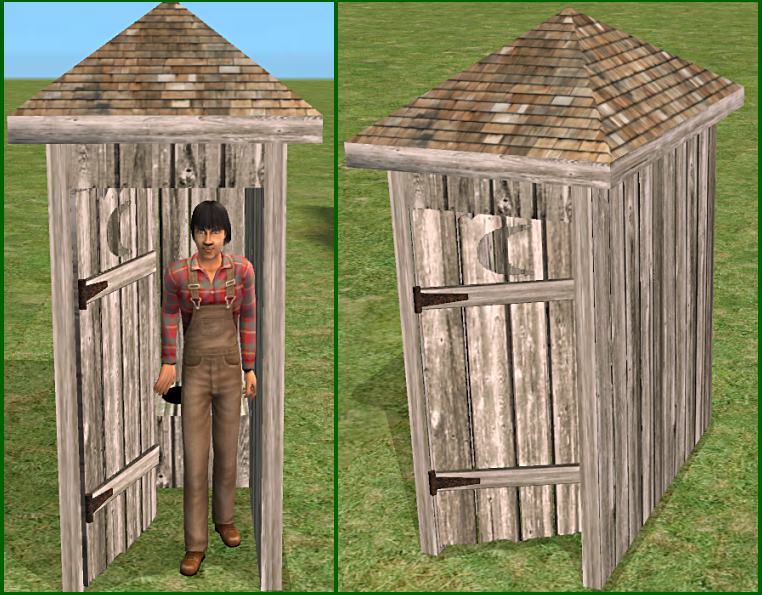
Your Sims don't have indoor plumbing? No problem, just put one of these in the backyard and they can still take care of life's necessities.

The outhouse doesn't require any expansion packs. It needs a flat 3 tile area, two tiles for the outhouse and an empty tile in front. It will be found in the plumbing category.
The .package is cloned from Numenor's Toilet Stall Template
The mesh is built from scratch in MilkShape.
Polys = 814 (Original Maxis toilet stall = 2696 polys)
All my items including this one may be recolored/re-skinned.
You can use and alter my alphas and bumpmaps as you wish - no credit needed.
If you are posting your work here, link to the thread so people can get the mesh.
If you are posting on the Exchange, you should also link to the thread since meshes do not always package up properly in complete Sims and Lots.
If you are posting them on your own site you can offer my mesh for download on your site too. Credit for the mesh is appreciated but not required.
If you are altering the mesh for any reason, please take the trouble to do it correctly - change the filename, use fix integrety, and re-link it to your own color .packages.
You can use all my items in your lots, screenshots, stories, movies, and complete Sims - no credits necessary, just have fun with them.
Polygon Counts:
814
The outhouse doesn't require any expansion packs. It needs a flat 3 tile area, two tiles for the outhouse and an empty tile in front. It will be found in the plumbing category.
The .package is cloned from Numenor's Toilet Stall Template
The mesh is built from scratch in MilkShape.
Polys = 814 (Original Maxis toilet stall = 2696 polys)
All my items including this one may be recolored/re-skinned.
You can use and alter my alphas and bumpmaps as you wish - no credit needed.
If you are posting your work here, link to the thread so people can get the mesh.
If you are posting on the Exchange, you should also link to the thread since meshes do not always package up properly in complete Sims and Lots.
If you are posting them on your own site you can offer my mesh for download on your site too. Credit for the mesh is appreciated but not required.
If you are altering the mesh for any reason, please take the trouble to do it correctly - change the filename, use fix integrety, and re-link it to your own color .packages.
You can use all my items in your lots, screenshots, stories, movies, and complete Sims - no credits necessary, just have fun with them.
Polygon Counts:
814
This is a new mesh, and means that it's a brand new self contained object that usually does not require a specific Pack (although this is possible depending on the type). It may have Recolours hosted on MTS - check below for more information.
| Filename | Size | Downloads | Date | |||||
|
DPXL_Outhouse.zip
Size: 222.4 KB · Downloads: 22,433 · 14th Nov 2007 |
222.4 KB | 22,433 | 14th Nov 2007 | |||||
| For a detailed look at individual files, see the Information tab. | ||||||||
Key:
- - File was updated after upload was posted
Install Instructions
Basic Download and Install Instructions:
1. Download: Click the download link to save the .rar or .zip file(s) to your computer.
2. Extract the zip, rar, or 7z file.
3. Place in Downloads Folder: Cut and paste the .package file(s) into your Downloads folder:
1. Download: Click the download link to save the .rar or .zip file(s) to your computer.
2. Extract the zip, rar, or 7z file.
3. Place in Downloads Folder: Cut and paste the .package file(s) into your Downloads folder:
- Origin (Ultimate Collection): Users\(Current User Account)\Documents\EA Games\The Sims™ 2 Ultimate Collection\Downloads\
- Non-Origin, Windows Vista/7/8/10: Users\(Current User Account)\Documents\EA Games\The Sims 2\Downloads\
- Non-Origin, Windows XP: Documents and Settings\(Current User Account)\My Documents\EA Games\The Sims 2\Downloads\
- Mac: Users\(Current User Account)\Documents\EA Games\The Sims 2\Downloads
- Mac x64: /Library/Containers/com.aspyr.sims2.appstore/Data/Library/Application Support/Aspyr/The Sims 2/Downloads
- For a full, complete guide to downloading complete with pictures and more information, see: Game Help: Downloading for Fracking Idiots.
- Custom content not showing up in the game? See: Game Help: Getting Custom Content to Show Up.
- If you don't have a Downloads folder, just make one. See instructions at: Game Help: No Downloads Folder.
Recolours of this mesh
There are 2 recolours of this mesh on MTS:
Also Thanked - Users who thanked this download also thanked:
Packs Needed
None, this is Sims 2 base game compatible!
Other Information
Style:
– Antique
: Antique or Historical
– Retro
Room:
– Outdoor
Tags
What's New:
I do NOT do Requests - this is a hobby for me, and I don't even have time to make all the things I personally would like to do so please don't ask.
==================================
Recent updates:
The Bodyshop Mechanic program was updated March 14 - if you use Bodyshop at all, you might want to take a look.
All my vehicles have now been updated to work, without alterations, with Numenor's Drivable Cars without NightLife mod.
Some of my downloads got corrupted in the recent hard-drive crash - These are all replaced now - and a big thanks to those who helped by sending the original .zip files.
==================================
Recent updates:
The Bodyshop Mechanic program was updated March 14 - if you use Bodyshop at all, you might want to take a look.
All my vehicles have now been updated to work, without alterations, with Numenor's Drivable Cars without NightLife mod.
Some of my downloads got corrupted in the recent hard-drive crash - These are all replaced now - and a big thanks to those who helped by sending the original .zip files.
More Downloads BETA
Here are some more of my downloads: