
 Sign in to Mod The Sims
 Conversion Clothes "light" -- A bunch of texture-referencing edits [Freetime]
 Conversion Clothes "light" -- A bunch of texture-referencing edits [Freetime]
MTS has all free content, all the time. Donate to help keep it running.
SCREENSHOTS
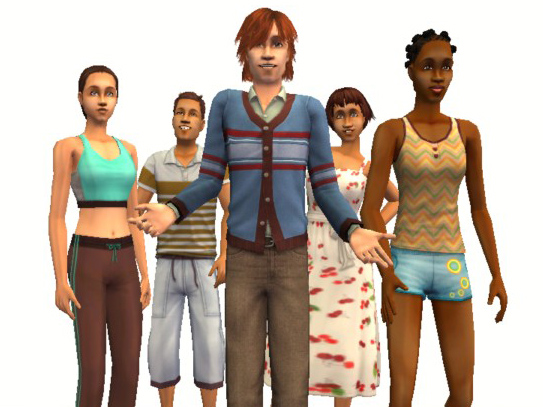
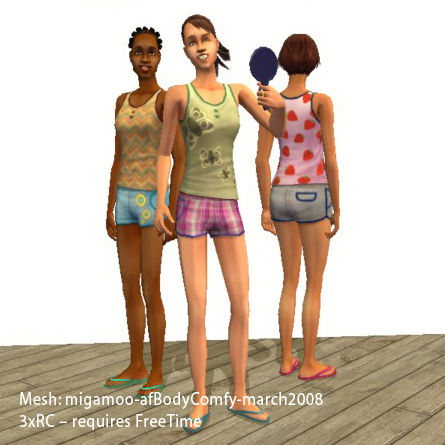
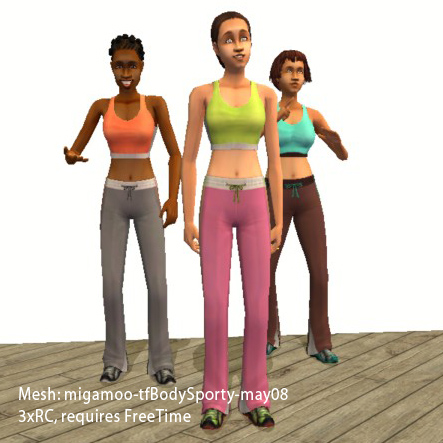
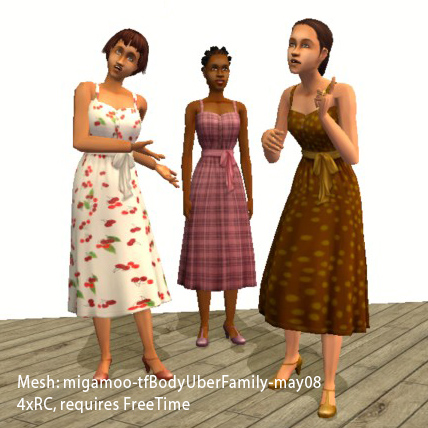
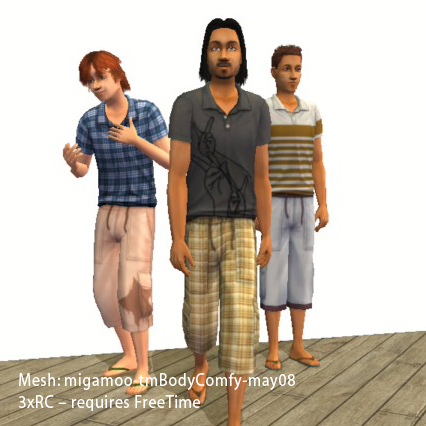
txconv-02_ft_overview.jpg - width=543 height=407
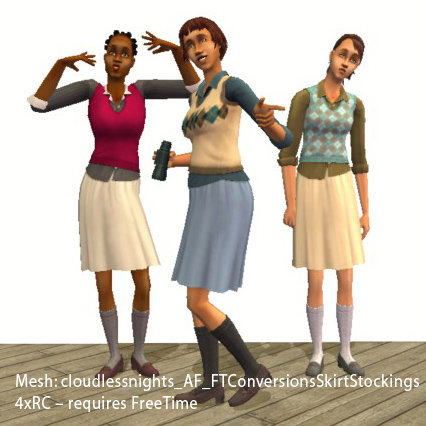
txconv-02_ft_aftech.jpg - width=426 height=426
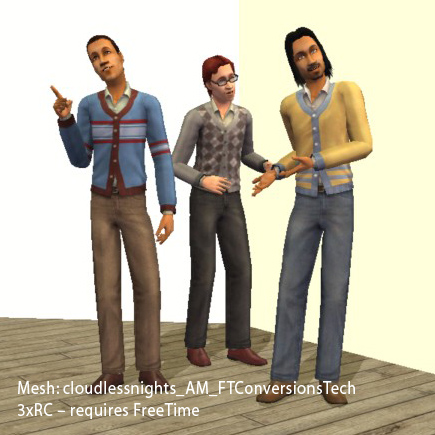
txconv-02_ft_amtech.jpg - width=435 height=435
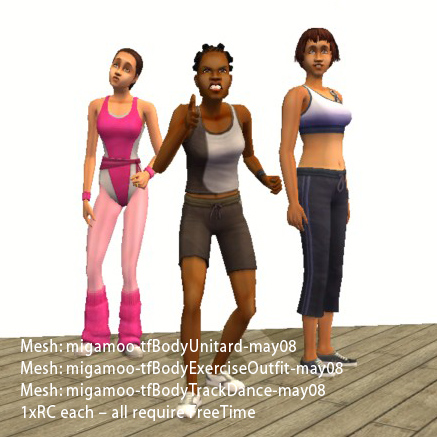
txconv-02_ft_migamoosports.jpg - width=437 height=437
txconv-02_ft_afbodycomfy.jpg - width=445 height=445
txconv-02_ft_tfbodysporty.jpg - width=443 height=443
txconv-02_ft_tfbodyuberfamily.jpg - width=428 height=428
txconv-02_ft_tmbodycomfy.jpg - width=426 height=426
Created by plasticbox
Uploaded: 22nd May 2008 at 12:14 PM
Updated: 22nd May 2008 at 7:55 PM
Updated: 22nd May 2008 at 7:55 PM
There have been a lot of great conversion meshes uploaded recently that come with the original Maxis textures as recolours -- perfect for people who don't have the EPs they're converted from, but for those who do it results in a lot of duplicate textures. My poor old computer can't handle a lot of custom content, so I made a couple of edits that reference the in-game textures directly instead of using separate recolours. They only weigh 1-2k each, as opposed to 200-800k.
This is part 2 of 2, with edits that require Freetime (see part 1 for Base Game, OfB, and Seasons stuff). All of the original Maxis colours included, except for tfbodyuberfamily, that's only the 4 dresses without aprons.
Files below are for the following meshes -- polygon counts I've copied from the original threads:
cloudlessnights - AF_FTConversionsSkirtStockings (TF->AF conversion of vest+skirt)
Vertices: 2044, Faces: 2436
cloudlessnights - AM_FTConversionsTech (TM->AM conversion of vest+jeans)
Vertices: 1626, Faces: 2122
migamoo - tfbodyexercise (AF->TF conversion of gymwear)
2558, 1875
migamoo - tfbodysporty (AF->TF conversion of gymwear)
2314, 1779
migamoo - tfbodyunitard (AF->TF conversion of gymwear)
2572, 2066
migamoo - tfbodytrackdance (AF->TF conversion of gymwear)
2578, 1921
migamoo - tfbodyuberfamily (AF->TF conversion of long dress)
2468, 1782
migamoo - tmbodycomfy (AM->TM conversion of shirt+shorts)
2362, 1806
migamoo - afbodycomfy (TF->AF conversion of shirt+shorts)
2296, 1770
Meshes are included with all of the downloads.
I've also thrown in two hidden recolours for the adult "bodysporty" mesh (maxis-AFbodysporty_2xRC.zip) -- that's the green/pink and brown/blue versions versions of the tank top + long pants gymwear, not pictured but they look exactly like the teen ones. They don't need a separate mesh.
You can do what you want with this. Please link back to this thread when redistributing. Please respect that I don't do requests.
Additional Credits:
Thanks to cloudlessnights and migamoo for making the meshes, and to Phaenoh for her recent conversions which helped me figure this out.
This is part 2 of 2, with edits that require Freetime (see part 1 for Base Game, OfB, and Seasons stuff). All of the original Maxis colours included, except for tfbodyuberfamily, that's only the 4 dresses without aprons.
Files below are for the following meshes -- polygon counts I've copied from the original threads:
cloudlessnights - AF_FTConversionsSkirtStockings (TF->AF conversion of vest+skirt)
Vertices: 2044, Faces: 2436
cloudlessnights - AM_FTConversionsTech (TM->AM conversion of vest+jeans)
Vertices: 1626, Faces: 2122
migamoo - tfbodyexercise (AF->TF conversion of gymwear)
2558, 1875
migamoo - tfbodysporty (AF->TF conversion of gymwear)
2314, 1779
migamoo - tfbodyunitard (AF->TF conversion of gymwear)
2572, 2066
migamoo - tfbodytrackdance (AF->TF conversion of gymwear)
2578, 1921
migamoo - tfbodyuberfamily (AF->TF conversion of long dress)
2468, 1782
migamoo - tmbodycomfy (AM->TM conversion of shirt+shorts)
2362, 1806
migamoo - afbodycomfy (TF->AF conversion of shirt+shorts)
2296, 1770
Meshes are included with all of the downloads.
I've also thrown in two hidden recolours for the adult "bodysporty" mesh (maxis-AFbodysporty_2xRC.zip) -- that's the green/pink and brown/blue versions versions of the tank top + long pants gymwear, not pictured but they look exactly like the teen ones. They don't need a separate mesh.
You can do what you want with this. Please link back to this thread when redistributing. Please respect that I don't do requests.
Additional Credits:
Thanks to cloudlessnights and migamoo for making the meshes, and to Phaenoh for her recent conversions which helped me figure this out.
This is a new mesh recolour, and means that you will need to download the particular mesh itself in order for this to show up in your game. See the Meshes Needed section or read the text for more information.
| Filename | Size | Downloads | Date | |||||
|
pbox_migamoo-tfBodyUberFamily_4xRC.zip
Size: 133.2 KB · Downloads: 1,333 · 22nd May 2008 |
133.2 KB | 1,333 | 22nd May 2008 | |||||
|
pbox_maxis-AFbodysporty_2xRC.zip
Size: 2.5 KB · Downloads: 1,440 · 22nd May 2008 |
2.5 KB | 1,440 | 22nd May 2008 | |||||
|
pbox_migamoo-FT-gym-conversions_6xRC.zip
Size: 517.2 KB · Downloads: 1,557 · 22nd May 2008 |
517.2 KB | 1,557 | 22nd May 2008 | |||||
|
pbox_migamoo-tmBodyComfy_3xRC.zip
Size: 124.7 KB · Downloads: 1,398 · 22nd May 2008 |
124.7 KB | 1,398 | 22nd May 2008 | |||||
|
pbox_migamoo-afBodyComfy_3xRC.zip
Size: 124.1 KB · Downloads: 1,437 · 22nd May 2008 |
124.1 KB | 1,437 | 22nd May 2008 | |||||
|
pbox_cloudlessnights-AF-FTConversionsSkirtStockings_4xRC.zip
Size: 134.7 KB · Downloads: 1,363 · 22nd May 2008 |
134.7 KB | 1,363 | 22nd May 2008 | |||||
|
pbox_cloudlessnights_AM-FTConversionsTech_3xRC.zip
Size: 109.1 KB · Downloads: 1,516 · 22nd May 2008 |
109.1 KB | 1,516 | 22nd May 2008 | |||||
| For a detailed look at individual files, see the Information tab. | ||||||||
Key:
- - File was updated after upload was posted
Install Instructions
Basic Download and Install Instructions:
1. Download: Click the download link to save the .rar or .zip file(s) to your computer.
2. Extract the zip, rar, or 7z file.
3. Place in Downloads Folder: Cut and paste the .package file(s) into your Downloads folder:
1. Download: Click the download link to save the .rar or .zip file(s) to your computer.
2. Extract the zip, rar, or 7z file.
3. Place in Downloads Folder: Cut and paste the .package file(s) into your Downloads folder:
- Origin (Ultimate Collection): Users\(Current User Account)\Documents\EA Games\The Sims™ 2 Ultimate Collection\Downloads\
- Non-Origin, Windows Vista/7/8/10: Users\(Current User Account)\Documents\EA Games\The Sims 2\Downloads\
- Non-Origin, Windows XP: Documents and Settings\(Current User Account)\My Documents\EA Games\The Sims 2\Downloads\
- Mac: Users\(Current User Account)\Documents\EA Games\The Sims 2\Downloads
- Mac x64: /Library/Containers/com.aspyr.sims2.appstore/Data/Library/Application Support/Aspyr/The Sims 2/Downloads
- For a full, complete guide to downloading complete with pictures and more information, see: Game Help: Downloading for Fracking Idiots.
- Custom content not showing up in the game? See: Game Help: Getting Custom Content to Show Up.
- If you don't have a Downloads folder, just make one. See instructions at: Game Help: No Downloads Folder.
Meshes needed
This download requires one or more meshes to work properly. Please check the Description tab for information about the meshes needed, then download them below:| MTS cannot guarantee any off-site links will be available |
| Free Time Skirt & Stockings outfit converted for adults by cloudlessnights |
| Comfy Wear - Free Time Comfy Outfit for Adults by migamoo |
| Free Time 'Tech' Outfit for (young) adult males by cloudlessnights |
| Work it out - Free Time gym-wear for teen girl by migamoo |
| - Myriad - A plethora of Adult to Teen Conversions by migamoo |
Recolours of this mesh
There are 1 recolours of this mesh on MTS:
Also Thanked - Users who thanked this download also thanked:
Packs Needed
Packs Needed
| Base Game | |
|---|---|
 | Sims 2 |
| Expansion Pack | |
|---|---|
 | Free Time |
Sharing and recycling:
Everything I upload here is published under the current BY-NC-SA Creative Commons license (Attribution, Non-Commercial, Share-Alike). In practical terms:
– Feel free to recycle, you don’t need to ask.
– For the attribution, please link to the upload you’re using wherever possible (instead of my profile). This is particularly important with edits made for/with different games or game versions.
– If you use my stuff in something you make, please upload the result to a free, accessible, noncommercial site with no more restrictions than these. Code must remain open source; meshes and other material must remain re-usable.
Please do not redistribute any unmodified files – link to the upload post instead.
– Feel free to recycle, you don’t need to ask.
– For the attribution, please link to the upload you’re using wherever possible (instead of my profile). This is particularly important with edits made for/with different games or game versions.
– If you use my stuff in something you make, please upload the result to a free, accessible, noncommercial site with no more restrictions than these. Code must remain open source; meshes and other material must remain re-usable.
Please do not redistribute any unmodified files – link to the upload post instead.