
 Sign in to Mod The Sims
 *Working* Magazine Rack [UPD 29 jan 2009]
 *Working* Magazine Rack [UPD 29 jan 2009]
MTS has all free content, all the time. Donate to help keep it running.
SCREENSHOTS


LF-magazines.jpg - width=784 height=569
Centerfold.jpg - width=480 height=480
UNI-Assignments.jpg - width=565 height=480
Maid.jpg - width=583 height=480
RackTypes.jpg - width=1024 height=373
Main.jpg - width=760 height=300
Featured Upload!
This is a featured upload! It showcases the best talent and creativity available on MTS and in the community. 


Created by Numenor
Uploaded: 25th Jun 2008 at 11:47 PM
Updated: 14th Mar 2009 at 8:49 PM - Restored missing attachment
Updated: 14th Mar 2009 at 8:49 PM - Restored missing attachment
*WORKING* MAGAZINE RACK
Store away all your magazines and books!
-- Updated 29 Jan 2009 --
Store away all your magazines and books!
-- Updated 29 Jan 2009 --
29 JAN 2009 - BUGFIX
Fixed a bug that affected games with Seasons:
- the rack doesn't cause any more a "jump bug" whenever hovering the mouse over it;
- it's now possible to correctly study the extra subjects (charisma etc.) if there is a "Golden Bookcase" (SSN career reward) in the lot.
Thanks Amberkat for reporting.
29 OCT 2008 - UPDATE
 Improvement: sims can read magazines at will, increasing their interest, without losing interest in other subjects (thus getting rid of the annoyance reported by MagicMoon here) Bugfix: a rare jump bug occurred when clicking on the racks (see Aelflaed's report here).
16 SEPT 2008 - UPDATE
- Included the 5 new skills from Apartment Life
- Added 5 more languages (see below for complete list and credits)
---------------------------------------------------------------
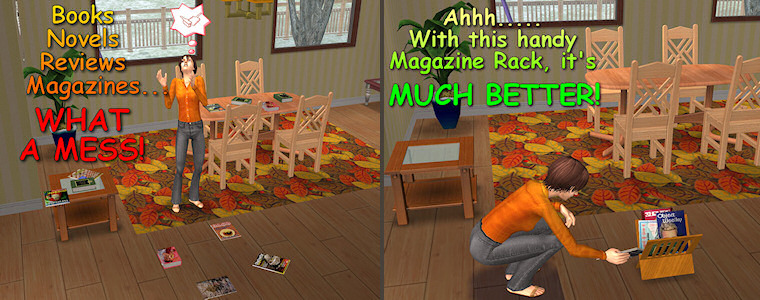
Tidy up your home! All those magazines that usually clog your house, covering tables and floor, have finally found a nice place to be stored into!
FEATURE HIGHLIGHTS
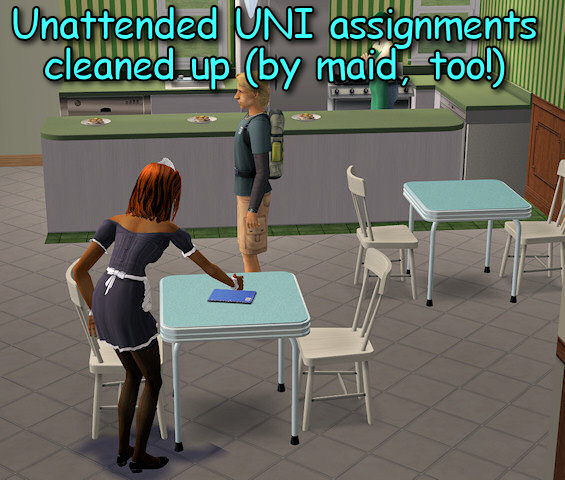
- You can store in the racks all the base-game magazines, the hobby magazines, the books (including the custom-written novels) and even the unattanded UNI assignments.
- You can then pick back from the rack any of the stored magazine or book (not the assignments), read it at will, and then put it back into the rack.
- The magazines, after a number of readings, become "old" and can't be read any more (this apply to the base-game one, too!).
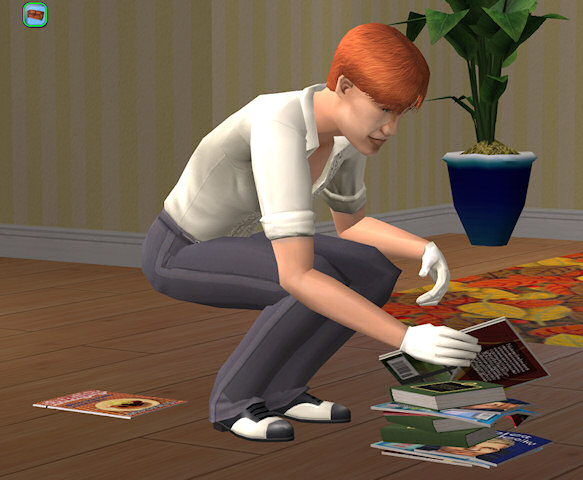
- The maid, and any sim "influenced" to clean, will automatically put away all books, magazines and UNI assignments.
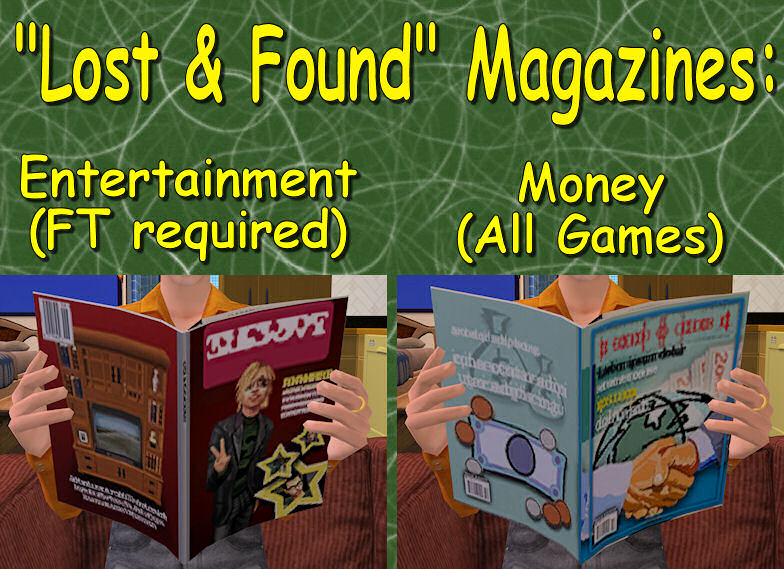
- Lost&Found magazines: all the rack by default contain the lost "money" magazine (base-game) and also the lost "Entertainment Hobby" (FT required).
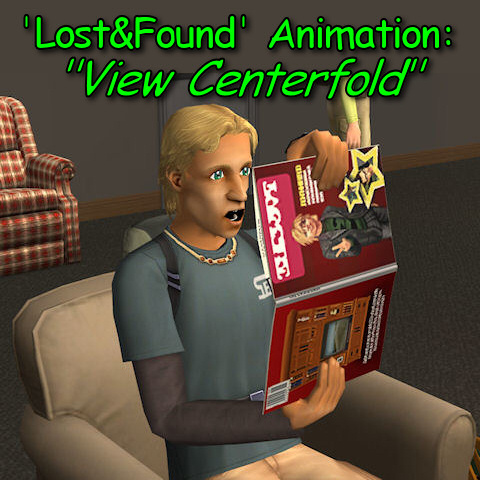
- Lost&Found animation "View Centerfold": while reading, the sims will randomly play this funny animation.
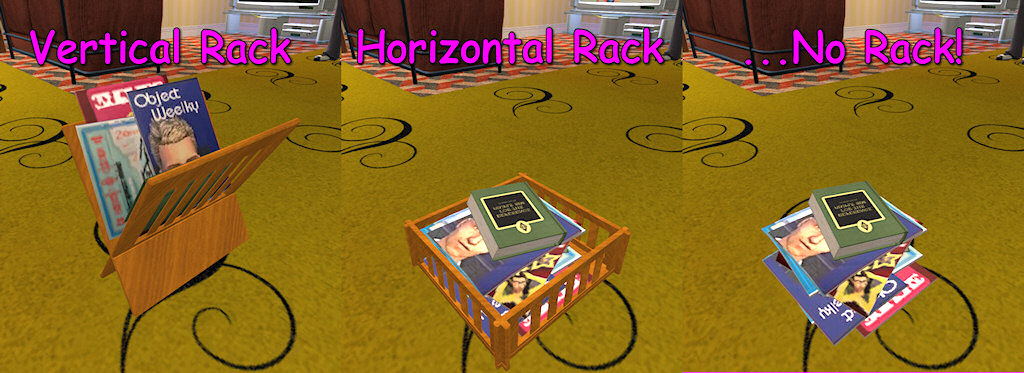
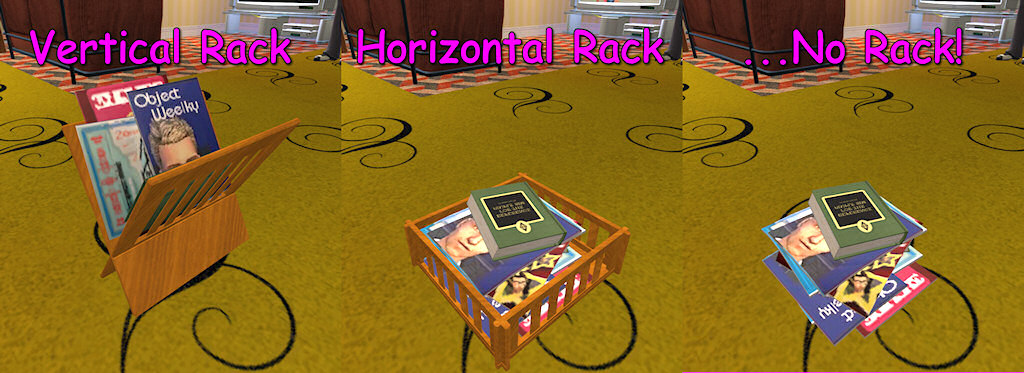
- The Magazine Rack comes in two versions: vertical and horizontal; the horizontal can become a simple pile of magazines by applying the "invisible" recolour provided in the package.
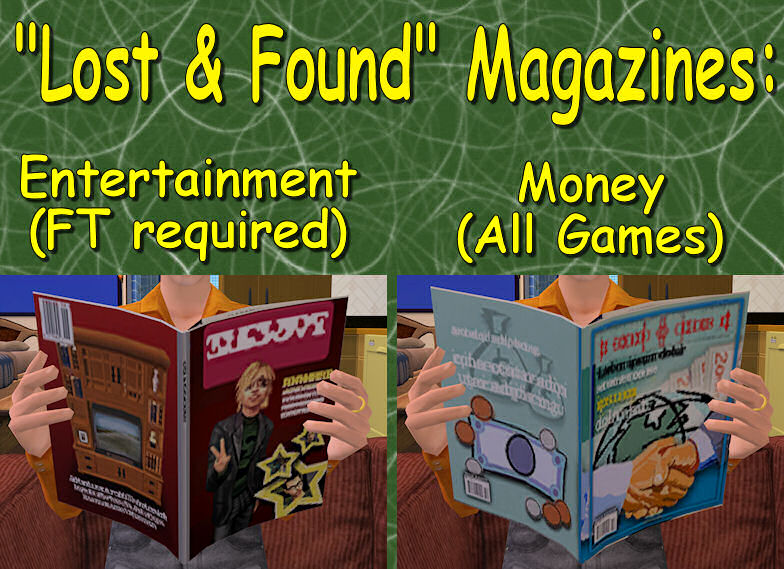

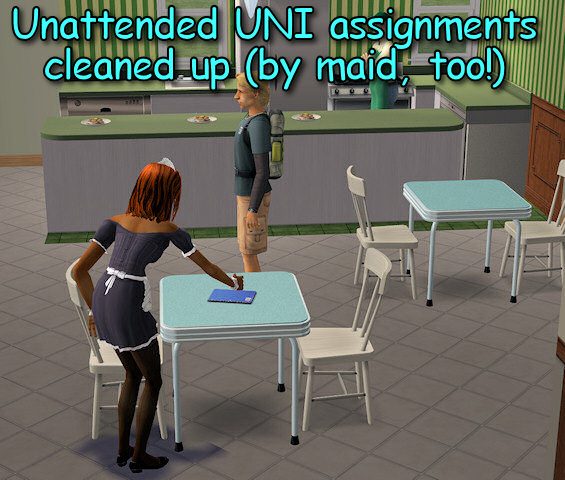
(click on thumbnails to enlarge)
GAME ADAPTIVITY - GAME COMPATIBILITY
The racks are compatible with any game (tested from base-game to Apartment Life). Depending on your game, some additional features may become available.
- Common features, available in all games:
- store into/pick from the rack the "interest" magazines (i.e. the ones bought from the community vending racks);
- store into/pick from the rack reading and study books;
- Lost&Found "Money" magazine + Lost&Found "Centerfold" animation;
- Automatic cleaning by maid.
- If you have University:
- the unattended assignments can be "stored" in the rack (actually, deleted from the game). The assignments owned by playable sims are not removed; the assignments currently in use by any sims are not removed;
- Automatic clean-up by sims "influenced" to clean.
- If you have FreeTime:
- store into/pick from the rack the "hobby" magazines (i.e. the ones received by subscription);
- store into/pick from the rack the custom-written novels (i.e. the ones received by subscription);
- Lost&Found "Entertainment" magazine.
- If you have Open for Business:
- DON'T try to sell books in your store using this rack; and don't try to sell the rack itself: the OFB functions are disabled and won't work This is a residential object, after all
 .
.
- DON'T try to sell books in your store using this rack; and don't try to sell the rack itself: the OFB functions are disabled and won't work This is a residential object, after all
- If you have Apartment Life:
- You can study the 5 new skills.
 .
.Note: Multiple racks - You can put as many racks as you want in your house, but they work as in real life: if you store a magazine into one rack, don't expect to find it in all the other racks!

On the other hand, the standard bookcase functions (reading books, studying books, custom novels) work like the Maxis bookcases: all the books are shared between all the bookcases (including the rack).
Note: Pie Menu - Most of the pie menu entries have been modified to make them consistent with the idea of "magazine" (e.g. Study/Parenting has become Browse Monthly Review/"Children: User Manual"
 ); I only speak English and Italian, and several users helped translating the menu into new languages, but some players might read the usual text.
 INSTALLATION
In the attached rar you will find two Racks (horizontal and vertical), and a Magazine. All the three packages must be put in your Downloads folder.
NOTE: The Magazine is always required for the Racks to work; on the other hand, if you don't like one of the two racks, you can safely discard it.
RECOLOURING INSTRUCTIONS
You can recolour the racks by following two alternate methods.
- (Preferable) Using the TEMPLATES - Download the recolour templates from this thread; Start Object Workshop, click "Open..." and load the chosen template (racks or magazines); then choose "CLONE" (attention: not "recolour"!) and proceed; when the clone is created, just replace the texture with your own. This method will create ONE recolour package (for either the wooden part or the magazines) that works for BOTH racks at the same time.
- Following the general recolouring tutorial - Keep in mind that the vertical and horizontal racks are autonomous objects (they don't share the textures) and must be recoloured separately. Start Object Workshop, click "Open..." and load the chosen rack mesh (either the horizontal or the vertical); then choose "Recolour" and proceed. In the subset selection, I recommend to choose only one subset (either "magazines" or "rack"). Finish the recolour following the tutorial.
CREDITS and ACKNOWLEDGEMENTS
The "vertical" rack is based on a mesh originally created by Boblishman for a different rack (working just as a normal bookcase) and posted here.
The horizontal meshes and the internal code were entirely made by myself.
Polygon Counts:
Vertical rack: 590 faces, 954 vertices
Horizontal rack: 1316 faces, 1953 vertices
Magazine template: zero (it uses the Maxis mesh already in game)
MENU TRANSLATIONS
Languages currently included in the racks (some languages don't have the exact magazine names, but it's not important):
- English (by Numenor) - Italian (by Numenor) - German (by Frizelbliz) - Spanish (by Man1968) - Swedish (by Stimy) - French (by SeasonPink) - Polish (by domilika) - Urdu-Romanised (in the Hindi language) (by ieta_cassiopeia) - Japanese (by mijiki-kun) - Norwegian (by Annapast) - Portuguese (by Ocorreia) - Brazilian (by DaniloFTS and Larissamenezes) - Thai (by The T) - Russian (by Shoukeir).
Thanks a lot to anyone provided the translations! By now, I don't plan to add more languages.
This is a new mesh, and means that it's a brand new self contained object that usually does not require a specific Pack (although this is possible depending on the type). It may have Recolours hosted on MTS - check below for more information.
| Filename | Size | Downloads | Date | |||||
|
MagazineRacks.rar
Size: 211.8 KB · Downloads: 34,689 · 29th Jan 2009 |
211.8 KB | 34,689 | 29th Jan 2009 | |||||
|
Recolour_TEMPLATES.rar
Size: 41.1 KB · Downloads: 29,144 · 4th Jul 2008 |
41.1 KB | 29,144 | 4th Jul 2008 | |||||
| For a detailed look at individual files, see the Information tab. | ||||||||
Key:
- - File was updated after upload was posted
Install Instructions
Basic Download and Install Instructions:
1. Download: Click the download link to save the .rar or .zip file(s) to your computer.
2. Extract the zip, rar, or 7z file.
3. Place in Downloads Folder: Cut and paste the .package file(s) into your Downloads folder:
1. Download: Click the download link to save the .rar or .zip file(s) to your computer.
2. Extract the zip, rar, or 7z file.
3. Place in Downloads Folder: Cut and paste the .package file(s) into your Downloads folder:
- Origin (Ultimate Collection): Users\(Current User Account)\Documents\EA Games\The Sims™ 2 Ultimate Collection\Downloads\
- Non-Origin, Windows Vista/7/8/10: Users\(Current User Account)\Documents\EA Games\The Sims 2\Downloads\
- Non-Origin, Windows XP: Documents and Settings\(Current User Account)\My Documents\EA Games\The Sims 2\Downloads\
- Mac: Users\(Current User Account)\Documents\EA Games\The Sims 2\Downloads
- Mac x64: /Library/Containers/com.aspyr.sims2.appstore/Data/Library/Application Support/Aspyr/The Sims 2/Downloads
- For a full, complete guide to downloading complete with pictures and more information, see: Game Help: Downloading for Fracking Idiots.
- Custom content not showing up in the game? See: Game Help: Getting Custom Content to Show Up.
- If you don't have a Downloads folder, just make one. See instructions at: Game Help: No Downloads Folder.
Recolours of this mesh
There are 3 recolours of this mesh on MTS:
Also Thanked - Users who thanked this download also thanked:
Packs Needed
None, this is Sims 2 base game compatible!
Other Information
Style:
– Contemporary
Room:
– Living
: Living Room
– Bedroom
Maxis Flags:
– Not Applicable
Tags
Redistribution Policy and License Agreement
*** I RETIRED FROM MODDING ***
You may contact me via personal messages here at MTS, and I will reply, but I don't grant I can help you, as a long time has gone by since I created my mods.
This following policy applies to ALL my creations, unless otherwise stated on the download thread.
It's FORBIDDEN: to repost my stuff anywhere.
It's FORBIDDEN: to clone my creations.
It's ALLOWED: to create recolours for my objects (and post them on any site, including paysites), BUT you can't include the mesh in your recolour: you must give credits to me for the mesh, and provide a link to the mesh download thread.
It's ALLOWED: to include my creations in your lots, BUT the lots must be uploaded on free sites (except the Exchange), and you must provide credits and a link to the download thread.
You may contact me via personal messages here at MTS, and I will reply, but I don't grant I can help you, as a long time has gone by since I created my mods.
This following policy applies to ALL my creations, unless otherwise stated on the download thread.
It's FORBIDDEN: to repost my stuff anywhere.
It's FORBIDDEN: to clone my creations.
It's ALLOWED: to create recolours for my objects (and post them on any site, including paysites), BUT you can't include the mesh in your recolour: you must give credits to me for the mesh, and provide a link to the mesh download thread.
It's ALLOWED: to include my creations in your lots, BUT the lots must be uploaded on free sites (except the Exchange), and you must provide credits and a link to the download thread.
More Downloads BETA
Here are some more of my downloads: