
 Sign in to Mod The Sims
 [Barbers Cut] Facial Hair Set
 [Barbers Cut] Facial Hair Set
MTS has all free content, all the time. Donate to help keep it running.
SCREENSHOTS
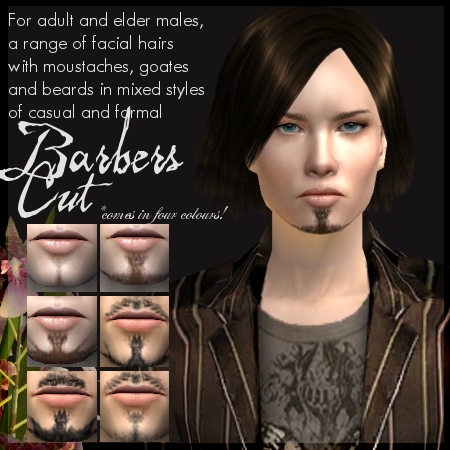


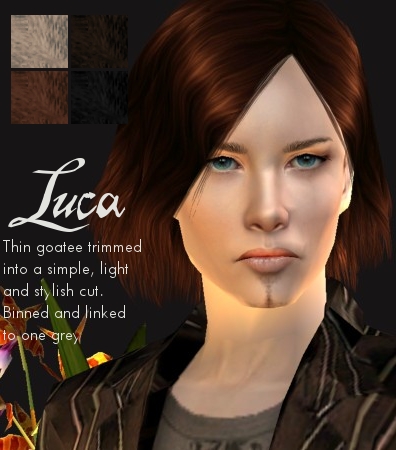

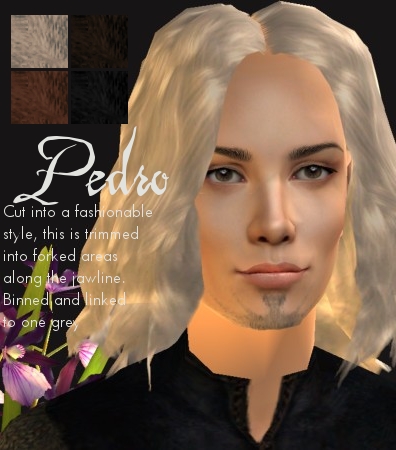
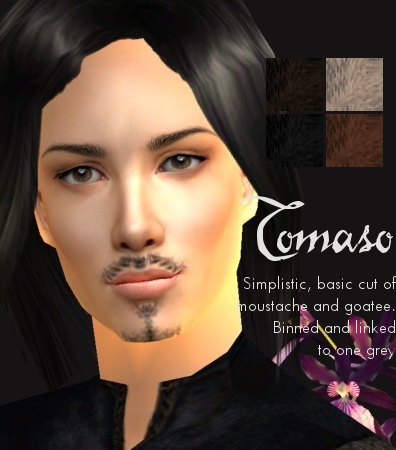

BarbersCut.jpg - width=450 height=450
BarbersCutGiano.jpg - width=397 height=450
BarbersCutInigo.jpg - width=394 height=450
BarbersCutLuca.jpg - width=396 height=450
BarbersCutNero.jpg - width=397 height=450
BarbersCutPedro.jpg - width=396 height=450
BarbersCutTomaso.jpg - width=396 height=450
BarbersCutAll.jpg - width=322 height=431
Picked Upload!
This is a picked upload! It showcases some of the best talent and creativity available on MTS and in the community.
Created by Nymphy
Uploaded: 18th Aug 2008 at 1:54 AM
Updated: 30th Aug 2008 at 11:48 PM by xnymphetaminex
Updated: 30th Aug 2008 at 11:48 PM by xnymphetaminex
Today I've got something new for you all. In celebration and a big thanks for reaching 300 thousand downloads, this is a rather large set of various facial hairs for your sim gents - because our poor men really are a bit low on custom content
Have not particularly tried doing facial hair before, so this is basically a first attempt, and I think they came out quite well. I wanted to make something that I had not tried before, and that also showed how I'd improved as a creator. I hope you enjoy these, and thank you to everyone who has shown me support in creating. And thats my ramble over
There are 6 sets in total, and each in the 4 basic colours. These are all binned, family linked, and linked to one grey: oh so snazzy! And of course, no mesh or EPs are required for these to work. As there are few colours, you are welcome to recolour (and edit) these to your hearts desire, just let me know at some point. These are in a variety of styles, such as formal and casual, so should suit most sims. I also attempted for them to be realistic but also slightly Maxis-y, so they can go well with different users' styles
The 6 sets you get are:
Giano - simple moustache with forked stubble goatee
Inigo - simple style of moustache and small beard
Luca - trimmed thin goatee
Nero - stubble that stretches along the jawline
Pedro - forked trimmed goatee that stretches along the chin
Tomaso - simple basic moustache and goatee
No additional facial hair was used in the preview pics. In fact there are no other facial items used at all. So what you see is what you get
Policy can be seen under my main profile page. And the custom content used in the previews are all free: plants by Macrossi, clothes by Aikea and Bosie, skins by Ephemera and Enayla, eyes and eyebrows by Anva, hairs by me (meshes used are free) and Navetsea, and the walls are by someone here at MTS2..I forget who, bah.
Enjoy! Hope you like my 75th upload
-Nymphy
Additional Credits:
GoSlings who gave some feedback and advise on these. Thanks!
Have not particularly tried doing facial hair before, so this is basically a first attempt, and I think they came out quite well. I wanted to make something that I had not tried before, and that also showed how I'd improved as a creator. I hope you enjoy these, and thank you to everyone who has shown me support in creating. And thats my ramble over

There are 6 sets in total, and each in the 4 basic colours. These are all binned, family linked, and linked to one grey: oh so snazzy! And of course, no mesh or EPs are required for these to work. As there are few colours, you are welcome to recolour (and edit) these to your hearts desire, just let me know at some point. These are in a variety of styles, such as formal and casual, so should suit most sims. I also attempted for them to be realistic but also slightly Maxis-y, so they can go well with different users' styles
The 6 sets you get are:
Giano - simple moustache with forked stubble goatee
Inigo - simple style of moustache and small beard
Luca - trimmed thin goatee
Nero - stubble that stretches along the jawline
Pedro - forked trimmed goatee that stretches along the chin
Tomaso - simple basic moustache and goatee
No additional facial hair was used in the preview pics. In fact there are no other facial items used at all. So what you see is what you get
Policy can be seen under my main profile page. And the custom content used in the previews are all free: plants by Macrossi, clothes by Aikea and Bosie, skins by Ephemera and Enayla, eyes and eyebrows by Anva, hairs by me (meshes used are free) and Navetsea, and the walls are by someone here at MTS2..I forget who, bah.
Enjoy! Hope you like my 75th upload

-Nymphy
Additional Credits:
GoSlings who gave some feedback and advise on these. Thanks!
This is a Maxis Recolour which means that it is a recolour of an item that already exists in your game. Please check the Pack requirements to see which game pack it recolours.
| Filename | Size | Downloads | Date | |||||
|
BarbersCut All.rar
Size: 1.80 MB · Downloads: 63,833 · 18th Aug 2008 |
1.80 MB | 63,833 | 18th Aug 2008 | |||||
|
BarbersCut Tomaso.rar
Size: 323.8 KB · Downloads: 11,234 · 18th Aug 2008 |
323.8 KB | 11,234 | 18th Aug 2008 | |||||
|
BarbersCut Pedro.rar
Size: 340.3 KB · Downloads: 11,032 · 18th Aug 2008 |
340.3 KB | 11,032 | 18th Aug 2008 | |||||
|
BarbersCut Nero.rar
Size: 294.3 KB · Downloads: 15,681 · 18th Aug 2008 |
294.3 KB | 15,681 | 18th Aug 2008 | |||||
|
BarbersCut Luca.rar
Size: 251.9 KB · Downloads: 14,095 · 18th Aug 2008 |
251.9 KB | 14,095 | 18th Aug 2008 | |||||
|
BarbersCut Inigo.rar
Size: 315.7 KB · Downloads: 11,450 · 18th Aug 2008 |
315.7 KB | 11,450 | 18th Aug 2008 | |||||
|
BarbersCut Giano.rar
Size: 313.5 KB · Downloads: 16,486 · 18th Aug 2008 |
313.5 KB | 16,486 | 18th Aug 2008 | |||||
| For a detailed look at individual files, see the Information tab. | ||||||||
Key:
- - File was updated after upload was posted
Install Instructions
Basic Download and Install Instructions:
1. Download: Click the download link to save the .rar or .zip file(s) to your computer.
2. Extract the zip, rar, or 7z file.
3. Place in Downloads Folder: Cut and paste the .package file(s) into your Downloads folder:
1. Download: Click the download link to save the .rar or .zip file(s) to your computer.
2. Extract the zip, rar, or 7z file.
3. Place in Downloads Folder: Cut and paste the .package file(s) into your Downloads folder:
- Origin (Ultimate Collection): Users\(Current User Account)\Documents\EA Games\The Sims™ 2 Ultimate Collection\Downloads\
- Non-Origin, Windows Vista/7/8/10: Users\(Current User Account)\Documents\EA Games\The Sims 2\Downloads\
- Non-Origin, Windows XP: Documents and Settings\(Current User Account)\My Documents\EA Games\The Sims 2\Downloads\
- Mac: Users\(Current User Account)\Documents\EA Games\The Sims 2\Downloads
- Mac x64: /Library/Containers/com.aspyr.sims2.appstore/Data/Library/Application Support/Aspyr/The Sims 2/Downloads
- For a full, complete guide to downloading complete with pictures and more information, see: Game Help: Downloading for Fracking Idiots.
- Custom content not showing up in the game? See: Game Help: Getting Custom Content to Show Up.
- If you don't have a Downloads folder, just make one. See instructions at: Game Help: No Downloads Folder.
Also Thanked - Users who thanked this download also thanked:
Policy aye?
http://i36.tinypic.com/2h3symo.jpg
Please see below for my policy. This is the current policy so ignore old terms which are posted in older threads. The policy below is for TS2, please do not edit any of my stuff for TS3 without asking me first.
I hope you enjoy creations and if you want more then wander your way over to my site !
Please see below for my policy. This is the current policy so ignore old terms which are posted in older threads. The policy below is for TS2, please do not edit any of my stuff for TS3 without asking me first.
I hope you enjoy creations and if you want more then wander your way over to my site !
More Downloads BETA
Here are some more of my downloads: