
 Sign in to Mod The Sims
 Drivable Cars without NL (Game Add-on) *UPD 28nov2008*
 Drivable Cars without NL (Game Add-on) *UPD 28nov2008*
MTS has all free content, all the time. Donate to help keep it running.
SCREENSHOTS
OBJD_Edit.png - width=881 height=697
OBJD_Thumb.jpg - width=379 height=300
Featured Upload!
This is a featured upload! It showcases the best talent and creativity available on MTS and in the community. 


Created by Numenor
Uploaded: 10th Nov 2008 at 1:57 AM
Updated: 14th Dec 2009 at 9:25 AM - Updated "Cars.package" archive
Updated: 14th Dec 2009 at 9:25 AM - Updated "Cars.package" archive
DRIVABLE CARS WITHOUT NIGHTLIFE
Game Add-on by Numenor (and Maxis...)
Game Add-on by Numenor (and Maxis...)
14 DEC 2009 - Updated the "Cars" archive
In order to achieve compatibility with MogHughson's "Decorative Parking Spaces", the Cars.package archive has been updated (thanks MogHughson!). If you use MogHughson's Parking Spaces, please redownload the Cars.package (Note: the updated package works fine even without the Parking Spaces, so you can redownload it anyway...).
28 NOV 2008 - Updated the "Stuff" archive
- Fixed the Maxis recolours for both the Driveways/Extensions, and for the Garage Door
- Included the light definition in the garage door (in some games, the light flowing through the door only hit the objects, but not the walls and floor)
- Included the "fogged" texture needed for the windshields when woohooing.
11 NOV 2008 - Added Nightlife cars + Updated the "Stuff" archive
Please redownload the "Stuff.rar, because I forgot some animations
for the "Smoogo Minima" car. And enjoy the *FIVE* Nightlife cars,
included in the "Cars.rar" archive.
 IMPORTANT: GAME REQUIREMENTS
 This add-on can be used by people that don't have Nightlife, but have at least ONE expansion pack or stuff pack except University.
In other words, if you have Open For Business or any *newer* EP/SP, then you can use this add-on; it works fine even if you only have one stuff pack, such as Family Fun or Celebration, etc.
Of course, if you already have Nightlife, this add-on is completely useless for you

WHAT IS THIS ADD-ON:
It allows using custom drivable cars in non-Nightlife games.
As you probably know, Maxis released some months ago a similar add-on, named "Driveway & Garage Set", that lets the player use drivable cars without Nightlife, but it only works with the Maxis cars. Therefore, I've created a special version that allows using custom-made cars, too (but read below!).
Downlaoding the "Cars.rar", you will also get the 5 cars that came with Nightlife (Hatchback, MiniVan, Sedan, PickUp and Sportscar).
HOW TO USE CUSTOM CARS IN NON-NIGHTLIFE GAMES
- It's mandatory to download the "Stuff.rar" and unpack it to your Downloads. It's strongly advised to download and unpack the "Sounds.rar", too (without it, you won't hear any sound with the car animation). Optionally, download and unpack the "Cars.rar", in order to get the 5 Nightlife cars.
- Download from our Automotive section (or from any other site
 ) your favourite cars.
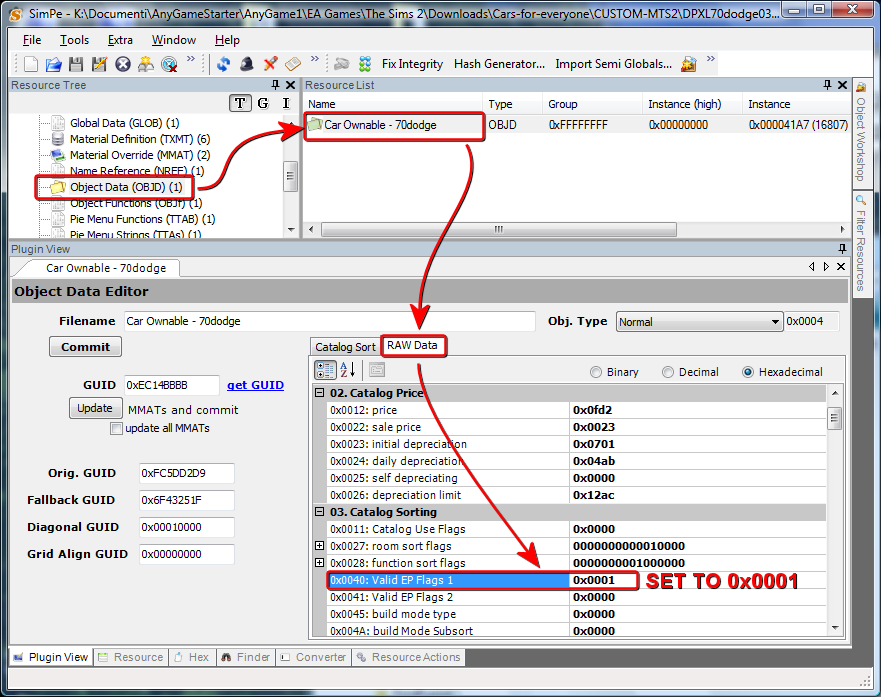
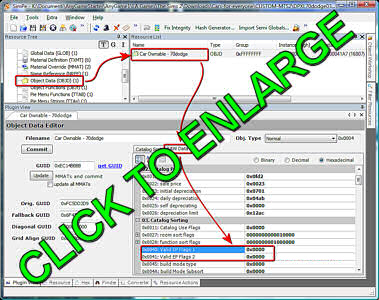
 - Modify the downloaded cars using this simple procedure (you will need SimPE); look at the following image as a guide:
- Open the car with SimPE.
- From the Resource Tree, select "Object Data (OBJD)".
- Select the Object Data file that appears in the Resource List.
- Be sure that the "Raw Data" tab is selected.
- Find the line labeled "0x0040: Valid EP Flags 1" and change the value to 0x0001.
- COMMIT and SAVE, then close SimPE.
- Put the modified car into your Downloads and play at will!

 ) your favourite cars.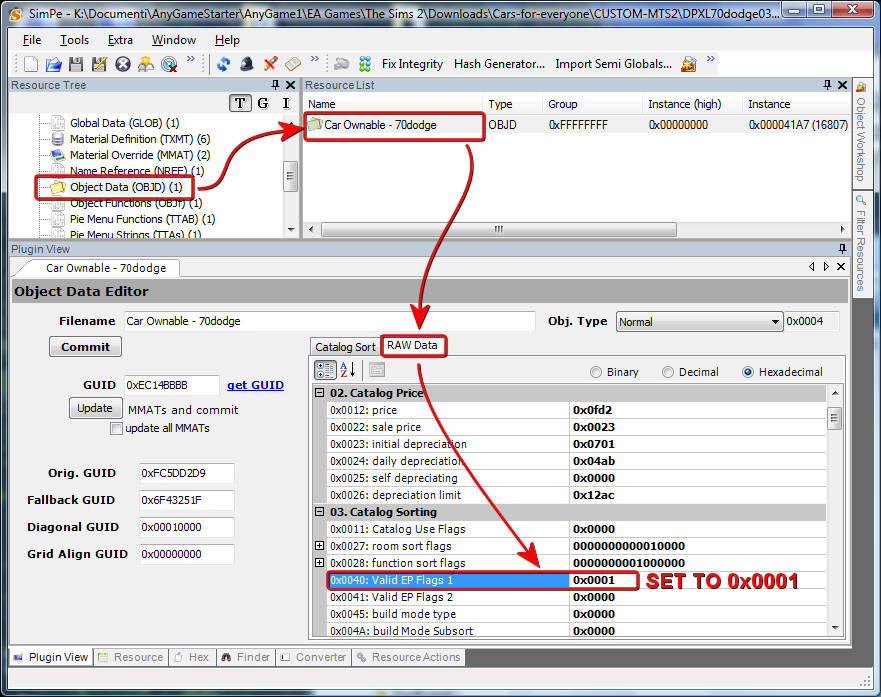

NOTE: of course, the modification of the car is NOT needed, if the creator stated in his thread that the car is already "Compatible with Numenor's 'Drivable Cars Without Nightlife' add-on".
CREDIT and ACKNOWLEDGMENTS
All the resources included in this add-on are by Maxis / EA Games; my job was to understand why the custom cars didn't work with the original "Garage Set" by Maxis; and then to find the needed resources in the game files, extract them and conveniently pack them into the two files attached to this post, providing the needed instruction to modify the custom cars.
REDISTRIBUTION POLICY
Please DON'T REPOST THIS MOD ANYWHERE. People NEED to know where to ask questions and report bugs, and THIS is the only place where they can find help and support.
| Filename | Size | Downloads | Date | |||||
|
DrivableCarsWithoutNL_Cars.rar
| Compatible with MogHughson's "Decorative Parking Spaces"
Size: 5.10 MB · Downloads: 32,277 · 10th Nov 2008 |
5.10 MB | 32,277 | 10th Nov 2008 | |||||
|
DrivableCarsWithoutNL_Sounds.rar
Size: 8.37 MB · Downloads: 29,428 · 10th Nov 2008 |
8.37 MB | 29,428 | 10th Nov 2008 | |||||
|
DrivableCarsWithoutNL_Stuff.rar
Size: 1.91 MB · Downloads: 31,660 · 10th Nov 2008 |
1.91 MB | 31,660 | 10th Nov 2008 | |||||
| For a detailed look at individual files, see the Information tab. | ||||||||
Key:
- - File was updated after upload was posted
Install Instructions
Basic Download and Install Instructions:
1. Download: Click the download link to save the .rar or .zip file(s) to your computer.
2. Extract the zip, rar, or 7z file.
3. Place in Downloads Folder: Cut and paste the .package file(s) into your Downloads folder:
1. Download: Click the download link to save the .rar or .zip file(s) to your computer.
2. Extract the zip, rar, or 7z file.
3. Place in Downloads Folder: Cut and paste the .package file(s) into your Downloads folder:
- Origin (Ultimate Collection): Users\(Current User Account)\Documents\EA Games\The Sims™ 2 Ultimate Collection\Downloads\
- Non-Origin, Windows Vista/7/8/10: Users\(Current User Account)\Documents\EA Games\The Sims 2\Downloads\
- Non-Origin, Windows XP: Documents and Settings\(Current User Account)\My Documents\EA Games\The Sims 2\Downloads\
- Mac: Users\(Current User Account)\Documents\EA Games\The Sims 2\Downloads
- Mac x64: /Library/Containers/com.aspyr.sims2.appstore/Data/Library/Application Support/Aspyr/The Sims 2/Downloads
- For a full, complete guide to downloading complete with pictures and more information, see: Game Help: Downloading for Fracking Idiots.
- Custom content not showing up in the game? See: Game Help: Getting Custom Content to Show Up.
- If you don't have a Downloads folder, just make one. See instructions at: Game Help: No Downloads Folder.
Also Thanked - Users who thanked this download also thanked:
Redistribution Policy and License Agreement
*** I RETIRED FROM MODDING ***
You may contact me via personal messages here at MTS, and I will reply, but I don't grant I can help you, as a long time has gone by since I created my mods.
This following policy applies to ALL my creations, unless otherwise stated on the download thread.
It's FORBIDDEN: to repost my stuff anywhere.
It's FORBIDDEN: to clone my creations.
It's ALLOWED: to create recolours for my objects (and post them on any site, including paysites), BUT you can't include the mesh in your recolour: you must give credits to me for the mesh, and provide a link to the mesh download thread.
It's ALLOWED: to include my creations in your lots, BUT the lots must be uploaded on free sites (except the Exchange), and you must provide credits and a link to the download thread.
You may contact me via personal messages here at MTS, and I will reply, but I don't grant I can help you, as a long time has gone by since I created my mods.
This following policy applies to ALL my creations, unless otherwise stated on the download thread.
It's FORBIDDEN: to repost my stuff anywhere.
It's FORBIDDEN: to clone my creations.
It's ALLOWED: to create recolours for my objects (and post them on any site, including paysites), BUT you can't include the mesh in your recolour: you must give credits to me for the mesh, and provide a link to the mesh download thread.
It's ALLOWED: to include my creations in your lots, BUT the lots must be uploaded on free sites (except the Exchange), and you must provide credits and a link to the download thread.