
 Sign in to Mod The Sims
 Sim with New Skintone, Dress Recolor, and Custom Eyes: Winter Solstice
 Sim with New Skintone, Dress Recolor, and Custom Eyes: Winter Solstice
MTS has all free content, all the time. Donate to help keep it running.
SCREENSHOTS
WinterSolstice3.jpg - width=600 height=450
WinterSolstice1.jpg - width=1020 height=447
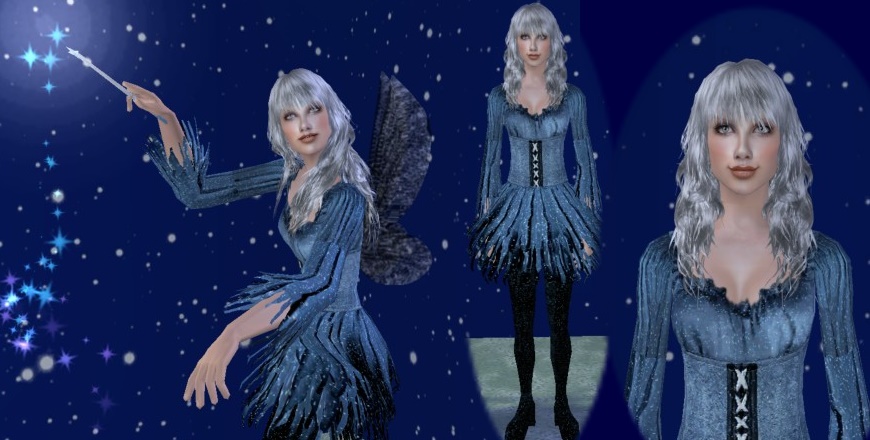
WinterSolstice2.jpg - width=870 height=440
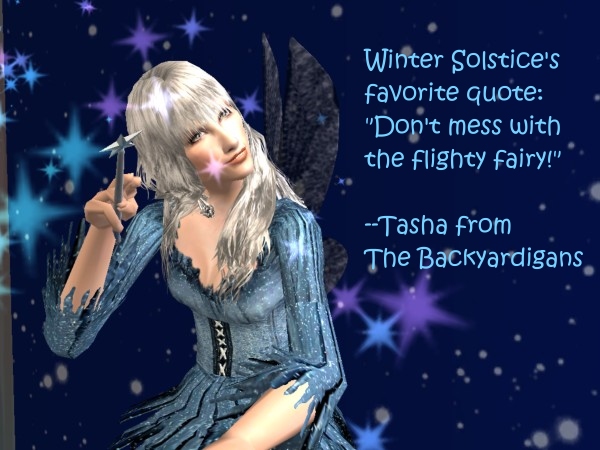
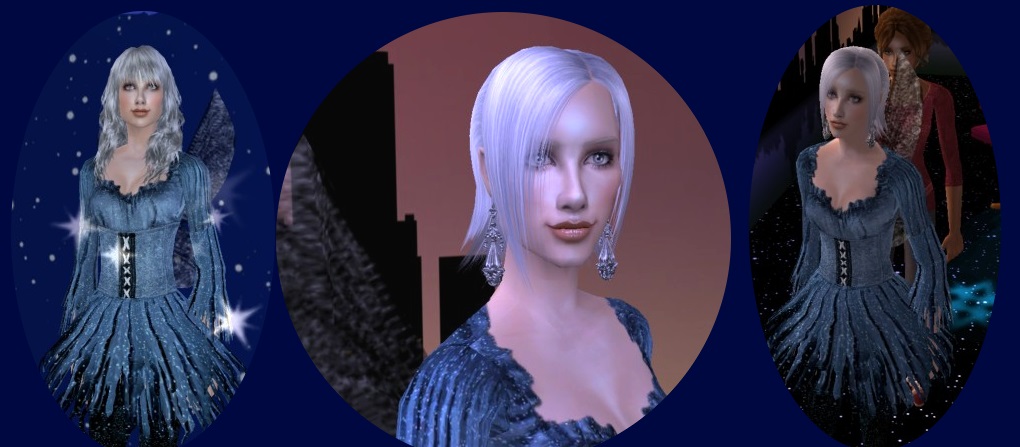
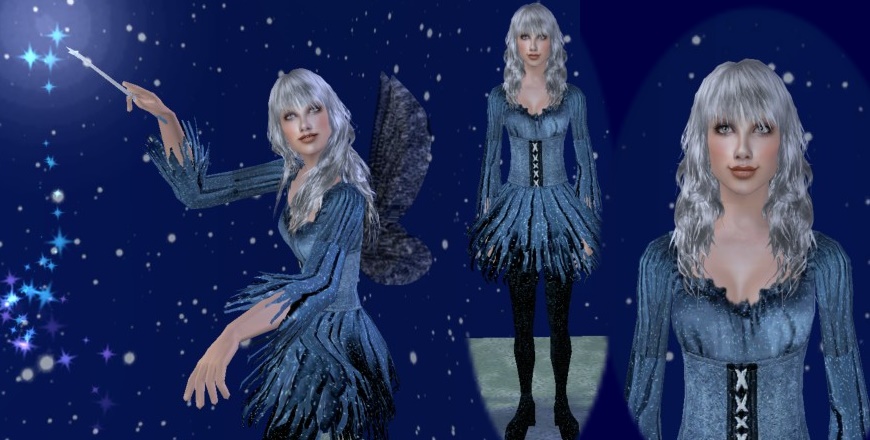
Winter Solstice is the frosty twin sister of my first fairy upload, Summer Solstice. She's a cool character with a warm heart and a new skintone, the lightest in my "Glow" series of skintones.
FYI, I'm bringing back the FX Series I am known to some people for. But it is updated now, and while I was working on the FX Series' darker skintones, I ended up with a totally different type of facial skin that served beautifully for lighter skintones as well. It had a sort of "glow" compared to the FX series and that's how I gave it that name. If the gods of mods are kind, I hope to be able to bring all the colors of the series to you on my models.
Since we just had Halloween here in the USA and are now heading into the cold winter months in my region, I thought I'd start off with the more fantasy themed frosty tones.
This skintone is different from the Winter Fairy skintone on the Summer Solstice sim I uploaded earlier in a subtle way. The nose is different, the shading on the face is different. But they are very close in color.
I hope to get my boys, Dagmar and Jack Frost, uploaded next so you can see what the male aspect of the skintones look like.
What you get: I think I accidently photographed Winter in two different shades of blue dress. The dress she actually comes packaged in is the less blue one that you see in the photo where she's waving her magic wand.
This is a recolor of the Featured Witchy Clothes Goth Style dress by Sherahbim: http://linna.modthesims2.com/download.php?t=253051 and the mesh by Reisuru is included as per her terms: http://linna.modthesims2.com/member.php?u=897963
She is packaged with all of the cosmetics listed in the credits--eyebrows, a light blush, lipstick and eyeliner.
She comes packaged in Maxis hair that is a bun with a crown on it.
Shown but NOT included:
Wings
Custom hairstyles
Earrings
Custom Content by Me:
- SS86 Winter Solstice
- Eye Package: FXEyes, Color "Ice"
- SS86-Glow_Winter Skintone
- SS86-SheraFrostyIceBlue
Custom Content Included:
- Rensim - Madness Brows - Semi-Grey by Rensim
- Lipstick: Lotsa Lip -Sin-namon- Bruno@MTS2 by Bruno of MTS2
- Eyeliner Package by Anva by Anva
- Blush by La_Exotique
- Dress Mesh by reisuru
Additional Credits:
As stated earlier, the dress is a recolor of the Goth style witch dress found in this upload: http://linna.modthesims2.com/download.php?t=253051
The mesh by Reisuru: http://linna.modthesims2.com/member.php?u=897963 was included in Sherahbim's upload and that's where I got the mesh from.
Sherahbim accords permission to include her mesh and to do recolors of her work on her MTS2 profile and additionally she has a site where this original mesh may be obtained here: http://reisuru.livejournal.com/
Long Hair with Bangs: By MYOS, : Myos Female Hair 11 from Sim Artists Union http://simsartistsunion.com/ Under Genetics, Page 7 http://simsartistsunion.com/bbs/vie...&desc=asc&no=52
Elfish Hair: http://www.rosesims.org/hair/rosehair_18.htm
Wings: Fairy Wings: The mesh is by Boblishman: http://linna.modthesims2.com/download.php?t=144608
Recolor: I think it's the one by RavenKitty: http://linna.modthesims2.com/download.php?t=144766 It's hard to be certain because no information pops up in mouseovers in BodyShop or CAS.
Earrings: by Helgasims: http://helgasims.com/accessories.htm
 PLEASE NOTE IMPORTANT INFORMATION ABOUT THIS FILE AFTER MTS2 SERVER CRASH:
This file that is currently available as of April 10, 2009 is NOT the same exact one as the original. I had made some tweaks and improvements to the skin. The male skin was slightly changed around the face. The female face is NOT changed, but I gave a "breast reduction" to the teen female part of the skin. This is as a result of reading various opinions about teen sims that most teen custom content looked too adult or mature than is realistic for the approximate age the Sims2 teens seem to be.
FYI, I'm bringing back the FX Series I am known to some people for. But it is updated now, and while I was working on the FX Series' darker skintones, I ended up with a totally different type of facial skin that served beautifully for lighter skintones as well. It had a sort of "glow" compared to the FX series and that's how I gave it that name. If the gods of mods are kind, I hope to be able to bring all the colors of the series to you on my models.
Since we just had Halloween here in the USA and are now heading into the cold winter months in my region, I thought I'd start off with the more fantasy themed frosty tones.
This skintone is different from the Winter Fairy skintone on the Summer Solstice sim I uploaded earlier in a subtle way. The nose is different, the shading on the face is different. But they are very close in color.
I hope to get my boys, Dagmar and Jack Frost, uploaded next so you can see what the male aspect of the skintones look like.
What you get: I think I accidently photographed Winter in two different shades of blue dress. The dress she actually comes packaged in is the less blue one that you see in the photo where she's waving her magic wand.
This is a recolor of the Featured Witchy Clothes Goth Style dress by Sherahbim: http://linna.modthesims2.com/download.php?t=253051 and the mesh by Reisuru is included as per her terms: http://linna.modthesims2.com/member.php?u=897963
She is packaged with all of the cosmetics listed in the credits--eyebrows, a light blush, lipstick and eyeliner.
She comes packaged in Maxis hair that is a bun with a crown on it.
Shown but NOT included:
Wings
Custom hairstyles
Earrings
Custom Content by Me:
- SS86 Winter Solstice
- Eye Package: FXEyes, Color "Ice"
- SS86-Glow_Winter Skintone
- SS86-SheraFrostyIceBlue
Custom Content Included:
- Rensim - Madness Brows - Semi-Grey by Rensim
- Lipstick: Lotsa Lip -Sin-namon- Bruno@MTS2 by Bruno of MTS2
- Eyeliner Package by Anva by Anva
- Blush by La_Exotique
- Dress Mesh by reisuru
Additional Credits:
As stated earlier, the dress is a recolor of the Goth style witch dress found in this upload: http://linna.modthesims2.com/download.php?t=253051
The mesh by Reisuru: http://linna.modthesims2.com/member.php?u=897963 was included in Sherahbim's upload and that's where I got the mesh from.
Sherahbim accords permission to include her mesh and to do recolors of her work on her MTS2 profile and additionally she has a site where this original mesh may be obtained here: http://reisuru.livejournal.com/
Long Hair with Bangs: By MYOS, : Myos Female Hair 11 from Sim Artists Union http://simsartistsunion.com/ Under Genetics, Page 7 http://simsartistsunion.com/bbs/vie...&desc=asc&no=52
Elfish Hair: http://www.rosesims.org/hair/rosehair_18.htm
Wings: Fairy Wings: The mesh is by Boblishman: http://linna.modthesims2.com/download.php?t=144608
Recolor: I think it's the one by RavenKitty: http://linna.modthesims2.com/download.php?t=144766 It's hard to be certain because no information pops up in mouseovers in BodyShop or CAS.
Earrings: by Helgasims: http://helgasims.com/accessories.htm
 PLEASE NOTE IMPORTANT INFORMATION ABOUT THIS FILE AFTER MTS2 SERVER CRASH: This file that is currently available as of April 10, 2009 is NOT the same exact one as the original. I had made some tweaks and improvements to the skin. The male skin was slightly changed around the face. The female face is NOT changed, but I gave a "breast reduction" to the teen female part of the skin. This is as a result of reading various opinions about teen sims that most teen custom content looked too adult or mature than is realistic for the approximate age the Sims2 teens seem to be.
| Filename | Size | Downloads | Date | |||||
|
SS86_Glow_Winter_WinterSolstice.zip
Size: 5.45 MB · Downloads: 5,388 · 23rd Nov 2008 |
5.45 MB | 5,388 | 23rd Nov 2008 | |||||
| For a detailed look at individual files, see the Information tab. | ||||||||
Key:
- - File was updated after upload was posted
Install Instructions
Basic Download and Install Instructions:
1. Download: Click the download link to save the .rar or .zip file(s) to your computer.
2. Extract the zip, rar, or 7z file.
3. Install: Double-click on the .sims2pack file to install its contents to your game. The files will automatically be installed to the proper location(s).
1. Download: Click the download link to save the .rar or .zip file(s) to your computer.
2. Extract the zip, rar, or 7z file.
3. Install: Double-click on the .sims2pack file to install its contents to your game. The files will automatically be installed to the proper location(s).
- You may want to use the Sims2Pack Clean Installer instead of the game's installer, which will let you install sims and pets which may otherwise give errors about needing expansion packs. It also lets you choose what included content to install. Do NOT use Clean Installer to get around this error with lots and houses as that can cause your game to crash when attempting to use that lot. Get S2PCI here: Clean Installer Official Site.
- For a full, complete guide to downloading complete with pictures and more information, see: Game Help: Downloading for Fracking Idiots.
- Custom content not showing up in the game? See: Game Help: Getting Custom Content to Show Up.
- If you get an error that says "This content requires expansion pack data that is not installed", please use either Clean Installer to install this sim.
Meshes needed
This download requires one or more meshes to work properly. Please check the Description tab for information about the meshes needed, then download them below:| MTS cannot guarantee any off-site links will be available |
| linna.modthesims2.com/member.php?u=153167 (non-MTS link) |
Also Thanked - Users who thanked this download also thanked:
Packs Needed
None, this is Sims 2 base game compatible!
Tags
#Fantasy Sim, #Fairy, #Serahbim Witchy recolor, #Skintone, #Eyes, #Elf, #Witch
About Me
My policy toward my work is you are free to do what you want with it. My hope is that you'll keep anything you build on my work free for everyone to use. I want to see awesome custom content available for the game, and if that means sometimes I am left out of the glory and people forget or choose not to credit me for my part, that's cool. My real life is fulfilling enough.
It's not as if SummerSong is my real name, after all. I was born back when parents were still naming their kids Bob or Mike or Ann or Kate. Brittany was a kind of Spaniel and Madison was a city in Wisconsin. So the odds of parents coming up with a cool name like SummerSong were slim back then. Unless they were into psychedelics and/or lived in a commune. Mine just drank a lot on weekends only and my mom smoked Salem cigs while pregnant--that was about the extent they walked on the wild side. Crap--guess that doesn't count. My life is so "meh".
It's not as if SummerSong is my real name, after all. I was born back when parents were still naming their kids Bob or Mike or Ann or Kate. Brittany was a kind of Spaniel and Madison was a city in Wisconsin. So the odds of parents coming up with a cool name like SummerSong were slim back then. Unless they were into psychedelics and/or lived in a commune. Mine just drank a lot on weekends only and my mom smoked Salem cigs while pregnant--that was about the extent they walked on the wild side. Crap--guess that doesn't count. My life is so "meh".
More Downloads BETA
Here are some more of my downloads: