
 Sign in to Mod The Sims
 Enhanced Gameplay Cameras
 Enhanced Gameplay Cameras
MTS has all free content, all the time. Donate to help keep it running.
SCREENSHOTS
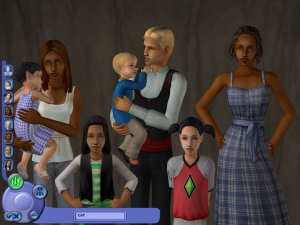

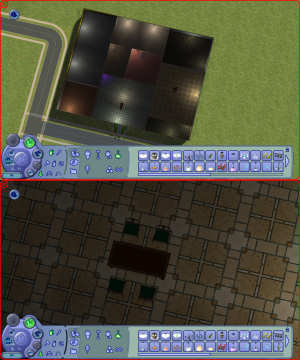
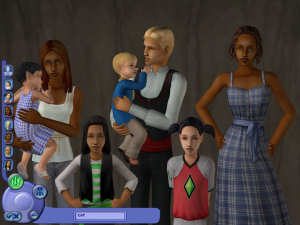
CAF.jpg - width=300 height=225
Create-A-Family max zoom in
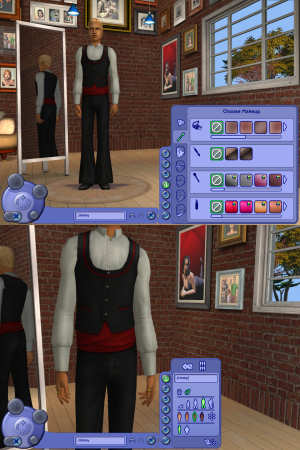
CAS.jpg - width=300 height=450
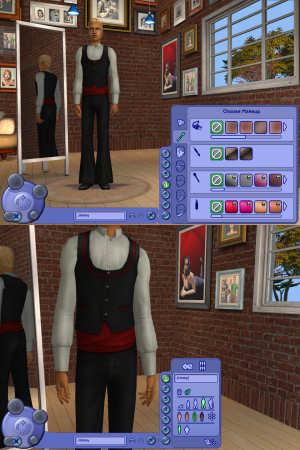
CAS (Top: Face zoom out; Bottom: Clothes zoom in)
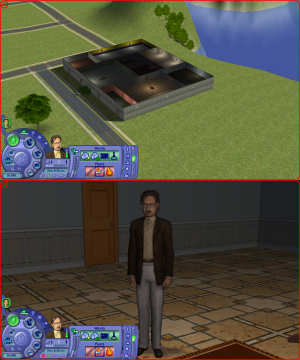
LiveBig.jpg - width=300 height=360
Live - Large Lot
LiveSmall.jpg - width=300 height=360
Live - Small Lot
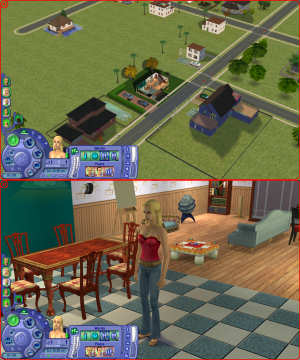
Neighborhood.jpg - width=300 height=360
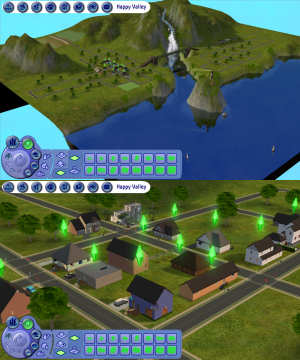
Neighborhood
TopDown.jpg - width=300 height=360
Top-Down View (Build Mode)
Picked Upload!
This is a picked upload! It showcases some of the best talent and creativity available on MTS and in the community.

Created by Tom Duhamel
Uploaded: 26th Dec 2008 at 5:52 PM
Updated: 30th Aug 2011 at 2:58 AM - Added the Known Issue statement
Updated: 30th Aug 2011 at 2:58 AM - Added the Known Issue statement
There are many camera configurations available out there, but none that I liked. Most camera settings available are made for modders, photographers or movie producers. None are very comfortable for the casual player.
These camera configurations were tweaked with playability in mind. I picked the Maxis default cameras and gave them some more flexibility without going to the extremes. I tried to keep a lot of comfort for playing and maintain the original feel of the game.
Below is a brief description of the changes I've made along with pictures.
Live Camera
This is the basic camera, the one you use while actually playing the game. I gave it more flexibility while maintaining the general feel you are used to and keeping things comfortable.
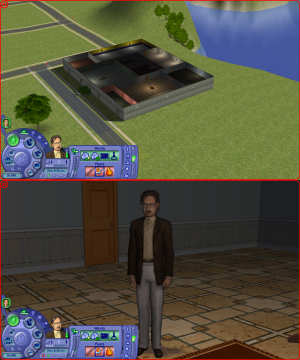
 Starting with version 1.1, the distribution now contains a No Fade add-on. Normally, when zooming in close to some objects such as staircases and ceiling lamps, they fade out and eventually disappear completely. With this add-on, this effect is removed. (See Instructions section below.)
Neighborhood Camera
Maxis default Neighborhood camera is very restrictive, no wonder it's the one people tweak the most. Most authors of original neighborhoods will recommend that you use a modified camera in order to use their creation the way they intended.
Top-Down View Camera (Build Mode)
Increased the maximum viewing distance so that larger lots can now be viewed at once.
Free Camera
This is the camera used when hitting Tab. This camera is mainly used for pictures and movies, and with that in mind I made it more precise, without making it ridiculously slow. This camera is not used for actual gameplay.
Tip: Place the camera as close as possible to where you want it to be in Live mode before hitting Tab, since you will find that this camera now moves much slower than before.
CAS Camera
This is actually a set of two cameras, namely Create-A-Sim (CAS) and Create-A-Family (CAF)
Compatibility Notes
These files are compatible with the base game, all the way up to the latest
expansion packs (namely Apartment Life and Mansions & Gardens).
Known Issue
There exists a rare condition which causes this mod to crash the game. While this situation seems to be very rare (millions of users worldwide are using this mod without problems), I thought it would be better to warn you, so that you can work your way out.
The known problem occurs only with users who own the M&G expansion pack (no matter what other pack you have or have not), and only occurs in the neighborhood. I have not been able to reproduce the problem myself, but at one point I got the help of one user who had the problem, but despite looking and trying different possibilities, we were not able to pinpoint the problem nor find a solution. We have also determined that other custom cameras did the same problem on that same machine.
For those affected, the game will crash immediately upon loading the neighborhood view. Restoring the original file fixes the problem. The crash does not make any further damage to the game, so this problem is not permanent and not considered critical.
Though this problem is very rare, if you find that you have the problem, the solution is to restore the original neighborhood camera. The other cameras will not cause any problem and you can use them normally, but you will loose the features that I have implemented for your neighborhood. (Note: Please make a backup of your original cameras, as stated by the instructions below, in case you run into problems.)
If at any point in the future someone finds a solution, please contact me. For now, this notice is the best I can do for you.
*** Installation Instructions ***
Camera configuration files go to: "My Documents\EA Games\The Sims 2\Cameras\" (NOT Downloads)
1. Backup all files from the Cameras folder before proceeding (I will not provide you with default files).
2. Install the files from the archive in the Cameras folder, replacing default ones. (See notes below regarding the No Fade add-on.)
You are not required to install all of the different cameras. You can only select and install those you like. Feel free to try other cameras from other authors and mix them with mine any way suits your needs.
BuildCamera.txt = Top-Down View Camera
CASCamera.txt = CAS and CAF cameras
FirstPersonCameras.txt = Free Camera
LiveCamera.txt = Live Camera
LiveCameraNoFade.txt = Live Camera No Fade add-on*
NeighborhoodCamera.txt = Neighborhood Camera
*No Fade add-on: To install the No Fade add-on for the Live camera, simply drop the file LiveCameraNoFade.txt with the others. If you don't want to disable the fading effect, do no install this file. (See Live Camera section above for more information.)
To uninstall, overwrite the files with the ones you backed up.
Note: When installing a new EP/SP, the install process overwrites the camera files with fresh ones. Therefore, you need to re-install this mod after installing an EP or SP.
Copyright Notice
The International Copyright Law does not extend to the point as to cover simple configuration values. However, since tweaking these values required that a lot of Sims be tortured, I invite you to kindly follow the usual rules.
Additional Credits
Paint Shop Pro 9 for screenshots and picture editing
And as always, the incredible Notepad
No animals were shaved during the production of this mod.
These camera configurations were tweaked with playability in mind. I picked the Maxis default cameras and gave them some more flexibility without going to the extremes. I tried to keep a lot of comfort for playing and maintain the original feel of the game.
Below is a brief description of the changes I've made along with pictures.
Live Camera
This is the basic camera, the one you use while actually playing the game. I gave it more flexibility while maintaining the general feel you are used to and keeping things comfortable.
- Zoom out further so to see the largest lots at once, without impacting playability at regular zoom level
- Zoom in further so to see Shady's beautiful eyes
- Camera height increased, so that at close zoom levels the view is more natural and comfortable
- Adjusted pitch so that, at farther zoom levels, you can move the camera lower (without going to the extreme so that the camera would enter a neighboring house of hide behind a mountain) or higher (so that you can actually get a top-down view from Live mode)
- Minimized the delay in tracking mode (when you right-click a Sim's thumbnail) while avoiding that the camera dances with the Sim
 Starting with version 1.1, the distribution now contains a No Fade add-on. Normally, when zooming in close to some objects such as staircases and ceiling lamps, they fade out and eventually disappear completely. With this add-on, this effect is removed. (See Instructions section below.)
Neighborhood Camera
Maxis default Neighborhood camera is very restrictive, no wonder it's the one people tweak the most. Most authors of original neighborhoods will recommend that you use a modified camera in order to use their creation the way they intended.
- Doubled the zoom out distance in order to view the entire neighborhood at once
- Slightly increased the zoom in distance
- Allowed the camera to be moved over the entire neighborhood, to the borders, instead of just two blocks from the center (you can see the end of the world)
- Allowed pitch (vertical angle) change
- Fixed the field of view (FOV) so that the neighborhood won't distort as you move around on some screen resolutions
Top-Down View Camera (Build Mode)
Increased the maximum viewing distance so that larger lots can now be viewed at once.
Free Camera
This is the camera used when hitting Tab. This camera is mainly used for pictures and movies, and with that in mind I made it more precise, without making it ridiculously slow. This camera is not used for actual gameplay.
- Can now be moved to ground level (if you feel you need to take pictures of shoes)
- Pitch increased so that you can take pictures of the grass or the sky (it's a shame that Maxis drawn stars and clouds in the sky but didn't allow you to view them)
- In order to increase precision, the camera moves much slower than before, but is still comfortable to work with
Tip: Place the camera as close as possible to where you want it to be in Live mode before hitting Tab, since you will find that this camera now moves much slower than before.
CAS Camera
This is actually a set of two cameras, namely Create-A-Sim (CAS) and Create-A-Family (CAF)
- When editing the face, can zoom out completely and view the whole body
- When editing clothing, can zoom in to mid-body (instead of to the face) so that you can view details of clothes
- Mouse wheel sensitivity improved so that you don't have to spin forever
- Improved zooming capabilities for pets
- CAF: Can now zoom in and get a family picture (the default zoom level is so low that it's not actually very useful)
*=*=*=*=*=*=*=*=*=*=*=*=*=*=*=*=*=*=*=*=*=*=*
Compatibility Notes
These files are compatible with the base game, all the way up to the latest
expansion packs (namely Apartment Life and Mansions & Gardens).
Known Issue
There exists a rare condition which causes this mod to crash the game. While this situation seems to be very rare (millions of users worldwide are using this mod without problems), I thought it would be better to warn you, so that you can work your way out.
The known problem occurs only with users who own the M&G expansion pack (no matter what other pack you have or have not), and only occurs in the neighborhood. I have not been able to reproduce the problem myself, but at one point I got the help of one user who had the problem, but despite looking and trying different possibilities, we were not able to pinpoint the problem nor find a solution. We have also determined that other custom cameras did the same problem on that same machine.
For those affected, the game will crash immediately upon loading the neighborhood view. Restoring the original file fixes the problem. The crash does not make any further damage to the game, so this problem is not permanent and not considered critical.
Though this problem is very rare, if you find that you have the problem, the solution is to restore the original neighborhood camera. The other cameras will not cause any problem and you can use them normally, but you will loose the features that I have implemented for your neighborhood. (Note: Please make a backup of your original cameras, as stated by the instructions below, in case you run into problems.)
If at any point in the future someone finds a solution, please contact me. For now, this notice is the best I can do for you.
*** Installation Instructions ***
Camera configuration files go to: "My Documents\EA Games\The Sims 2\Cameras\" (NOT Downloads)
1. Backup all files from the Cameras folder before proceeding (I will not provide you with default files).
2. Install the files from the archive in the Cameras folder, replacing default ones. (See notes below regarding the No Fade add-on.)
You are not required to install all of the different cameras. You can only select and install those you like. Feel free to try other cameras from other authors and mix them with mine any way suits your needs.
BuildCamera.txt = Top-Down View Camera
CASCamera.txt = CAS and CAF cameras
FirstPersonCameras.txt = Free Camera
LiveCamera.txt = Live Camera
LiveCameraNoFade.txt = Live Camera No Fade add-on*
NeighborhoodCamera.txt = Neighborhood Camera
*No Fade add-on: To install the No Fade add-on for the Live camera, simply drop the file LiveCameraNoFade.txt with the others. If you don't want to disable the fading effect, do no install this file. (See Live Camera section above for more information.)
To uninstall, overwrite the files with the ones you backed up.
Note: When installing a new EP/SP, the install process overwrites the camera files with fresh ones. Therefore, you need to re-install this mod after installing an EP or SP.
Copyright Notice
The International Copyright Law does not extend to the point as to cover simple configuration values. However, since tweaking these values required that a lot of Sims be tortured, I invite you to kindly follow the usual rules.
Additional Credits
Paint Shop Pro 9 for screenshots and picture editing
And as always, the incredible Notepad
No animals were shaved during the production of this mod.
| Filename | Size | Downloads | Date | |||||
|
Enhanced_Gameplay_Cameras_11.rar
| Enhanced Gameplay Cameras 1.1 2009-01-04
Size: 6.4 KB · Downloads: 64,865 · 5th Jan 2009 |
6.4 KB | 64,865 | 5th Jan 2009 | |||||
| For a detailed look at individual files, see the Information tab. | ||||||||
Key:
- - File was updated after upload was posted
Install Instructions
Basic Download and Install Instructions:
1. Download: Click the download link to save the .rar or .zip file(s) to your computer.
2. Extract the zip, rar, or 7z file.
3. Place in Downloads Folder: Cut and paste the .package file(s) into your Downloads folder:
1. Download: Click the download link to save the .rar or .zip file(s) to your computer.
2. Extract the zip, rar, or 7z file.
3. Place in Downloads Folder: Cut and paste the .package file(s) into your Downloads folder:
- Origin (Ultimate Collection): Users\(Current User Account)\Documents\EA Games\The Sims™ 2 Ultimate Collection\Downloads\
- Non-Origin, Windows Vista/7/8/10: Users\(Current User Account)\Documents\EA Games\The Sims 2\Downloads\
- Non-Origin, Windows XP: Documents and Settings\(Current User Account)\My Documents\EA Games\The Sims 2\Downloads\
- Mac: Users\(Current User Account)\Documents\EA Games\The Sims 2\Downloads
- Mac x64: /Library/Containers/com.aspyr.sims2.appstore/Data/Library/Application Support/Aspyr/The Sims 2/Downloads
- For a full, complete guide to downloading complete with pictures and more information, see: Game Help: Downloading for Fracking Idiots.
- Custom content not showing up in the game? See: Game Help: Getting Custom Content to Show Up.
- If you don't have a Downloads folder, just make one. See instructions at: Game Help: No Downloads Folder.
Also Thanked - Users who thanked this download also thanked:
Packs Needed
None, this is Sims 2 base game compatible!
Other Information
Type:
– Global Mods
: Mods that change the way the game works without requiring any user intervention.
Tags
Policies regarding any files posted by me on the MTS2 website
Copyright © 2008-2020 Tom Duhamel
You may download, use, post or otherwise distribute my files at the following conditions:
1. Do not repost on other websites (support MTS2 community)
2. You are free to release any modified version of my files, provided that:
. a. Modified copies are posted only at MTS2
. b. You credit me as the original author with a link to the thread of the original files
. c. You make clear you are not the original author and clearly state what changes you have made
3. Do not torture or otherwise harm a Sim using my files
You may download, use, post or otherwise distribute my files at the following conditions:
1. Do not repost on other websites (support MTS2 community)
2. You are free to release any modified version of my files, provided that:
. a. Modified copies are posted only at MTS2
. b. You credit me as the original author with a link to the thread of the original files
. c. You make clear you are not the original author and clearly state what changes you have made
3. Do not torture or otherwise harm a Sim using my files
More Downloads BETA
Here are some more of my downloads: