
 Sign in to Mod The Sims
 Nikki Sixx
 Nikki Sixx
MTS has all free content, all the time. Donate to help keep it running.
SCREENSHOTS
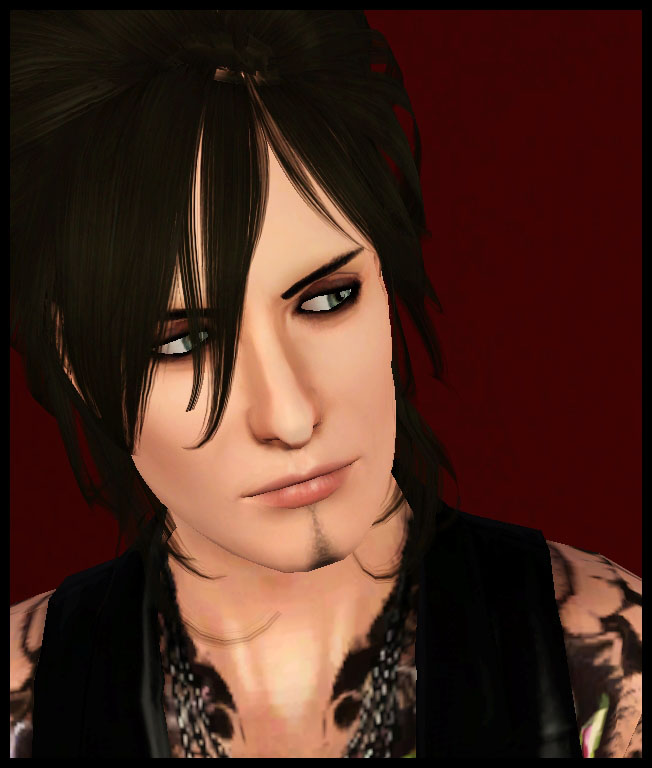

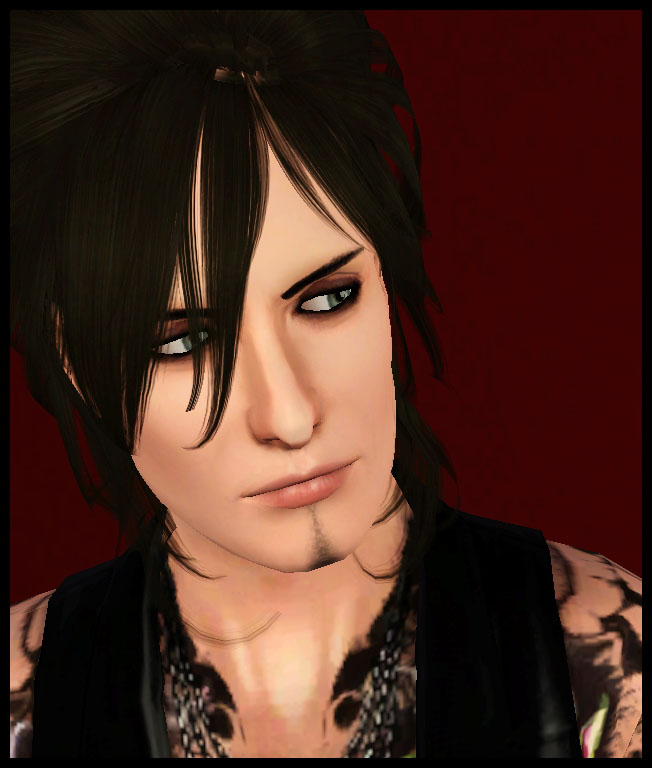
Nikki Sixx 1.jpg - width=652 height=768
Nikki Sixx - face
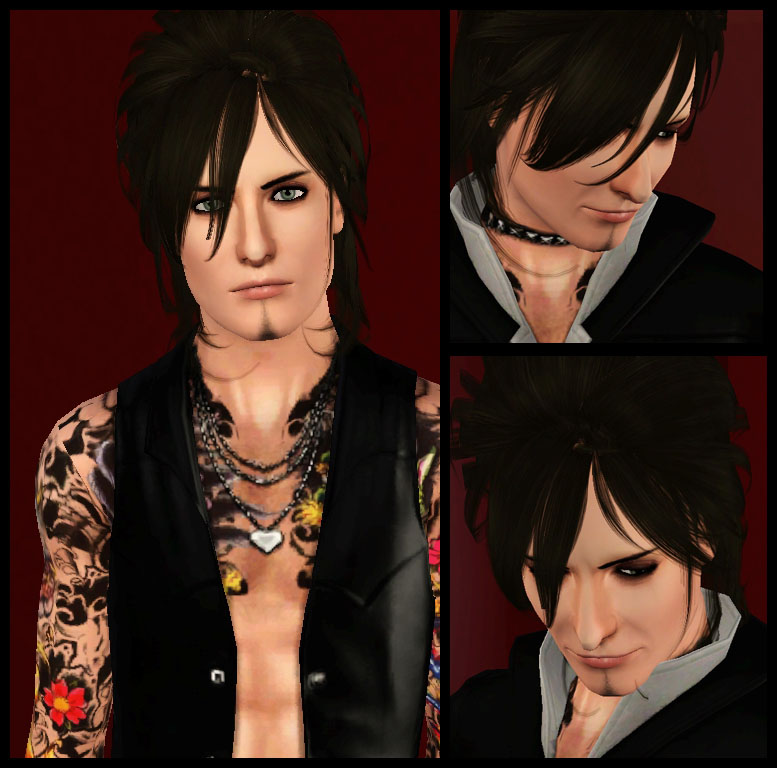
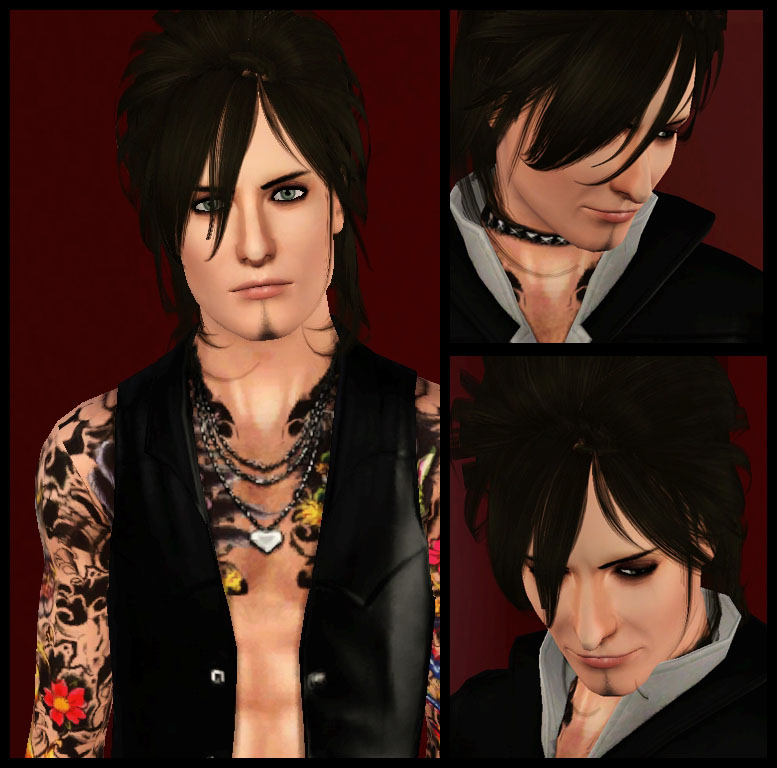
Nikki Sixx 2.jpg - width=777 height=768
Nikki Sixx - shots
Nikki Sixx 3.jpg - width=900 height=732
Nikki Sixx - shots
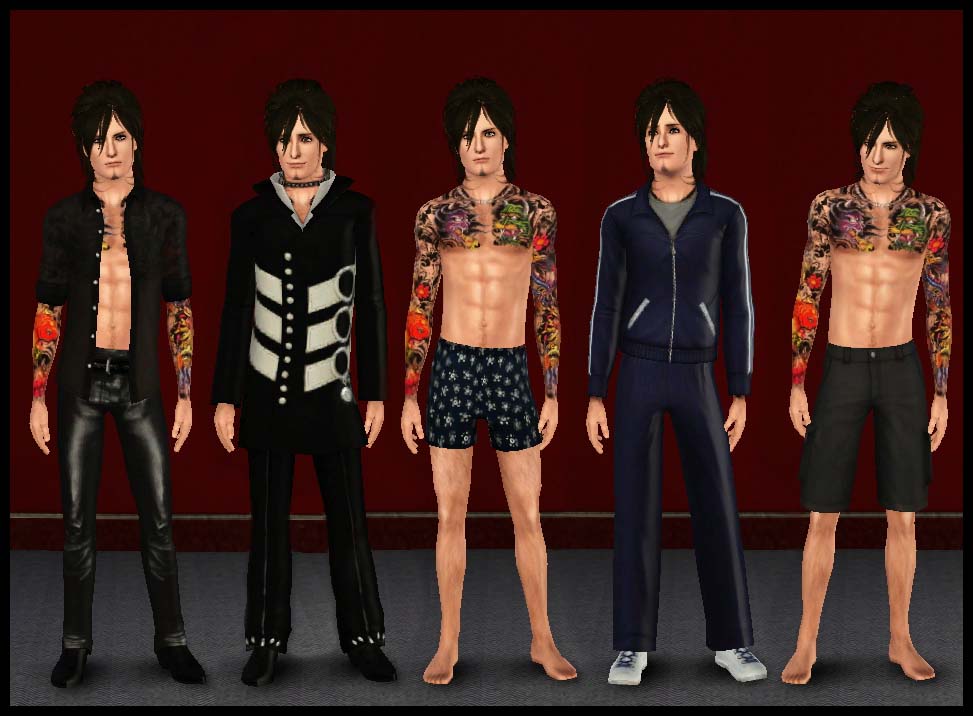
Outfits.jpg - width=973 height=716
Outfits
Thumbnail.jpg - width=250 height=250
Thumbnail
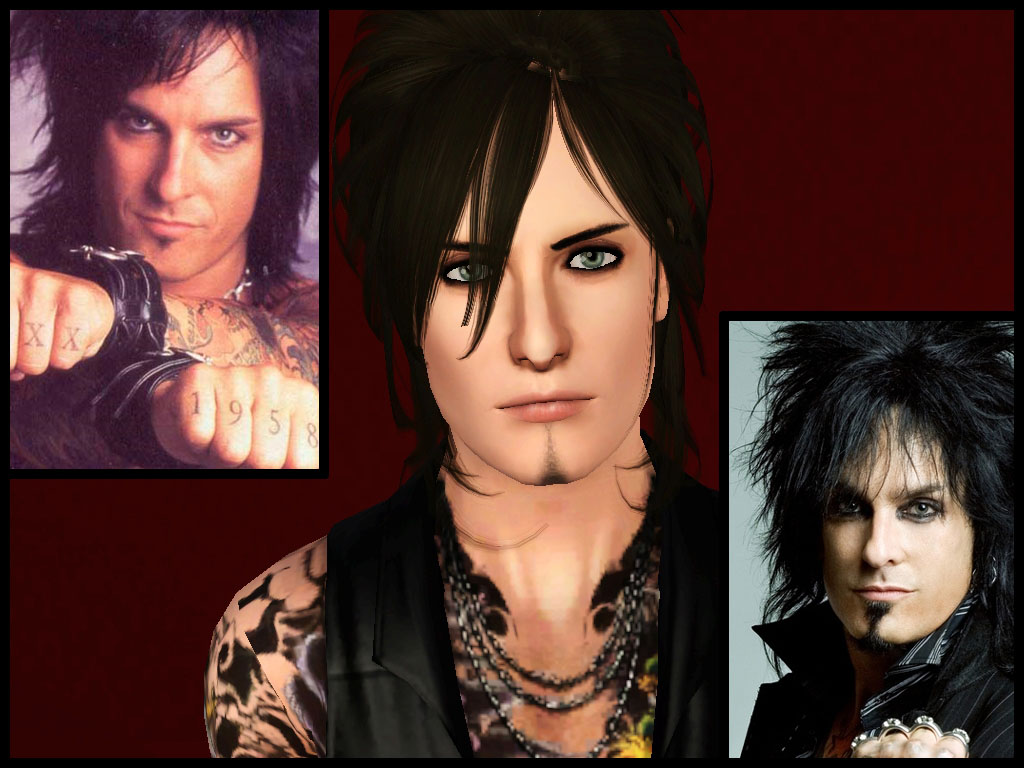
Nikki Sixx for upload.jpg - width=1024 height=768
Comparison pic
Uploaded: 21st Aug 2010 at 5:12 AM
Updated: 1st Mar 2011 at 8:10 PM by Astraea Nevermore
Updated: 1st Mar 2011 at 8:10 PM by Astraea Nevermore
Nikki Sixx (born Frank Carlton Ferrana, Jr., December 11, 1958) is an American bassist, author, fashion designer, photographer, and the main songwriter for the band Mötley Crüe. He has also played bass for glam metal bands London, the experimental band 58, the hard rock band Brides of Destruction and more recently, Sixx:A.M.
(Wikipedia)
Ok, I'll admit that I'm not the biggest Mötley Crüe fan out of there, even if I still enjoy their music. The idea for this sim came just after seeing the hair conversion you can see in these screenshots, which looked pretty damn close to Nikki Sixx's hair... that made me think that he would have been one hell of a sim, and here's the final result
 I had a lot of fun making him and playing with him, hope you'll like this Nikki sim as much as I do =)
He should be compatible with base game, just make sure to use a fully patched game, 'cos I used that opacity tool for make up that came with the Ambitions patch, and I don't know if that's gonna cause any problems for games with previous patches! If you experience any problem, just let me know!
Now going with the...
Custom content used:
Sim
-Non-default hairy skintone, converted by jmtmom
-Face skin replacement by Aikea Guinea
-Hair by Discovering Club (scroll down the page and click on the Download button... if you have troubles getting it from there, follow the infos on MS3B)
-Lipstick by The Sims World
-Eyebrows by Arisuka
-Eyebags, still by Arisuka (can't say from which set they are, exactly... I have all of them!)
-Tiffany Glaze default replacement eyes by escand (in case you don't want to change your defaults, you might download the eye contacts version, found in the same link)
-Stubble by bocboc256
Clothes/accessories
-Open shirt by Lady Frontbum
-Leather pants by Aikea Guinea
-Tattoos: Japanese sleeves + backpiece by XJonasX
Other outfits are all Maxis ones.
Mods used - PLEASE READ:
-AwesomeMod for slider multiplier, you'll need that if you want to edit the sim's features, and to remove the limit to the number of additional sliders you can have in game. If you don't want to install AwesomeMod, here you can get another hack to remove just the slider limit.
-Facial sliders by Ahmad. Just download 'em all :P
-UI Mod by Rez Delnava: you'll *NEED* this for the non-default skintone to show up. Otherwise, you're probably gonna get a scary boogeyman with no eyes, instead of Nikki Sixx.
EDIT: the UI mod is not updated for PATCH 1.17/Late Night, however you don't really need it anymore for the non-default skintone to show up: if you install non-default skintones, in fact, the game will still recognize them: read the note added by the MTS staff on the top of the UI Mod page to have more infos on how non-default skintones work in game
EDIT #2: added a version of the sim packaged with default skintone
Sim
-Non-default hairy skintone, converted by jmtmom
-Face skin replacement by Aikea Guinea
-Hair by Discovering Club (scroll down the page and click on the Download button... if you have troubles getting it from there, follow the infos on MS3B)
-Lipstick by The Sims World
-Eyebrows by Arisuka
-Eyebags, still by Arisuka (can't say from which set they are, exactly... I have all of them!)
-Tiffany Glaze default replacement eyes by escand (in case you don't want to change your defaults, you might download the eye contacts version, found in the same link)
-Stubble by bocboc256
Clothes/accessories
-Open shirt by Lady Frontbum
-Leather pants by Aikea Guinea
-Tattoos: Japanese sleeves + backpiece by XJonasX
Other outfits are all Maxis ones.
Mods used - PLEASE READ:
-AwesomeMod for slider multiplier, you'll need that if you want to edit the sim's features, and to remove the limit to the number of additional sliders you can have in game. If you don't want to install AwesomeMod, here you can get another hack to remove just the slider limit.
-Facial sliders by Ahmad. Just download 'em all :P
-
EDIT: the UI mod is not updated for PATCH 1.17/Late Night, however you don't really need it anymore for the non-default skintone to show up: if you install non-default skintones, in fact, the game will still recognize them: read the note added by the MTS staff on the top of the UI Mod page to have more infos on how non-default skintones work in game
EDIT #2: added a version of the sim packaged with default skintone
Additional Credits:
HUGE thanks to all the people that helped me to improve the sim in the Creator Feedback Forum! You rock! =)
| Filename | Size | Downloads | Date | |||||
|
NikkiSixx_withDEFAULTSkin.rar
| Nikki Sixx sim with default skintone
Size: 410.7 KB · Downloads: 5,363 · 1st Mar 2011 |
410.7 KB | 5,363 | 1st Mar 2011 | |||||
|
Nikki_Sixx.rar
| Nikki Sixx sim
Size: 392.0 KB · Downloads: 12,672 · 21st Aug 2010 |
392.0 KB | 12,672 | 21st Aug 2010 | |||||
| For a detailed look at individual files, see the Information tab. | ||||||||
Key:
- - File was updated after upload was posted
Install Instructions
Quick Guide:
1. Click the file listed on the Files tab to download the sim to your computer.
2. Extract the zip, rar, or 7z file.
2. Select the .sim file you got from extracting.
3. Cut and paste it into your Documents\Electronic Arts\The Sims 3\SavedSims folder. If you do not have this folder yet, it is recommended that you open the game, enter Create-a-Sim, and save a sim to the sim bin to create this folder, rather than doing so manually. After that you can close the game and put the .sim file in SavedSims
4. Once the .sim file is in SavedSims, you can load the game, and look for your sim in the premade sims bin in Create-a-Sim.
Extracting from RAR, ZIP, or 7z: You will need a special program for this. For Windows, we recommend 7-Zip and for Mac OSX, we recommend Keka. Both are free and safe to use.
Need more help?
If you need more info, see Game Help:Installing TS3 Simswiki for a full, detailed step-by-step guide! Special Installation Instructions
1. Click the file listed on the Files tab to download the sim to your computer.
2. Extract the zip, rar, or 7z file.
2. Select the .sim file you got from extracting.
3. Cut and paste it into your Documents\Electronic Arts\The Sims 3\SavedSims folder. If you do not have this folder yet, it is recommended that you open the game, enter Create-a-Sim, and save a sim to the sim bin to create this folder, rather than doing so manually. After that you can close the game and put the .sim file in SavedSims
4. Once the .sim file is in SavedSims, you can load the game, and look for your sim in the premade sims bin in Create-a-Sim.
Extracting from RAR, ZIP, or 7z: You will need a special program for this. For Windows, we recommend 7-Zip and for Mac OSX, we recommend Keka. Both are free and safe to use.
Need more help?
If you need more info, see Game Help:Installing TS3 Simswiki for a full, detailed step-by-step guide! Special Installation Instructions
- If you get an error that says "This content requires expansion pack data that is not installed", please use either Clean Installer to install this sim.
Also Thanked - Users who thanked this download also thanked:
Policy
• Feel free to edit, fix, retexture, recolor, include my meshes with your retextures/recolors, include my cc with your sims/lots and anything else you can think of, no need to ask.
• Please do not re-upload my stuff. If you see that one of my uploads is missing, contact me and I’ll be glad to provide a new working link for you.
• No Adfly/any kind of paywall and/or paysites. This applies to both sims using my content and retextures/recolors of my meshes. Patreon downloads are fine ONLY if your retexture/recolor/edit is available for free right from the start. No “Patron-exclusive” content or anything like that. My content is free for all and will always be, and so should be your edits of my stuff.
• Credit/tagging/linking is nice, although the last two are not mandatory. As long as you don’t claim you made my crap, you’re free to do whatever you want :D
• Remember that a lot of my stuff wouldn’t even exist without the work of other creators, so please try to respect them as well :)
• Most important: HAVE FUN!
Check my other downloads over at Tumblr!
If you'd like to support me, please consider making a donation at my Patreon :)
• Please do not re-upload my stuff. If you see that one of my uploads is missing, contact me and I’ll be glad to provide a new working link for you.
• No Adfly/any kind of paywall and/or paysites. This applies to both sims using my content and retextures/recolors of my meshes. Patreon downloads are fine ONLY if your retexture/recolor/edit is available for free right from the start. No “Patron-exclusive” content or anything like that. My content is free for all and will always be, and so should be your edits of my stuff.
• Credit/tagging/linking is nice, although the last two are not mandatory. As long as you don’t claim you made my crap, you’re free to do whatever you want :D
• Remember that a lot of my stuff wouldn’t even exist without the work of other creators, so please try to respect them as well :)
• Most important: HAVE FUN!
Check my other downloads over at Tumblr!
If you'd like to support me, please consider making a donation at my Patreon :)
More Downloads BETA
Here are some more of my downloads: