
 Sign in to Mod The Sims
 Lot Compressor
 Lot Compressor
MTS has all free content, all the time. Donate to help keep it running.
SCREENSHOTS


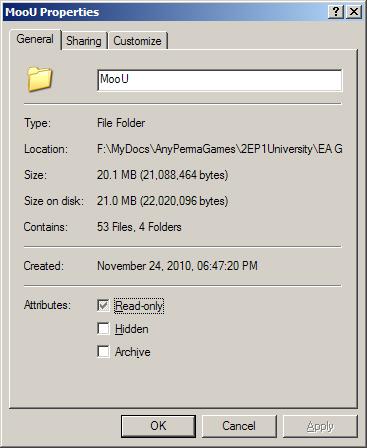
0Before.JPG - width=367 height=448
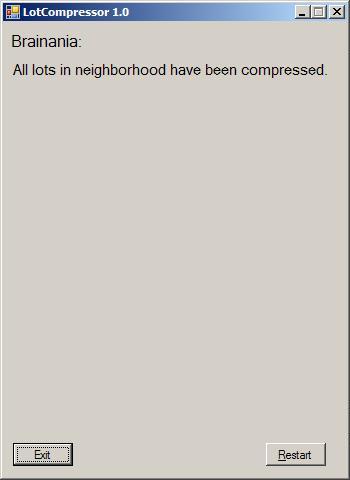
1Welcome.JPG - width=350 height=480
2ChooseHood.JPG - width=350 height=480
3ChooseLot.JPG - width=350 height=480
4ChooseAllLots.JPG - width=350 height=480
5Verify.JPG - width=350 height=480
6Done.JPG - width=350 height=480
7Compressed.JPG - width=367 height=448
Mootilda unfortunately passed away in September of 2014. They were a respected member of the community and contributed to the Simming community for many years.
Picked Upload!
This is a picked upload! It showcases some of the best talent and creativity available on MTS and in the community.


LotCompressor Version 1.0:
Description:
The LotCompressor will make your lots smaller, so that they are easier to share. A "compress all" feature allows you to compress all of the lots in an entire neighborhood or subhood.
Although I wrote this utility to help with sharing lots and neighborhoods, it can also help to reduce the size of your save game on your hard drive by permanently reducing the size of your lot bin and all of your community lots. Since community lots are not saved as you play, the size reductions will remain in effect unless you modify these lots.
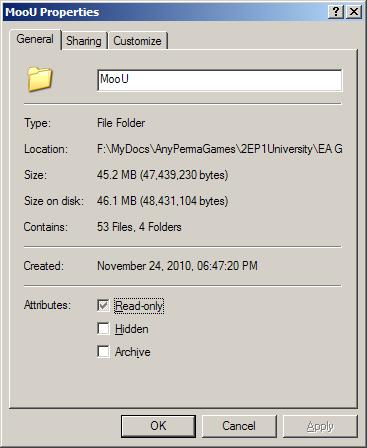
The LotCompressor shrinks the size of your lots by removing several unnecessary images. The missing images are not necessary and will regenerate the next time that you save your lot. Removing these images can significantly reduce the size of your lot. As an example, the subhood that I compressed went from 45 MB to 20 MB (see attached images). Your results may vary.
New forms of compression may be added at a later date. If you have ideas on how to compress lots further, please let me know.
Installation:
To install, just download LotCompressor.zip and unzip it. Run the EXE from the unzipped location.
This is "alpha" software and is still in development; it is not guaranteed to work and may corrupt your neighborhoods. Be sure to backup your game before using this tool.
I have included the source code for version 1.0 in LotCompressorSource.zip. There is no need to download this file unless you are a C# programmer who wishes to look at or modify the code.
Requirements:
- The program uses some DLLs from SimPE; they are included in the zip file.
- The LotCompressor is released under the GNU General Public License.
- You need the Microsoft .NET Framework 2.0 to run the LotCompressor:
http://www.microsoft.com/en-us/down...s.aspx?id=20137
Running under OS/X:
Please read this thread for information about running the LotCompressor under OS/X:
http://www.modthesims.info/showthread.php?t=366580
Instructions:
1) Backup your game files. The LotCompressor will NOT make backups for you.
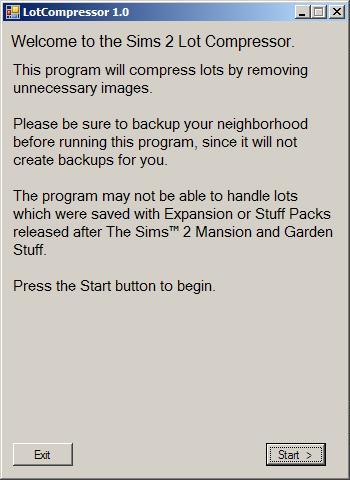
2) Run LotCompressor.EXE. Click on Start.
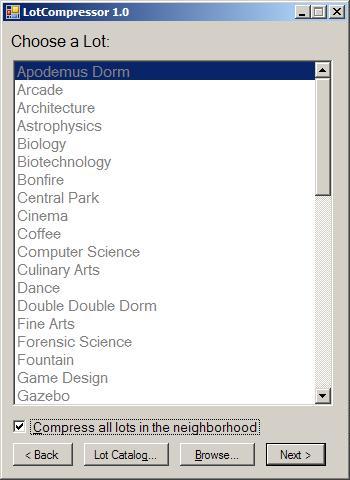
3) Select the neighborhood and lot(s), or choose a lot from the LotCatalog. If your neighborhood is not in the standard location, use the Browse button to select the neighborhood. See Numenor's comment for instructions on accessing AnyGameStarter neighborhoods:
http://www.modthesims2.com/download...683#post2168683
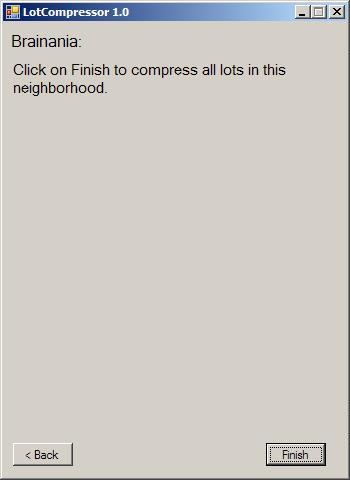
4) Verify that you have selected the appropriate lot(s) and click on the Finish button.
5) Keep your backup until you are completely satisfied with the changes.
Description:
The LotCompressor will make your lots smaller, so that they are easier to share. A "compress all" feature allows you to compress all of the lots in an entire neighborhood or subhood.
Although I wrote this utility to help with sharing lots and neighborhoods, it can also help to reduce the size of your save game on your hard drive by permanently reducing the size of your lot bin and all of your community lots. Since community lots are not saved as you play, the size reductions will remain in effect unless you modify these lots.
The LotCompressor shrinks the size of your lots by removing several unnecessary images. The missing images are not necessary and will regenerate the next time that you save your lot. Removing these images can significantly reduce the size of your lot. As an example, the subhood that I compressed went from 45 MB to 20 MB (see attached images). Your results may vary.
New forms of compression may be added at a later date. If you have ideas on how to compress lots further, please let me know.
Installation:
To install, just download LotCompressor.zip and unzip it. Run the EXE from the unzipped location.
This is "alpha" software and is still in development; it is not guaranteed to work and may corrupt your neighborhoods. Be sure to backup your game before using this tool.
I have included the source code for version 1.0 in LotCompressorSource.zip. There is no need to download this file unless you are a C# programmer who wishes to look at or modify the code.
Requirements:
- The program uses some DLLs from SimPE; they are included in the zip file.
- The LotCompressor is released under the GNU General Public License.
- You need the Microsoft .NET Framework 2.0 to run the LotCompressor:
http://www.microsoft.com/en-us/down...s.aspx?id=20137
Running under OS/X:
Please read this thread for information about running the LotCompressor under OS/X:
http://www.modthesims.info/showthread.php?t=366580
Instructions:
1) Backup your game files. The LotCompressor will NOT make backups for you.
2) Run LotCompressor.EXE. Click on Start.
3) Select the neighborhood and lot(s), or choose a lot from the LotCatalog. If your neighborhood is not in the standard location, use the Browse button to select the neighborhood. See Numenor's comment for instructions on accessing AnyGameStarter neighborhoods:
http://www.modthesims2.com/download...683#post2168683
4) Verify that you have selected the appropriate lot(s) and click on the Finish button.
5) Keep your backup until you are completely satisfied with the changes.
| Filename | Size | Downloads | Date | |||||
|
LotCompressorSource.zip
| C# source code V1.0 - for programmers only
Size: 47.0 KB · Downloads: 426 · 29th Nov 2010 |
47.0 KB | 426 | 29th Nov 2010 | |||||
|
LotCompressor.zip
| Current version of the LotCompressor V1.0
Size: 643.8 KB · Downloads: 2,947 · 29th Nov 2010 |
643.8 KB | 2,947 | 29th Nov 2010 | |||||
| For a detailed look at individual files, see the Information tab. | ||||||||
Key:
- - File was updated after upload was posted
Install Instructions
Basic Download and Install Instructions:
1. Download: Click the download link to save the .rar or .zip file(s) to your computer.
2. Extract the zip, rar, or 7z file.
3. Place in Downloads Folder: Cut and paste the .package file(s) into your Downloads folder:
1. Download: Click the download link to save the .rar or .zip file(s) to your computer.
2. Extract the zip, rar, or 7z file.
3. Place in Downloads Folder: Cut and paste the .package file(s) into your Downloads folder:
- Origin (Ultimate Collection): Users\(Current User Account)\Documents\EA Games\The Sims™ 2 Ultimate Collection\Downloads\
- Non-Origin, Windows Vista/7/8/10: Users\(Current User Account)\Documents\EA Games\The Sims 2\Downloads\
- Non-Origin, Windows XP: Documents and Settings\(Current User Account)\My Documents\EA Games\The Sims 2\Downloads\
- Mac: Users\(Current User Account)\Documents\EA Games\The Sims 2\Downloads
- Mac x64: /Library/Containers/com.aspyr.sims2.appstore/Data/Library/Application Support/Aspyr/The Sims 2/Downloads
- For a full, complete guide to downloading complete with pictures and more information, see: Game Help: Downloading for Fracking Idiots.
- Custom content not showing up in the game? See: Game Help: Getting Custom Content to Show Up.
- If you don't have a Downloads folder, just make one. See instructions at: Game Help: No Downloads Folder.
Also Thanked - Users who thanked this download also thanked:
Packs Needed
None, this is Sims 2 base game compatible!
Other Information
Operating System:
– Windows
: Windows XP, Windows Vista, Windows 7, etc
Utility Type:
– Save Editors
: Tools for modifying savegames, lots, neighbourhood packages etc.
Plugin Type:
– Not Applicable
: Standalone tools
Tags
#small, #lot. package, #size, #share, #upload
Sharing, Requests, Help
Sharing:
Please do not share my programs, lots, or neighborhoods without my permission. Instead, please direct people to the latest release on this website.
Feel free to share my mods, but be sure to give people a link to the download thread here, just in case there are any future fixes.
The source code for most of my programs is available in the download thread. If I am inactive on ModTheSims for a year, or if I die, you may take over development and support of any of my programs without my permission, but the program must remain free of cost and you must keep the source code in the public domain.
 Requests:
If you have requests for new tools, or suggestions for existing tools, please post in the Moo Tools social group; see my Group Memberships for link. I do not accept requests for anything other than programs.
 Help:
Help:
For help with any of my tools, please post in the appropriate download thread.
 DO NOT ask for help or support via PM.
I will delete such requests without responding. Please see rule #5 here for details: http://www.modthesims.info/showthread.php?t=135664
Please do not share my programs, lots, or neighborhoods without my permission. Instead, please direct people to the latest release on this website.
Feel free to share my mods, but be sure to give people a link to the download thread here, just in case there are any future fixes.
The source code for most of my programs is available in the download thread. If I am inactive on ModTheSims for a year, or if I die, you may take over development and support of any of my programs without my permission, but the program must remain free of cost and you must keep the source code in the public domain.
Requests:If you have requests for new tools, or suggestions for existing tools, please post in the Moo Tools social group; see my Group Memberships for link. I do not accept requests for anything other than programs.
Help:For help with any of my tools, please post in the appropriate download thread.
DO NOT ask for help or support via PM.I will delete such requests without responding. Please see rule #5 here for details: http://www.modthesims.info/showthread.php?t=135664
More Downloads BETA
Here are some more of my downloads: