
 Sign in to Mod The Sims
 "Comfy Pet Pillow" Retextures - Part One
 "Comfy Pet Pillow" Retextures - Part One
MTS has all free content, all the time. Donate to help keep it running.
SCREENSHOTS
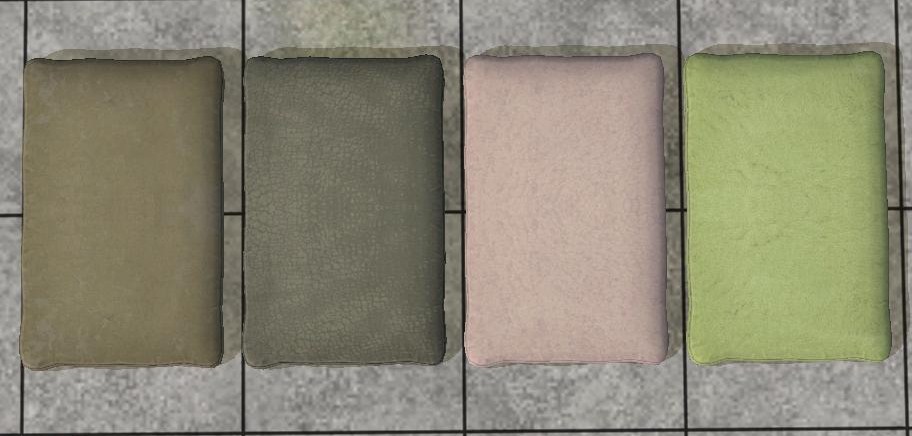
Sims2ep9 2011-03-04 19-11-36-33.jpg - width=912 height=436
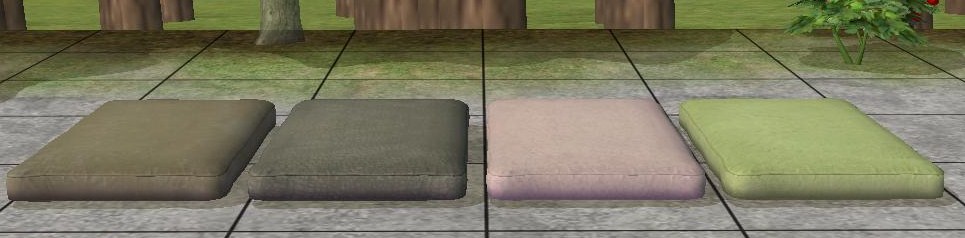
Sims2ep9 2011-03-04 19-12-24-23.jpg - width=965 height=238

----Part 2----
----Part 3----
Have you always wished for a rubbery type pet bed, or a modern carpetanised one? Wishes granted! Since I learned to make recolours and retextures for objects in SimPE, I really hated the normal dark and dull pet beds, so I took some pics of my house, and saved some from the net, and I set to work!
As you can see, I have changed the textures a lot and have tweaked them until I was sick, so they look more unique than those stupid dark things EA call "beds."
I had a lot of fun making this, and I also hope you enjoy playing with it with your furry friends!
Happy simming and petting!
Additional Credits: SimPE Photoshop
$RaMRoM$ tutorial http://www.modthesims.info/showthread.php?p=1707366
----Part 3----
Have you always wished for a rubbery type pet bed, or a modern carpetanised one? Wishes granted! Since I learned to make recolours and retextures for objects in SimPE, I really hated the normal dark and dull pet beds, so I took some pics of my house, and saved some from the net, and I set to work!
As you can see, I have changed the textures a lot and have tweaked them until I was sick, so they look more unique than those stupid dark things EA call "beds."
I had a lot of fun making this, and I also hope you enjoy playing with it with your furry friends!
Happy simming and petting!

Additional Credits: SimPE Photoshop
$RaMRoM$ tutorial http://www.modthesims.info/showthread.php?p=1707366
This is a Maxis Recolour which means that it is a recolour of an item that already exists in your game. Please check the Pack requirements to see which game pack it recolours.
This custom content if it is not clothing, may require a seperate download to work properly. This is available at Colour Enable Package (CEP) by Numenor.
| Filename | Size | Downloads | Date | |||||
|
Comfy Pet Pillow Retextures JackJess MTS.rar
Size: 168.3 KB · Downloads: 4,066 · 15th Mar 2011 |
168.3 KB | 4,066 | 15th Mar 2011 | |||||
| For a detailed look at individual files, see the Information tab. | ||||||||
Key:
- - File was updated after upload was posted
Install Instructions
Basic Download and Install Instructions:
1. Download: Click the download link to save the .rar or .zip file(s) to your computer.
2. Extract the zip, rar, or 7z file
3. Place in Downloads Folder: Cut and paste the .package file(s) into your Downloads folder:
Need more information?
1. Download: Click the download link to save the .rar or .zip file(s) to your computer.
2. Extract the zip, rar, or 7z file
3. Place in Downloads Folder: Cut and paste the .package file(s) into your Downloads folder:
- Origin (Ultimate Collection): Users\(Current User Account)\Documents\EA Games\The Sims™ 2 Ultimate Collection\Downloads\
- Non-Origin, Windows Vista/7/8/10: Users\(Current User Account)\Documents\EA Games\The Sims 2\Downloads\
- Non-Origin, Windows XP: Documents and Settings\(Current User Account)\My Documents\EA Games\The Sims 2\Downloads\
- Mac: Users\(Current User Account)\Documents\EA Games\The Sims 2\Downloads
- Mac x64:
/Library/Containers/com.aspyr.sims2.appstore/Data/Library/Application Support/Aspyr/The Sims 2/Downloads
Need more information?
- For a full, complete guide to downloading complete with pictures and more information, see: Game Help: Downloading for Fracking Idiots.
- Custom content not showing up in the game? See: Game Help: Getting Custom Content to Show Up.
- If you don't have a Downloads folder, just make one. See instructions at: Game Help: No Downloads Folder.
Recommended
The creator also recommends the following uploads:
Also Thanked - Users who thanked this download also thanked:
Packs Needed
| Base Game | |
|---|---|
 | Sims 2 |
| Expansion Pack | |
|---|---|
 | Pets |
Why not take a look around?
Okay, policies, policies, you NORTY peoples.
• Please DON´T do ANYTHING without my permission.
• Please DON´T request me.
• And before you ask, NO PAYSITES! NOHE.
• Please DON´T claim this as yours, meanie.
• PLEASE DON´T DO ANYTHING ELSE KNOWN AS ANNOYING.
• Please DON´T do ANYTHING without my permission.
• Please DON´T request me.
• And before you ask, NO PAYSITES! NOHE.
• Please DON´T claim this as yours, meanie.
• PLEASE DON´T DO ANYTHING ELSE KNOWN AS ANNOYING.
More Downloads BETA
Here are some more of my downloads: