
 Sign in to Mod The Sims
 Pants in plaid with sneakers (Adult female)
 Pants in plaid with sneakers (Adult female)
MTS has all free content, all the time. Donate to help keep it running.
SCREENSHOTS
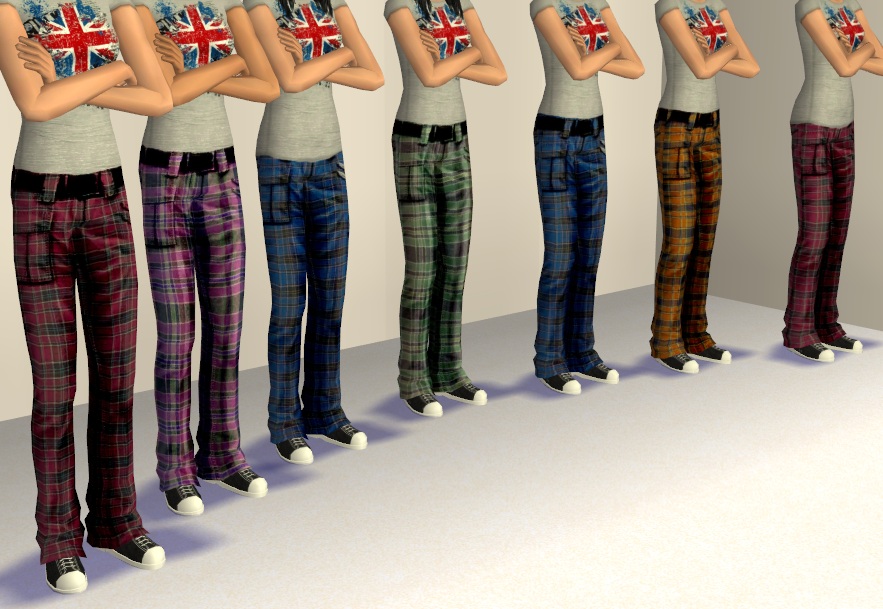
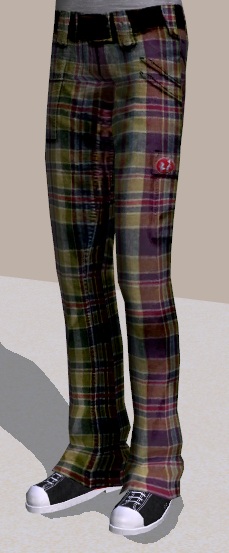

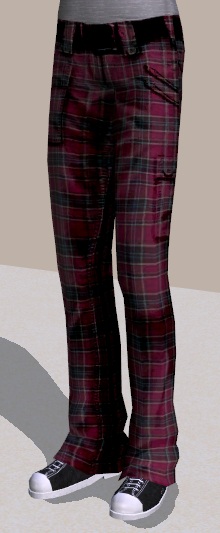
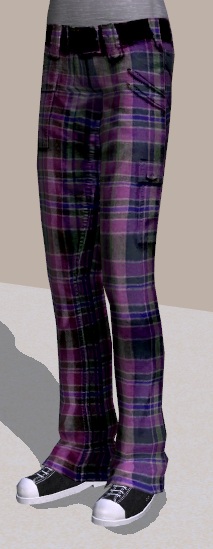
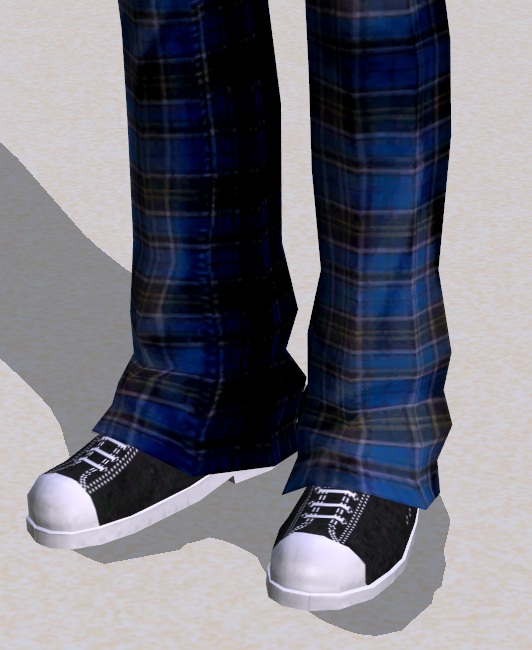

Allfront.jpg - width=883 height=609
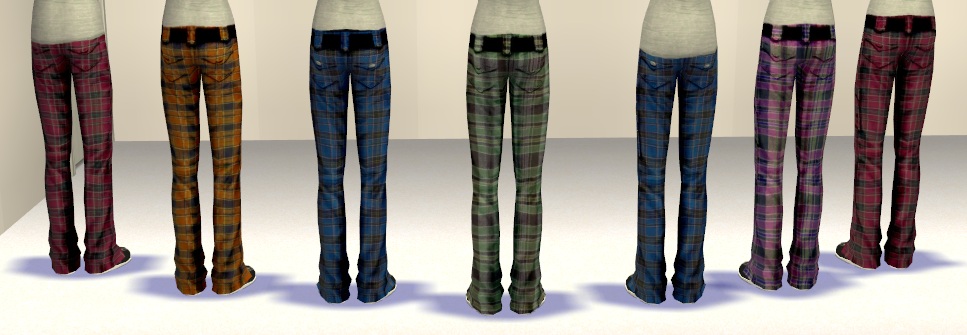
Allback.jpg - width=967 height=335
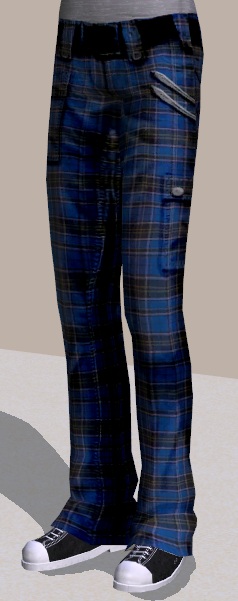
Blue1.jpg - width=238 height=601
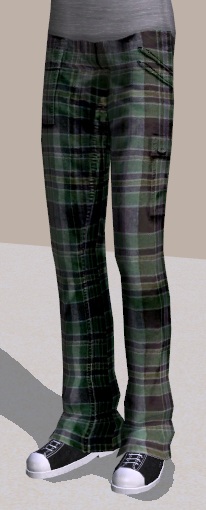
Green.jpg - width=206 height=510
Mixed.jpg - width=229 height=553
Orange.jpg - width=209 height=498
Red.jpg - width=220 height=533
Purple.jpg - width=213 height=549
Shoes.jpg - width=532 height=650
Frontback.jpg - width=971 height=228



This is an age conversion of teen plaid pants made by .laetitia. I think her idea and execution are absolutely stunning, and I really wanted the pants for my adult sims. With some help of the very friendly VioletPadfoot I was able to convert the teen pants into adult pants using the classic untucked/tucked mesh by HystericalParoxysm.
Link to the original teen pants by .laetitia; http://www.modthesims.info/d/258958
I have used .laetitias texture for the pants, but the shoes are from frizelbliz. Full credit to these two for all the actual graphic work and the ideas, I've merely put it together in this particular form.
There are 6 colors (red, blue, green, purple, orange, mixed), all available in both untucked and tucked versions. The shoes are the same black sneakers for all versions.
The files are all properly named and easy to distinguish, so if you don't want all colors it's very easy to grab only the ones you want.
Found in everyday -> bottoms.
The mesh you need is called MESH_AF_B_SlouchypantsBoots, and can be found here;
http://www.modthesims.info/download.php?t=228762
CREDITS:
.laetitia for the texture and the original idea (http://www.modthesims.info/d/258958)
HystericalParoxysm for mesh
frizelbliz for shoes (http://www.modthesims.info/download.php?t=251468)
VioletPadfoot for the instructions on how to actually do this
Programs used: Bodyshop, Paint
The shirt seen in the picture is by sga_girl and can be found here;
http://www.modthesims.info/download.php?t=429985
Additional Credits:
.laetitia
frizelbliz
HystericalParoxysm
VioletPadfoot
Link to the original teen pants by .laetitia; http://www.modthesims.info/d/258958
I have used .laetitias texture for the pants, but the shoes are from frizelbliz. Full credit to these two for all the actual graphic work and the ideas, I've merely put it together in this particular form.
There are 6 colors (red, blue, green, purple, orange, mixed), all available in both untucked and tucked versions. The shoes are the same black sneakers for all versions.
The files are all properly named and easy to distinguish, so if you don't want all colors it's very easy to grab only the ones you want.
Found in everyday -> bottoms.
The mesh you need is called MESH_AF_B_SlouchypantsBoots, and can be found here;
http://www.modthesims.info/download.php?t=228762
CREDITS:
.laetitia for the texture and the original idea (http://www.modthesims.info/d/258958)
HystericalParoxysm for mesh
frizelbliz for shoes (http://www.modthesims.info/download.php?t=251468)
VioletPadfoot for the instructions on how to actually do this
Programs used: Bodyshop, Paint
The shirt seen in the picture is by sga_girl and can be found here;
http://www.modthesims.info/download.php?t=429985
Additional Credits:
.laetitia
frizelbliz
HystericalParoxysm
VioletPadfoot
This is a new mesh recolour, and means that you will need to download the particular mesh itself in order for this to show up in your game. See the Meshes Needed section or read the text for more information.
| Filename | Size | Downloads | Date | |||||
|
PlaidPantsUntucked.zip
Size: 2.11 MB · Downloads: 8,729 · 6th Apr 2012 |
2.11 MB | 8,729 | 6th Apr 2012 | |||||
|
PlaidPantsTucked.zip
Size: 2.00 MB · Downloads: 8,586 · 6th Apr 2012 |
2.00 MB | 8,586 | 6th Apr 2012 | |||||
| For a detailed look at individual files, see the Information tab. | ||||||||
Key:
- - File was updated after upload was posted
Install Instructions
Basic Download and Install Instructions:
1. Download: Click the download link to save the .rar or .zip file(s) to your computer.
2. Extract the zip, rar, or 7z file.
3. Place in Downloads Folder: Cut and paste the .package file(s) into your Downloads folder:
1. Download: Click the download link to save the .rar or .zip file(s) to your computer.
2. Extract the zip, rar, or 7z file.
3. Place in Downloads Folder: Cut and paste the .package file(s) into your Downloads folder:
- Origin (Ultimate Collection): Users\(Current User Account)\Documents\EA Games\The Sims™ 2 Ultimate Collection\Downloads\
- Non-Origin, Windows Vista/7/8/10: Users\(Current User Account)\Documents\EA Games\The Sims 2\Downloads\
- Non-Origin, Windows XP: Documents and Settings\(Current User Account)\My Documents\EA Games\The Sims 2\Downloads\
- Mac: Users\(Current User Account)\Documents\EA Games\The Sims 2\Downloads
- Mac x64: /Library/Containers/com.aspyr.sims2.appstore/Data/Library/Application Support/Aspyr/The Sims 2/Downloads
- For a full, complete guide to downloading complete with pictures and more information, see: Game Help: Downloading for Fracking Idiots.
- Custom content not showing up in the game? See: Game Help: Getting Custom Content to Show Up.
- If you don't have a Downloads folder, just make one. See instructions at: Game Help: No Downloads Folder.
Meshes needed
This download requires one or more meshes to work properly. Please check the Description tab for information about the meshes needed, then download them below:| MTS cannot guarantee any off-site links will be available |
| Fanseefem Casuals - Untuckable Shirts + Slouchy Jeans... for the Laydeez by HystericalParoxysm |
Also Thanked - Users who thanked this download also thanked:
Packs Needed
None, this is Sims 2 base game compatible!
Other Information
Age:
– Young Adult
– Adult
Gender:
– Female
Clothing Type:
– Everyday
Clothing Style:
– Modern
– Alternative
: Emo/Goth/Punk etc
Other Type:
– Not Applicable
– Untuckables
– Plus Sized
Maxis Flags:
– Not Applicable
Outfit Type:
– Bottom
Tags
About my creations
--- Currently retired from creating due to health reasons ----
--- No longer sharing content on MTS ---
I hope to return one day but for now consider me retired, and my uploads unsupported. I still share things sometimes on tumblr and I chat on discord servers, but I do not promise support for things I've shared as I don't know when or if I'm around and whether or not I'll have the ability and energy to do something if I am around.
If you ever downloaded something of mine, thank you! It's a great feeling seeing something you spent time on be useful to someone else in their game, and with all the great CC out there I'm very flattered you would choose to get something of mine.
I do not take requests. I do sometimes make things for people, but only when I see someone wishing for something on the forums and I feel like making it for them. So if you have a mod you wish would exist, make a post in Hacks and CC that you'd like to see!-thread. That's what it's there for after all! :)
A shoutout to VioletPadfoot for inspiring me to try creating, long ago. You gave me the nudge that got me started, and I'm very grateful. I'd also like to thank all of the wonderful experienced creators (gdayars, justJones, maybesomethingdunno, NixNivis, whoward69, HugeLunatic and many more) out there that wrote the tutorials I've used, or that has answered my questions when I've gotten stuck. You guys are what makes learning fun, and what inspires me to keep expanding my knowledge with new projects. Special thanks to Michelle who has helped me a lot when it comes to objects and recolors, and BoilingOil who taught me some modding basics that I needed when I started modding more seriously.
Policy
My policy is now open. I'd appreciate a message telling me about your work, because it's fun for me to see, and it means I know about it and can refer others to it if they reach out. As much as I would like to provide support for my own work, my health is too unstable and I have to prioritize. So if anyone else would like to fix problems or continue something and share it with others, that's great go forth :) If you can learn from my work or improve on it, wonderful. Welcome to ask questions on crafters, if I can I'll answer.
I'd appreciate if people do not share default replacements from my stuff as I do not like default replacements, but I can't stop you anyway so no point in acting like I could. If you want to respect my wishes, I appreciate it, if you don't care then well nothing I can do about it.
Other sites
Only share content on tumblr now. Still retired though so probably nothing, but if something new comes out, that's where it'll be. You can find it linked here on my profile.
--- No longer sharing content on MTS ---
I hope to return one day but for now consider me retired, and my uploads unsupported. I still share things sometimes on tumblr and I chat on discord servers, but I do not promise support for things I've shared as I don't know when or if I'm around and whether or not I'll have the ability and energy to do something if I am around.
If you ever downloaded something of mine, thank you! It's a great feeling seeing something you spent time on be useful to someone else in their game, and with all the great CC out there I'm very flattered you would choose to get something of mine.
I do not take requests. I do sometimes make things for people, but only when I see someone wishing for something on the forums and I feel like making it for them. So if you have a mod you wish would exist, make a post in Hacks and CC that you'd like to see!-thread. That's what it's there for after all! :)
A shoutout to VioletPadfoot for inspiring me to try creating, long ago. You gave me the nudge that got me started, and I'm very grateful. I'd also like to thank all of the wonderful experienced creators (gdayars, justJones, maybesomethingdunno, NixNivis, whoward69, HugeLunatic and many more) out there that wrote the tutorials I've used, or that has answered my questions when I've gotten stuck. You guys are what makes learning fun, and what inspires me to keep expanding my knowledge with new projects. Special thanks to Michelle who has helped me a lot when it comes to objects and recolors, and BoilingOil who taught me some modding basics that I needed when I started modding more seriously.
Policy
My policy is now open. I'd appreciate a message telling me about your work, because it's fun for me to see, and it means I know about it and can refer others to it if they reach out. As much as I would like to provide support for my own work, my health is too unstable and I have to prioritize. So if anyone else would like to fix problems or continue something and share it with others, that's great go forth :) If you can learn from my work or improve on it, wonderful. Welcome to ask questions on crafters, if I can I'll answer.
I'd appreciate if people do not share default replacements from my stuff as I do not like default replacements, but I can't stop you anyway so no point in acting like I could. If you want to respect my wishes, I appreciate it, if you don't care then well nothing I can do about it.
Other sites
Only share content on tumblr now. Still retired though so probably nothing, but if something new comes out, that's where it'll be. You can find it linked here on my profile.
More Downloads BETA
Here are some more of my downloads: