
 Sign in to Mod The Sims
 Overlip Curve Slider (Fixed 13/04)
 Overlip Curve Slider (Fixed 13/04)
MTS has all free content, all the time. Donate to help keep it running.
SCREENSHOTS
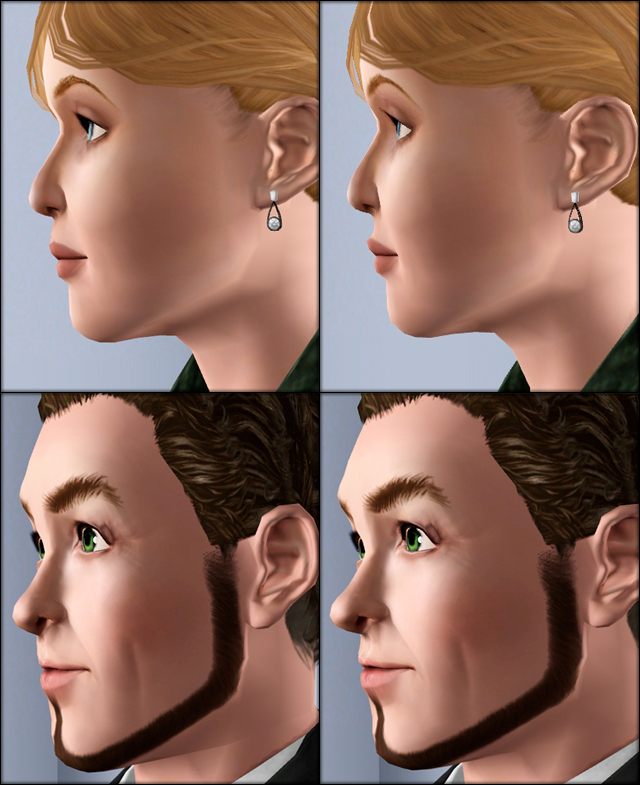


Adults.jpg - width=640 height=785
Child-Toddler.jpg - width=640 height=785
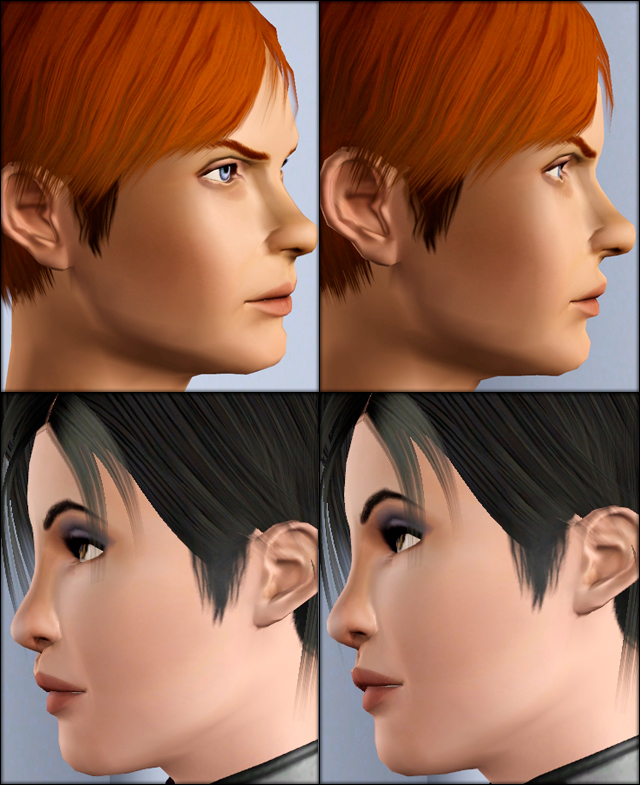
Teens.jpg - width=640 height=785

13/04/2012 - New version
Thanks to Ambular for pointing out a problem with the adult male element of the slider. I've uploaded a fixed version; please delete the old one and use the updated file instead. Your already-created sims who use this slider won't be affected by the update, the slider will continue to work on them as if nothing had changed (well, except that the am bit is fixed...).
So, there I am, quietly making a sim - very pretty sim, stunning in fact. And I swivel the camera, and think "Urgh, something I did to her nose has given her a philtrum like a slide rule" (Well ok, I didn't actually think "philtrum", I googled it afterwards); so I go to find the slider with which to correct this nasal monstrosity, and wtf EA, there isn't one?!
Well, there is now.
40 fracking meshes. You know it takes 40 fracking meshes to make one of these things?
Anyway, the slider works for all ages, male and female, and is found in the Mouth -> Upper Lip CAS panel. Due to the level of detail you're working with when using this, the results will be different for different sims, as the overlip is blended with all the other aspects of the face sculpt. All my models have the slider at either 0% (very sticky-out), or 100% (very sticky-in); and as you can see, the end results vary. The bloke with the face fuzz gets ye olde slide rule - the girl with the black hair ends up looking like Homer Simpson.
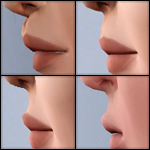
The toddler version - see attached pic - is a little bit jaggedy. I apologise for this; there just aren't as many vertices to work with in that part of the toddler face mesh.
Wahay, now I actually deserve that Plastic Surgeon sticker on my profile again!
Does this work with the new EP? Yes.
Does this work with the new patch? Yes.
But you wrote that before the patch even came out! Yes.
Additional Credits:
Made with CmarNYC's wonderful MorphMaker and accompanying tutorial.
The stuff on the sims is by Anubis (black hair), Elexis (toddler hair), and TumTum (brown male hair).
Other stuff, including eyes and skintone, is by -Shady-, LadyFrontbum, Ephemera, and Evie.
Thanks to Ambular for pointing out a problem with the adult male element of the slider. I've uploaded a fixed version; please delete the old one and use the updated file instead. Your already-created sims who use this slider won't be affected by the update, the slider will continue to work on them as if nothing had changed (well, except that the am bit is fixed...).
So, there I am, quietly making a sim - very pretty sim, stunning in fact. And I swivel the camera, and think "Urgh, something I did to her nose has given her a philtrum like a slide rule" (Well ok, I didn't actually think "philtrum", I googled it afterwards); so I go to find the slider with which to correct this nasal monstrosity, and wtf EA, there isn't one?!
Well, there is now.
40 fracking meshes. You know it takes 40 fracking meshes to make one of these things?

Anyway, the slider works for all ages, male and female, and is found in the Mouth -> Upper Lip CAS panel. Due to the level of detail you're working with when using this, the results will be different for different sims, as the overlip is blended with all the other aspects of the face sculpt. All my models have the slider at either 0% (very sticky-out), or 100% (very sticky-in); and as you can see, the end results vary. The bloke with the face fuzz gets ye olde slide rule - the girl with the black hair ends up looking like Homer Simpson.
The toddler version - see attached pic - is a little bit jaggedy. I apologise for this; there just aren't as many vertices to work with in that part of the toddler face mesh.
Wahay, now I actually deserve that Plastic Surgeon sticker on my profile again!
Does this work with the new EP? Yes.
Does this work with the new patch? Yes.
But you wrote that before the patch even came out! Yes.
Additional Credits:
Made with CmarNYC's wonderful MorphMaker and accompanying tutorial.
The stuff on the sims is by Anubis (black hair), Elexis (toddler hair), and TumTum (brown male hair).
Other stuff, including eyes and skintone, is by -Shady-, LadyFrontbum, Ephemera, and Evie.

| Filename | Size | Downloads | Date | |||||
|
Overlip Curve Slider.rar
Size: 3.7 KB · Downloads: 74,526 · 7th Apr 2012 |
3.7 KB | 74,526 | 7th Apr 2012 | |||||
| For a detailed look at individual files, see the Information tab. | ||||||||
Key:
- - File was updated after upload was posted
Install Instructions
Recommended
The creator also recommends the following uploads:
Philtrum width slider by #aWT/.
Also Thanked - Users who thanked this download also thanked:
Links
If you want to keep up-to-date with my new uploads, use my Creator RSS.
For all my meshes and textures, see my journal.
More Downloads BETA
Here are some more of my downloads: