
 Sign in to Mod The Sims
 Mesh Tangent Recalculator - fixes seams on skin
 Mesh Tangent Recalculator - fixes seams on skin
MTS has all free content, all the time. Donate to help keep it running.
SCREENSHOTS

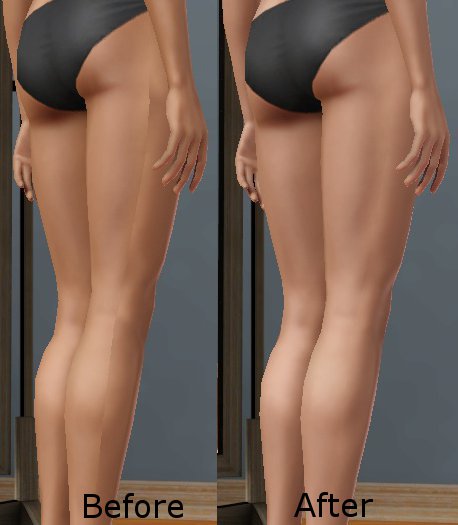
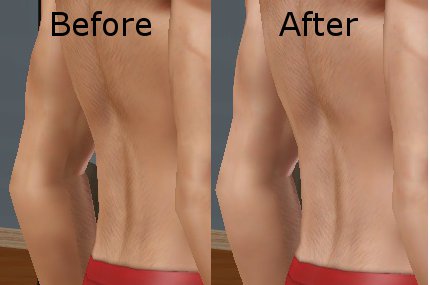
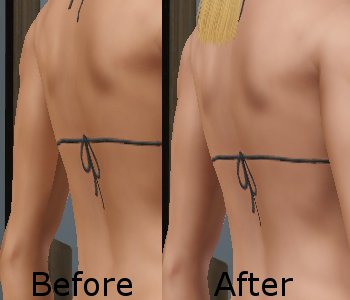
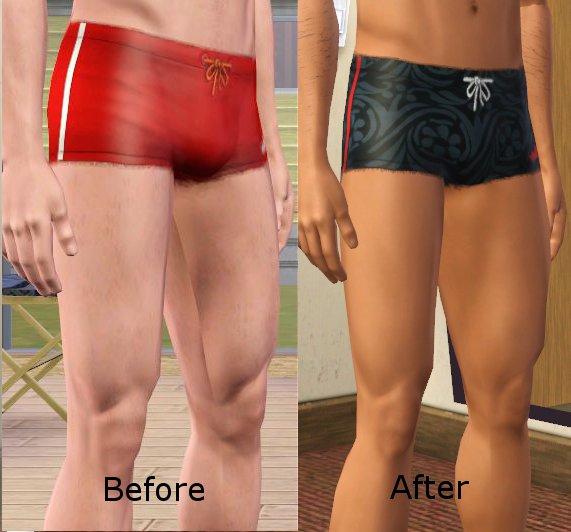
muscleSeamFixer.jpg - width=250 height=250
FemaleLegSeamFix.jpg - width=458 height=525
MaleArmSeamFix.jpg - width=430 height=285
FemaleArmSeamFix.jpg - width=350 height=300
MaleLegSeamFix.jpg - width=571 height=532
Cmar unfortunately passed away in October 2023. They contributed heavily to the Simming community for many years and will be missed!

After a custom body/clothing mesh has been edited in Milkshape, often lines will appear on the skin of the sim when the muscle definition slider is increased past very low settings. This is a tool to modify those meshes and fix this problem.
What the problem is and what the tool does:
The skin lines are caused by some kind of mismatch of the mesh tangents calculated by Milkshape at the seams. If you look closely at EA meshes vs Milkshape-edited meshes, there are also more subtle differences in the way the muscle definition appears. This tool recalculates the tangents for the entire mesh. The results are not identical to the EA values, but the appearance is much closer to the EA meshes and the skin seams are fixed.
I don't know if the same problem appears with meshes edited with Blender.
Since TSRW meshes (.wso) don't contain any tangent information, those meshes can't be fixed directly with this tool. If necessary, when done with working in TSRW you could export the project contents as a .package, export the meshes, run this tool on them, and import them to the .package again.
Edit: TSRW has been updated to use my calculation for the tangents when it imports a .wso mesh, so if you're using a recent version skin seams should no longer be a problem.
Installation and use:
Unzip the files into a folder and run MeshTangentCalculator.exe.
Compatibility:
Requires .NET 2.0 or higher and DirectX3D. Any Windows system running Sims 3 probably already has these installed. May run on Unix and possibly Mac using Wine. The same functionality is included in my upcoming MeshToolkit which should run on Mac and Unix using Mono.
Instructions for use with an existing clothing package:
Still experimental!
While I've tested on several meshes, this is still somewhat experimental. When you use the tool it's a good idea to save the mesh as a new version instead of replacing your mesh. Please report any problems.
Additional Credits:
NOAA_Julien on Unity forums for the C# tangent calculation code, which I adapted for Sims 3 meshes.
BloomsBase and Omegastarr82 for testing.
What the problem is and what the tool does:
The skin lines are caused by some kind of mismatch of the mesh tangents calculated by Milkshape at the seams. If you look closely at EA meshes vs Milkshape-edited meshes, there are also more subtle differences in the way the muscle definition appears. This tool recalculates the tangents for the entire mesh. The results are not identical to the EA values, but the appearance is much closer to the EA meshes and the skin seams are fixed.
I don't know if the same problem appears with meshes edited with Blender.
Since TSRW meshes (.wso) don't contain any tangent information, those meshes can't be fixed directly with this tool. If necessary, when done with working in TSRW you could export the project contents as a .package, export the meshes, run this tool on them, and import them to the .package again.
Edit: TSRW has been updated to use my calculation for the tangents when it imports a .wso mesh, so if you're using a recent version skin seams should no longer be a problem.
Installation and use:
Unzip the files into a folder and run MeshTangentCalculator.exe.
Compatibility:
Requires .NET 2.0 or higher and DirectX3D. Any Windows system running Sims 3 probably already has these installed. May run on Unix and possibly Mac using Wine. The same functionality is included in my upcoming MeshToolkit which should run on Mac and Unix using Mono.
Instructions for use with an existing clothing package:
- I recommend making a backup copy of your package first, just in case.
- If it's your first time using s3pe, make sure you have both the Display: Names and Tags boxes checked in the bottom part.
- Open the package with s3pe, highlight each GEOM file, right-click and Extract them to File. They'll extract to a .simgeom file.
- Run MeshTangentCalculator, select each of the .simgeom files you just extracted, and click the Calculate button to fix them and save a fixed version.
- Either right-click each GEOM in S3PE again and use Replace to replace them with the fixed version, or select all the fixed files and drag them into S3PE making sure you have 'Replace Duplicates' selected.
- Save the package and you're done.
Still experimental!
While I've tested on several meshes, this is still somewhat experimental. When you use the tool it's a good idea to save the mesh as a new version instead of replacing your mesh. Please report any problems.
Additional Credits:
NOAA_Julien on Unity forums for the C# tangent calculation code, which I adapted for Sims 3 meshes.
BloomsBase and Omegastarr82 for testing.
| Filename | Size | Downloads | Date | |||||
|
MeshTangentCalculator_1_0_1_0.zip
| Mesh Tangent Calculator tool
Size: 20.1 KB · Downloads: 9,632 · 22nd Jun 2012 |
20.1 KB | 9,632 | 22nd Jun 2012 | |||||
| For a detailed look at individual files, see the Information tab. | ||||||||
Key:
- - File was updated after upload was posted
Install Instructions
Quick Guide:
1. Click the file listed on the Files tab to download the file to your computer.
2. Extract the zip, rar, or 7z file. Now you will have either a .package or a .sims3pack file.
For Package files:
1. Cut and paste the file into your Documents\Electronic Arts\The Sims 3\Mods\Packages folder. If you do not already have this folder, you should read the full guide to Package files first: Sims 3:Installing Package Fileswiki, so you can make sure your game is fully patched and you have the correct Resource.cfg file.
2. Run the game, and find your content where the creator said it would be (build mode, buy mode, Create-a-Sim, etc.).
For Sims3Pack files:
1. Cut and paste it into your Documents\Electronic Arts\The Sims 3\Downloads folder. If you do not have this folder yet, it is recommended that you open the game and then close it again so that this folder will be automatically created. Then you can place the .sims3pack into your Downloads folder.
2. Load the game's Launcher, and click on the Downloads tab. Find the item in the list and tick the box beside it. Then press the Install button below the list.
3. Wait for the installer to load, and it will install the content to the game. You will get a message letting you know when it's done.
4. Run the game, and find your content where the creator said it would be (build mode, buy mode, Create-a-Sim, etc.).
Extracting from RAR, ZIP, or 7z: You will need a special program for this. For Windows, we recommend 7-Zip and for Mac OSX, we recommend Keka. Both are free and safe to use.
Need more help?
If you need more info, see:
1. Click the file listed on the Files tab to download the file to your computer.
2. Extract the zip, rar, or 7z file. Now you will have either a .package or a .sims3pack file.
For Package files:
1. Cut and paste the file into your Documents\Electronic Arts\The Sims 3\Mods\Packages folder. If you do not already have this folder, you should read the full guide to Package files first: Sims 3:Installing Package Fileswiki, so you can make sure your game is fully patched and you have the correct Resource.cfg file.
2. Run the game, and find your content where the creator said it would be (build mode, buy mode, Create-a-Sim, etc.).
For Sims3Pack files:
1. Cut and paste it into your Documents\Electronic Arts\The Sims 3\Downloads folder. If you do not have this folder yet, it is recommended that you open the game and then close it again so that this folder will be automatically created. Then you can place the .sims3pack into your Downloads folder.
2. Load the game's Launcher, and click on the Downloads tab. Find the item in the list and tick the box beside it. Then press the Install button below the list.
3. Wait for the installer to load, and it will install the content to the game. You will get a message letting you know when it's done.
4. Run the game, and find your content where the creator said it would be (build mode, buy mode, Create-a-Sim, etc.).
Extracting from RAR, ZIP, or 7z: You will need a special program for this. For Windows, we recommend 7-Zip and for Mac OSX, we recommend Keka. Both are free and safe to use.
Need more help?
If you need more info, see:
- For package files: Sims 3:Installing Package Fileswiki
- For Sims3pack files: Game Help:Installing TS3 Packswiki
Also Thanked - Users who thanked this download also thanked:
Packs Needed
None, this is Sims 3 base game compatible!
Other Information
Operating System:
– Windows
: Windows XP, Windows Vista, Windows 7, etc
Utility Type:
– CC Editors
: Tools for modifying .package files, sims*pack files, and resources contained within those files.
– Meshing Tools
: Tools and utilities helpful to meshers.
Plugin Type:
– Not Applicable
: Standalone tools
Tags
About Me
If you have a problem with one of my mods, please post in the thread for that mod. There's no reason to pm me - it fills up my inbox and means no one else is going to be able to learn from your problem and my answers.
My policy on use of my work:
Feel free to use any of my meshes, morphs, skins, or whatever as a base. If you change, convert, or enhance my stuff you may post it without asking, but please give credit. If you use them without changes, please post a link to my downloads rather than reposting. However, you may include them with Sims or lots without asking, but with credit.
Please do not post anything using my creative work on any pay site or the Exchange, unless it's in a free section of a pay site. If you want to post your own original creation made using my tools to a pay site or the Exchange, you may do so, but give credit for the tool.
Obviously my tools are for free use by anyone, but I'd appreciate a credit if you post something created with them.
So basically: no pay site, no Exchange, give credit. Other than that, meh.
If at some time I lose interest in Sims 3, or am too busy, or die, anyone who wants to may update/modify/add to any of my work as long as they follow the MTS policy on updating broken or outdated custom content.
I don't take requests. Suggestions for enhancing work I'm doing or have done are welcome, whether or not I act on them, but please no requests for totally unrelated stuff that I probably have no idea how to do.
My policy on use of my work:
Feel free to use any of my meshes, morphs, skins, or whatever as a base. If you change, convert, or enhance my stuff you may post it without asking, but please give credit. If you use them without changes, please post a link to my downloads rather than reposting. However, you may include them with Sims or lots without asking, but with credit.
Please do not post anything using my creative work on any pay site or the Exchange, unless it's in a free section of a pay site. If you want to post your own original creation made using my tools to a pay site or the Exchange, you may do so, but give credit for the tool.
Obviously my tools are for free use by anyone, but I'd appreciate a credit if you post something created with them.
So basically: no pay site, no Exchange, give credit. Other than that, meh.
If at some time I lose interest in Sims 3, or am too busy, or die, anyone who wants to may update/modify/add to any of my work as long as they follow the MTS policy on updating broken or outdated custom content.
I don't take requests. Suggestions for enhancing work I'm doing or have done are welcome, whether or not I act on them, but please no requests for totally unrelated stuff that I probably have no idea how to do.