
 Sign in to Mod The Sims
 DIY Dining Table
 DIY Dining Table
MTS has all free content, all the time. Donate to help keep it running.
SCREENSHOTS
Tables1.jpg - width=960 height=647
Tables2.jpg - width=960 height=510
Dining.jpg - width=960 height=508
Uploaded: 23rd Jul 2012 at 10:05 PM
Updated: 12th Sep 2012 at 6:13 PM
Updated: 12th Sep 2012 at 6:13 PM
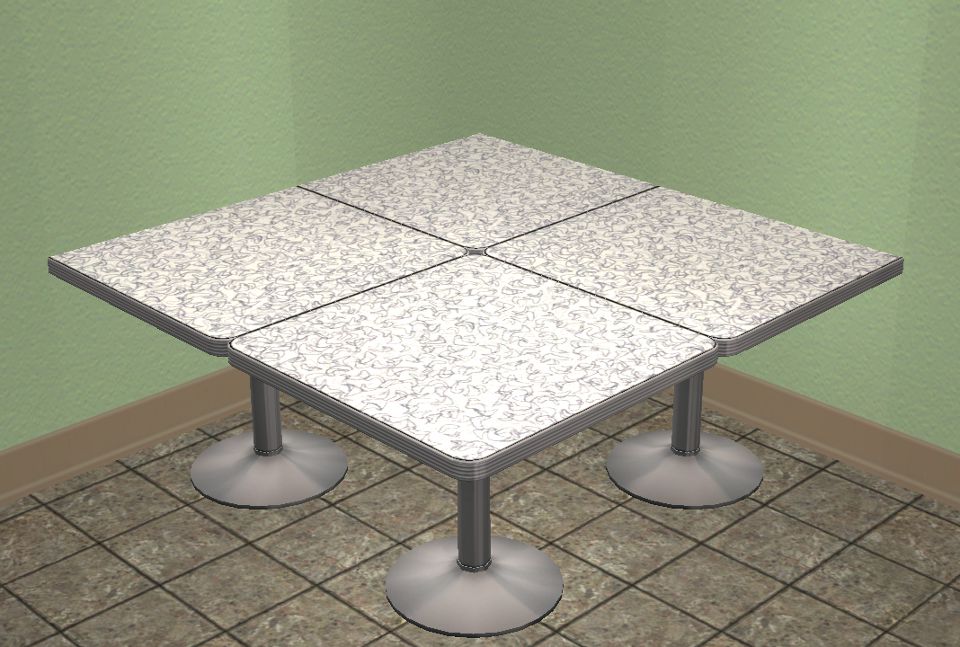
This is something that took a whole lot of trial and error. I wanted to do something unique, and this is the end result of that. The table is cloned from and repository linked to the Nightlife Diner Table, the table will also allow for "keep buying" which took me forever to figure that one out, I was digging through BHAVs and everything, and the solution was quite simple really, much more than I was giving it credit for, you only have to go to the OBJD and find where it says "Keep Buying" and select "true" then commit.
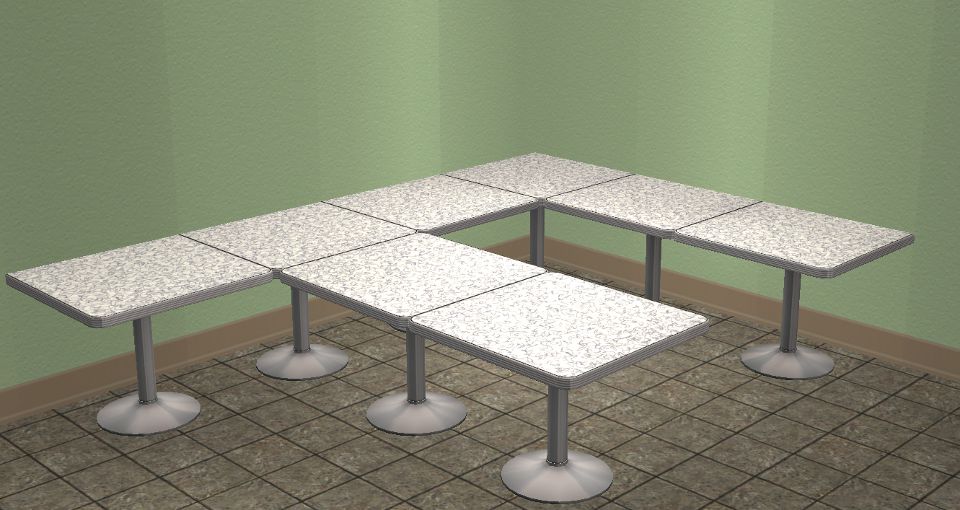
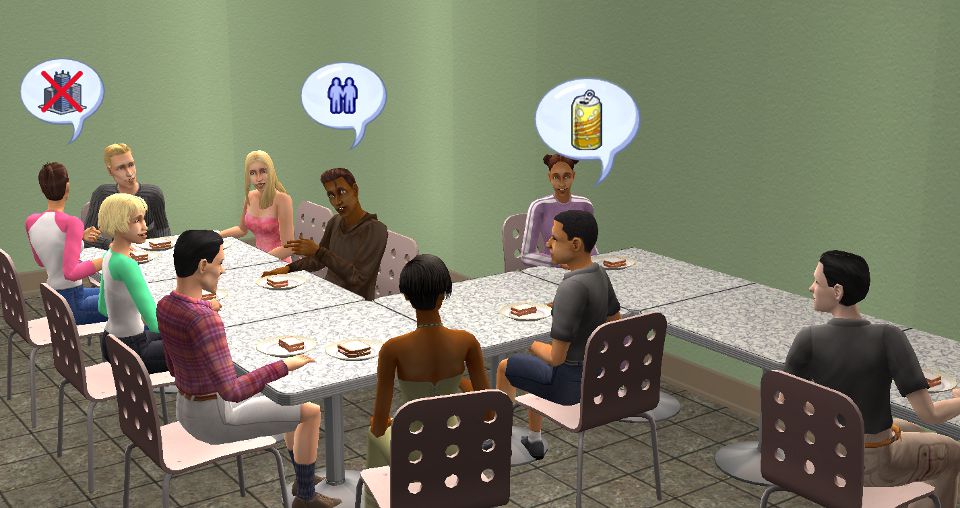
This can be useful for large dinner parties with a lot of guests, birthday parties, community lots, a cafeteria setting, that sort of thing. So you're saying can't this be achieved with boolProp SnapObjectsToGrid false, well yes, and no. You can do it only to the tables but, if you want chairs there, sims can't eat at the tables. With this object, sims can eat at the tables, and you can design it to look any way you want. I hope you can find some use for it, I know I certainly can, it took me a long time to make it so I hope you do like it. The poly count is 378.
I should clear up, if you place several Maxis tables at an odd shape there will be gaps in between, so you would just have several tables in your room. This table makes it so you can connect them to form one table.
I noticed there was a problem with the shadows while playing with it, so I fixed that.
P.S. Check the creator recommended creations tab for extra serving sizes this will come in handy especially if you want very many tables placed. Also in creator recommendations are recolors of this particular table which will be shown in this table.
P.P.S. Ignore the man's feet clipping through the table, it happens even on the regular table, it's just a side effect of The Sims 2.
Polygon Counts:
378
Additional Credits:
IgnorantBliss for the repository link object tutorial
Quaxi and SimPE Will Wright, Maxis, and EA
Milkshape
This can be useful for large dinner parties with a lot of guests, birthday parties, community lots, a cafeteria setting, that sort of thing. So you're saying can't this be achieved with boolProp SnapObjectsToGrid false, well yes, and no. You can do it only to the tables but, if you want chairs there, sims can't eat at the tables. With this object, sims can eat at the tables, and you can design it to look any way you want. I hope you can find some use for it, I know I certainly can, it took me a long time to make it so I hope you do like it. The poly count is 378.
I should clear up, if you place several Maxis tables at an odd shape there will be gaps in between, so you would just have several tables in your room. This table makes it so you can connect them to form one table.
I noticed there was a problem with the shadows while playing with it, so I fixed that.
P.S. Check the creator recommended creations tab for extra serving sizes this will come in handy especially if you want very many tables placed. Also in creator recommendations are recolors of this particular table which will be shown in this table.
P.P.S. Ignore the man's feet clipping through the table, it happens even on the regular table, it's just a side effect of The Sims 2.
Polygon Counts:
378
Additional Credits:
IgnorantBliss for the repository link object tutorial
Quaxi and SimPE Will Wright, Maxis, and EA
Milkshape
This is a new mesh, and means that it's a brand new self contained object that usually does not require a specific Pack (although this is possible depending on the type). It may have Recolours hosted on MTS - check below for more information.
| Filename | Size | Downloads | Date | |||||
|
NightlifeDIYdiningTable_99.zip
Size: 20.6 KB · Downloads: 1,492 · 23rd Jul 2012 |
20.6 KB | 1,492 | 23rd Jul 2012 | |||||
| For a detailed look at individual files, see the Information tab. | ||||||||
Key:
- - File was updated after upload was posted
Install Instructions
Basic Download and Install Instructions:
1. Download: Click the download link to save the .rar or .zip file(s) to your computer.
2. Extract the zip, rar, or 7z file.
3. Place in Downloads Folder: Cut and paste the .package file(s) into your Downloads folder:
1. Download: Click the download link to save the .rar or .zip file(s) to your computer.
2. Extract the zip, rar, or 7z file.
3. Place in Downloads Folder: Cut and paste the .package file(s) into your Downloads folder:
- Origin (Ultimate Collection): Users\(Current User Account)\Documents\EA Games\The Sims™ 2 Ultimate Collection\Downloads\
- Non-Origin, Windows Vista/7/8/10: Users\(Current User Account)\Documents\EA Games\The Sims 2\Downloads\
- Non-Origin, Windows XP: Documents and Settings\(Current User Account)\My Documents\EA Games\The Sims 2\Downloads\
- Mac: Users\(Current User Account)\Documents\EA Games\The Sims 2\Downloads
- Mac x64: /Library/Containers/com.aspyr.sims2.appstore/Data/Library/Application Support/Aspyr/The Sims 2/Downloads
- For a full, complete guide to downloading complete with pictures and more information, see: Game Help: Downloading for Fracking Idiots.
- Custom content not showing up in the game? See: Game Help: Getting Custom Content to Show Up.
- If you don't have a Downloads folder, just make one. See instructions at: Game Help: No Downloads Folder.
Recommended
The creator also recommends the following uploads:
Also Thanked - Users who thanked this download also thanked:
Packs Needed
Other Information
Style:
– Retro
– Contemporary
Room:
– Kitchen
– Dining
: Dining Room
Maxis Flags:
– AddOn
: Maxis Add-Ons (like an armchair that matches a Maxis couch)
Tags
Packs Needed
| Base Game | |
|---|---|
 | Sims 2 |
| Expansion Pack | |
|---|---|
 | Nightlife |
About Me
Welcome to my profile page. I hope you enjoy my downloads here as much as I enjoy making them and sharing them with you!
My Policy - I think my policy is pretty fair. You can use my creations with sims, or lots. You can recolor my creations as well. You may also clone my objects with extra functionality. There is no need to clone any objects that use standard functionality. You may also edit my meshes. Feel free to convert for other Sims games. I ask that you please let me know if you use any of my creations first and provide me with a link after uploading so that I can see the work you have done! Please give credit, and a link to the original download in your upload. No Paysites, Please
Regarding Requests - I have received many requests here that I feel are unnecessary, or something I think that others would not find very useful. Also I like to share what I can think of myself with my own creativity, and not someone else. I ask that you respect my wishes not to fulfill any requests. The only request I take are for custom Sims 2 majors.
For movie making, picture taking, and storytelling there is no need to provide any credit. You may freely use any of my creations for this purpose.
More Downloads BETA
Here are some more of my downloads: