
 Sign in to Mod The Sims
 Unadorned: 12 Accessory-free, Inspiration Set Hairs
 Unadorned: 12 Accessory-free, Inspiration Set Hairs
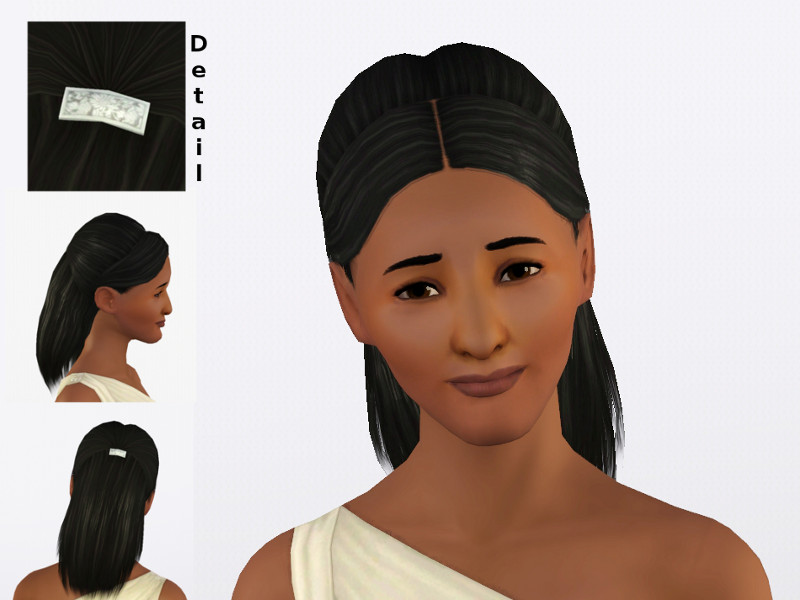
Simply Stunning Maang Tikka.jpg - width=800 height=600
The Simply Stunning Maang Tikka comes with a barrette with a permanent pattern. It has a single color channel.
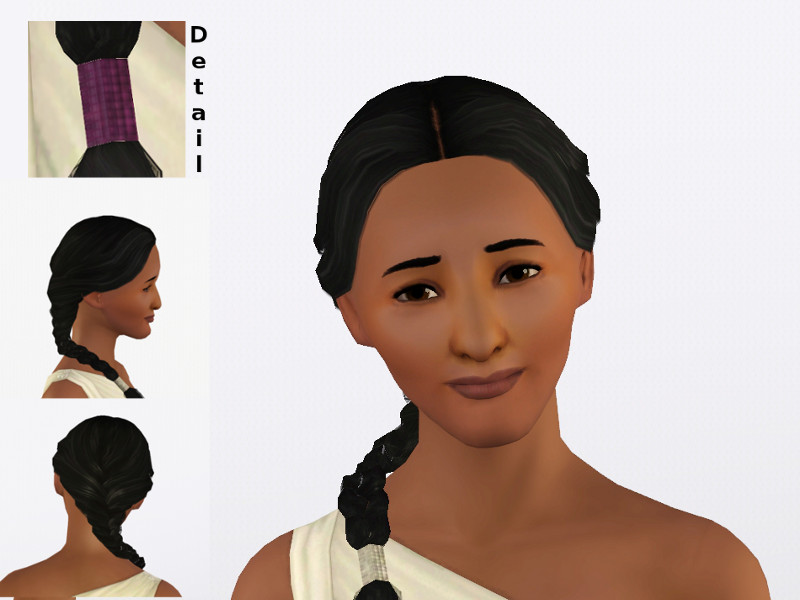
Scarf and Maang Tikka.jpg - width=800 height=600
The Scarf and Maang Tikka's long braid is secured with a recolorable band. It has a permanent pattern controlled by a single color channel.
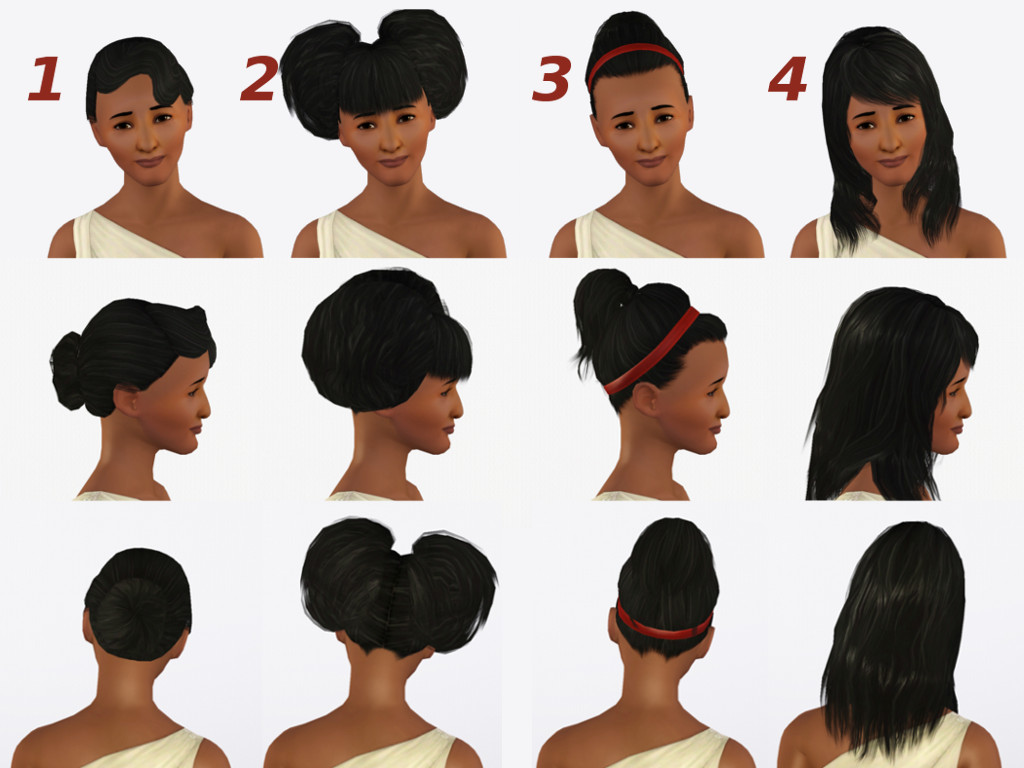
1-4.jpg - width=1024 height=768
Here are hairs 1-4 from different angles.
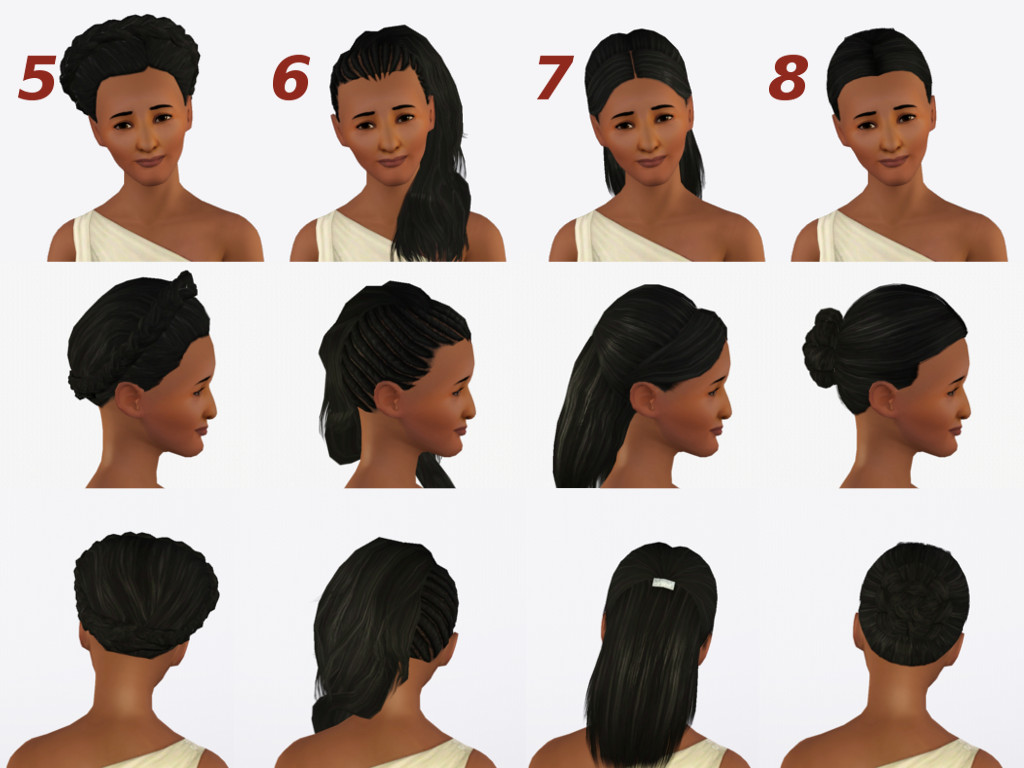
5-8.jpg - width=1024 height=768
Here are hairs 5-8 from different angles.
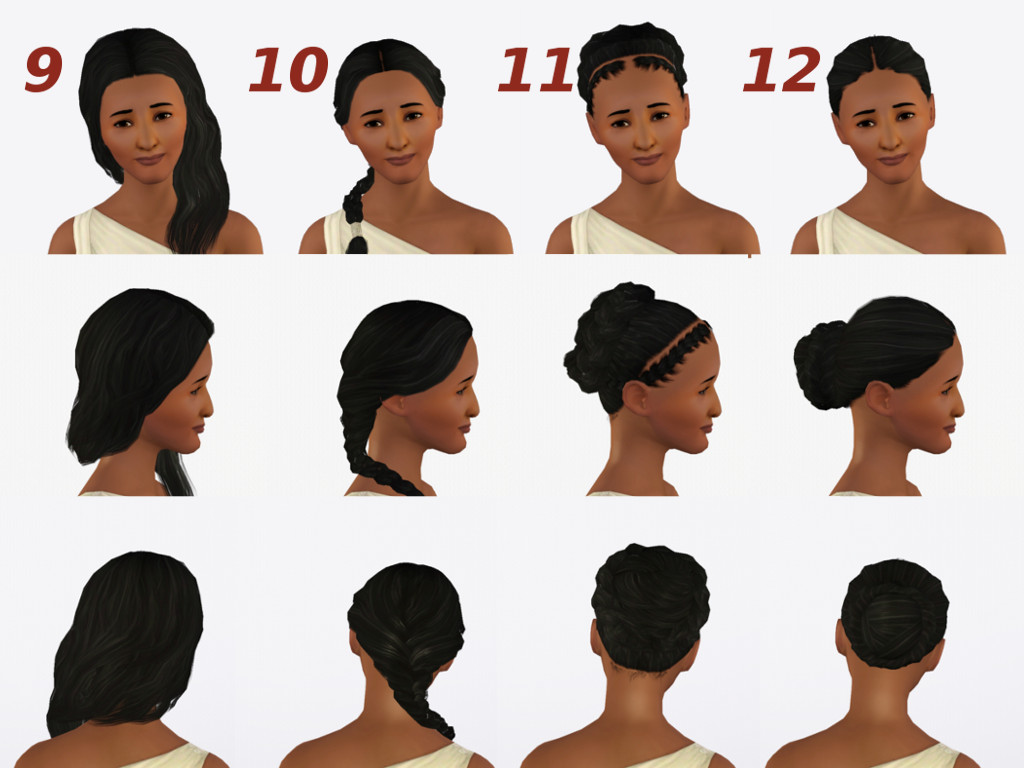
9-12.jpg - width=1024 height=768
Here are hairs 9-12 from different angles.
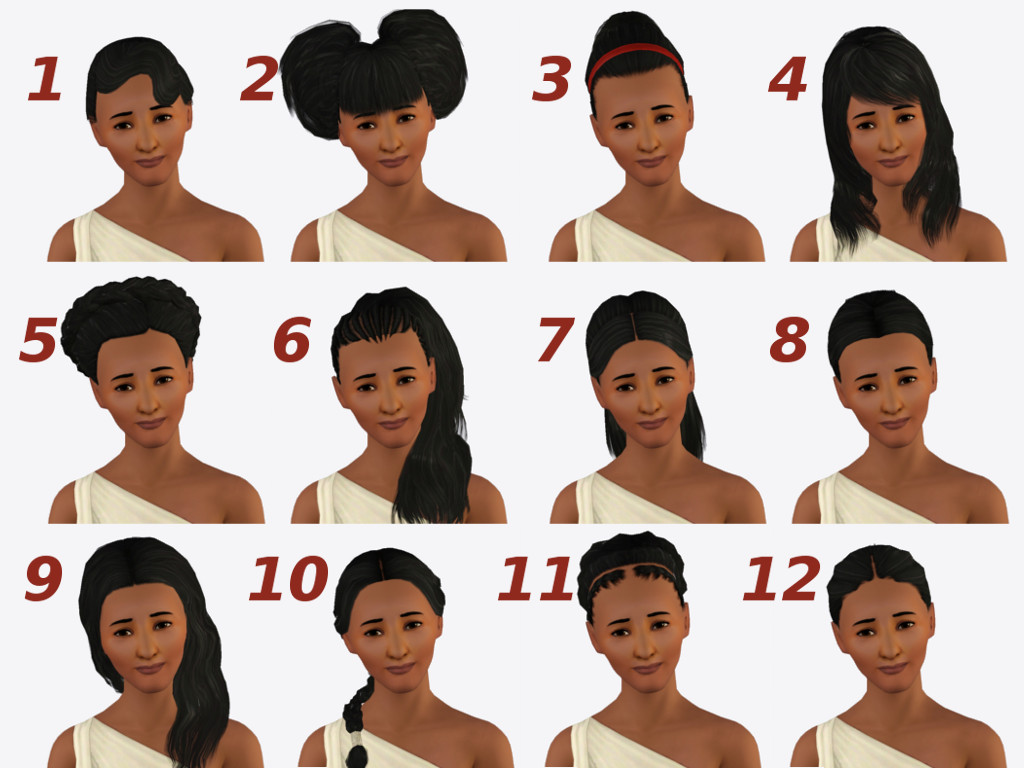
Numbers.jpg - width=1024 height=768
Each hair was assigned a number, allowing you to pick and choose. The numbers are also linked to their original Store name, so you can determine which ones will show up in your game.
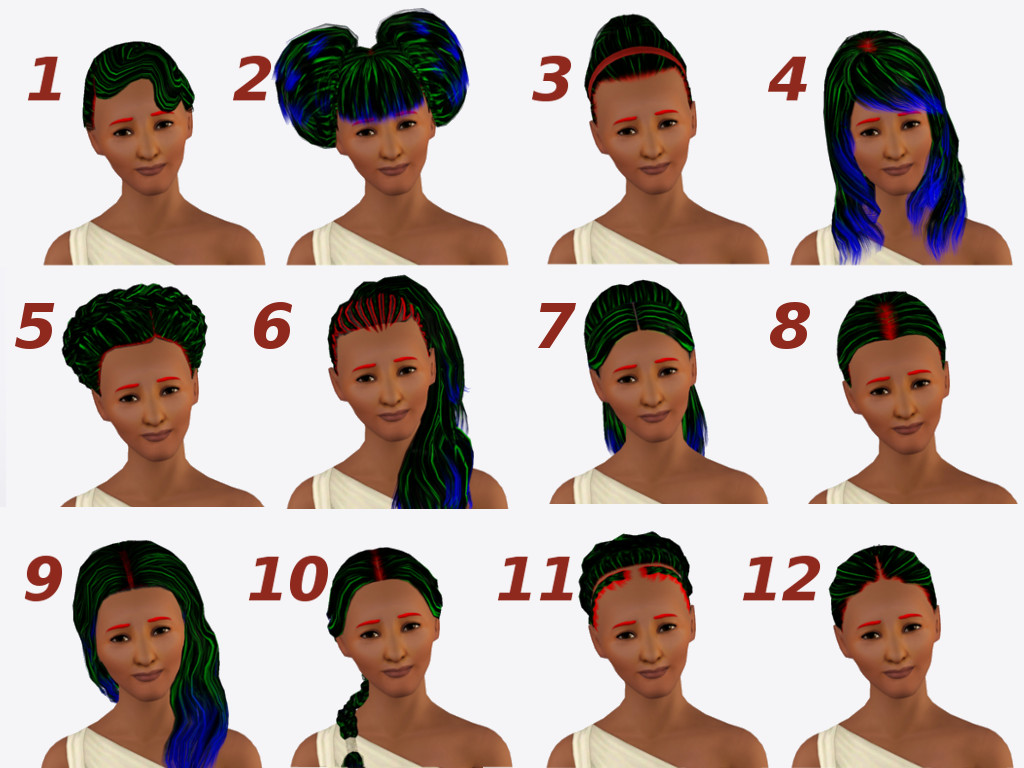
Control.jpg - width=1024 height=768
This is the Control texture, with roots illustrated in red, highlights in green, and tips in blue.

These hairs are linked to the original Store hairs, you MUST have the original Store hairs installed for these edits to appear!
It won't break your game to install them if you don't have the original Store hair, they'll just appear as disturbing abominations instead.
This Set Includes:
1. Cante Captivating- Flor de Fuego
2. Japanese Inspired-Inner Balance Hairstyle
3. Japanese Inspired-Harmony Headband Hairstyle
4. Japanese Inspired- The Right Hairstyle
5. Africa Inspiration- Ornamental Beads Hairstyle
6. Africa Inspiration- Feathers and Braids
7. India Inspiration- Simply Stunning Maang Tikka
8. India Inspiration- Jeweled Adoration Maang Tikka
9. India Inspiration- Jeweled Eye Maang Tikka
10. India Inspiration- Scarf and Maang Tikka
11. India Inspiration- Glamorous Maang Tikka
12. India Inspiration- Elegant Teardrop Maang Tikka
There are two files for each hair: an AF file and an EF file. This is just so that the thumbnail displays correctly, don't let it throw you. If you have purchased the Store hair for adults then you should automatically have the elder version installed as well, and can drop both these files in your Packages folder without worry.
In case you only have some of the Store hairs, or you only want some of the edits, each hair is in its own folder, numbered and labelled with the original Store name. Each hair is numbered in the image below.
Note that these are not default replacements, but rather are additional hairs that appear alongside the Store hairs.
Features:
- All the hairs come with the original morphs, for all four states.
- All hairs are available for teen-elder, even if the original hair was not.
- All hairs are binned correctly, meaning some will be found in the regular hair section and some will be found in the hair-with-accessories section, depending on whether or not they're CAST-able.
- All CAST-able hairs come with a single color preset, to avoid cluttering up your hair bin.
- All file sizes are teeny tiny, because they are linked to their original Store hairs.
- Removing the accessories reduced the polycount by more than 1,000 polys on several of the hairs.
- Your Sim will not be poked in the scalp by an ornamental butterfly while she sleeps.
Notes about specific hairs:
- The Flor de Fuego hair has small clipping issues on particularly wide foreheads. The morphs are imperfect, but that is as EA made them. The Store hair was also originally not for elders, though I have since remedied that.
- The Harmony Headband Hairstyle originally had permanent shadowing on the headband texture, where the butterflies used to be; I reworked the texture to remove it. The headband has one recolorable channel with no permanent pattern.
- The Jeweled Adoration Maang Tikka had a severely borked control texture, a fact that had been somewhat obscured by the tikka but became quite obvious when the tikka was removed. I have repaired the control texture, and it should function as normal.
- The Scarf and Maang Tikka has one recolorable channel, where the hair band ties off the braid. The band has a permanent pattern to it, as seen in the attached detail pictures.
Polygon Counts:
2347 polys - Cante Captivating- Flor de Fuego
3332 polys - Japanese Inspired-Inner Balance Hairstyle
3632 polys - Japanese Inspired-Harmony Headband Hairstyle
3494 polys - Japanese Inspired- The Right Hairstyle
3508 polys - Africa Inspiration- Ornamental Beads Hairstyle
3533 polys - Africa Inspiration- Feathers and Braids
2288 polys - India Inspiration- Simply Stunning Maang Tikka
2088 polys - India Inspiration- Jeweled Adoration Maang Tikka
3752 polys - India Inspiration- Jeweled Eye Maang Tikka
2108 polys - India Inspiration- Scarf and Maang Tikka
2852 polys - India Inspiration- Glamorous Maang Tikka
2330 polys - India Inspiration- Elegant Teardrop Maang Tikka
This is a new mesh, and means that it's a brand new self contained object that usually does not require a specific Pack (although this is possible depending on the type). It may have Recolours hosted on MTS - check below for more information.
| Filename | Size | Downloads | Date | |||||
|
Hairs 9-12.rar
| Contains hairs from the India Inspiration set.
Size: 4.58 MB · Downloads: 18,794 · 30th Jul 2012 |
4.58 MB | 18,794 | 30th Jul 2012 | |||||
|
Hairs 5-8.rar
| Contains hairs from the Africa Inspiration and India Inspiration sets.
Size: 5.50 MB · Downloads: 19,899 · 30th Jul 2012 |
5.50 MB | 19,899 | 30th Jul 2012 | |||||
|
Hairs 1-4.rar
| Contains hairs from the Cante Captivating and Japanese Inspired sets.
Size: 5.97 MB · Downloads: 19,012 · 30th Jul 2012 |
5.97 MB | 19,012 | 30th Jul 2012 | |||||
| For a detailed look at individual files, see the Information tab. | ||||||||
Key:
- - File was updated after upload was posted
Install Instructions
1. Click the file listed on the Files tab to download the file to your computer.
2. Extract the zip, rar, or 7z file. Now you will have either a .package or a .sims3pack file.
For Package files:
1. Cut and paste the file into your Documents\Electronic Arts\The Sims 3\Mods\Packages folder. If you do not already have this folder, you should read the full guide to Package files first: Sims 3:Installing Package Fileswiki, so you can make sure your game is fully patched and you have the correct Resource.cfg file.
2. Run the game, and find your content where the creator said it would be (build mode, buy mode, Create-a-Sim, etc.).
For Sims3Pack files:
1. Cut and paste it into your Documents\Electronic Arts\The Sims 3\Downloads folder. If you do not have this folder yet, it is recommended that you open the game and then close it again so that this folder will be automatically created. Then you can place the .sims3pack into your Downloads folder.
2. Load the game's Launcher, and click on the Downloads tab. Find the item in the list and tick the box beside it. Then press the Install button below the list.
3. Wait for the installer to load, and it will install the content to the game. You will get a message letting you know when it's done.
4. Run the game, and find your content where the creator said it would be (build mode, buy mode, Create-a-Sim, etc.).
Extracting from RAR, ZIP, or 7z: You will need a special program for this. For Windows, we recommend 7-Zip and for Mac OSX, we recommend Keka. Both are free and safe to use.
Need more help?
If you need more info, see:
- For package files: Sims 3:Installing Package Fileswiki
- For Sims3pack files: Game Help:Installing TS3 Packswiki
About Me
- I prefer a maxis-match style, so my downloads are unlikely to use adjust-shine highlights or other fancy-pants pizazz. Since I mostly create for my own game, my aesthetic inevitably gets all over my downloads.
- The Sims who model my creations are yanked somewhat at random from my SimBin, and were either created for gameplay or born in-game to Sims who were. Since I prefer my Sims with goofy smiles and exaggerated features, they are probably not unique enough to upload.
- I'm still working on my policy, so please ask if you have any questions!
More Downloads BETA
Here are some more of my downloads: