
 Sign in to Mod The Sims
- Site Map >
- Community >
- Sims Discussion >
- Sims Medieval >
- Downloads - Mod bugfix: Spell Rune Combinations
- Site Map >
- Community >
- Sims Discussion >
- Sims Medieval >
- Downloads - Mod bugfix: Spell Rune Combinations
#1
 30th Mar 2011 at 1:35 PM
Last edited by Rick : 30th Mar 2011 at 5:53 PM.
30th Mar 2011 at 1:35 PM
Last edited by Rick : 30th Mar 2011 at 5:53 PM.
30th Mar 2011 at 1:35 PM
Last edited by Rick : 30th Mar 2011 at 5:53 PM.
Posts: 150
Thanks: 26381 in 64 Posts
Mod bugfix: Spell Rune Combinations
This mod changes some spells to use different rune combinations so there are no duplicate rune combinations for any spells. This mod will likely be invalidated when a patch is released to fix this issue.spellfix.zip
Extract to your game install directory (ie, C:\Program Files\Electronic Arts\The Sims Medieval\). If you are on Windows Vista or Windows 7, you may need to extract to another location, then copy the extracted files to get around UAC issues. Here are better instructions, just pretend anything that says The Sims 3 is The Sims Medieval.
Note that any in-game text that references the runes of the spells that have been changed has not been updated.
Here are the changed spell rune combinations:
(I tried to keep all of the rune combinations thematic where possible)
Name: Original -> Changed
Charm: Energy, Force, Light -> Air, Force, Light
Conflagration: Air, Fire, Energy -> Air, Energy, Fire
Delightful Fireworks: Energy, Force, Light -> Fire, Force, Light
Enchant Seed: Force, Energy, Light -> Air, Light, Energy
Enslave: Dark, Energy, Force -> Force, Dark, Energy
Friendship: Force, Energy, Light -> Force, Light, Energy
Illusion of Feasts: Air, Fire, Light -> Air, Light, Fire
Magical Tune: Force, Air, Energy -> Air, Force, Energy
Mind Control: Force, Air, Energy -> Force, Air, Dark
Multiply Food: Force, Air, Energy -> Force, Energy, Air
Protection From Fire: Air, Fire, Energy -> Light, Energy, Fire
Resist Fire: Fire, Light, Energy -> Light, Fire, Energy
Sky Shield: Energy, Force, Light -> Energy, Force, Air
Tickle: Air, Fire, Energy -> Air, Energy, Force
For comparison, here are all of the original spell rune combinations:
Alacrity: Fire, Light, Energy
Beacon of Hope: Light, Energy, Chaos
Charm: Energy, Force, Light
Conflagration: Air, Fire, Energy
Curse: Energy, Dark, Force
Delightful Fireworks: Energy, Force, Light
Enchant Seed: Force, Energy, Light
Endurance: Air, Energy, Light
Enslave: Dark, Energy, Force
Fiery Eye of Visibility: Air, Fire, Light
Flare: Energy, Fire, Light
Forest Fire: Air, Fire, Energy
Friendship: Force, Energy, Light
Gale: Air, Force, Order
Ghostly Music: Air, Energy, Order
Golemify: Light, Force, Energy
Growth: Light, Energy, Air
Illusion of Feasts: Air, Fire, Light
Inferno: Fire, Energy, Chaos
Lightning Bolt: Force, Air, Energy
Magic Arrow: Energy, Air, Light
Magic Probe: Energy, Light, Air
Magical Tune: Force, Air, Energy
Mend: Energy, Order, Light
Mend Tormented Soul: Dark, Energy, Force
Miasma: Dark, Order, Fire
Mind Control: Force, Air, Energy
Multiply Food: Force, Air, Energy
Protection From Fire: Air, Fire, Energy
Purge Demons: Light, Energy, Force
Rainstorm: Energy, Force, Light
Resist Fire: Fire, Light, Energy
Sky Shield: Energy, Force, Light
Sleep: Dark, Chaos, Force
Spirit Thief: Dark, Force, Air
Summon Artifact: Energy, Light, Force
Telepathy: Light, Energy, Order
Teleport: Air, Light, Chaos
Terror: Dark, Order, Energy
Tickle: Air, Fire, Energy
Vanish: Air, Light, Force
Advertisement
Test Subject



#3
31st Mar 2011 at 3:01 AM
31st Mar 2011 at 3:01 AM
Posts: 1,828
Thanks: 1113 in 4 Posts
Thank you, Rick! It's sweet of you to make your expertise available to the community.
I've made some mods for The Sims 1 -- yes, The Sims ONE :-) -- which you can find at http://corylea.com/Sims1ModsByCorylea.html
I've made some mods for The Sims 1 -- yes, The Sims ONE :-) -- which you can find at http://corylea.com/Sims1ModsByCorylea.html


#4
31st Mar 2011 at 3:05 AM
31st Mar 2011 at 3:05 AM
Posts: 1,227
Thanks for this Rick! Your mods work brilliantly :D; you truly are great to help out the community this way...
...Titanium white...
...Titanium white...
Test Subject
#5
31st Mar 2011 at 3:14 AM
31st Mar 2011 at 3:14 AM
Posts: 53
Thank you so much. 

#6
31st Mar 2011 at 8:21 PM
31st Mar 2011 at 8:21 PM
Posts: 1,828
Thanks: 1113 in 4 Posts
Since Rick says, "Note that any in-game text that references the runes of the spells that have been changed has not been updated," you'll want to have a list of the changed version of the spells with you when you play the game. Rick has included such a list in his post, but I thought a downloadable list might be helpful. I've sorted his list into columns, to make it easier to see the differences between the old and new spells.
Here's what it looks like:
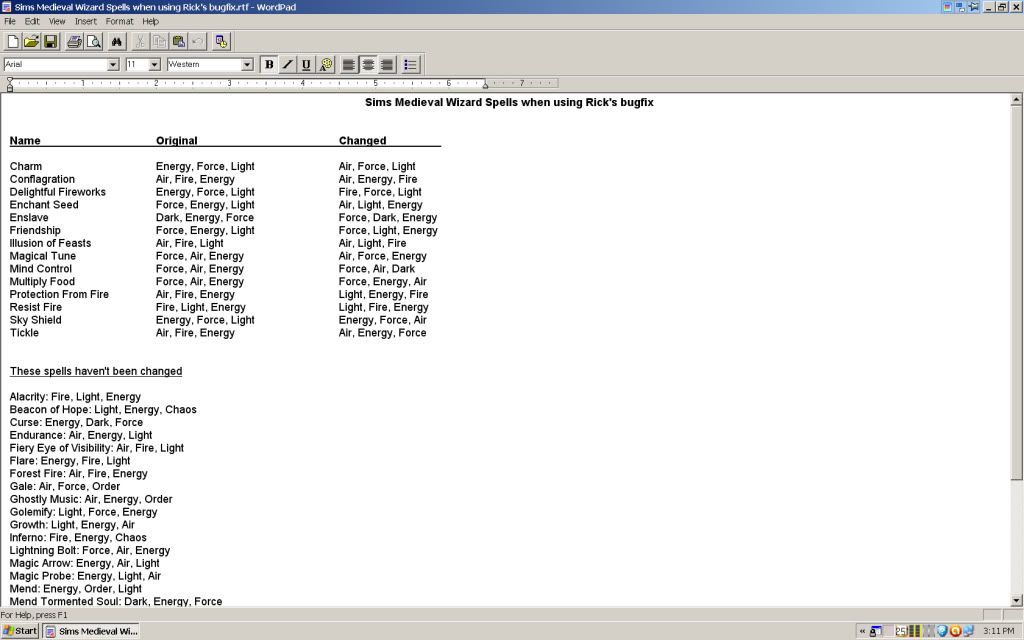
The list is in rich text format; view it in Wordpad. It's zipped, below; you'll need to unzip it, of course. (It's not actually big enough to need zipping, but rtf isn't one of the allowable file formats.)
Thanks again, Rick, for making this bugfix!
I've made some mods for The Sims 1 -- yes, The Sims ONE :-) -- which you can find at http://corylea.com/Sims1ModsByCorylea.html
Here's what it looks like:
The list is in rich text format; view it in Wordpad. It's zipped, below; you'll need to unzip it, of course. (It's not actually big enough to need zipping, but rtf isn't one of the allowable file formats.)
Thanks again, Rick, for making this bugfix!
Attached files:
 |
Sims Medieval Wizard Spells when using Rick's bugfix.zip (1.0 KB, 796 downloads) - View custom content | |
     2527  03-31-11 15:10   Sims Medieval Wizard Spells when using Rick's bugfix.rtf
 --------                   -------
     2527                   1 file
|
||
I've made some mods for The Sims 1 -- yes, The Sims ONE :-) -- which you can find at http://corylea.com/Sims1ModsByCorylea.html
#7
1st Apr 2011 at 1:01 AM
1st Apr 2011 at 1:01 AM
Posts: 372
Thanks again Rick! And Thanks for the nice neat list Corylea
Burn The midnight oil, it will be daylight soon...
Burn The midnight oil, it will be daylight soon...
Test Subject
#8
1st Apr 2011 at 5:32 PM
1st Apr 2011 at 5:32 PM
Posts: 7
none of the 'original' rune combos work at all, i tried them all, I really want all those skills :/
Test Subject
#9
1st Apr 2011 at 5:34 PM
1st Apr 2011 at 5:34 PM
Posts: 7
and the link doesnt work aswell :/
#10
2nd Apr 2011 at 12:59 AM
2nd Apr 2011 at 12:59 AM
Posts: 1,828
Thanks: 1113 in 4 Posts
Quote: Originally posted by smilies221
| and the link doesnt work aswell :/ |
I just tried it, and the link works fine for me. You might want to try again.
I've made some mods for The Sims 1 -- yes, The Sims ONE :-) -- which you can find at http://corylea.com/Sims1ModsByCorylea.html
Test Subject
#11
2nd Apr 2011 at 3:28 PM
Last edited by mangaroo : 2nd Apr 2011 at 4:03 PM.
2nd Apr 2011 at 3:28 PM
Last edited by mangaroo : 2nd Apr 2011 at 4:03 PM.
Posts: 7
Quote: Originally posted by Corylea
| I just tried it, and the link works fine for me. You might want to try again. |
ive tried, it goes to blank page, or try gib.com, or something like that, idk, maybe its my security or something idk :/ i want it! lol
his Spellfix.zip doesnt work
Lab Assistant
Test Subject
#13
2nd Apr 2011 at 10:12 PM
2nd Apr 2011 at 10:12 PM
Posts: 17
It worked for me, just took longer than normally to start.

#14
3rd Apr 2011 at 3:51 PM
3rd Apr 2011 at 3:51 PM
Posts: 560
Thanks: 820 in 2 Posts
Well, my wizard keeps failing to prepare spells. All of the ones that succeed are a few of the unchanged ones. I'll not sure if it's the mod or the sim herself. Has anyone had the same problem?
My true to life tumblr: http://smargent.tumblr.com/
My true to life tumblr: http://smargent.tumblr.com/
Test Subject
#15
4th Apr 2011 at 3:44 PM
4th Apr 2011 at 3:44 PM
Posts: 7
can any of you answer, why i cant prepare ANY of these spells? do you have to unlock through quest?? cos i did a quest about mind control but didnt get the spell :/
Test Subject
#16
12th Apr 2011 at 5:20 AM
12th Apr 2011 at 5:20 AM
Posts: 10
Has anyone got this mod to work? I cannot prepare ANY of these spells except those all ready unlocked at level 10?
I do have other mods and they do work so yes it is in the right directory and I do have my resource.cfg file...
I do have other mods and they do work so yes it is in the right directory and I do have my resource.cfg file...

#17
12th Apr 2011 at 8:57 AM
12th Apr 2011 at 8:57 AM
Posts: 138
Hello and thank you for doing this - here is a silly question - how come I can only memorise a few spells - then the next day it says that he/she needs to remember 2 spells and he/she is already at their quota - do I have to unlearn the spells just to learn the new ones? This is annoying and it should be that they can keep all spells learnt remembered to grow in their skill - thanks

#18
12th Apr 2011 at 9:06 AM
12th Apr 2011 at 9:06 AM
Posts: 6,105
Thanks: 12816 in 71 Posts
Quote: Originally posted by silvertora
| Hello and thank you for doing this - here is a silly question - how come I can only memorise a few spells - then the next day it says that he/she needs to remember 2 spells and he/she is already at their quota - do I have to unlearn the spells just to learn the new ones? This is annoying and it should be that they can keep all spells learnt remembered to grow in their skill - thanks |
Yes, you have to forget em.
Silly maybe, but the whole idea that you can only memorize a certain number of spells at a time has a long history in fantasy gaming. It's kinda how spells in old versions of Dungeons and Dragons worked :-)

#19
12th Apr 2011 at 12:08 PM
12th Apr 2011 at 12:08 PM
Posts: 1,205
Mmm, actually, only wizards can technically "know" unlimited spells (unless they chosen a specific school, then they are restricted) in 3.5. But the sorcerer and similar classes are limited in how many they can know (usually based on caster level and ability score) and the idea of limitation is still seen up to 4th edition! Though, in 4th edition, the way it works is very different.
And then I reread and realize, oh wait, memorization (and feel stupid for the mistake). But, in 3.5, wizards can only memorize a certain amount, and in 4th, like I said, it works things differently. Sorcerers on the other hand can only cast so many a day, but wizards specifically memorize their spells.
/off-topicness
Is that a shillelagh in your pocket, or are you just sinning against God?
And then I reread and realize, oh wait, memorization (and feel stupid for the mistake). But, in 3.5, wizards can only memorize a certain amount, and in 4th, like I said, it works things differently. Sorcerers on the other hand can only cast so many a day, but wizards specifically memorize their spells.
/off-topicness
Is that a shillelagh in your pocket, or are you just sinning against God?
#20
17th Apr 2011 at 3:38 AM
17th Apr 2011 at 3:38 AM
Posts: 207
Why does my wizard only know some spells? She's at level 10 so shouldn't she have all those spells available for memorizing? Not very many of the spells on that list are available to my wizard. Why does she only have some of them in the list? Is there a quest or something that makes the other ones available? And she can never cast 'ghostly music'. I don't even know why she has that one. It's always grayed out when she's going to cast a spell.

#21
17th Apr 2011 at 3:53 AM
17th Apr 2011 at 3:53 AM
Posts: 3,552
Thanks: 55563 in 750 Posts
A lot of the spells that are in the lists up top are Clone spells, clones of the other ones. There are for example 2 clones of the Flare spell, but you can only learn and use the Flare spell under normal circumstances, not the other two. All the others are used I believe during quests, and you learn them during the quest I presume. There are 15 spells you can learn normally IIRC.
MedievalMods and Sims3mods: Dive Cave Reset Fix, Resort Revamp, Industrial Oven Revamp, Will O' Wisp fix, UI Sounds Disabled, No Cars, Gnome Family Planner, Townies Out on the Town, No Martial Arts Clothes, Fast Skilling, etc. http://simsasylum.com/tfm/
MedievalMods and Sims3mods: Dive Cave Reset Fix, Resort Revamp, Industrial Oven Revamp, Will O' Wisp fix, UI Sounds Disabled, No Cars, Gnome Family Planner, Townies Out on the Town, No Martial Arts Clothes, Fast Skilling, etc. http://simsasylum.com/tfm/
Test Subject
#22
12th Jun 2011 at 2:17 AM
12th Jun 2011 at 2:17 AM
Posts: 2
Hi I stumbled across this thread in searching for a solution to this problem. I downloaded the mod but I don't think I have it in the right location in my files, since nothing has changed. I have windows 7 so I did extract the file to another location and then copy it into the C:\Program Files\Electronic Arts\The Sims Medieval\ but nothing is happening? I'm kind of new to doing anything out of the ordinary for Sims Medieval although I used to for Sims 2 and the original Sims. Thanks so much!
btw, I did try to follow the link to the better instructions and not really sure where I'm supposed to go, it dumps me elsewhere.
btw, I did try to follow the link to the better instructions and not really sure where I'm supposed to go, it dumps me elsewhere.
#23
12th Jun 2011 at 11:21 AM
12th Jun 2011 at 11:21 AM
Posts: 3,552
Thanks: 55563 in 750 Posts
The thread which is stickied up top titled How To Mod Your Game For Beginners has all the skivvy on installing mods.
MedievalMods and Sims3mods: Dive Cave Reset Fix, Resort Revamp, Industrial Oven Revamp, Will O' Wisp fix, UI Sounds Disabled, No Cars, Gnome Family Planner, Townies Out on the Town, No Martial Arts Clothes, Fast Skilling, etc. http://simsasylum.com/tfm/
MedievalMods and Sims3mods: Dive Cave Reset Fix, Resort Revamp, Industrial Oven Revamp, Will O' Wisp fix, UI Sounds Disabled, No Cars, Gnome Family Planner, Townies Out on the Town, No Martial Arts Clothes, Fast Skilling, etc. http://simsasylum.com/tfm/
Test Subject
#24
12th Jun 2011 at 4:30 PM
Last edited by KittyB8099 : 12th Jun 2011 at 4:43 PM.
12th Jun 2011 at 4:30 PM
Last edited by KittyB8099 : 12th Jun 2011 at 4:43 PM.
Posts: 2
Quote: Originally posted by Shimrod101
| The thread which is stickied up top titled How To Mod Your Game For Beginners has all the skivvy on installing mods. |
I did read that and followed the instructions and it's still not working for me. I didn't know if Windows 7 does something different. I guess maybe I will have to kill off my wizard which is really really upsetting, but I need this quest to complete dominition and the mod just isn't changing anything for me.
Edit: I just tried one more thing, apparently the resource file was in the wrong spot (due to the copying procedure for windows 7) I tried moving it and it works now! Thanks so much for the mod!

#25
12th Jun 2011 at 4:32 PM
12th Jun 2011 at 4:32 PM
Posts: 374
Thanks: 1402 in 5 Posts
Quote: Originally posted by KittyB8099
|
Hi I stumbled across this thread in searching for a solution to this problem. I downloaded the mod but I don't think I have it in the right location in my files, since nothing has changed. I have windows 7 so I did extract the file to another location and then copy it into the C:\Program Files\Electronic Arts\The Sims Medieval\ but nothing is happening? I'm kind of new to doing anything out of the ordinary for Sims Medieval although I used to for Sims 2 and the original Sims. Thanks so much! btw, I did try to follow the link to the better instructions and not really sure where I'm supposed to go, it dumps me elsewhere. |
KittyB8099 - You need to place the .package file in C:\Program Files\Electronic Arts\The Sims Medieval\Mods\Packages. You will have to create the Mods folder as a subfolder of The Sims Medival folder and then create the subfolder, Packages, in the Mods folder, if you haven't already do so.
Please don't destroy your Wizard! It's just a matter of correctly placing the file!

Who Posted
|
|