Sign in to Mod The Sims
 Final Fantasy Wall Paint with Light - Simnuts101 recolor
 Final Fantasy Wall Paint with Light - Simnuts101 recolor


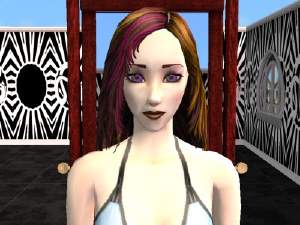
snapshot_00000004_cfa95954.jpg - width=400 height=300
snapshot_00000004_cfa959a4.jpg - width=400 height=300
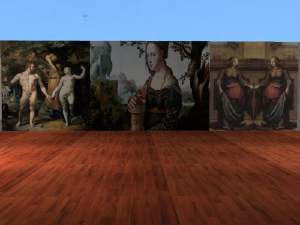
snapshot_00000004_8fa95b82.jpg - width=400 height=300
snapshot_00000004_8fa95b52.jpg - width=400 height=300
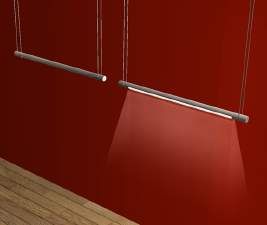
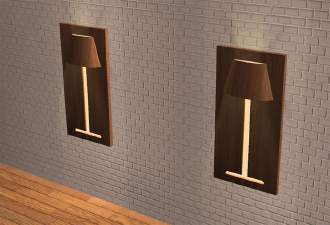
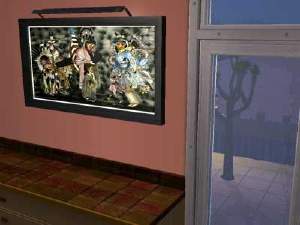
Here is a recolor of the fabulous mesh that Simnuts 101 made. Two recolors of the very much awaited Final Fantasy XII.
YOu need to get the mesh here to see them in the game.
PLEASE NOTE THAT THESE PAINTING DO NOT SHOW UP UNDER DECORATIVE BUT SHOW UP UNDER WALL LIGHTING IN THE CATALOG
They look good during the day if you have the light off and gorgeous at night with them on!

As always, I appreciate if you can please post some feedback. If you are in a hurry, then click the thanks if you like this and rate it

If you happen to want to use my content for your work or would like to recolor please ask me 1st and give proper credit, also add a link to my thread.
Also, please NEVER upload any of my work to a pay sites or to The Sims exchange. The content was meant for MTS2 community.
I am also accepting requests for paintings, bedding, makeup, some genetics and objects recolors.
ENJOY!!!!
|
ff12 light.zip
Download
Uploaded: 1st Jun 2005, 418.6 KB.
433 downloads.
|
||||||||
|
ff12 light.rar
Download
Uploaded: 1st Jun 2005, 359.3 KB.
576 downloads.
|
||||||||
| For a detailed look at individual files, see the Information tab. | ||||||||
Install Instructions
1. Download: Click the download link to save the .rar or .zip file(s) to your computer.
2. Extract the zip, rar, or 7z file.
3. Place in Downloads Folder: Cut and paste the .package file(s) into your Downloads folder:
- Origin (Ultimate Collection): Users\(Current User Account)\Documents\EA Games\The Sims™ 2 Ultimate Collection\Downloads\
- Non-Origin, Windows Vista/7/8/10: Users\(Current User Account)\Documents\EA Games\The Sims 2\Downloads\
- Non-Origin, Windows XP: Documents and Settings\(Current User Account)\My Documents\EA Games\The Sims 2\Downloads\
- Mac: Users\(Current User Account)\Documents\EA Games\The Sims 2\Downloads
- Mac x64: /Library/Containers/com.aspyr.sims2.appstore/Data/Library/Application Support/Aspyr/The Sims 2/Downloads
- For a full, complete guide to downloading complete with pictures and more information, see: Game Help: Downloading for Fracking Idiots.
- Custom content not showing up in the game? See: Game Help: Getting Custom Content to Show Up.
- If you don't have a Downloads folder, just make one. See instructions at: Game Help: No Downloads Folder.
Loading comments, please wait...

Uploaded: 1st Jun 2005 at 9:11 AM
Updated: 18th Oct 2008 at 9:51 PM by -Maylin-
-
-
by klarsicht42 7th May 2005 at 9:19pm
 29
16k
6
29
16k
6
-
-
-
-
by DBCAB 23rd Nov 2005 at 11:08pm
18
21.8k
17
-
by ralexpdx 13th Apr 2006 at 3:24am
3
5.6k
1
-
-

-


-
-
Paintings for Chapels or art studios
by Mishkat 24th Mar 2005 at 12:01am
:hi: Here are 4 paintings for the art minded Sim. Great for chapels, italianate houses, art studios... more...
1
2.9k
-
-
-
-
-

Manga/Anime Painting Collection Set 4
by Mishkat 11th Mar 2005 at 4:10am
Hello everybody! more...
6
12.4k
5
-
-
-