When the default Ingredient_1 ("Sugar") isn't found, the loader will test each item from SubstIngredient_1 tag and automatically use the first valid ingredient found.
Quote:
<?xml version="1.0"?>
<RecipeMasterList>
<!-- Start - Keep this block of data untouched. MUST be before any Data tuning -->
<Data>
<Recipe_Key></Recipe_Key>
.................................
<Ingredient_1></Ingredient_1>
<Ingredient_2></Ingredient_2>
<Ingredient_3></Ingredient_3>
<SubstIngredient_1></SubstIngredient_1> You must include these new tags.
<SubstIngredient_2></SubstIngredient_2>
<SubstIngredient_3></SubstIngredient_3>
................................
</Data>
<!-- End -->
<!-- Place your Data tunings below this line -->
<Data>
<Recipe_Key>StrawberryPie</Recipe_Key>
.......................................
<Ingredient_1>Sugar</Ingredient_1>
<Ingredient_2>Kiwi</Ingredient_2>
<Ingredient_3>Strawberry</Ingredient_3>
<SubstIngredient_1>Mycenas,SweetGrass,Apple</SubstIngredient_1> Recommendation: Always set basegame ingredient at the last position of the sequence.
<SubstIngredient_2>Spotlight Mushrooms,Cheese</SubstIngredient_2>
<SubstIngredient_3>Pumpkin,Apple</SubstIngredient_3>
......................................
</Data>
</RecipeMasterList>
For the Plant AutoSoil:
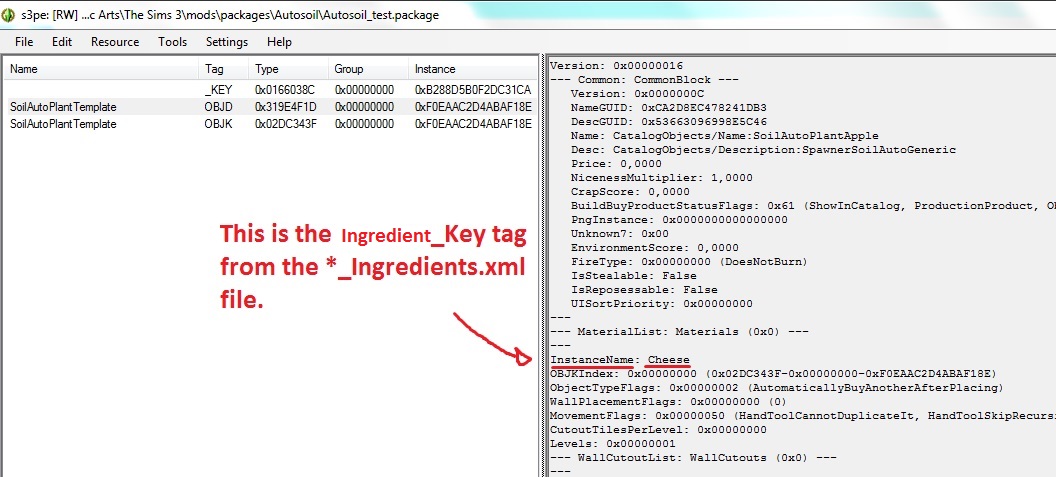
Duplicate the files (OBJD and OBJK) from the "Autosoil_test.package" and change the instance value (hash a new unique file name for them and don't forget to update the TGI resource from the OBJD to correct link your OBJK). Edit the OBJD and change the "InstanceName" property to the Ingredient_Key value of your ingredient (See the image). Ready.
Attention: You can only plant ingredients that have the correct plantable data (*_Plants.xml).

 8th Nov 2015 at 2:21 AM