View Single Post in: [Testing!] Electric box, power generator, and more

#43
 6th Feb 2018 at 12:25 AM
6th Feb 2018 at 12:25 AM
Posts: 1,738
Thanks: 23023 in 150 Posts
BkajnlConcepts, I'm impressed. 
SparkySays, glad to hear.
I brought new version of electrical box. Changes are not that big. I found yet another object that needed turning off (neon coffee table). It's covered now. I changed how electrical box affects lot value again. Changed short circuit logic a bit. Oh and I added shadows.
First draft of electrical box's full huge description.
I also brought power generator. I was meaning to post it a while ago, but I can't help to procrastinate from writing a description... It's the worst part of modding.
Power generator and fuel can are custom objects that provide a backup power source and do more than that.
Buy them in Misc-Misc. section.
 Requirements: UC/AL/M&G until I implement EP checks to make it more compatible and safe for other configs.
Both objects are in the same file. They are self-contained in terms that even though they are designed to work with electrical box, they can be used with or without it.
Description.
_________
 New files are on the next page(s).

SparkySays, glad to hear.

I brought new version of electrical box. Changes are not that big. I found yet another object that needed turning off (neon coffee table). It's covered now. I changed how electrical box affects lot value again. Changed short circuit logic a bit. Oh and I added shadows.
First draft of electrical box's full huge description.
Electric box of power problems
Experience power outages, phone line disconnections, burnt bulbs, tv antenna problems and different wiring related accidents. Upgrade and maintain electrical panel for better protection, tinker it for fun, build skill and hobby. Dive into the world of fuses, breakers, shorts and spikes.
Electrical box is a detailed mod about electricity and a new object you can interact with.
First and foremost, or "Tell me the basics, and I'm off to play"
1. Are you playing Ultimate Collection or have AL/M&G as your latest expansions? If not, make backup of your good 'hoods and test first. You don't need all EPs for this, and I worked on making it compatible with any setup, but I only tested on UC. If your latest EP is UNI or NL, don't even bother to download.
2. Run HCDU+ to make sure there are no conflicts and don't forget to clear game's cache.
3. Get related mods and objects, if you'd like: links here
4. Buy electrical box in misc. electronics and place it on a lot you want to be affected. In apartments, it has to be on private territory. From then, it does its thing and you can do things with it.
5. If you decide to delete the mod, make sure all lots have power on, before you uninstall. There's a debug interaction on electrical box, if you need it.
6. I can't promise there won't be bugs. There probably will be updates. We tested it a lot, but it's a complicated mod, so let's be realistic. If you catch any errors, please let me know and I'll do my best to fix them.
7. You may think, it's that unused power outage scenario. No. I did use bits of unused in-game code, but this mod covers a lot more objects and does a lot more stuff than that scenario.
Although I took inspiration in real life, this mod is by no means an accurate representation of physics of electricity. It is a game. If you're interested in how things really work, ask professionals and - please - always read manuals.
So here's this thing's manual, I guess. I wouldn't want to give out too much and spoil unexpected fun, but what're you gonna do. If anything, read the headers.
Power outage
Loss of electricity is the most complicated thing about this mod. To give you some sense of the level of detail: when power is out, water in a hottub stops bubbling and fridge motor goes silent. Sounds, lights, interactions, textures, effects, animations - I've tried to make it look like it's for real. Has support for business objects, too.
There are prolonged power outages that may happen as a consequence of thunderstorm, blizzard or random event. Those are the ones you have to wait through and can't really do anything about them. There are also those that you can do something about, because you are directly responsible for them: digging accident and unpaid bills. More on them in their respective threads.
Usually power outage affects all object on a lot. Apartments are special. Unless it's centralized power outage or digging accident, apartment neighbors have electricity in their flats as well as common areas. So, if you haven't paid your bills or have a breakage, only you suffer. Respectively, when you use backup source to power your own apartment during total blackout, common areas and neighbors are not powered.
Objects that will NOT work, sound, animate and/or emit light, if power is off
Objects that WILL work, but with no effects, if power is off
Objects that WILL work fully, if power is off
Custom objects
If an object of certain category operates pretty much like maxis clone, it should behave as intended. Those categories of objects are:
Other objects like musical instruments are done by GUIDs, so custom ones won't be recognized by the mod, unless you modify either my mod or the object itself. Mini-tutorials on how to register custom objects in the mod, see below.
If you encounter any errors caused by the mod conflicting with a custom object, please let me know.
Emergency power sources
Power backup comes into play during long power outages caused by an external event (e.g. blizzard blackout), unpaid bills or digging accident with breached wiring, given there's nothing broken in the electrical panel that would prevent it from supplying power. You have almost no battery capacity, so if the backup source stops producing energy, the power will go back off in a few minutes.
Wind & solar are parts of M&G expansion, although, what makes them useful is functionality performed by electrical box.
- They switch on automatically and require special equipment - inverter - installed in the electrical panel.
- One wind turbine is big enough to power any lot as long as there's wind. It may stop if wind speed is very low.
- Solar panels work in daytime. Their efficiency depends on sky clarity and season. Apartments need 1-2 solar panels, other lots need 2-4 solar panels. Large ground solar panel is counted as 2 panels, whereas small roof panel is 1.
- See also: energy rebate fix.
Portable gas power generator is an object made by me that you can download separately.
- It works on fuel that costs money. It doesn't need inverter, but it needs to be turned on manually and refueled in time. It makes noise, can break and be dangerous due to exhaust and so on. You can plug in up to 6 items per generator at the same time.
Bike generator is also a separate object, cloned from the Free Time bike.
- Doesn't make noise and a lot less dangerous than gas generator, but there is a trick - sims have to workout to make power. You may connect up to 3 individual objects per bike for them to be powered. More on generators later.
Electrical problems
Power tripping
If the lights went off, you don't always know what happened right away. So, first thing you do is check the electrical panel. Sometimes you may find blown fuses or tripped circuit breaker there. You won't be able to use electrical objects until you fix it. But the tripping itself is usually a consequence of something else. By disconnection of supply, electrical panel protects wiring and equipment on the lot from damage when it detects a problem. Different things can be a reason for that: short circuit in a faulty appliance, overload in peak hours, lightning(?), fire in electrical system, sim's doing, poltergeist.
Voltage surges
There are very fast and very big voltage spikes that can happen during storm, remote event, or direct lightning strike to the electrical box (if you placed it outside). These can potentially break all your electronics and fry your electrical panel, unless you have surge protector installed. Electronics in this case include stereos, televisions and computers.
Minor power surge may happen during peak hours. Default protection acts by temporary turning off power, so that abnormal voltage doesn't hurt electronics and appliances. It's usually more or less brief, sometimes repeated.
Peak/busy hours are 3 hours between 7 p.m. and 10 p.m. everyday.
Short circuit and overheating
Short circuit is a dangerous event caused by broken electrical gizmo. Electrical box usually reacts by turning off power. If you ignore the signs and keep turning the power back on before fixing the culprit, you may as well be asking for trouble. Should overheated wiring start to burn, you'll be looking at fire. To make you feel better, though, you don't need to worry every time something breaks around the house - it's not always short circuit, and even when it is, you have means of avoiding destruction.
Another way overheating may happen is when you set stuff on fire while cooking, etc. Again, electrical box will try to shut the power. But if something is wrong with it, it may fail to disconnect, which leaves your other electronics and appliances vulnerable to damage and may lead to more fire.
To sum it up, worst case scenario: broken objects, damaged electrical box, destroyed upgrades, fire. Best case: simply tripped power.
Breakable electrical objects that count:
Landline phone problems
These include:
- External phone outage for a breif or long time (because of storm/snow or random).
- Sporadic phone interruption during conversation (during rain/snow, by sim/ghost or random).
- Local malfunction in telephone wire that you have to fix (by sim/ghost or random).
- Unpaid bills penalty.
Cell phones are not affected by any of these problems.
You get small compensation if the outage is too long.
Static noise on television
Annoy sims during rain or snow, or caused by sim/ghost, or randomly.
Burnt light bulb
If a lamp went off and can't be turned on, it is probably a sign of burnt light bulb. Sims may not like it. The chance of this event is affected mostly by building condition and how new the lamp is (if lamp's value deprecated). New bulb costs 10 simoleons. It should not break again for at least few days after replacement.
Chances of incidents and damage they cause are affected by installed equipment, building and area conditions, hidden faults and sim's qualities. Consequences vary from nothing noticeble to electrical box damage, fire and fried electronics.
You may want to know every little % chance and what factors are affecting it. And I am really afraid that you'd ask. Gives me chills as I type this. I suggest that we go over the major things here.
Building and area conditions
- Area condition affects external events, e.g. accident on a power plant. Bad area means more likely power/phone outages and longer downtime, more severe and repeated power surges during busy hours, worse phone line connection, etc.
- Building condition represents local state of utilities on the lot. Bad building means more often and dangerous short circuits, worse outcome in case of voltage spike, higher chance of blown fuses or tripped breaker, more problems with phone wiring, TV antenna and burnt bulbs, etc.
You get the idea. Set conditions to how you see the given lot in your head.
Reducing lot value
Bad conditions reduce lot value and therefore affect lot price, bills or rent. Lot price matters when family buys or sells residential and community lots. Bills will be reduced on residential, frat and dorm lots, but not apartments. Apartments get lower rent if electrical box is properly preinstalled beforehand.
If a family buys cheaper lot or rents cheaper apartment this way, it will cost them money to change conditions to normal. They can get around money charge, if they're poor or sneaky.
Technical notes:
- You buy electric box for §0, then its value changes. Base value is 0. Bad conditions add -1500 each (-750 for apartments).
- When you build a lot without a family, electrical box randomizes it's settings, so you can preinstall electrcial box with any settings you want. In apartments, place electrical box after you've changed lot zoning to aparment or click on it with hand tool before going to neighborhood view. This way electrical box will be a part of basic furnishings and lower the price when sims rent the place.
- Apartment bill calculator doesn't like negative values, so electrical box's value will reset to zero while in live mode and won't affect bills in apartments.
- If you see negative rent or extra large rent, it probably means you went to far on reducing it.
Upgrades
You start with simple cheap equipment, but there are more advanced pieces that do a better job:
- Circuit breaker. Old-fashioned fuses protect circuit from overcurrent, but they take time to replace when they've blown. With circuit breaker, you can quickly switch it on, should the power trip. You also can switch if off any time you want, e.g. to avoid electrocution when repairing electronics or appliances.
- Surge protector. Default voltage control relay protects your stuff from minor power surges by shutting it down until voltage goes back to normal. But it can't stand against swift voltage spikes that can happen during storms. Surge protector takes care of those. You'll have to buy new one from time to time for it has limited load.
- Power inverter. Allows to use solar and wind energy as a backup during long power outages. Comes with everything you need, except an actual solar panel or wind turbine.
There are circumstances in which equipment fails or goes out of order and needs replacement. For example, a sim may bork it during tinkering, a ghost may displace it, it may get damaged after lightning strike, fire, etc.
Repairing
Basically, it works like repairing any other object in the game, but with some details. Different incidents cause different damage to the electrical box, which affects amount of work to repair it and sometimes visual effects. Not everyone knows how to repair or even open it. In case of failure, sim can be electrocuted, unless electricity isn't delivered to the box (external power outage).
Installing upgrades works as repair. You can hire repairman or call landlord to do it! And you honestly should, if you have low skill.
Maintaning & Tinkering
Maintenance is important. Connections need to be twisted from time to time, and all that. Ignoring it may end up in breakage and hidden faults. Maintain interaction builds mechanical skill and tinkering hobby. If it is not available, it means the box doesn't need it. The higher the skill the less time it takes to do the job. Maintenance level may also be affected by repairing and ghosts haunting. Tinkering is not necessary, but it raises fun and hobby. It can substitute maintenance, though it has lower impact. At both interactions sims have a chance to fail and break something (and get lectured!) or reveal and fix a hidden fault.
Hidden fault
Even if you think your electrical panel is in order, there's still a risk that something is not quite right. You may see it as a wild card in a bad way, but it's not random, actually. It sometimes occurs as a hidden result of repair (nobody's perfect), lack of maintenance or ghost's mischief.
The more neat and skilled in mechanics a sim is, the less chance he or she will do a half-assed job. The same qualities are good for catching hidden faults during maintenance/tinkering.
Faulty electrical panel may let you down in critical times. For example, circuit breaker or surge protector may fail when expected to do their jobs.
Interactions list
Animated:
- Repair - repair phone wire, change blown fuses, repair circuit breaker, adjust new equipment, finish the fixing, tackle all the problems
- Maintain (raises mechanical skill and tinkering hobby, improves box's maintenance, a sim may reveal hidden faults or break something)
- Tinker for fun (raises fun and tinkering hobby, while at it a sim may do maintenance, reveal hidden faults or break something)
- Switch circuit breaker On & Off
- Look inside (if the box is open, sims may autonomously get curious, especially, if they love tinkering or aspire for knowledge; after that they may proceed to tinkering, if they are enthusiastic enough)
- Close (because sims leave the box open if they didn't finish repair, and sloppy sims leave the box open anyways)
- Look around, Stop, Whine, Be Scared (hidden reactions)
- What's the problem with the phone/electricity? (sims can try and investigate it!)
- Manual Power/Phone Restriction (if you play a challenge and rolled a random event, you can manually shut down power or phone - why not?)
Instant:
- Upgrade - buy circuit breaker, buy surge protector, buy power inverter
- Set area condition - normal or bad
- Set building condition - normal or bad
- Set object model - 1-tiled or 2-tiled
Debug:
- Power On & Off
- Phone line On & Off
- Show stats
- Induce - breakage, power outage, short circuit, burnt light bulb
Other details
- Sims react on suddenly turned off lights, burned electric box and whatnot. Reaction type depends on their location, age, personality, mood, aspiration score.
- Electrical panel can't be put in inventory, sold in business, stolen or repossessed.
- Angry and happy ghosts may have different impact on it.
- etc...
Technical mumbo-jumbo about resources
- I've made as few overrides as possible to avoid conflicts and inconveniences. Mods that alter the same resources may conflict with mine.
- The following do not override existing resources, but if some mod creates a resource with the same Type-Group-Instance as one of these, it may conflict with mine. The chance of that happening is low.
How to add custom objects to the system
If you have a custom object that proved to be unaffected by the mod and you want to include it, this is for you. Make sure it is really not affected though. Most custom objects already are.
I. Including custom electrical objects.
Following steps will make an object unusable by sims when power is off: all interactions will be anavailable.
1. Open "electric-box...package" in SimPE
2. Open Behavior Constant (BCON) #107F called "Custom GUIDs for disabling interactions" in plugin view.
3. Insert GUIDs starting from line 1.
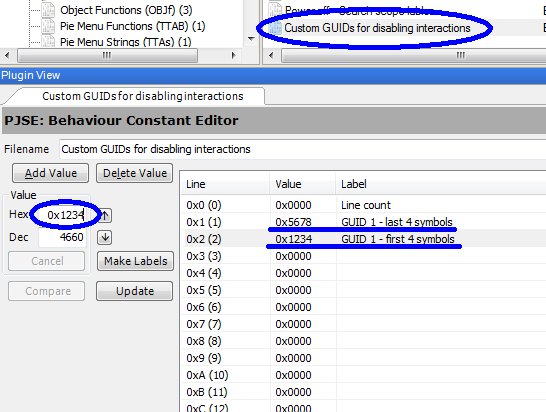
Each object will take two lines. First object will take lines 1 and 2. Start with last 4 symbols of GUID and then put first 4 symbols on the next line. Be sure to put values in the Hex box. Picture example GUID 12345678:
So on you continue. Second object will take line 3 and 4, third - lines 5 and 6. You can fill in a lot of GUIDs. The limit is line 127 (7F).
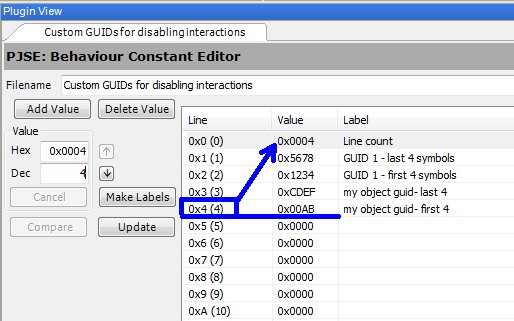
4. When you're finished, take note of the number of the last line you filled. Put that number in line 0 (labeled "Line count"). This is important!
Examples:
a) if you've stopped at line 4, put "4" in line 0.
b) if you've stopped at line 14 (E), put either "E" in the Hex box, or "14" in the Dec box of the line 0.
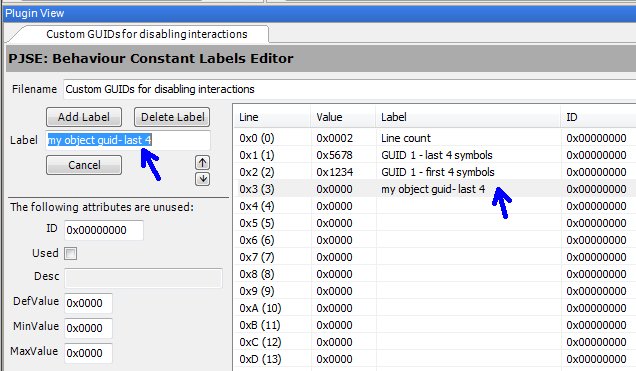
5. You may write labels, too. For that open Behavior Constant Labels (TRCN) #107F called similarly "Custom GUIDs for disabling interactions". Select a line and type your text in a box to the left.
II. Excluding custom non-electric lamps.
This will make a lamp immune to power related situations: it won't turn off during power outage and won't need bulb replacement.
The steps are the same as for objects above, except the table you will be filling is #107A "Custom GUIDs for non-electric lamps".
Maxis lamps are already covered, don't type them in (unless you discover I missed some).
In case you're wondering, example GUID is Adele's prop candle.
III. Changing the objects.
If you're an object creator and want to update your object to recognize electricity, simply add power check in BHAVs, where it's due (global op-code 25C - Is Power On?). Things to keep in mind: sim interactions (both guardians and actions), standby functionality (main), lights, animations, effects, moving textures, sounds. Think about how power going off would affect all those aspects, and make needed changes.
Did you know that ... ?
- Not all events have notifications. Things like short circuits, hidden faults, busy hours surges, and so on, happen quietly, waiting for you to notice them. Or not...
- Circuit breaker comes with ground fault circuit interrupter (GFCI). If CB is installed and not broken, sims will never die of electrocution during repair/tinkering electronics/appliances, even if they got a little shocked and burnt. You can avoid electric shock at all by turning the breaker off - if power is off when your sims are repairing stuff, they have no chance to even get electrocuted. Also, with CB, there will be no fire after electrocution. How to tell that you were saved: if the power was on, but suddenly went off during repairing/tinkering, it might be that CB reacted to leakage current and cut the power. Exceptions are elevators and servos, and also sims may still die from holiday reindeers, evil kites and digging.
- In the early days of electric box there was a flickering lights event. It was awesome and very atmospheric, until I realized that turning lights off and on too often sometimes causes weird graphical artifacts, like big dark shadows that only go away when you move around some furniture. Even though the glitch didn't seem to be harmful, I decided to remove the flickering lights.
_____________________________
Experience power outages, phone line disconnections, burnt bulbs, tv antenna problems and different wiring related accidents. Upgrade and maintain electrical panel for better protection, tinker it for fun, build skill and hobby. Dive into the world of fuses, breakers, shorts and spikes.
Electrical box is a detailed mod about electricity and a new object you can interact with.
 First and foremost, or "Tell me the basics, and I'm off to play"
1. Are you playing Ultimate Collection or have AL/M&G as your latest expansions? If not, make backup of your good 'hoods and test first. You don't need all EPs for this, and I worked on making it compatible with any setup, but I only tested on UC. If your latest EP is UNI or NL, don't even bother to download.
2. Run HCDU+ to make sure there are no conflicts and don't forget to clear game's cache.
3. Get related mods and objects, if you'd like: links here
4. Buy electrical box in misc. electronics and place it on a lot you want to be affected. In apartments, it has to be on private territory. From then, it does its thing and you can do things with it.
5. If you decide to delete the mod, make sure all lots have power on, before you uninstall. There's a debug interaction on electrical box, if you need it.
6. I can't promise there won't be bugs. There probably will be updates. We tested it a lot, but it's a complicated mod, so let's be realistic. If you catch any errors, please let me know and I'll do my best to fix them.
7. You may think, it's that unused power outage scenario. No. I did use bits of unused in-game code, but this mod covers a lot more objects and does a lot more stuff than that scenario.
Although I took inspiration in real life, this mod is by no means an accurate representation of physics of electricity. It is a game. If you're interested in how things really work, ask professionals and - please - always read manuals.
So here's this thing's manual, I guess. I wouldn't want to give out too much and spoil unexpected fun, but what're you gonna do. If anything, read the headers.
Power outage
Loss of electricity is the most complicated thing about this mod. To give you some sense of the level of detail: when power is out, water in a hottub stops bubbling and fridge motor goes silent. Sounds, lights, interactions, textures, effects, animations - I've tried to make it look like it's for real. Has support for business objects, too.
There are prolonged power outages that may happen as a consequence of thunderstorm, blizzard or random event. Those are the ones you have to wait through and can't really do anything about them. There are also those that you can do something about, because you are directly responsible for them: digging accident and unpaid bills. More on them in their respective threads.
Usually power outage affects all object on a lot. Apartments are special. Unless it's centralized power outage or digging accident, apartment neighbors have electricity in their flats as well as common areas. So, if you haven't paid your bills or have a breakage, only you suffer. Respectively, when you use backup source to power your own apartment during total blackout, common areas and neighbors are not powered.
Objects that will NOT work, sound, animate and/or emit light, if power is off
Lamps, except for maxis candles and torches and registered custom objects (more on this below)
Computers (can be repaired)
Arcade games
Stereos (can be repaired), except for cheap small basegame boombox (see it as working on batteries)
Pinball machines
Karaoke
Bowling lane
Plastic surgery kit
Vending machines with sweets and drinks
Electro dance sphere
Garden sprinklers (can be repaired)
Cash registers, except for the antique
Electric guitars: usual and career reward
Synthesizer (can be repaired)
Microphone
Treadmill
Bandatron selling tickets
Biotech Station
Polygraph
Candy Factory
Surgical Dummy
Kiosk with portable electronics
Ceiling fans
Videogame console for TV
Televisions (can be repaired)
Coffee makers and espresso machines (allowed to juggle cups)
Dishwashers (can be repaired)
Microwaves (can be repaired)
Toaster ovens
Food processors
Ovens (allowed to cook on stove-tops)
Christmas trees and glowing reindeer
Elevators (can be repaired; work in apartments if power is off only in current apartment)
Computers (can be repaired)
Arcade games
Stereos (can be repaired), except for cheap small basegame boombox (see it as working on batteries)
Pinball machines
Karaoke
Bowling lane
Plastic surgery kit
Vending machines with sweets and drinks
Electro dance sphere
Garden sprinklers (can be repaired)
Cash registers, except for the antique
Electric guitars: usual and career reward
Synthesizer (can be repaired)
Microphone
Treadmill
Bandatron selling tickets
Biotech Station
Polygraph
Candy Factory
Surgical Dummy
Kiosk with portable electronics
Ceiling fans
Videogame console for TV
Televisions (can be repaired)
Coffee makers and espresso machines (allowed to juggle cups)
Dishwashers (can be repaired)
Microwaves (can be repaired)
Toaster ovens
Food processors
Ovens (allowed to cook on stove-tops)
Christmas trees and glowing reindeer
Elevators (can be repaired; work in apartments if power is off only in current apartment)
Objects that WILL work, but with no effects, if power is off
Refrigerators (there will be no light and motor noise, but actions are available)
Fountains (no spraying, but actions are available)
Hydroponic garden (no light)
Racks for magazines and videogames (no light)
Aquariums (no light and bubbles when possible)
Holiday garlands on walls and trees (no glowing effects, but viewing is not restricted)
Hottubs (no light and bubbles)
Sims' plumbobs (no glow)
Some shop signs and exit sign (no light and glow)
Neon counters, bar and coffee table (no light and neon, but interactable)
Stacking blocks (no color changing for club thingies)
Business Car Display (turns off lights and rotation)
Fountains (no spraying, but actions are available)
Hydroponic garden (no light)
Racks for magazines and videogames (no light)
Aquariums (no light and bubbles when possible)
Holiday garlands on walls and trees (no glowing effects, but viewing is not restricted)
Hottubs (no light and bubbles)
Sims' plumbobs (no glow)
Some shop signs and exit sign (no light and glow)
Neon counters, bar and coffee table (no light and neon, but interactable)
Stacking blocks (no color changing for club thingies)
Business Car Display (turns off lights and rotation)
Objects that WILL work fully, if power is off
Burglar alarm (see it as working on batteries, although still debating)
Fire alarm (see it as working on batteries)
Juicer (see it as mechanical)
Fire extinguishing sprinkler (set off by heat, not power)
Photobooth (see it as working on accumulators)
Phones (although they usually look as radio phones, I decided to pretend they work the old fashioned way, and make the telephone line disconnection a separate event)
Wireless mobile electronics
... etc.
Fire alarm (see it as working on batteries)
Juicer (see it as mechanical)
Fire extinguishing sprinkler (set off by heat, not power)
Photobooth (see it as working on accumulators)
Phones (although they usually look as radio phones, I decided to pretend they work the old fashioned way, and make the telephone line disconnection a separate event)
Wireless mobile electronics
... etc.
Custom objects
If an object of certain category operates pretty much like maxis clone, it should behave as intended. Those categories of objects are:
Televisions
Coffee makers and espresso machines
Dishwashers
Microwaves
Toaster ovens
Food processors
Stoves
Hot tubs
Cash registers
Garden sprinklers
Lamps (no distinction for candles though, unless you register them in the mod)
Computers
Pinball machines
Stereos
Coffee makers and espresso machines
Dishwashers
Microwaves
Toaster ovens
Food processors
Stoves
Hot tubs
Cash registers
Garden sprinklers
Lamps (no distinction for candles though, unless you register them in the mod)
Computers
Pinball machines
Stereos
Other objects like musical instruments are done by GUIDs, so custom ones won't be recognized by the mod, unless you modify either my mod or the object itself. Mini-tutorials on how to register custom objects in the mod, see below.
If you encounter any errors caused by the mod conflicting with a custom object, please let me know.
Emergency power sources
Power backup comes into play during long power outages caused by an external event (e.g. blizzard blackout), unpaid bills or digging accident with breached wiring, given there's nothing broken in the electrical panel that would prevent it from supplying power. You have almost no battery capacity, so if the backup source stops producing energy, the power will go back off in a few minutes.
Wind & solar are parts of M&G expansion, although, what makes them useful is functionality performed by electrical box.
- They switch on automatically and require special equipment - inverter - installed in the electrical panel.
- One wind turbine is big enough to power any lot as long as there's wind. It may stop if wind speed is very low.
- Solar panels work in daytime. Their efficiency depends on sky clarity and season. Apartments need 1-2 solar panels, other lots need 2-4 solar panels. Large ground solar panel is counted as 2 panels, whereas small roof panel is 1.
- See also: energy rebate fix.
Portable gas power generator is an object made by me that you can download separately.
- It works on fuel that costs money. It doesn't need inverter, but it needs to be turned on manually and refueled in time. It makes noise, can break and be dangerous due to exhaust and so on. You can plug in up to 6 items per generator at the same time.
Bike generator is also a separate object, cloned from the Free Time bike.
- Doesn't make noise and a lot less dangerous than gas generator, but there is a trick - sims have to workout to make power. You may connect up to 3 individual objects per bike for them to be powered. More on generators later.
Electrical problems
Power tripping
If the lights went off, you don't always know what happened right away. So, first thing you do is check the electrical panel. Sometimes you may find blown fuses or tripped circuit breaker there. You won't be able to use electrical objects until you fix it. But the tripping itself is usually a consequence of something else. By disconnection of supply, electrical panel protects wiring and equipment on the lot from damage when it detects a problem. Different things can be a reason for that: short circuit in a faulty appliance, overload in peak hours, lightning(?), fire in electrical system, sim's doing, poltergeist.
Voltage surges
There are very fast and very big voltage spikes that can happen during storm, remote event, or direct lightning strike to the electrical box (if you placed it outside). These can potentially break all your electronics and fry your electrical panel, unless you have surge protector installed. Electronics in this case include stereos, televisions and computers.
Minor power surge may happen during peak hours. Default protection acts by temporary turning off power, so that abnormal voltage doesn't hurt electronics and appliances. It's usually more or less brief, sometimes repeated.
Peak/busy hours are 3 hours between 7 p.m. and 10 p.m. everyday.
Short circuit and overheating
Short circuit is a dangerous event caused by broken electrical gizmo. Electrical box usually reacts by turning off power. If you ignore the signs and keep turning the power back on before fixing the culprit, you may as well be asking for trouble. Should overheated wiring start to burn, you'll be looking at fire. To make you feel better, though, you don't need to worry every time something breaks around the house - it's not always short circuit, and even when it is, you have means of avoiding destruction.
Another way overheating may happen is when you set stuff on fire while cooking, etc. Again, electrical box will try to shut the power. But if something is wrong with it, it may fail to disconnect, which leaves your other electronics and appliances vulnerable to damage and may lead to more fire.
To sum it up, worst case scenario: broken objects, damaged electrical box, destroyed upgrades, fire. Best case: simply tripped power.
Breakable electrical objects that count:
- stereo
- television
- computer
- microwave
- trash compactor
- dishwasher
- hottub
- elevator
- robot base station
- synthesizer
- television
- computer
- microwave
- trash compactor
- dishwasher
- hottub
- elevator
- robot base station
- synthesizer
Landline phone problems
These include:
- External phone outage for a breif or long time (because of storm/snow or random).
- Sporadic phone interruption during conversation (during rain/snow, by sim/ghost or random).
- Local malfunction in telephone wire that you have to fix (by sim/ghost or random).
- Unpaid bills penalty.
Cell phones are not affected by any of these problems.
You get small compensation if the outage is too long.
Static noise on television
Annoy sims during rain or snow, or caused by sim/ghost, or randomly.
Burnt light bulb
If a lamp went off and can't be turned on, it is probably a sign of burnt light bulb. Sims may not like it. The chance of this event is affected mostly by building condition and how new the lamp is (if lamp's value deprecated). New bulb costs 10 simoleons. It should not break again for at least few days after replacement.
Chances of incidents and damage they cause are affected by installed equipment, building and area conditions, hidden faults and sim's qualities. Consequences vary from nothing noticeble to electrical box damage, fire and fried electronics.
You may want to know every little % chance and what factors are affecting it. And I am really afraid that you'd ask. Gives me chills as I type this. I suggest that we go over the major things here.
Building and area conditions
- Area condition affects external events, e.g. accident on a power plant. Bad area means more likely power/phone outages and longer downtime, more severe and repeated power surges during busy hours, worse phone line connection, etc.
- Building condition represents local state of utilities on the lot. Bad building means more often and dangerous short circuits, worse outcome in case of voltage spike, higher chance of blown fuses or tripped breaker, more problems with phone wiring, TV antenna and burnt bulbs, etc.
You get the idea. Set conditions to how you see the given lot in your head.
Reducing lot value
Bad conditions reduce lot value and therefore affect lot price, bills or rent. Lot price matters when family buys or sells residential and community lots. Bills will be reduced on residential, frat and dorm lots, but not apartments. Apartments get lower rent if electrical box is properly preinstalled beforehand.
If a family buys cheaper lot or rents cheaper apartment this way, it will cost them money to change conditions to normal. They can get around money charge, if they're poor or sneaky.
Technical notes:
- You buy electric box for §0, then its value changes. Base value is 0. Bad conditions add -1500 each (-750 for apartments).
- When you build a lot without a family, electrical box randomizes it's settings, so you can preinstall electrcial box with any settings you want. In apartments, place electrical box after you've changed lot zoning to aparment or click on it with hand tool before going to neighborhood view. This way electrical box will be a part of basic furnishings and lower the price when sims rent the place.
- Apartment bill calculator doesn't like negative values, so electrical box's value will reset to zero while in live mode and won't affect bills in apartments.
- If you see negative rent or extra large rent, it probably means you went to far on reducing it.
Upgrades
You start with simple cheap equipment, but there are more advanced pieces that do a better job:
- Circuit breaker. Old-fashioned fuses protect circuit from overcurrent, but they take time to replace when they've blown. With circuit breaker, you can quickly switch it on, should the power trip. You also can switch if off any time you want, e.g. to avoid electrocution when repairing electronics or appliances.
- Surge protector. Default voltage control relay protects your stuff from minor power surges by shutting it down until voltage goes back to normal. But it can't stand against swift voltage spikes that can happen during storms. Surge protector takes care of those. You'll have to buy new one from time to time for it has limited load.
- Power inverter. Allows to use solar and wind energy as a backup during long power outages. Comes with everything you need, except an actual solar panel or wind turbine.
There are circumstances in which equipment fails or goes out of order and needs replacement. For example, a sim may bork it during tinkering, a ghost may displace it, it may get damaged after lightning strike, fire, etc.
Repairing
Basically, it works like repairing any other object in the game, but with some details. Different incidents cause different damage to the electrical box, which affects amount of work to repair it and sometimes visual effects. Not everyone knows how to repair or even open it. In case of failure, sim can be electrocuted, unless electricity isn't delivered to the box (external power outage).
Installing upgrades works as repair. You can hire repairman or call landlord to do it! And you honestly should, if you have low skill.
Maintaning & Tinkering
Maintenance is important. Connections need to be twisted from time to time, and all that. Ignoring it may end up in breakage and hidden faults. Maintain interaction builds mechanical skill and tinkering hobby. If it is not available, it means the box doesn't need it. The higher the skill the less time it takes to do the job. Maintenance level may also be affected by repairing and ghosts haunting. Tinkering is not necessary, but it raises fun and hobby. It can substitute maintenance, though it has lower impact. At both interactions sims have a chance to fail and break something (and get lectured!) or reveal and fix a hidden fault.
Hidden fault
Even if you think your electrical panel is in order, there's still a risk that something is not quite right. You may see it as a wild card in a bad way, but it's not random, actually. It sometimes occurs as a hidden result of repair (nobody's perfect), lack of maintenance or ghost's mischief.
The more neat and skilled in mechanics a sim is, the less chance he or she will do a half-assed job. The same qualities are good for catching hidden faults during maintenance/tinkering.
Faulty electrical panel may let you down in critical times. For example, circuit breaker or surge protector may fail when expected to do their jobs.
Interactions list
Animated:
- Repair - repair phone wire, change blown fuses, repair circuit breaker, adjust new equipment, finish the fixing, tackle all the problems
- Maintain (raises mechanical skill and tinkering hobby, improves box's maintenance, a sim may reveal hidden faults or break something)
- Tinker for fun (raises fun and tinkering hobby, while at it a sim may do maintenance, reveal hidden faults or break something)
- Switch circuit breaker On & Off
- Look inside (if the box is open, sims may autonomously get curious, especially, if they love tinkering or aspire for knowledge; after that they may proceed to tinkering, if they are enthusiastic enough)
- Close (because sims leave the box open if they didn't finish repair, and sloppy sims leave the box open anyways)
- Look around, Stop, Whine, Be Scared (hidden reactions)
- What's the problem with the phone/electricity? (sims can try and investigate it!)
- Manual Power/Phone Restriction (if you play a challenge and rolled a random event, you can manually shut down power or phone - why not?)
Instant:
- Upgrade - buy circuit breaker, buy surge protector, buy power inverter
- Set area condition - normal or bad
- Set building condition - normal or bad
- Set object model - 1-tiled or 2-tiled
Debug:
- Power On & Off
- Phone line On & Off
- Show stats
- Induce - breakage, power outage, short circuit, burnt light bulb
Other details
- Sims react on suddenly turned off lights, burned electric box and whatnot. Reaction type depends on their location, age, personality, mood, aspiration score.
- Electrical panel can't be put in inventory, sold in business, stolen or repossessed.
- Angry and happy ghosts may have different impact on it.
- etc...
Technical mumbo-jumbo about resources
- I've made as few overrides as possible to avoid conflicts and inconveniences. Mods that alter the same resources may conflict with mine.
1 - BHAV | Repair - Electrocute? (global check) 0x7FD46CD0 0x000002F9
2 - BHAV | Is Power On? (global check) 0x7FD46CD0 0x0000025C
3 - BHAV | Events - Sound - Loop Start (fridges) 0x7F9A5330 0x00002060
4 - BHAV | Visibility - Unhide - SO (restocking for sale) 0x7F905E60 0x0000100D
5 - BHAV | Function - Cook - TEST (stoves) 0x7F033984 0x00002001
6 - BHAV | CT - Get Cook Types - Temp 3 (stoves) 0x7F033984 0x00002035
7 - BHAV | CT - Get Cook Types - Temp 3 - Auto (stoves) 0x7F033984 0x00002022
8 - BHAV | Elevator - Can Get Out? (elevators) 0x7FE6B74C 0x0000204B
9 - BHAV | CT - Water - Start Bubbling (hottubs) 0x7FEABABA 0x00002025
2 - BHAV | Is Power On? (global check) 0x7FD46CD0 0x0000025C
3 - BHAV | Events - Sound - Loop Start (fridges) 0x7F9A5330 0x00002060
4 - BHAV | Visibility - Unhide - SO (restocking for sale) 0x7F905E60 0x0000100D
5 - BHAV | Function - Cook - TEST (stoves) 0x7F033984 0x00002001
6 - BHAV | CT - Get Cook Types - Temp 3 (stoves) 0x7F033984 0x00002035
7 - BHAV | CT - Get Cook Types - Temp 3 - Auto (stoves) 0x7F033984 0x00002022
8 - BHAV | Elevator - Can Get Out? (elevators) 0x7FE6B74C 0x0000204B
9 - BHAV | CT - Water - Start Bubbling (hottubs) 0x7FEABABA 0x00002025
- The following do not override existing resources, but if some mod creates a resource with the same Type-Group-Instance as one of these, it may conflict with mine. The chance of that happening is low.
Extra files for neon club bar:
---- BHAV | 0x42484156 0x7F16C853 0x0000166E
---- STR# | 0x53545223 0x7F16C853 0x00000087 (subset names)
---- STR# | 0x53545223 0x7F16C853 0x00000088 (material names)
Extra files for neon club coffee table:
---- BHAV | 0x42484156 0x7F69580C 0x0000166A
---- STR# | 0x53545223 0x7F69580C 0x00000087 (subset names)
---- STR# | 0x53545223 0x7F69580C 0x00000088 (material names)
Extra semi-globals for lamps:
---- TTAB | 0x54544142 0x7F60C397 0x00000056
---- TTAs | 0x54544173 0x7F60C397 0x00000056
---- BHAV | 0x42484156 0x7F60C397 0x00002256
---- BHAV | 0x42484156 0x7F60C397 0x00002257
---- BHAV | 0x42484156 0x7F60C397 0x00002258
---- BHAV | 0x42484156 0x7F60C397 0x00002259
---- BHAV | 0x42484156 0x7F60C397 0x0000225A
---- BHAV | 0x42484156 0x7F60C397 0x0000225B
---- BHAV | 0x42484156 0x7F60C397 0x0000225C
---- BHAV | 0x42484156 0x7F16C853 0x0000166E
---- STR# | 0x53545223 0x7F16C853 0x00000087 (subset names)
---- STR# | 0x53545223 0x7F16C853 0x00000088 (material names)
Extra files for neon club coffee table:
---- BHAV | 0x42484156 0x7F69580C 0x0000166A
---- STR# | 0x53545223 0x7F69580C 0x00000087 (subset names)
---- STR# | 0x53545223 0x7F69580C 0x00000088 (material names)
Extra semi-globals for lamps:
---- TTAB | 0x54544142 0x7F60C397 0x00000056
---- TTAs | 0x54544173 0x7F60C397 0x00000056
---- BHAV | 0x42484156 0x7F60C397 0x00002256
---- BHAV | 0x42484156 0x7F60C397 0x00002257
---- BHAV | 0x42484156 0x7F60C397 0x00002258
---- BHAV | 0x42484156 0x7F60C397 0x00002259
---- BHAV | 0x42484156 0x7F60C397 0x0000225A
---- BHAV | 0x42484156 0x7F60C397 0x0000225B
---- BHAV | 0x42484156 0x7F60C397 0x0000225C
How to add custom objects to the system
If you have a custom object that proved to be unaffected by the mod and you want to include it, this is for you. Make sure it is really not affected though. Most custom objects already are.
I. Including custom electrical objects.
Following steps will make an object unusable by sims when power is off: all interactions will be anavailable.
1. Open "electric-box...package" in SimPE
2. Open Behavior Constant (BCON) #107F called "Custom GUIDs for disabling interactions" in plugin view.
3. Insert GUIDs starting from line 1.
Each object will take two lines. First object will take lines 1 and 2. Start with last 4 symbols of GUID and then put first 4 symbols on the next line. Be sure to put values in the Hex box. Picture example GUID 12345678:
So on you continue. Second object will take line 3 and 4, third - lines 5 and 6. You can fill in a lot of GUIDs. The limit is line 127 (7F).
4. When you're finished, take note of the number of the last line you filled. Put that number in line 0 (labeled "Line count"). This is important!
Examples:
a) if you've stopped at line 4, put "4" in line 0.
b) if you've stopped at line 14 (E), put either "E" in the Hex box, or "14" in the Dec box of the line 0.
5. You may write labels, too. For that open Behavior Constant Labels (TRCN) #107F called similarly "Custom GUIDs for disabling interactions". Select a line and type your text in a box to the left.
II. Excluding custom non-electric lamps.
This will make a lamp immune to power related situations: it won't turn off during power outage and won't need bulb replacement.
The steps are the same as for objects above, except the table you will be filling is #107A "Custom GUIDs for non-electric lamps".
Maxis lamps are already covered, don't type them in (unless you discover I missed some).
In case you're wondering, example GUID is Adele's prop candle.
III. Changing the objects.
If you're an object creator and want to update your object to recognize electricity, simply add power check in BHAVs, where it's due (global op-code 25C - Is Power On?). Things to keep in mind: sim interactions (both guardians and actions), standby functionality (main), lights, animations, effects, moving textures, sounds. Think about how power going off would affect all those aspects, and make needed changes.
Did you know that ... ?
- Not all events have notifications. Things like short circuits, hidden faults, busy hours surges, and so on, happen quietly, waiting for you to notice them. Or not...
- Circuit breaker comes with ground fault circuit interrupter (GFCI). If CB is installed and not broken, sims will never die of electrocution during repair/tinkering electronics/appliances, even if they got a little shocked and burnt. You can avoid electric shock at all by turning the breaker off - if power is off when your sims are repairing stuff, they have no chance to even get electrocuted. Also, with CB, there will be no fire after electrocution. How to tell that you were saved: if the power was on, but suddenly went off during repairing/tinkering, it might be that CB reacted to leakage current and cut the power. Exceptions are elevators and servos, and also sims may still die from holiday reindeers, evil kites and digging.
- In the early days of electric box there was a flickering lights event. It was awesome and very atmospheric, until I realized that turning lights off and on too often sometimes causes weird graphical artifacts, like big dark shadows that only go away when you move around some furniture. Even though the glitch didn't seem to be harmful, I decided to remove the flickering lights.
_____________________________
I also brought power generator. I was meaning to post it a while ago, but I can't help to procrastinate from writing a description... It's the worst part of modding.

Power generator and fuel can are custom objects that provide a backup power source and do more than that.
Buy them in Misc-Misc. section.
 Requirements: UC/AL/M&G until I implement EP checks to make it more compatible and safe for other configs.
Both objects are in the same file. They are self-contained in terms that even though they are designed to work with electrical box, they can be used with or without it.
Description.
Functional power generator. Noisy. Flammable. Dangerous. Does not depend on sun or wind, but burns fuel and emits gas. You can turn it on in case of power outage and get energy. It doesn't need inverter, but it needs to be turned on manually and refueled in time. You can also use it to save a few bucks on the bills (M&G needed for this feature, I believe). Costs $400.
- Can break and be fixed. Protect it from rain, snow and puddles.
- Can act up on turning on. False start can be amusing.
- Can create fuel puddles. Sloppy sims have more luck.
- Can be hot. Let cool down before refueling or repairing. Accidental spillage of fuel on hot generator may cause ignition. Trying to repair hot generator can be uncomfortable.
- Can be dangerous due to exhaust. Don't run power generator inside or near windows, doors or stairs that lead inside. Or do it and experience carbon simoxide poisoning. Too much of it can kill you pretty fast! Should you feel fatigue, nausea or vomit, try to get some fresh air outside and rest. Carbon simoxide can accumulate, so don't think that once you turned off the generator it is suddenly all OK. It requires time to ventilate.
- Can work 6 hours straight (on one full refill).
Fuel can provides fuel for portable power generator. Costs $30 and contains enough for two full refills.
You can save a few bucks buying it beforehand, but you don't have to. How refueling works. If you have any fuel cans on the lot or in your inventory, you will use those. If a fuel can is too far away, you'll pull fake one from your back, but the fuel will still be subtracted from the real one. If you don't have any fuel in stock, you'll refuel for money using fake "accessory" fuel can and pay fixed fee ($20) no mater how much fuel your generator needs. With fuel in stock, on the other hand, you only use the amount of fuel your generator needs, which is more practical.
Used fuel cans will be thrown away in garbage. Sloppy sims may think otherwise.
Caution: flammable substance.
In case you're wondering.
Gas emitter is invisible object without form that you can not buy or sell. It's the thing that accumulates carbon simoxide from nearby generators and manages it's effects.
I might have forgotten something, but the basics are covered. If you have questions, please ask.
- Can break and be fixed. Protect it from rain, snow and puddles.
- Can act up on turning on. False start can be amusing.
- Can create fuel puddles. Sloppy sims have more luck.
- Can be hot. Let cool down before refueling or repairing. Accidental spillage of fuel on hot generator may cause ignition. Trying to repair hot generator can be uncomfortable.
- Can be dangerous due to exhaust. Don't run power generator inside or near windows, doors or stairs that lead inside. Or do it and experience carbon simoxide poisoning. Too much of it can kill you pretty fast! Should you feel fatigue, nausea or vomit, try to get some fresh air outside and rest. Carbon simoxide can accumulate, so don't think that once you turned off the generator it is suddenly all OK. It requires time to ventilate.
- Can work 6 hours straight (on one full refill).
Fuel can provides fuel for portable power generator. Costs $30 and contains enough for two full refills.
You can save a few bucks buying it beforehand, but you don't have to. How refueling works. If you have any fuel cans on the lot or in your inventory, you will use those. If a fuel can is too far away, you'll pull fake one from your back, but the fuel will still be subtracted from the real one. If you don't have any fuel in stock, you'll refuel for money using fake "accessory" fuel can and pay fixed fee ($20) no mater how much fuel your generator needs. With fuel in stock, on the other hand, you only use the amount of fuel your generator needs, which is more practical.
Used fuel cans will be thrown away in garbage. Sloppy sims may think otherwise.
Caution: flammable substance.
In case you're wondering.
Gas emitter is invisible object without form that you can not buy or sell. It's the thing that accumulates carbon simoxide from nearby generators and manages it's effects.
I might have forgotten something, but the basics are covered. If you have questions, please ask.
_________
New files are on the next page(s).