
 Sign in to Mod The Sims
 Wolf head mesh and skin (Hair)
 Wolf head mesh and skin (Hair)
MTS has all free content, all the time. Donate to help keep it running.
SCREENSHOTS
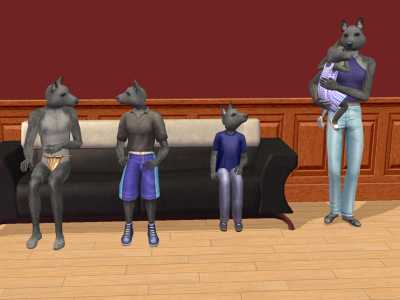
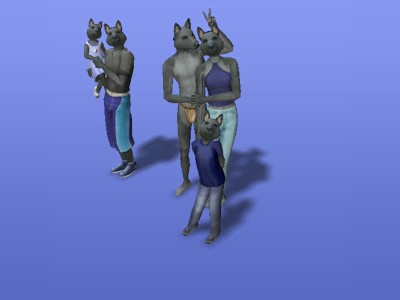
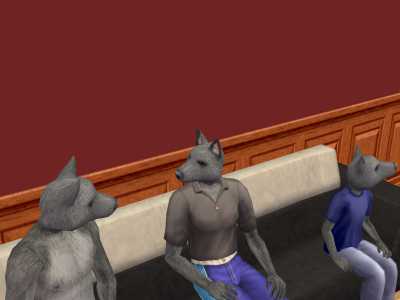
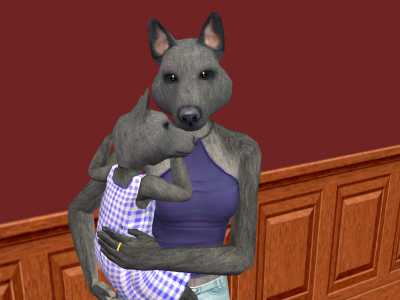
snapshot_52a8388c_32a83946.jpg - width=400 height=300
snapshot_52a8388c_52a8388d.jpg - width=400 height=300
snapshot_52a8388c_b2a83968.jpg - width=400 height=300
snapshot_52a8388c_f2a83959.jpg - width=400 height=300
Created by Xarteras
Uploaded: 3rd Jan 2007 at 7:45 PM
Updated: 6th Jan 2007 at 9:26 PM
Updated: 6th Jan 2007 at 9:26 PM
--- Update ---
I have now fixed the compatibility issues, it should now really work with all versions of the sims
At the moment please use something else than the package installer included with the sims to install the sims2pack, as it seems to fail to properly install sims2pack files created with the current version of SimPE.
Any other package installer (Such als Sims2Pack clean installer) or Q-Xpress should work.
Also I have provided a second package (nos2p_wolfheadmeshandskin.rar) for the ones that cannot use another installer than the native one.
This package contains the package files that go into the downloads folder directly.
I will remove it when I figure out why the sims2pack ones don't work with the native installer.
You don't need to update when the old version worked correctly.
If you updated after installing the previous version delete b57bc9db_FurSuit.package in your sim2 downloads folder or the skin will be there 2 times. (Don't delete this file if you have sims depending on the old version or the lots containing them won't load properly anymore).
--------------
I made the wolf head after searching for ages without finding any proper head meshes for animal sims. So I decided to make my own.
As it turned out quite well I decided to share it here with others wanting a good head mesh as bad as I do
The set includes: The wolf head hair mesh, the wolf skin (Required as it makes the head of the wearer invisible so it's structure can't be seen through the head) and an eye disabler.
The objects should not need any expansion packs to use in your game, but as they are a remake of a maxis mesh from pets (No clone, though) it would be only fair to maxis to have at least the pets EP
These objects are ready for all EPs (Including University (Yound Adults)).
The wolf head mesh can be found in hair colors for all ages and genders.
The wolf skin can be found under skin tones, also for all ages and genders.
Recolor and Remesh as you want, I encourage you to do so, it would be cool to see different skin textures and meshes based on this
But please link here if you edit it.
You may include these meshes in uploaded lots here at MTS2 or the Sims 2 “Exchange” but please do not post on pay sites.
"Wolfhead": Faces = 1084 Vertices = 690.
The head is an altered version of the maxis wolf pet's head made wearable on sims and I altered it and reweighted the vertices so it fits seamlessly on your sim's body.
All changes to the maxis meshes and skin were done by me (Xarteras).
The head mesh and skin depend on each other to make the sim's head invisible and are therefore packaged together.
Please use the eye disabler and remove the eyebrows when creating a sims with this mesh as they may shine through otherwise.
Only one situation is know where problems occur, this is when having a job where wearing a hat is required.
When wearing a hat the wolf head disappears (As it's a hair mesh) but the head of the sim stays invisible (As that effect belongs to the body skin).
Due to the nature this is done technically this is sadly impossible to overcome for me at the moment, so you have to decide if you want to use this mesh when having a job that required hats.
Existing sims can be changed through creating a new one using this mesh and skin and doing SimSurgery (Included in SimPE) on the old one with the new as archetype.
You do this at your own risk.
Screenshots below:
I have now fixed the compatibility issues, it should now really work with all versions of the sims

At the moment please use something else than the package installer included with the sims to install the sims2pack, as it seems to fail to properly install sims2pack files created with the current version of SimPE.
Any other package installer (Such als Sims2Pack clean installer) or Q-Xpress should work.
Also I have provided a second package (nos2p_wolfheadmeshandskin.rar) for the ones that cannot use another installer than the native one.
This package contains the package files that go into the downloads folder directly.
I will remove it when I figure out why the sims2pack ones don't work with the native installer.
You don't need to update when the old version worked correctly.
If you updated after installing the previous version delete b57bc9db_FurSuit.package in your sim2 downloads folder or the skin will be there 2 times. (Don't delete this file if you have sims depending on the old version or the lots containing them won't load properly anymore).
--------------
I made the wolf head after searching for ages without finding any proper head meshes for animal sims. So I decided to make my own.
As it turned out quite well I decided to share it here with others wanting a good head mesh as bad as I do
The set includes: The wolf head hair mesh, the wolf skin (Required as it makes the head of the wearer invisible so it's structure can't be seen through the head) and an eye disabler.
The objects should not need any expansion packs to use in your game, but as they are a remake of a maxis mesh from pets (No clone, though) it would be only fair to maxis to have at least the pets EP
These objects are ready for all EPs (Including University (Yound Adults)).
The wolf head mesh can be found in hair colors for all ages and genders.
The wolf skin can be found under skin tones, also for all ages and genders.
Recolor and Remesh as you want, I encourage you to do so, it would be cool to see different skin textures and meshes based on this
But please link here if you edit it.
You may include these meshes in uploaded lots here at MTS2 or the Sims 2 “Exchange” but please do not post on pay sites.
"Wolfhead": Faces = 1084 Vertices = 690.
The head is an altered version of the maxis wolf pet's head made wearable on sims and I altered it and reweighted the vertices so it fits seamlessly on your sim's body.
All changes to the maxis meshes and skin were done by me (Xarteras).
The head mesh and skin depend on each other to make the sim's head invisible and are therefore packaged together.
Please use the eye disabler and remove the eyebrows when creating a sims with this mesh as they may shine through otherwise.
Only one situation is know where problems occur, this is when having a job where wearing a hat is required.
When wearing a hat the wolf head disappears (As it's a hair mesh) but the head of the sim stays invisible (As that effect belongs to the body skin).
Due to the nature this is done technically this is sadly impossible to overcome for me at the moment, so you have to decide if you want to use this mesh when having a job that required hats.
Existing sims can be changed through creating a new one using this mesh and skin and doing SimSurgery (Included in SimPE) on the old one with the new as archetype.
You do this at your own risk.
Screenshots below:
This is a Maxis Recolour which means that it is a recolour of an item that already exists in your game. Please check the Pack requirements to see which game pack it recolours.
| Filename | Size | Downloads | Date | |||||
|
nos2p_wolfheadmeshandskin.rar
Size: 5.75 MB · Downloads: 9,846 · 6th Jan 2007 |
5.75 MB | 9,846 | 6th Jan 2007 | |||||
|
wolfheadmeshandskin_updated.rar
Size: 5.72 MB · Downloads: 12,621 · 6th Jan 2007 |
5.72 MB | 12,621 | 6th Jan 2007 | |||||
| For a detailed look at individual files, see the Information tab. | ||||||||
Key:
- - File was updated after upload was posted
Install Instructions
Basic Download and Install Instructions:
1. Download: Click the download link to save the .rar or .zip file(s) to your computer.
2. Extract the zip, rar, or 7z file.
3. Place in Downloads Folder: Cut and paste the .package file(s) into your Downloads folder:
1. Download: Click the download link to save the .rar or .zip file(s) to your computer.
2. Extract the zip, rar, or 7z file.
3. Place in Downloads Folder: Cut and paste the .package file(s) into your Downloads folder:
- Origin (Ultimate Collection): Users\(Current User Account)\Documents\EA Games\The Sims™ 2 Ultimate Collection\Downloads\
- Non-Origin, Windows Vista/7/8/10: Users\(Current User Account)\Documents\EA Games\The Sims 2\Downloads\
- Non-Origin, Windows XP: Documents and Settings\(Current User Account)\My Documents\EA Games\The Sims 2\Downloads\
- Mac: Users\(Current User Account)\Documents\EA Games\The Sims 2\Downloads
- Mac x64: /Library/Containers/com.aspyr.sims2.appstore/Data/Library/Application Support/Aspyr/The Sims 2/Downloads
- For a full, complete guide to downloading complete with pictures and more information, see: Game Help: Downloading for Fracking Idiots.
- Custom content not showing up in the game? See: Game Help: Getting Custom Content to Show Up.
- If you don't have a Downloads folder, just make one. See instructions at: Game Help: No Downloads Folder.
Also Thanked - Users who thanked this download also thanked:
More Downloads BETA
Here are some more of my downloads: