Sign in to Mod The Sims
 My first excellent upload
 My first excellent upload
SCREENSHOTS
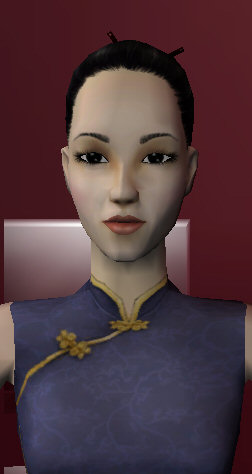
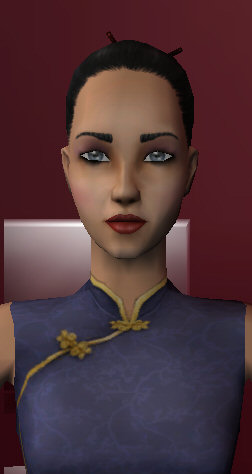
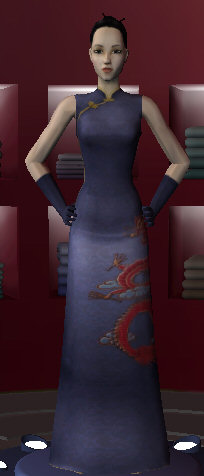
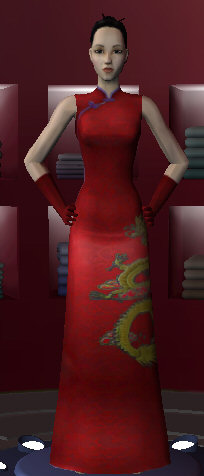


61.jpg - width=252 height=474
68.jpg - width=252 height=474
62.jpg - width=204 height=476
63.jpg - width=204 height=476
64.jpg - width=204 height=476
65.jpg - width=204 height=476
66.jpg - width=204 height=476
67.jpg - width=204 height=476
Downloaded 232 times
11 Thanks
0 Favourited
8,249 Views
Say Thanks!
Thanked!
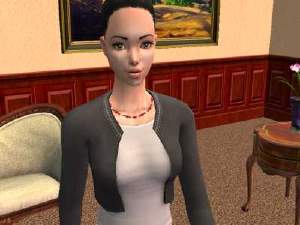
After days and days of remorseless work-jest joking… :bump: here is the very excellent very beautiful East Asian style dresses I made! (In various colors)-look at the pictures
 Don't forget to download the skin and make up add!
You don’t have to but if you will you'll also have:
Whiter skin, darker hair and eyes, lipstick, eye shadow, eye pencil.
I had to remove them from dresses.rar to save weight and let you download it in another download. (adds.rar)
Enjoy. :D
 Don't forget to download the skin and make up add!
You don’t have to but if you will you'll also have:
Whiter skin, darker hair and eyes, lipstick, eye shadow, eye pencil.
I had to remove them from dresses.rar to save weight and let you download it in another download. (adds.rar)
Enjoy. :D
Advertisement:
This is a new mesh recolour, and means that you will need to download the particular mesh itself in order for this to show up in your game. See the Meshes Needed section or read the text for more information.
|
Adds (skin makeup eyes hair and more).rar
Download
Uploaded: 29th Jan 2005, 3.18 MB.
1,053 downloads.
|
||||||||
|
Dresses.rar
Download
Uploaded: 29th Jan 2005, 2.81 MB.
1,461 downloads.
|
||||||||
| For a detailed look at individual files, see the Information tab. | ||||||||
Install Instructions
Basic Download and Install Instructions:
1. Download: Click the download link to save the .rar or .zip file(s) to your computer.
2. Extract the zip, rar, or 7z file.
3. Place in Downloads Folder: Cut and paste the .package file(s) into your Downloads folder:
1. Download: Click the download link to save the .rar or .zip file(s) to your computer.
2. Extract the zip, rar, or 7z file.
3. Place in Downloads Folder: Cut and paste the .package file(s) into your Downloads folder:
- Origin (Ultimate Collection): Users\(Current User Account)\Documents\EA Games\The Sims™ 2 Ultimate Collection\Downloads\
- Non-Origin, Windows Vista/7/8/10: Users\(Current User Account)\Documents\EA Games\The Sims 2\Downloads\
- Non-Origin, Windows XP: Documents and Settings\(Current User Account)\My Documents\EA Games\The Sims 2\Downloads\
- Mac: Users\(Current User Account)\Documents\EA Games\The Sims 2\Downloads
- Mac x64: /Library/Containers/com.aspyr.sims2.appstore/Data/Library/Application Support/Aspyr/The Sims 2/Downloads
- For a full, complete guide to downloading complete with pictures and more information, see: Game Help: Downloading for Fracking Idiots.
- Custom content not showing up in the game? See: Game Help: Getting Custom Content to Show Up.
- If you don't have a Downloads folder, just make one. See instructions at: Game Help: No Downloads Folder.
Advertisement:
Loading comments, please wait...
Author

Download Details
Packs:
None, this is Sims 2 base game compatible!
Uploaded: 29th Jan 2005 at 11:02 AM
Uploaded: 29th Jan 2005 at 11:02 AM
Other Download Recommendations:
-
-

-
-
-
-
-
by ikzouffgeennaamweten2 17th Dec 2005 at 8:25am
-
by elie the little french 20th Dec 2005 at 12:22pm
-
-


More downloads by CHURECHU:
See more