
 Sign in to Mod The Sims
 [CEP Extra] FT Koi Pond
 [CEP Extra] FT Koi Pond


koi pond thumb.jpg - width=256 height=256
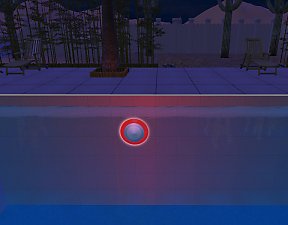
koi pond.jpg - width=1280 height=800
koi pond 2.jpg - width=1280 height=800

This can't have an invisible recolor for grass bits as it turns blue. This is because it "hides" the floor when placed to cut out for the pond portion.
 Installation
HL_CEP_ft_careerKoiPond - Install this in \Documents\EA Games\The Sims 2\zCEP-EXTRA
HL_CEP_ft_careerKoiPond-pfiles - Install this in C:\Program Files (x86)\EA GAMES\The Sims 2\TSData\Res\Catalog\zCEP-EXTRA.
| Filename | Type | Size |
|---|---|---|
| HL_CEP_ft_careerKoiPond.7z | 7z | |
| HL_CEP_ft_careerKoiPond-pfiles.package | package | 972 |
| koi pond 2.jpg | jpg | 439955 |
| koi pond thumb.jpg | jpg | 40021 |
| koi pond.jpg | jpg | 543109 |
| HL_CEP_ft_careerKoiPond.package | package | 136056 |
|
HL_CEP_ft_careerKoiPond.7z
Download
Uploaded: 30th Oct 2022, 1.06 MB.
1,582 downloads.
|
||||||||
| For a detailed look at individual files, see the Information tab. | ||||||||
Install Instructions
1. Download: Click the download link to save the .rar or .zip file(s) to your computer.
2. Extract the zip, rar, or 7z file.
3. Place in Downloads Folder: Cut and paste the .package file(s) into your Downloads folder:
- Origin (Ultimate Collection): Users\(Current User Account)\Documents\EA Games\The Sims™ 2 Ultimate Collection\Downloads\
- Non-Origin, Windows Vista/7/8/10: Users\(Current User Account)\Documents\EA Games\The Sims 2\Downloads\
- Non-Origin, Windows XP: Documents and Settings\(Current User Account)\My Documents\EA Games\The Sims 2\Downloads\
- Mac: Users\(Current User Account)\Documents\EA Games\The Sims 2\Downloads
- Mac x64: /Library/Containers/com.aspyr.sims2.appstore/Data/Library/Application Support/Aspyr/The Sims 2/Downloads
- For a full, complete guide to downloading complete with pictures and more information, see: Game Help: Downloading for Fracking Idiots.
- Custom content not showing up in the game? See: Game Help: Getting Custom Content to Show Up.
- If you don't have a Downloads folder, just make one. See instructions at: Game Help: No Downloads Folder.
Loading comments, please wait...


 View with Names
Uploaded: 10th Jul 2022 at 11:20 PM
Updated: 30th Oct 2022 at 6:31 PM
-
by HugeLunatic 19th Jun 2017 at 4:17pm
 4
14k
22
4
14k
22
-
by gdayars 28th Oct 2017 at 12:10am
6
13.4k
30
-
by HugeLunatic updated 2nd Apr 2024 at 11:12am
+1 packs
8 26.5k 12 Apartment Life
-
by HugeLunatic updated 24th Jun 2021 at 10:40pm
+1 packs
14 24.1k 44 Kitchen & Bath
-
by HugeLunatic 1st Feb 2019 at 1:58pm
+1 packs
3 13.1k 28 Bon Voyage
-
by HugeLunatic updated 8th May 2019 at 7:31pm
+1 packs
2 9.7k 26 Apartment Life
-
by HugeLunatic updated 30th Mar 2025 at 5:03pm
+1 packs
4 7.1k 22 Pets
Pets
-
Mr. Generic's Sign [CEP-Extra]
by HugeLunatic 25th Jun 2020 at 5:25pm
+1 packs
4 5.2k 12 Open for Business
-
-
by HugeLunatic updated 12th Nov 2022 at 6:28pm
+1 packs
3 3.3k 13 Free Time


-
Recolor Your Stairs!! *Updated*
by HugeLunatic 15th Oct 2009 at 9:33pm
Updated Oct-16 - Fixed issue with Sims not using the stair properly. Non-recolorable stairs...what a giant step backwards. more...
 41
64.2k
107
41
64.2k
107
-
by HugeLunatic 13th Aug 2012 at 11:49pm
While browsing through game images I found (again) this wall image that wasn't in game. more...
6
13.1k
30
-
by HugeLunatic updated 14th Sep 2024 at 11:25pm
+1 packs
8 10.5k 18 Nightlife
-
by HugeLunatic 18th Nov 2013 at 3:35am
Some recolors of the "Space Opera Panes by GalactiGlass" to match the "Futur-Nu Prime by Zuper Tech" Door . more...
+1 packs
3 7.8k 18 Pets
-
by HugeLunatic updated 6th May 2008 at 1:06am
Updated 23-Dec-09 This set is now slaved. The master mesh is the bookcase. more...
+3 packs
14 51.2k 71 University
Pets
Bon Voyage
University
Pets
Bon Voyage
-
by HugeLunatic 30th Oct 2022 at 8:13pm
+1 packs
3 2k 9 Nightlife
-
-
by HugeLunatic 22nd Sep 2022 at 1:12pm
+1 packs
8 4.2k 25 Nightlife
-


-
by HugeLunatic 20th Jun 2010 at 11:07pm
The whole swirling, warping, rotating thing with musical notes coming out of the speakers is very annoying and distorts the more...


Packs Needed
| Base Game | |
|---|---|
| Sims 2 |
| Expansion Pack | |
|---|---|
| Free Time |
About Me
Pet Stories || Dog Agility Items? || Castaway Stories || Holy Simoly Extras
4esf Archive || Holy Simoly Archive || CEP-Extras List || Buyable Game Objects
lunie content from GoS/s2a
Installation of CEP Extras-the package with pfiles appended to the name will go into your cep extras folder where your game is installed (typically c drive, you do you)
-the other goes in CEP extra folder in documents.
The following locations are what I am aware of, beyond that you'll have to do some searching.
Downloads Folder:
C:\Users\<user>\Documents\EA Games\The Sims 2 Legacy
C:\Users\<user>\Documents\EA Games\The Sims 2 Ultimate Collection
With multiple launchers, the location for your game install will vary.
C:\Program Files\EA GAMES\The Sims 2 Legacy\TSData\Res\Catalog\zCEP-EXTRA
C:\Program Files\EA GAMES\The Sims 2\TSData\Res\Catalog\zCEP-EXTRA
C:\Program Files (x86)\EA GAMES\The Sims 2\TSData\Res\Catalog\zCEP-EXTRA