TS4 Sound Tool

by denton47 Posted 14th Mar 2020 at 3:16 PM - Updated 15th Feb 2026 at 7:37 AM by denton47
 
297 Comments / Replies (Who?) - 263 Feedback Posts, 33 Thanks Posts
Hide Thanks Posts for this thread (Show only feedback)
Page 7 of 12
Field Researcher
#151 Old 21st Oct 2022 at 5:04 PM Last edited by wild_guy : 21st Oct 2022 at 7:06 PM.
Hey Denton! What are 'voact_' sounds? The tool doesn't recognize them.
Field Researcher
Original Poster
#152 Old 22nd Oct 2022 at 7:56 AM
Quote: Originally posted by wild_guy
Hey Denton! What are 'voact_' sounds? The tool doesn't recognize them.

They are voices based on the Acting skill level, you will have to construct them manually and use the Lookup function on the Effect tab.

The game has 3 levels,

_a1skill
_a2skill
_a3skill

so for Female Voice 1 (_fa) the sound effect name is,

voact_actinggig_havedrinkwith_riskysuccess_x_a1skill_fa = 0xC1230D4B11426834
Test Subject
#153 Old 23rd Oct 2022 at 6:15 AM
Why is TS4 Sound Tool is slow and doesn't respond when playing sound files
Field Researcher
#154 Old 23rd Oct 2022 at 9:58 AM
Quote: Originally posted by denton47
They are voices based on the Acting skill level, you will have to construct them manually and use the Lookup function on the Effect tab.
Thanks so much, very useful info! Could you maybe add it to the tool description so it can be easily found if needed?
Test Subject
#155 Old 23rd Oct 2022 at 11:18 AM
Hi denton47, thank you very much for your incredible application!

I have some feature requests:
- I'd like to extract the entire collection of sounds/songs/effects all at once, instead of selecting each one and saving them manually.
- It'd be more convenient if I could extract all the channels of a modal audio file all at once.

I also ask you if you published the source code of the application.

Thank you very much
Field Researcher
Original Poster
#156 Old 24th Oct 2022 at 7:15 PM
Quote: Originally posted by Aijajacob
Why is TS4 Sound Tool is slow and doesn't respond when playing sound files

The tool takes time to load because it has to decode a lot of resources to find the names of music and sound events, can you please provide a little more information about what you are having trouble playing ?
Field Researcher
Original Poster
#157 Old 24th Oct 2022 at 7:16 PM
Quote: Originally posted by wild_guy
Thanks so much, very useful info! Could you maybe add it to the tool description so it can be easily found if needed?

I will see about adding more modifiers, MizoreYukii also posted earlier about communication skills. There are still milestones and the whole footstep, shoe type, terrain type mapping which I haven't figured out yet.
Field Researcher
Original Poster
#158 Old 24th Oct 2022 at 7:19 PM
Quote: Originally posted by Dannazione
- I'd like to extract the entire collection of sounds/songs/effects all at once, instead of selecting each one and saving them manually.

I am not planning on extending the tool beyond the Export All function recently added, for songs you can load the master list and export everything in one go, for large scale conversion you can use the ealayer3.exe command line tool in a batch script, this is the syntax,

ealayer3 "S4_01EEF63A_001407EC_nnnnnnnnnnnnnnnn_AUD.snr" -m -o "S4_01EEF63A_001407EC_nnnnnnnnnnnnnnnn_AUD.mp3"


Quote: Originally posted by Dannazione
- It'd be more convenient if I could extract all the channels of a modal audio file all at once.

Again you will need to use the ealayer3.exe command line tool, the following will export all 8 channels into separate files,

ealayer3 "S4_01EEF63A_001407EC_F33ED9C4FFCF5648_AUD.sns" -m -o "S4_01EEF63A_001407EC_F33ED9C4FFCF5648_AUD.mp3"


Quote: Originally posted by Dannazione
I also ask you if you published the source code of the application.

I have no plans to publish the source code, but if you have any questions regarding the file formats please ask away.
Test Subject
#159 Old 12th Nov 2022 at 7:44 AM
Hey please let us drag drop sound files into ts4 sound tool and set a specific folder to open sound files
Test Subject
#160 Old 12th Nov 2022 at 7:45 AM
make ts4 sound tool faster than before
Test Subject
#161 Old 13th Nov 2022 at 10:40 PM
Is it possible to make custom voices with this tool using your own audio?

I have voices of some fictional characters here
Field Researcher
Original Poster
#162 Old 16th Nov 2022 at 6:14 AM
Quote: Originally posted by Aijajacob
make ts4 sound tool faster than before

Reading through all the combined tuning is the real killer here, especially as more and more packs are added, I am working on improving this part.
Field Researcher
Original Poster
#163 Old 16th Nov 2022 at 6:15 AM
Quote: Originally posted by ShiroHusko
Is it possible to make custom voices with this tool using your own audio?

I have voices of some fictional characters here

Yes it is, in the Sound Event dropdown look for names that start with vo, those are the Sim voices used in animations, you can clone them and keep the same name if you want to replace the voices or clone and give a new name you can use in your own animations.

The link to the Sims forum on the front page has more detailed information on how voices work, your voice recordings must be mp3 to import them.
Field Researcher
Original Poster
#164 Old 30th Dec 2022 at 7:26 AM
Quote: Originally posted by wild_guy
Thanks so much, very useful info! Could you maybe add it to the tool description so it can be easily found if needed?

I have added support for skill based voice sound events, please download new version 1.1.17.
Field Researcher
#165 Old 30th Dec 2022 at 6:25 PM
Quote: Originally posted by denton47
I have added support for skill based voice sound events, please download new version 1.1.17.

Thank you so much, Denton! I can't tell how much I appreciate all of your work that makes the whole process so much easier and more comfortable for creators, especially for animators!
Happy New Year
Field Researcher
#166 Old 30th Dec 2022 at 8:23 PM
Just one more little question. Maybe you could add a version number to the folder of the tool you put in the archive so that I don't always have to add it manually after extracting? Like this:
Screenshots
Test Subject
THANKS POST
#167 Old 22nd Jan 2023 at 4:00 PM
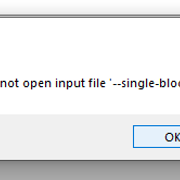
Hi! I have a problem with TS4 Sound Tool, it throws an error, my audio is MP3 format and it is MONO
Field Researcher
Original Poster
#168 Old 24th Jan 2023 at 6:44 PM
Quote: Originally posted by Macsus2002
Hi! I have a problem with TS4 Sound Tool, it throws an error, my audio is MP3 format and it is MONO

The message you are seeing is from the ealayer3.exe command line tool, I can't see the whole output in your screenshot but my best guess would be a problem with your mp3 filename.

The tool issues the follow command,

ealayer3.exe -E "filename.mp3" --single-block -b- -o "tempfile.snr"
Test Subject
#169 Old 17th Feb 2023 at 12:19 AM
Hello! i keep getting this error everytime i try to add my sound file.


************** Exception Text **************
System.ArgumentOutOfRangeException: Index was out of range. Must be non-negative and less than the size of the collection.
Parameter name: index
at System.ThrowHelper.ThrowArgumentOutOfRangeException(ExceptionArgument argument, ExceptionResource resource)
at System.Collections.Generic.List`1.get_Item(Int32 index)
at TS4SoundTool.Form1.ImportSound(String openFileName) in C:\Users\kh\source\repos\TS4SoundTool\TS4SoundTool\Form1.cs:line 5736
at TS4SoundTool.Form1.btnAdd_Click(Object sender, EventArgs e) in C:\Users\kh\source\repos\TS4SoundTool\TS4SoundTool\Form1.cs:line 5605
at System.Windows.Forms.Control.OnClick(EventArgs e)
at System.Windows.Forms.Button.OnClick(EventArgs e)
at System.Windows.Forms.Button.OnMouseUp(MouseEventArgs mevent)
at System.Windows.Forms.Control.WmMouseUp(Message& m, MouseButtons button, Int32 clicks)
at System.Windows.Forms.Control.WndProc(Message& m)
at System.Windows.Forms.ButtonBase.WndProc(Message& m)
at System.Windows.Forms.Button.WndProc(Message& m)
at System.Windows.Forms.Control.ControlNativeWindow.OnMessage(Message& m)
at System.Windows.Forms.Control.ControlNativeWindow.WndProc(Message& m)
at System.Windows.Forms.NativeWindow.Callback(IntPtr hWnd, Int32 msg, IntPtr wparam, IntPtr lparam)


************** Loaded Assemblies **************
mscorlib
Assembly Version: 4.0.0.0
Win32 Version: 4.8.9139.0 built by: NET481REL1LAST_B
CodeBase: file:///C:/Windows/Microsoft.NET/Framework/v4.0.30319/mscorlib.dll
----------------------------------------
TS4SoundTool
Assembly Version: 1.1.17.0
Win32 Version: 1.1.17.0
CodeBase: file:///C:/Users/chris/OneDrive/Desktop/TS4SoundTool_1_1_17/TS4SoundTool.exe
----------------------------------------
System.Windows.Forms
Assembly Version: 4.0.0.0
Win32 Version: 4.8.9075.0 built by: NET481REL1LAST_C
CodeBase: file:///C:/WINDOWS/Microsoft.Net/assembly/GAC_MSIL/System.Windows.Forms/v4.0_4.0.0.0__b77a5c561934e089/System.Windows.Forms.dll
----------------------------------------
System
Assembly Version: 4.0.0.0
Win32 Version: 4.8.9139.0 built by: NET481REL1LAST_B
CodeBase: file:///C:/WINDOWS/Microsoft.Net/assembly/GAC_MSIL/System/v4.0_4.0.0.0__b77a5c561934e089/System.dll
----------------------------------------
System.Drawing
Assembly Version: 4.0.0.0
Win32 Version: 4.8.9032.0 built by: NET481REL1
CodeBase: file:///C:/WINDOWS/Microsoft.Net/assembly/GAC_MSIL/System.Drawing/v4.0_4.0.0.0__b03f5f7f11d50a3a/System.Drawing.dll
----------------------------------------
s4pi.Package
Assembly Version: 1707.12.1222.13285
Win32 Version: 1707.12.1222.13285
CodeBase: file:///C:/Users/chris/OneDrive/Desktop/TS4SoundTool_1_1_17/s4pi.Package.DLL
----------------------------------------
s4pi.Interfaces
Assembly Version: 1711.19.2339.33581
Win32 Version: 1711.19.2339.33581
CodeBase: file:///C:/Users/chris/OneDrive/Desktop/TS4SoundTool_1_1_17/s4pi.Interfaces.DLL
----------------------------------------
System.Configuration
Assembly Version: 4.0.0.0
Win32 Version: 4.8.9032.0 built by: NET481REL1
CodeBase: file:///C:/WINDOWS/Microsoft.Net/assembly/GAC_MSIL/System.Configuration/v4.0_4.0.0.0__b03f5f7f11d50a3a/System.Configuration.dll
----------------------------------------
System.Core
Assembly Version: 4.0.0.0
Win32 Version: 4.8.9139.0 built by: NET481REL1LAST_B
CodeBase: file:///C:/WINDOWS/Microsoft.Net/assembly/GAC_MSIL/System.Core/v4.0_4.0.0.0__b77a5c561934e089/System.Core.dll
----------------------------------------
System.Xml
Assembly Version: 4.0.0.0
Win32 Version: 4.8.9032.0 built by: NET481REL1
CodeBase: file:///C:/WINDOWS/Microsoft.Net/assembly/GAC_MSIL/System.Xml/v4.0_4.0.0.0__b77a5c561934e089/System.Xml.dll
----------------------------------------
Accessibility
Assembly Version: 4.0.0.0
Win32 Version: 4.8.9032.0 built by: NET481REL1
CodeBase: file:///C:/WINDOWS/Microsoft.Net/assembly/GAC_MSIL/Accessibility/v4.0_4.0.0.0__b03f5f7f11d50a3a/Accessibility.dll
----------------------------------------
s4pi.Settings
Assembly Version: 1711.19.2339.33580
Win32 Version: 1711.19.2339.33580
CodeBase: file:///C:/Users/chris/OneDrive/Desktop/TS4SoundTool_1_1_17/s4pi.Settings.DLL
----------------------------------------
XmodsDataLib
Assembly Version: 1.0.0.0
Win32 Version: 1.0.0.0
CodeBase: file:///C:/Users/chris/OneDrive/Desktop/TS4SoundTool_1_1_17/XmodsDataLib.DLL
----------------------------------------

************** JIT Debugging **************
To enable just-in-time (JIT) debugging, the .config file for this
application or computer (machine.config) must have the
jitDebugging value set in the system.windows.forms section.
The application must also be compiled with debugging
enabled.

For example:

<configuration>
<system.windows.forms jitDebugging="true" />
</configuration>

When JIT debugging is enabled, any unhandled exception
will be sent to the JIT debugger registered on the computer
rather than be handled by this dialog box.
Field Researcher
Original Poster
#170 Old 17th Feb 2023 at 9:59 AM
Quote: Originally posted by Razor_Reflux26
Hello! i keep getting this error everytime i try to add my sound file.


************** Exception Text **************
System.ArgumentOutOfRangeException: Index was out of range. Must be non-negative and less than the size of the collection.
Parameter name: index
at System.ThrowHelper.ThrowArgumentOutOfRangeException(ExceptionArgument argument, ExceptionResource resource)
at System.Collections.Generic.List`1.get_Item(Int32 index)
at TS4SoundTool.Form1.ImportSound(String openFileName) in C:\Users\kh\source\repos\TS4SoundTool\TS4SoundTool\Form1.cs:line 5736
at TS4SoundTool.Form1.btnAdd_Click(Object sender, EventArgs e) in C:\Users\kh\source\repos\TS4SoundTool\TS4SoundTool\Form1.cs:line 5605
at System.Windows.Forms.Control.OnClick(EventArgs e)
at System.Windows.Forms.Button.OnClick(EventArgs e)
at System.Windows.Forms.Button.OnMouseUp(MouseEventArgs mevent)
at System.Windows.Forms.Control.WmMouseUp(Message& m, MouseButtons button, Int32 clicks)
at System.Windows.Forms.Control.WndProc(Message& m)
at System.Windows.Forms.ButtonBase.WndProc(Message& m)
at System.Windows.Forms.Button.WndProc(Message& m)
at System.Windows.Forms.Control.ControlNativeWindow.OnMessage(Message& m)
at System.Windows.Forms.Control.ControlNativeWindow.WndProc(Message& m)
at System.Windows.Forms.NativeWindow.Callback(IntPtr hWnd, Int32 msg, IntPtr wparam, IntPtr lparam)


************** Loaded Assemblies **************
mscorlib
Assembly Version: 4.0.0.0
Win32 Version: 4.8.9139.0 built by: NET481REL1LAST_B
CodeBase: file:///C:/Windows/Microsoft.NET/Framework/v4.0.30319/mscorlib.dll
----------------------------------------
TS4SoundTool
Assembly Version: 1.1.17.0
Win32 Version: 1.1.17.0
CodeBase: file:///C:/Users/chris/OneDrive/Desktop/TS4SoundTool_1_1_17/TS4SoundTool.exe
----------------------------------------
System.Windows.Forms
Assembly Version: 4.0.0.0
Win32 Version: 4.8.9075.0 built by: NET481REL1LAST_C
CodeBase: file:///C:/WINDOWS/Microsoft.Net/assembly/GAC_MSIL/System.Windows.Forms/v4.0_4.0.0.0__b77a5c561934e089/System.Windows.Forms.dll
----------------------------------------
System
Assembly Version: 4.0.0.0
Win32 Version: 4.8.9139.0 built by: NET481REL1LAST_B
CodeBase: file:///C:/WINDOWS/Microsoft.Net/assembly/GAC_MSIL/System/v4.0_4.0.0.0__b77a5c561934e089/System.dll
----------------------------------------
System.Drawing
Assembly Version: 4.0.0.0
Win32 Version: 4.8.9032.0 built by: NET481REL1
CodeBase: file:///C:/WINDOWS/Microsoft.Net/assembly/GAC_MSIL/System.Drawing/v4.0_4.0.0.0__b03f5f7f11d50a3a/System.Drawing.dll
----------------------------------------
s4pi.Package
Assembly Version: 1707.12.1222.13285
Win32 Version: 1707.12.1222.13285
CodeBase: file:///C:/Users/chris/OneDrive/Desktop/TS4SoundTool_1_1_17/s4pi.Package.DLL
----------------------------------------
s4pi.Interfaces
Assembly Version: 1711.19.2339.33581
Win32 Version: 1711.19.2339.33581
CodeBase: file:///C:/Users/chris/OneDrive/Desktop/TS4SoundTool_1_1_17/s4pi.Interfaces.DLL
----------------------------------------
System.Configuration
Assembly Version: 4.0.0.0
Win32 Version: 4.8.9032.0 built by: NET481REL1
CodeBase: file:///C:/WINDOWS/Microsoft.Net/assembly/GAC_MSIL/System.Configuration/v4.0_4.0.0.0__b03f5f7f11d50a3a/System.Configuration.dll
----------------------------------------
System.Core
Assembly Version: 4.0.0.0
Win32 Version: 4.8.9139.0 built by: NET481REL1LAST_B
CodeBase: file:///C:/WINDOWS/Microsoft.Net/assembly/GAC_MSIL/System.Core/v4.0_4.0.0.0__b77a5c561934e089/System.Core.dll
----------------------------------------
System.Xml
Assembly Version: 4.0.0.0
Win32 Version: 4.8.9032.0 built by: NET481REL1
CodeBase: file:///C:/WINDOWS/Microsoft.Net/assembly/GAC_MSIL/System.Xml/v4.0_4.0.0.0__b77a5c561934e089/System.Xml.dll
----------------------------------------
Accessibility
Assembly Version: 4.0.0.0
Win32 Version: 4.8.9032.0 built by: NET481REL1
CodeBase: file:///C:/WINDOWS/Microsoft.Net/assembly/GAC_MSIL/Accessibility/v4.0_4.0.0.0__b03f5f7f11d50a3a/Accessibility.dll
----------------------------------------
s4pi.Settings
Assembly Version: 1711.19.2339.33580
Win32 Version: 1711.19.2339.33580
CodeBase: file:///C:/Users/chris/OneDrive/Desktop/TS4SoundTool_1_1_17/s4pi.Settings.DLL
----------------------------------------
XmodsDataLib
Assembly Version: 1.0.0.0
Win32 Version: 1.0.0.0
CodeBase: file:///C:/Users/chris/OneDrive/Desktop/TS4SoundTool_1_1_17/XmodsDataLib.DLL
----------------------------------------

************** JIT Debugging **************
To enable just-in-time (JIT) debugging, the .config file for this
application or computer (machine.config) must have the
jitDebugging value set in the system.windows.forms section.
The application must also be compiled with debugging
enabled.

For example:

<configuration>
<system.windows.forms jitDebugging="true" />
</configuration>

When JIT debugging is enabled, any unhandled exception
will be sent to the JIT debugger registered on the computer
rather than be handled by this dialog box.

This error occurs if the imported sound is empty (one frame or less), please use the ealayer3 command line tool as described in my previous post and see if you can get more information about why it can't import your sound.
Test Subject
#171 Old 22nd Mar 2023 at 12:14 PM
The Sims 4 Sound Tool is so slow, always no respond, whenever I play any audio, especially long audio such as the karaoke audio. Could you please fix it? And Also add Drop and Import.
Forum Resident
#172 Old 23rd Mar 2023 at 4:18 PM
Default Sounds with silence in them gets imported incorrectly
Hi. I've noticed a bug with tool and all EALayer3 versions I've tested.

It happens whenever there's a block of silence in the audio. Here I have a zip showing the original file, SpeedOne, and the result of importing it with TS4SoundTool.

It removes large chunks of silences in audio, which makes it hard to use for longer interaction voice-overs and sounds with silence in them in general. I have a comparison screenshot showing the waveform of both files. They're exactly the same, except for the silences being trimmed in the EALayer imported version.

Any idea on how to resolve this?
Attached files:
File Type: zip  Speeds Comparison.zip (59.4 KB, 21 downloads)
Field Researcher
Original Poster
#173 Old 23rd Mar 2023 at 7:04 PM
Quote: Originally posted by simmythesim
Hi. I've noticed a bug with tool and all EALayer3 versions I've tested.

It happens whenever there's a block of silence in the audio. Here I have a zip showing the original file, SpeedOne, and the result of importing it with TS4SoundTool.

It removes large chunks of silences in audio, which makes it hard to use for longer interaction voice-overs and sounds with silence in them in general. I have a comparison screenshot showing the waveform of both files. They're exactly the same, except for the silences being trimmed in the EALayer imported version.

Any idea on how to resolve this?

The problem is the ealayer3.exe command line tool is skipping empty frames effectively making the recording shorter, there is another post about this and the solution was to add very low volume white noise to the empty passages using Audacity, this is not an ideal solution but works according to the poster.

I don't think Zenchreal is updating the tool anymore but the source code is available so I guess I will have to take a closer look eventually to fix it.
Forum Resident
#174 Old 23rd Mar 2023 at 9:56 PM
Quote: Originally posted by denton47
The problem is the ealayer3.exe command line tool is skipping empty frames effectively making the recording shorter, there is another post about this and the solution was to add very low volume white noise to the empty passages using Audacity, this is not an ideal solution but works according to the poster.

I don't think Zenchreal is updating the tool anymore but the source code is available so I guess I will have to take a closer look eventually to fix it.


Thanks for the reply. I used white noise in another sound that was failing to import properly, but it doesn't seem to work consistently without it being too loud and noticeable. I'll try and see if I can update ealayer3 to not skip silences.
Forum Resident
#175 Old 24th Mar 2023 at 12:28 AM
Quote: Originally posted by denton47
The problem is the ealayer3.exe command line tool is skipping empty frames effectively making the recording shorter, there is another post about this and the solution was to add very low volume white noise to the empty passages using Audacity, this is not an ideal solution but works according to the poster.

I don't think Zenchreal is updating the tool anymore but the source code is available so I guess I will have to take a closer look eventually to fix it.


Hiya! I found out the cause of the issue! I've also attached an edited version of the ealayer3 0.7.0 exe in order to not skip silences.

Here was the method I used to make this patched version.

I enabled verbose logging and look at what I got!
Turns out that it was skipping frames that were completely silent on purpose.


I looked at the source code of the tool and I eventually found the string mentioned here.


Ah ha! There it is, we want to change the Data Size < 1 comparison to something that always passes. What I did was to instead compare Data Size to be less than zero. Since it's impossible for data size to be negative, this change will cause it to never skip any frames.

Okay, great! I've found the probable cause of the issue. But I also have no experience with C++ whatsoever, and I'm not learning a programming language just for one tool.
What I did instead was instead open the ealayer3 0.7.0 exe inside Relyze, a software that can disassemble code. Oddly enough, I have assembly knowledge, but not C++ knowledge.

So I found the corresponding part of the source code here:


The lines "mov eax, 0x1" seem to correspond to that, so changing it to "mov eax, 0x0" should do what I want.

The bytes on the left side is what I need to find in the original exe so I just need to find B801000000398500F4FFFF.


Using a hex editor (I personally used 010 editor) I searched for that specific hex value.


Yay! We found the corresponding assembly byte code. Now all we need to do is change B801 to B800, and the instruction will change from Data Size < 1 to Data Size < 0, essentially meaning all frames will be read. No silences will be cut out anymore!

As promised, here is the attached modified ealayer3 file. It's version 0.7.0. You can compare the binaries together to make sure I'm not doing anything sketchy.
To fix the silence bug, simply drag and drop the ealayer3 file from the zip and replace the one that came from the bitbucket release in your TS4 Sound Tool folder.
Attached files:
File Type: zip  ealayer3 0.7.0 (no silence removal).zip (138.9 KB, 1855 downloads)
Page 7 of 12