
 Sign in to Mod The Sims
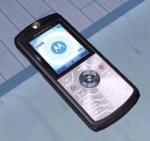
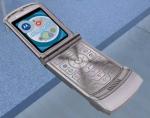
 Moto Razr V3 in Pink
 Moto Razr V3 in Pink
SCREENSHOTS


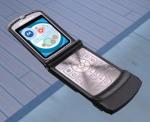
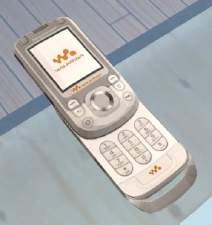
razr-pink1.jpg - width=460 height=265
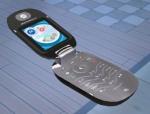
razr-pink2.jpg - width=466 height=105
razr-pink3.jpg - width=565 height=214
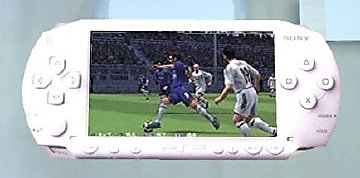
razr-pink4.jpg - width=308 height=449
Downloaded 965 times
359 Thanks
16 Favourited
44,272 Views
Say Thanks!
Thanked!
After a few requests i made a pink one too. I couldnt help myself because this phnone has turned out so great. It will replace the old phone, even if you have the black moto razr. It has the same name and will replace the black moto razr.
DO NOT POST ON PAY SITES and do not edit without my permission.
P.S. If you downloaded my NOKIA 8310 you'll have to delete that inorder for this to work. OR you can move nokia 8310 to any other folder than My Documents.
DO NOT POST ON PAY SITES and do not edit without my permission.
P.S. If you downloaded my NOKIA 8310 you'll have to delete that inorder for this to work. OR you can move nokia 8310 to any other folder than My Documents.
Advertisement:
This is a new mesh, and means that it's a brand new self contained object that usually does not require a specific Pack (although this is possible depending on the type). It may have Recolours hosted on MTS - check below for more information.
|
motorazr-pink.rar
Download
Uploaded: 28th May 2006, 124.6 KB.
20,168 downloads.
|
||||||||
| For a detailed look at individual files, see the Information tab. | ||||||||
Install Instructions
Basic Download and Install Instructions:
1. Download: Click the download link to save the .rar or .zip file(s) to your computer.
2. Extract the zip, rar, or 7z file.
3. Place in Downloads Folder: Cut and paste the .package file(s) into your Downloads folder:
1. Download: Click the download link to save the .rar or .zip file(s) to your computer.
2. Extract the zip, rar, or 7z file.
3. Place in Downloads Folder: Cut and paste the .package file(s) into your Downloads folder:
- Origin (Ultimate Collection): Users\(Current User Account)\Documents\EA Games\The Sims™ 2 Ultimate Collection\Downloads\
- Non-Origin, Windows Vista/7/8/10: Users\(Current User Account)\Documents\EA Games\The Sims 2\Downloads\
- Non-Origin, Windows XP: Documents and Settings\(Current User Account)\My Documents\EA Games\The Sims 2\Downloads\
- Mac: Users\(Current User Account)\Documents\EA Games\The Sims 2\Downloads
- Mac x64: /Library/Containers/com.aspyr.sims2.appstore/Data/Library/Application Support/Aspyr/The Sims 2/Downloads
- For a full, complete guide to downloading complete with pictures and more information, see: Game Help: Downloading for Fracking Idiots.
- Custom content not showing up in the game? See: Game Help: Getting Custom Content to Show Up.
- If you don't have a Downloads folder, just make one. See instructions at: Game Help: No Downloads Folder.
Advertisement:
Loading comments, please wait...
Author


Download Details
Packs:
 View with Names
Uploaded: 28th May 2006 at 8:04 PM
Updated: 17th Jan 2007 at 10:27 AM by IgnorantBliss
 View with Names
Uploaded: 28th May 2006 at 8:04 PM
Updated: 17th Jan 2007 at 10:27 AM by IgnorantBliss
Other Download Recommendations:
-
-
-
-
-
-
-
-
-
-
Motorola RAZR V3i (D&G) - version 2 (Pets compatible)
by mohd14 24th Oct 2006 at 5:36pm
 +1 packs
27 61.9k 23
+1 packs
27 61.9k 23 University


More downloads by mohd14:
See more


Packs Needed
| Expansion Pack | |
|---|---|
| University |
About Me
Do not edit my stuff without my permission.
And NO posting my stuff on other sites...ESPECIALLY not on pay sites.
And about requests : Retired.....for the time being.
And NO posting my stuff on other sites...ESPECIALLY not on pay sites.
And about requests : Retired.....for the time being.