
 Sign in to Mod The Sims
 Butterfly Kisses EyeShadow Set
 Butterfly Kisses EyeShadow Set
SCREENSHOTS

butterdlykisses - shadow.jpg - width=700 height=500
Downloaded 778 times
224 Thanks
14 Favourited
12,777 Views
Say Thanks!
Thanked!
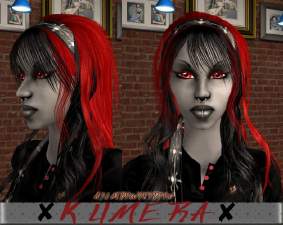
As I always liked the sweeping design of Maxis' shadow (without shadow!), I thought to take it and tweek it a bit. So I did just that. I took my BathoryAria shadows and piled them on top of Maxis' stencil, then added the small butterfly and so on. Then ended up with this blend of stuff.
ButterflyKisses comes in 8 shades:
SapphireTwinkles - Blue
CopperTwinkle - Browinsh-gold
MidnightTwinkle - Purple
RoseGardenTwinkle - Red
SpringTwinkle - Green
RobinTwinkle - DeepRed
MoonlightTwinkle - Grey
StarsTwinkle - Black/Silver
Anyhow, enjoy and thanks for downloading!!!
.:WykydSyn:.
Additional Credits:
Credited, but not included in the download:
Although you can only see a tiny bit of the outfit, I thought it proper to go ahead and credit Ghanima for it.
--------
Lipstic and brows by me.
Hair by Maxis.
ButterflyKisses comes in 8 shades:
SapphireTwinkles - Blue
CopperTwinkle - Browinsh-gold
MidnightTwinkle - Purple
RoseGardenTwinkle - Red
SpringTwinkle - Green
RobinTwinkle - DeepRed
MoonlightTwinkle - Grey
StarsTwinkle - Black/Silver
Anyhow, enjoy and thanks for downloading!!!
.:WykydSyn:.
Additional Credits:
Credited, but not included in the download:
Although you can only see a tiny bit of the outfit, I thought it proper to go ahead and credit Ghanima for it.
--------
Lipstic and brows by me.
Hair by Maxis.
Advertisement:
|
ws_butterflykisseseyeshadow.zip
Download
Uploaded: 7th Apr 2007, 502.1 KB.
3,773 downloads.
|
||||||||
| For a detailed look at individual files, see the Information tab. | ||||||||
Install Instructions
Basic Download and Install Instructions:
1. Download: Click the download link to save the .rar or .zip file(s) to your computer.
2. Extract the zip, rar, or 7z file.
3. Place in Downloads Folder: Cut and paste the .package file(s) into your Downloads folder:
1. Download: Click the download link to save the .rar or .zip file(s) to your computer.
2. Extract the zip, rar, or 7z file.
3. Place in Downloads Folder: Cut and paste the .package file(s) into your Downloads folder:
- Origin (Ultimate Collection): Users\(Current User Account)\Documents\EA Games\The Sims™ 2 Ultimate Collection\Downloads\
- Non-Origin, Windows Vista/7/8/10: Users\(Current User Account)\Documents\EA Games\The Sims 2\Downloads\
- Non-Origin, Windows XP: Documents and Settings\(Current User Account)\My Documents\EA Games\The Sims 2\Downloads\
- Mac: Users\(Current User Account)\Documents\EA Games\The Sims 2\Downloads
- Mac x64: /Library/Containers/com.aspyr.sims2.appstore/Data/Library/Application Support/Aspyr/The Sims 2/Downloads
- For a full, complete guide to downloading complete with pictures and more information, see: Game Help: Downloading for Fracking Idiots.
- Custom content not showing up in the game? See: Game Help: Getting Custom Content to Show Up.
- If you don't have a Downloads folder, just make one. See instructions at: Game Help: No Downloads Folder.
Advertisement:
Loading comments, please wait...
Author

Download Details
Packs:
None, this is Sims 2 base game compatible!
Uploaded: 7th Apr 2007 at 7:30 AM
Updated: 27th Apr 2007 at 10:56 PM
Uploaded: 7th Apr 2007 at 7:30 AM
Updated: 27th Apr 2007 at 10:56 PM
Tags
Other Download Recommendations:
-

by Barcelonista 30th Nov 2005 at 10:20pm
-
by Barcelonista 9th Dec 2005 at 9:32pm
-
by KiaraRawks 12th Jan 2006 at 8:24am
-
by Rock Chick 11th Feb 2007 at 2:16am
-

by Jessica_2020 10th Jul 2007 at 5:35pm
-
by ShojoAngel 29th Sep 2007 at 2:54am
-

by Daniel123dj 9th Oct 2007 at 8:07pm
-
-
-


More downloads by WykydSyn:
See more



About Me
My policy is simple: If you use any of my recolors on a custom Sim (full sim for upload), just give me credit. As far as using my creations in pics of you sims (for fun or whatever), no credit is necessary.