
 Sign in to Mod The Sims
 3 Tone Eyeshadow!
 3 Tone Eyeshadow!
SCREENSHOTS


colourshow.png - width=567 height=168
Screenshot-19.png - width=340 height=400
Orange, Orange, Yellow
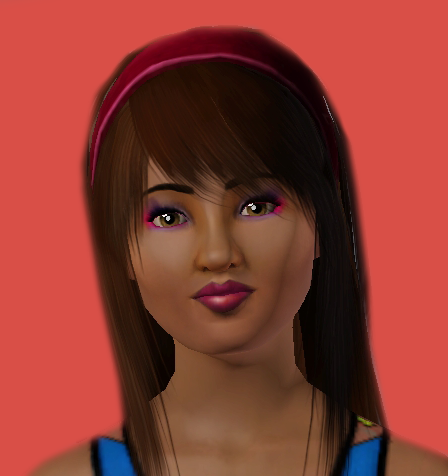
Screenshot-22.png - width=448 height=476
Pink, Purple, White
Screenshot-242.png - width=208 height=177
Aqua, Purple, Pink
Screenshot-18.png - width=258 height=268
Pink, Purple, White
Downloaded 4,124 times
544 Thanks
36 Favourited
29,820 Views
Say Thanks!
Thanked!
Picked Upload!
This is a picked upload! It showcases some of the best talent and creativity available on MTS and in the community.
3 Tone Eyeshadow for young adult, and adult.
Recolor these to whatever 3 tones your sim needs.
It took me a while to get these looking perfect, because i wanted the colors to be blended to give that 'real' look. In my opinion, these look best with brighter, fluro colors, But they still look great with darker tones.
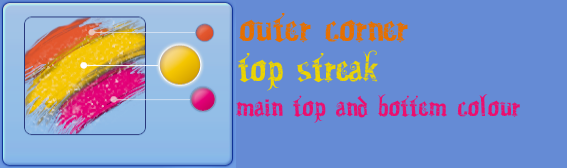
Enjoy!
Recolor these to whatever 3 tones your sim needs.
It took me a while to get these looking perfect, because i wanted the colors to be blended to give that 'real' look. In my opinion, these look best with brighter, fluro colors, But they still look great with darker tones.
Enjoy!
 Tell me what you think, and I'm happy to accept requests.
 Check out my Xtra Long Eyelashes that look great with this http://www.modthesims.info/download.php?t=375372
 Additional Credits:
TSR Workshop
Abobe Photoshop CS4
DDS Converter 2.1
Models:
Hair - XMsims
Superman Tank - Me
Everything Else - EA
Advertisement:
|
3 Tone Eyeshadow.zip
Download
Uploaded: 2nd Nov 2009, 124.9 KB.
10,268 downloads.
|
||||||||
| For a detailed look at individual files, see the Information tab. | ||||||||
Install Instructions
Quick Guide:
1. Click the download button, or the filename, to download the file to your computer.
2. Extract the zip, rar, or 7z file. Now you will have either a .package or a .sims3pack file.
For Package files:
1. Cut and paste the file into your Documents\Electronic Arts\The Sims 3\Mods\Packages folder. If you do not already have this folder, you should read the full guide to Package files first: Sims 3:Installing Package Fileswiki, so you can make sure your game is fully patched and you have the correct Resource.cfg file.
2. Run the game, and find your content where the creator said it would be (build mode, buy mode, Create-a-Sim, etc.).
For Sims3Pack files:
1. Cut and paste it into your Documents\Electronic Arts\The Sims 3\Downloads folder. If you do not have this folder yet, it is recommended that you open the game and then close it again so that this folder will be automatically created. Then you can place the .sims3pack into your Downloads folder.
2. Load the game's Launcher, and click on the Downloads tab. Find the item in the list and tick the box beside it. Then press the Install button below the list.
3. Wait for the installer to load, and it will install the content to the game. You will get a message letting you know when it's done.
4. Run the game, and find your content where the creator said it would be (build mode, buy mode, Create-a-Sim, etc.).
Extracting from RAR, ZIP, or 7z: You will need a special program for this. For Windows, we recommend 7-Zip and for Mac OSX, we recommend Keka. Both are free and safe to use.
Need more help?
If you need more info, see:
1. Click the download button, or the filename, to download the file to your computer.
2. Extract the zip, rar, or 7z file. Now you will have either a .package or a .sims3pack file.
For Package files:
1. Cut and paste the file into your Documents\Electronic Arts\The Sims 3\Mods\Packages folder. If you do not already have this folder, you should read the full guide to Package files first: Sims 3:Installing Package Fileswiki, so you can make sure your game is fully patched and you have the correct Resource.cfg file.
2. Run the game, and find your content where the creator said it would be (build mode, buy mode, Create-a-Sim, etc.).
For Sims3Pack files:
1. Cut and paste it into your Documents\Electronic Arts\The Sims 3\Downloads folder. If you do not have this folder yet, it is recommended that you open the game and then close it again so that this folder will be automatically created. Then you can place the .sims3pack into your Downloads folder.
2. Load the game's Launcher, and click on the Downloads tab. Find the item in the list and tick the box beside it. Then press the Install button below the list.
3. Wait for the installer to load, and it will install the content to the game. You will get a message letting you know when it's done.
4. Run the game, and find your content where the creator said it would be (build mode, buy mode, Create-a-Sim, etc.).
Extracting from RAR, ZIP, or 7z: You will need a special program for this. For Windows, we recommend 7-Zip and for Mac OSX, we recommend Keka. Both are free and safe to use.
Need more help?
If you need more info, see:
- For package files: Sims 3:Installing Package Fileswiki
- For Sims3pack files: Game Help:Installing TS3 Packswiki
Advertisement:
Loading comments, please wait...
Author

Download Details
Packs:
None, this is Sims 3 base game compatible!
Uploaded: 2nd Nov 2009 at 11:54 PM
Updated: 4th Jan 2010 at 11:22 AM
Uploaded: 2nd Nov 2009 at 11:54 PM
Updated: 4th Jan 2010 at 11:22 AM
Tags
Other Download Recommendations:
-
-
-
-
by G-Kristina 19th Nov 2009 at 1:01pm
-
-
by LadyFrontbum 13th Jan 2010 at 1:40pm
-
by LadyFrontbum 9th May 2010 at 2:37am
-
by LadyFrontbum 9th May 2010 at 8:15am
-
-

More downloads by xrachaelx:
See more
About Me
COMMING SOON!
The MegaTV
A very BOLD set of eyeshadows (requested)
whole new worlds as soon as i can get a hold of Create-a-World :)
The MegaTV
A very BOLD set of eyeshadows (requested)
whole new worlds as soon as i can get a hold of Create-a-World :)