Quick Reply
Search this Thread
Top Secret Researcher
Original Poster
#1 Old 14th Sep 2009 at 6:20 AM
Changing door rotation
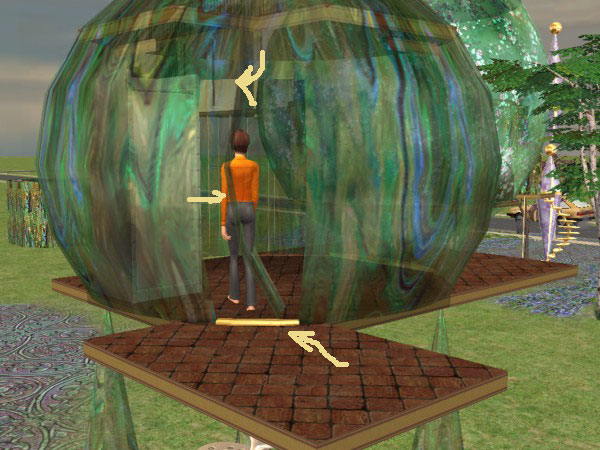
I have made some very curved doors & windows. My 1-tile doors looks fine as sims exit the door, because the curve of the door is away from the sim. However when they enter, the curve puts the door in the walk space.


The best solution would be for it to always open out ... but if that is not possible, moving the pivot point further to the right would lessen the effect. How do I do that?
Screenshots
Attached files:
File Type: rar  BTB-DoorASphere21-diagOK_but.rar (165.3 KB, 177 downloads) - View custom content

Retired from the Sims world. Please continue to enjoy my creations. Thank you to everyone who helped -- by either giving me the tools and knowledge to create or by encouraging me & downloading my creations. The Sims community is the BEST!
The ModFather
retired moderator
#2 Old 14th Sep 2009 at 8:28 AM
The joints can be moved from within the CRES. Looking at the Hierarchy, I guess that the joints to be moved are "l_door_rot" and "r_door_rot" (BTW: is it a double door? From the snapshots, it seemed a single door...).

You have to modify the X and Y values in the Translation box of each joint; adding 1 to the X will move the joint 1 tile to the left (looking the North side of the door); adding 1 to the Y will move the joint 1 tile southbound.

IMPORTANT: since the door mesh is attached to the joint, you must add the very same X and Y values, but with the opposite sign in the corresponding Translation box of the cShapeRefNode attached to the joint, or the entire door will be moved along with the rotation joint.

Example: if you add 0.5 to X and subtract 1.0 to Y in the l_door_rot, then you must subtract 0.5 to the X and add 1.0 to the Y in the "Practical - l_door_n" / "Practical - r_door_s".

The process is done by trial and errors, until you find the right X and Y values. I suggest to move the joint so that it will be at the center of the sphere: this way, when the game rotates the joint by 90°, the door will shift sideways, instead of pivoting around one side. I suggest to start with the values (X: +0.3, Y: -1.0).

I've finally started my Journal. Information only, no questions.

My latest activity: CEP 9.2.0! - AnyGameStarter 2.1.1 (UPD) - Scriptorium v.2.2f - Photo & Plaques hide with walls - Magazine Rack (UPD) - Animated Windows Hack (UPD) - Custom Instrument Hack (UPD) - Drivable Cars Without Nightlife (UPD) - Courtesy Lights (FIX) - Custom Fence-Arches - Painting-TV - Smarter Lights (UPD)


I *DON'T* accept requests, sorry.
Top Secret Researcher
Original Poster
#3 Old 14th Sep 2009 at 11:33 AM Last edited by bluetexasbonnie : 14th Sep 2009 at 12:50 PM.
Thank you.

P.S. The door in question is a single tile door. It is the diagonal and tied to a 2-tile door- which is probably confusing just looking at the packages.

Retired from the Sims world. Please continue to enjoy my creations. Thank you to everyone who helped -- by either giving me the tools and knowledge to create or by encouraging me & downloading my creations. The Sims community is the BEST!
Back to top