Quick Reply
Search this Thread
Lab Assistant
Original Poster
#1 Old 13th Sep 2011 at 1:42 PM

This user has the following games installed:

Sims 2, University, Nightlife, Open for Business, Pets, Seasons, Bon Voyage, Free Time, Apartment Life
Default Error - Delete.
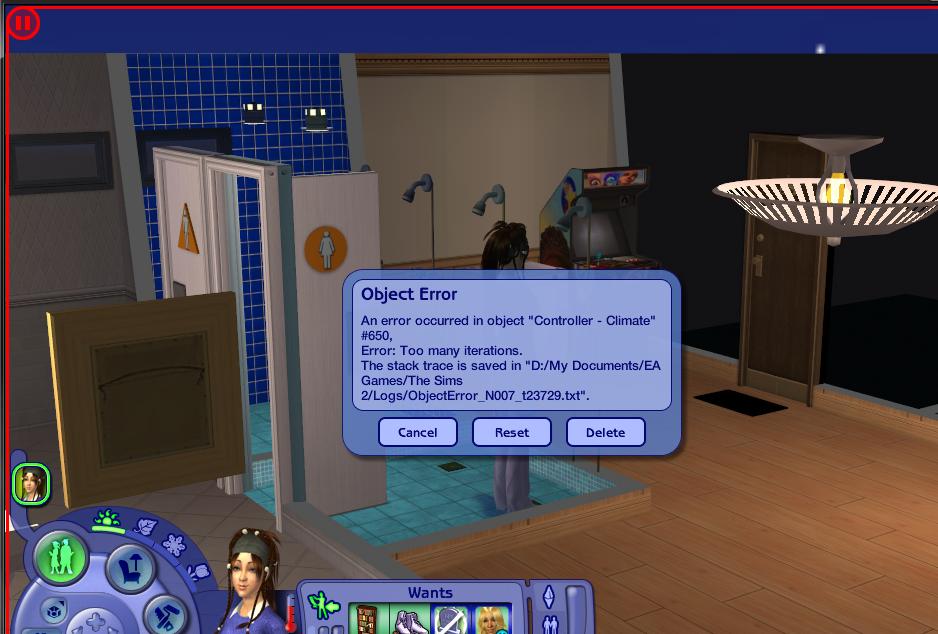
Okay i have this error that keeps popping on one of my apartments.
Is it okay to click the delete option? Coz that one seems to stop the error.
Turning off the "boolprop testingcheats" wont work either, coz the game just keeps manually resetting the error every 1 secs which keeps my game ultra lag.
I tried deleting it and didn't get the error again, but i didn't save my game yet.
Is this alright? This is different from Jump error coz this one doesn't affect the actual sims. Just lag.

Here's the error.


So is it okay to delete?
Screenshots

*Sigh*
Field Researcher
#2 Old 13th Sep 2011 at 4:35 PM
The climate controller is an invisible object which affects all the weather effects, such as rain, snow and temperature changes. If you delete it, it won't destroy your game but you won't have any weather on that lot anymore.

You would be better off figuring out what is causing the error. You almost certainly have a mod which is causing this behavior. Since it happens only in apartments, my guess is you have an outdated mod not designed to work with Apartment Life. Go through the Game Help FAQs to track down the problem mod.

On my site I have dozens more Sims 2 mods. These mods come with no support so use them at your own risk.
Lab Assistant
Original Poster
#3 Old 13th Sep 2011 at 4:55 PM
Hey thanks for the reply. I downloaded the "new weather atmosphere" last night which allows to change the weather, i have no idea that its not updated to AL. I already remove it on my downloads but the error is still there, that's why i ask here first if its safe to use the delete option. Its nice to know that it wont destroy my game.

*Sigh*
Field Researcher
#4 Old 13th Sep 2011 at 8:14 PM
After removing the mod make sure you delete your cache files to get rid of any residual nonsense. Then if you still get the error, try Reset and that might get the system to realize the mod is gone.

On my site I have dozens more Sims 2 mods. These mods come with no support so use them at your own risk.
Back to top