Quick Reply
Search this Thread
Test Subject
Original Poster
#1 Old 27th Jul 2012 at 11:19 PM Last edited by Lupine666 : 29th Jul 2012 at 3:21 AM.
Default Adding new lot types to my town, but...
Hello,

My sims live in the beach town that comes with the game.

I am running the base game, world adventures, late night and generations.

I recently used the excellent super patch which takes my version to 3.16

Following Carl's guide I am adding three lot types to the town: Exclusive Club, Hangout and Academy. Also I modified one of the pools to be a Poolside Club.

I did not use the Bridgeport official buildings of these lot types because they would not fit on the lots and because they mess with the skyline of my sims closed beach community.

The Good News:
New Opportunities have started to be offered and some are completeable. (such as dance for 3 hours at the pool club)

The Meh News:
Some of the opportunities do not seem to be completeable. I can go to the exclusive club BUT I cannot 'order a drink' (I dont think)

Also, none of the lots have interactions (except for 'visit ...'). I tried using copies of the towns existing buildings. The interactions I expected did appear, but interactions for the original building (the theatre offers 'see a show') did appear. I then took these buildings away.

Now I have either built my own building or placed a custom building which I downloaded from other players.

How to help me if you wish:
Keeping in mind that I am a somewhat advanced user, does anyone know any methods for getting a building that has the buttons that correspond to the lot. I hope that makes sense, please ask for clarification if needed.
Scholar
#2 Old 27th Jul 2012 at 11:26 PM
My answer may be too basic, but when you added or adjusted the lot did you switch it (edit town, edit lot) from its former community lot type (via the second dropdown)?
Test Subject
Original Poster
#3 Old 27th Jul 2012 at 11:28 PM Last edited by Lupine666 : 29th Jul 2012 at 3:24 AM.
Quote: Originally posted by Periandre
My answer may be too basic, but when you added or adjusted the lot did you switch it (edit town, edit lot) from its former community lot type (via the second dropdown)?


Thank you for the quick reply, yes I certainly managed to change the lot type, but I need to do something/add something to get the buildings on the lots to provide interactions.
And all the maladies of the world burst forth from Pandora's cooch
#4 Old 28th Jul 2012 at 12:25 AM
when you place a lot like, say, a lounge, the game needs a bit of time to generate a Sim to function as a mixologist, if it doesn't use a pre-existing "homeless" sim. Also, sometimes when it generates the mixologist, the Sim in question doesn't have any skill points in Mixology. When that happens, you can't order a drink or food. A way around this is a mod or cheat that lets you assign skill points, like Master Controller.
I'm not sure about the "lot buttons", sorry.
Test Subject
Original Poster
#5 Old 28th Jul 2012 at 12:29 AM
Quote: Originally posted by ButchSims
when you place a lot like, say, a lounge, the game needs a bit of time to generate a Sim to function as a mixologist, if it doesn't use a pre-existing "homeless" sim. Also, sometimes when it generates the mixologist, the Sim in question doesn't have any skill points in Mixology. When that happens, you can't order a drink or food. A way around this is a mod or cheat that lets you assign skill points, like Master Controller.
I'm not sure about the "lot buttons", sorry.


Thats ok Butch, I suspected that it might be an NPC/Employee issue, I will look into it and see if that helps.

but yeah the buildings seem to have their own buttons such as "see show" "take class" etc, but Im not sure how to assign buttons to a new building...
Lab Assistant
#6 Old 28th Jul 2012 at 12:58 AM
Oh I see......in order to, say, put a new theater on a different lot....you must PUT a theater on the lot. Commercial buildings are found in Build mode, under the Buildings tab. You can place your own city hall, stadium, etc.....this is the only way I know of to get the tags.

Good Luck.
Lab Assistant
#7 Old 28th Jul 2012 at 12:59 AM
Those buttons are interactions that rabbit holes (buildings you can't see inside of) have. Normal buildings don't have or need the buttons because you can directly control your sim inside them. You might also want to check that your exclusive club has one of the professional bars that came with Late Night. Those are the only bars you can order drinks/food from.
Test Subject
Original Poster
#8 Old 28th Jul 2012 at 1:23 AM
Quote: Originally posted by Chocklitkiss
Oh I see......in order to, say, put a new theater on a different lot....you must PUT a theater on the lot. Commercial buildings are found in Build mode, under the Buildings tab. You can place your own city hall, stadium, etc.....this is the only way I know of to get the tags.
Good Luck.


Thanks for the reply Chocklitkiss, yes I understand the use of the Commercial buildings but the only offerings for hangout, exclusive club, etc, seem to be skyscrapers which wont fit on the lots/ dont look right in my sims beach community.

If there are alternative buildings to be had please let me know where, and thanks again.


Quote: Originally posted by Sakarri
Those buttons are interactions that rabbit holes (buildings you can't see inside of) have. Normal buildings don't have or need the buttons because you can directly control your sim inside them. You might also want to check that your exclusive club has one of the professional bars that came with Late Night. Those are the only bars you can order drinks/food from.


Ah, yes, "interactions" and "rabbit holes". I have heard that vocabulary before and now I see that it is key to the issue I am having. I will make sure there is a professional bar when I check on the NPC's later tonight.

That was a very helpful comment Sakarri, grats.
I will report back, thanks
Lab Assistant
#9 Old 28th Jul 2012 at 1:39 AM
You're welcome.

Quote: Originally posted by Lupine666
If there are alternative buildings to be had please let me know where, and thanks again.


If you search the downloadable lots here for "bar" or "club", you should be able to find some nice ones that aren't in the giant skyscraper shells. (Shells look like rabbit holes, but are used to hold normal lots. Lot of vocab today )
Test Subject
Original Poster
#10 Old 28th Jul 2012 at 6:25 AM
reporting back!

On NPC's: yes, one of the registers has attracted an NPC. That register and the NPC are now Active. (I also placed one of the professional bars, but I would be very surprised if it also attracts an NPC mixologist) (the bar does not have the greyed-out sprocket icon like the register did)

On Shells: I placed a skyscraper but something is wrong, it has no functionality

On Subway stations: I know I didn't mention these earlier, but I placed one at the arena, one at the downtown park, one at the beach and one at the science facility. They all work!! I now have a public transit system!

On search: I searched for 'Rabbit holes' actually, that is the capability I think I want/need. There is an offering from Jinx which I have downloaded and will try tomorrow.

Once again, thank you for your kind support and I will let you know!
One Minute Ninja'd
#11 Old 28th Jul 2012 at 9:32 AM
Rabbit hole rugs won't give you "buttons" to identify bars, clubs, or venues. Yes, you need the rugs to get RH interactions, but bars, clubs, and venues aren't RHs. If the creator did not tag the building as a club/venue when saving it to share, it might not have an identifying tag when in map view (I'm asuming that's what your mean by buttons). Try placing the building onto a lot already designated as the venue/bar type you want. Then, in Edit Town, check that there is a title for the lot (Harry's Bar) and then save the lot to your library. Then try placing that saved building onto a properly identified lot (bar, dance club etc.) and see if you get the map tags that way.
Department of Post-Mortem Communications
#12 Old 28th Jul 2012 at 9:33 AM
The shells have no functionality because they are just what they are called: shells

There are three types of buildings in TS3
1. Those you build with BuildMode
2. Shells that came with Late Night and Showtime. These are empty and you will have to build something inside them. So these are not actually buildings but envelopes for buildings.
3. Rabbitholes. These are not really buildings either but objects your Sims interact with. They will disappear inside them and come out after a while when the action you commanded them to do in them is finished.

Now when it comes to community lots there are several things with regard to buildings:

- Rabbitholes are shown with the red tag or button and you can interact with them from Map View. All functionality is available from there, too.

- Blue map tags or buttons denote that this community lot has been classified as such by using the lot type function in Edit Town. This has nothing to do with the building or objects on that lot. You can determine an empty lot in the desert as a fishing spot and the game will show it as such even if there is neither water nor fish on that lot. Accordingly the only interaction availabe when clicking on the blue button is usually to just go there.

Functionality of the blue community lot types is determined by the objects placed there. So let's say I determine my empty lot in the desert to be an Exclusive Lounge. The game will allow this and Map View will show this lot with a blue button with the Martini glass. I can send my Sims there, they will change into their formal wear but nothing else will happen. As soon as I place a professional bar on that empty lot a mixologist will show up after a while and begin to serve drinks. Mind you, apart from that bar there is still nothing else on that lot, you don't need a building for the bar to function. The desert bar is fully functioning, although a bit boring, as soon as the bar object is placed.
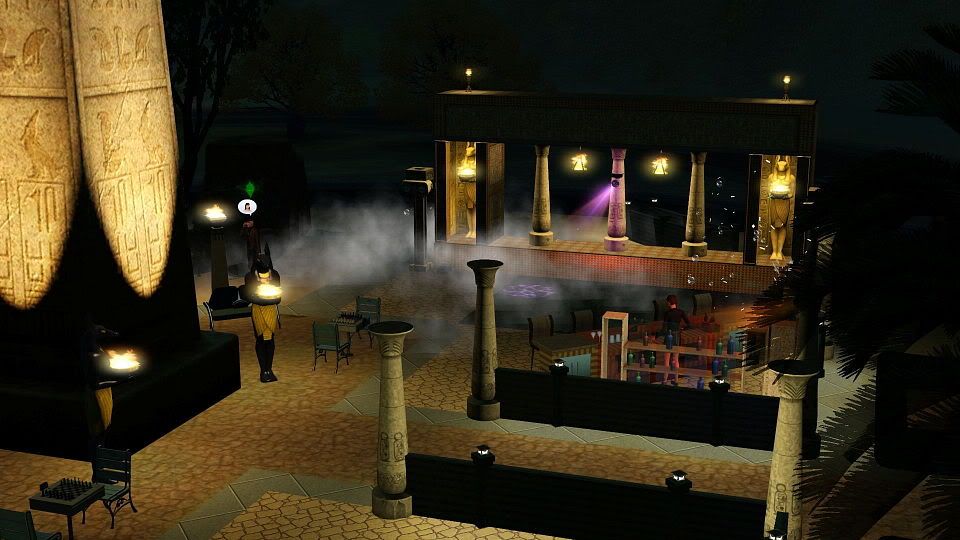
Here is an example of what I mean:

This is a Watering Hole bar I made in Lunar Lakes. As you can see it does not contain a building Sims can go into. The only thing that makes it work is the professional bar that I placed out in the open. The rest is just decorations and additional entertainment objects.
And the bar interactions are btw only available by clicking on the bar object, they are not available from Map View. There still is only the option to go there and visit.
One Minute Ninja'd
#13 Old 28th Jul 2012 at 10:25 AM
Babele, while I understand your post, and I do agree that setting the lot type should result in the proper map tag appearing in game. I too have had the experience of blank blue map tags associated with the placement of some pre-made lots. This occurs despite identifying the lot type correctly in Edit Town. In my case, so far this has occurred with a few pre-made bars. There was a professional bar in the lot. Now, perhaps this has to do with a faulty pre-made lot constructed on the wrong lot type designation (despite having the required object present, that is, the bar), although this shouldn't be possible based on your experience. However, it certainly has happened in my game on more than one occasion. Perhaps it is something specific to my game, although with another player reporting a similar issue, I doubt it's that specific.

I certainly leave open the possibility that some mod might be generating a conflict. I run many of Twallan's mods, along with a bunch of tuning and other script mods. The only core mod I use is Twallan's ErrorTrap.
Department of Post-Mortem Communications
#14 Old 28th Jul 2012 at 10:49 AM Last edited by babele44 : 28th Jul 2012 at 11:23 AM.
eskie227, I didn't understand OP's initial post such that they had empty map tags. If you're referring to this:
Quote:
Also, none of the lots have unique buttons. I tried using versions of the towns existing buildings. Buttons did appear, but they are for the original building. (the theatre offers 'see a show') I took the buildings away and either built my own or placed a custom build from others.
What I understood is that OP changed the lot type of an existing community lot, say Mirabello Plaza, to something like Hangout but Map View still only showed the red rabbithole tags. This is normal behaviour. Most rabbitholes, except for the Mausoleum, will override any lot assignment in Map View. Technically the lot is still a Hangout but it will not show. I used this, for example, to place a cc Equestrian Centre RH on a Horse Ranch lot and now they function as both. A horse's wish to visit the ranch will still fulfill although the blue Horse Ranch tag is gone and only the red Equestrian Centre tag is visible. I would be cautious, however, as not all possible combinations will probably work like that. Placing a rabbithole on a LN bar lot would probably conflict with the opening times of bars. But I've seen commercial centres tagged as hangouts and both rabbitholes and the hangout building were working fine and were actually quite busy.
But I think there is a way to show both map tags if the blue type is inside a shell. At least in one of my tests it worked when I placed the skydiving RH from the Store on a lot with a Showtime Venue that was in a shell (Los SueƱos something). There both the red RH tag and the SHT venue tag showed and as the RH was placed outside the actual venue area my Sims were not kicked out at 3 am.
You missing icons inside the tags seems to be something else and I don't think that it is related to a creator error. Once the lot in the bin is tagged correctly you can place it only on lots with either the same tag or with No Vistors Allowed. Both have so far resulted in correct tags afterwards for me.
One Minute Ninja'd
#15 Old 28th Jul 2012 at 4:56 PM
I think I understand your point. Placing both a venue and a RH building on the same lot with a venue should result in both map tags being displayed, even though the lot isn't categorized for both. I imagine this is much like combining several RHs on one lot, and still having the individual red tags associated with each building, even though they're sharing a community lot. It also sounds from your Equestrian Center lot that a RH red tag will "overwrite" a blue tag under some circumstances. When you placed the combined Ranch/Equestrian RH on the community lot, what did you designate as the lot type before placing the lot itself?
Inventor
#16 Old 28th Jul 2012 at 5:00 PM
When I get a challenge sometimes I click on the star on the map to complete it, and its grayed out, That means that the property isnt ready for the sim, so look at the thing in the sims tab, and find out if there is a time that it needs to be done, like present a check at the school is only open when the school is open. Thats why some of the stars are greyed out.

Some people have a Guardian Angel, you know a little guy sitting on your shoulder that tells you right from wrong, but mine is an Idiot.
Department of Post-Mortem Communications
#17 Old 28th Jul 2012 at 6:42 PM Last edited by babele44 : 28th Jul 2012 at 6:55 PM.
Quote: Originally posted by eskie227
I think I understand your point. Placing both a venue and a RH building on the same lot with a venue should result in both map tags being displayed, even though the lot isn't categorized for both. I imagine this is much like combining several RHs on one lot, and still having the individual red tags associated with each building, even though they're sharing a community lot. It also sounds from your Equestrian Center lot that a RH red tag will "overwrite" a blue tag under some circumstances. When you placed the combined Ranch/Equestrian RH on the community lot, what did you designate as the lot type before placing the lot itself?
I tagged it as Horse Ranch, otherwise it would not work as one as there are no objects that make a Horse Ranch a Horse Ranch, while the Equestrian Centre doesn't seem to need a lot specifically designated as such in order to be functional. Actually, I don't really understand why this option even exists in Edit Town, maybe it's there to attract horse owners and equestrian Sims to visit the lot, but so far I have never seen any other Sims but my own use the rabbithole. It's probably one of the most useless RHs to date, considering how much space it eats.

And as to the other thing: as I said, so far I have only been able to make both tags show up when the venue was inside a shell, other methods don't work. The best example from EA is the Coffeehouse in Starlight Shores, it's tagged as Coffeehouse but in Map View only the red Diner rabbithole shows, sometimes the blue Coffeehouse shows up too, but very rarely. This led my to conclude that the rabbithole is actually NOT needed for it to be a Coffeehouse and certainly not that very specific rabbithole. What makes it a Coffeehouse is the presence of the stage and the lot tag, so you can also change it to Live Show Venue and I'm sure it will work as such and replace the Diner with any other rabbithole you see fit or delete it completely. When it comes to the function of coffeehouse the Diner is merely a decoration.
If, on the other hand, you place the stage inside a shell and tag the lot as a venue, both the Diner and the Venue tag will show.
Test Subject
Original Poster
#18 Old 29th Jul 2012 at 8:57 AM
Wow, this has turned into a very advanced discussion. Thank you for your expertise eskie227 and babele44.

Additionally I am impressed with the screens.

Reporting back after another session: I placed one of Jinx's rabbit hole doors onto the new building at my new hangout lot, it was a combined business and restaurant door rabbit hole.

As you might have guessed the 'red interactions' of the rabbit hole override the (somewhat useless) blue interactions of the lot.

Also I am starting to suspect that lounges are just restaurants with a few additional objects. So, lots can spawn new opportunities but there are no new interactions I can add to my town?
Oh well, the subway system is new, and the new buildings are cool.
Eminence Grise
#19 Old 29th Jul 2012 at 9:36 AM
Quote: Originally posted by Lupine666
So, lots can spawn new opportunities but there are no new interactions I can add to my town?


What do you mean by new interactions? There are a lot of new interactions with each EP... but interactions come from sims or objects... not lots.
Test Subject
Original Poster
#20 Old 29th Jul 2012 at 9:39 AM
Quote: Originally posted by Srikandi
What do you mean by new interactions?


hey Srikandi,

By 'new interactions' I mean interactions that my town did not already have. I really need to improve my communication skills! Thanks for your attention!
Eminence Grise
#21 Old 29th Jul 2012 at 10:03 AM
Quote: Originally posted by Lupine666
hey Srikandi,

By 'new interactions' I mean interactions that my town did not already have. I really need to improve my communication skills! Thanks for your attention!


I'm still a bit confused Your sims can go to the new lot types and participate in the activities available at those lots... but those activities come from the objects on the lot, not the lot itself. Just like the old lot types.

At a library, you can read books... but that's not because the lot is a library, but because it has bookshelves on it, although making it a library enhances the effects of reading (faster skilling).

Same with a Late Night bar... if you put in a dance floor you can dance on it, if you put in a stage area with instruments your sim's band can get a gig there, if you put in a bubble blower they can blow bubbles, if you put in a professional bar they can order food and drinks, and mixologists can moonlight. But all those new options come from the objects, not the lot type per se.

Late Night also makes a lot of other interactions available, like all the stuff associated with vampirism and celebrity and hot tubs... those are features of the EP not associated with any lot types. Is that the kind of thing you mean when you talk about "interactions the town has"?
Department of Post-Mortem Communications
#22 Old 29th Jul 2012 at 10:14 AM Last edited by babele44 : 29th Jul 2012 at 10:37 AM.
Lupine666, if you mean by this that a town can work perfectly fine without any of the lot types that were added by expansions, yes, you're right.

But those new lots and their respective objects do add a lot of new interactions to your town. A Late Night bar is more than just a place where you can feed your Sim: many of the drinks add specific moodlets exclusive to the bar object; if your Sims are in a band they'll need all bars and lounges for gig opportunities (and of course a stage with music instruments in each of them); in bars you can start fights (bar brawls); bars attract different kinds of Sims than, for example, the library; only bars will allow you to fully experience the mixology skill; if you're playing a celebrity bars are a good place to play this out.
Similar with Pets. You don't need a Dog Park if you own a dog, and unless you want to participate in racing or jumping competitions, you won't need an Equestrian Centre. But the Dog Park attracts dog and animal loving Sims and dog owners, and a Horse Ranch attracts all equestrians. The reverse is also true. If there are no horses in your world the Horse Ranch will remain empty.

As a rule of thumb, if you intend to fully experience the contents of an expansion pack you'll also need its respective community lots.
But if your goal is just to reach the top of a career and have your Sims motives in the greens all time, you won't need these lots. These lots won't help you reach this goal more efficiently. Personally I don't like this playstyle very much when it comes to Sims. I'd rather play a game like SimCity or Civilization then instead.

ETA: In fact, the expansions add so many new interactions and play scenarios that I've never actually used all of them so far. Only yesterday I realised that I have never really used those camping grounds in vacation worlds and so decided that the next time I send my Sims on vacation I will have them spend their vacation at the remotest camp site possible: give them some showers in a can, some dried food, a backpack full of books and they can while away their time roasting food in the firepit, eating, conversing, reading and watching the stars. I'm sure they'll remain in their greens, too, and if not, well, woohooing can fix that.
Test Subject
Original Poster
#23 Old 29th Jul 2012 at 10:40 AM
Quote: Originally posted by Srikandi
I'm still a bit confused Your sims can go to the new lot types and participate in the activities available at those lots... but those activities come from the objects on the lot, not the lot itself. Just like the old lot types.

Same with a Late Night bar... if you put in a dance floor you can dance on it, if you put in a stage area with instruments your sim's band can get a gig there, if you put in a bubble blower they can blow bubbles, if you put in a professional bar they can order food and drinks, and mixologists can moonlight. But all those new options come from the objects, not the lot type per se.


I see, I see, I am a bit spoiled because I have many objects within my Sims house. bubble blowers, bars and hot tubs are nothing new.

But what I do need is a place for my sims band to play. That is actually why I started messing with new lots in the first place!! I will try and set up a stage for sure and report back!


Quote: Originally posted by babele44
Lupine666, if you mean by this that a town can work perfectly fine without any of the lot types that were added by expansions, yes, you're right.

But those new lots and their respective objects do add a lot of new interactions to your town. A Late Night bar is more than just a place where you can feed your Sim: many of the drinks add specific moodlets exclusive to the bar object; if your Sims are in a band they'll need all bars and lounges for gig opportunities (and of course a stage with music instruments in each of them); in bars you can start fights (bar brawls); bars attract different kinds of Sims than, for example, the library; only bars will allow you to fully experience the mixology skill; if you're playing a celebrity bars are a good place to play this out.


I do need gig opportunities and celebrity opportunities. If I can get find a way to get my teen male into a bar brawl then, yes I need to do that too!

you guys are the greatest, thank you for your expertise!
Department of Post-Mortem Communications
#24 Old 29th Jul 2012 at 11:07 AM
Quote:
I do need gig opportunities
Well, AFAIK, this does need every type of bar - Dive Bar, Watering Hole, Sports Bar, Exclusive, Fusion and Vampire Lounge - and as you cannot have them on one lot together you'll need 6 separate lots.
One Minute Ninja'd
#25 Old 29th Jul 2012 at 3:14 PM
Quote: Originally posted by Lupine666
But what I do need is a place for my sims band to play. That is actually why I started messing with new lots in the first place!! I will try and set up a stage for sure and report back!


I do need gig opportunities and celebrity opportunities. If I can get find a way to get my teen male into a bar brawl then, yes I need to do that too!


Just to clarify for you, bands do not need SHT stages. All you need is a collection of instruments on a lot. You can build a "stage" by adding a low platform, or even just demarcate an area for the instruments with a different color/designed floor tile. SHT stages are specific objects required for SHT careers (singer, magician, acrobat). If you're not planning on playing one of those careers, you don't need a SHT stage for your band.
Page 1 of 2
Back to top