Quick Reply
Search this Thread
Field Researcher
Original Poster
#1 Old 23rd Aug 2012 at 9:21 PM Last edited by TDC95 : 27th Aug 2012 at 6:13 PM.
Default Parts of mesh not transparent as wished solved
So i made a chandelier and made gaps with no bucket fill / pixels in it, so the spaces in between crystals and chain on the chandelier would remain invisible. Which would give me a much lower polly count then making individually crystal meshes.

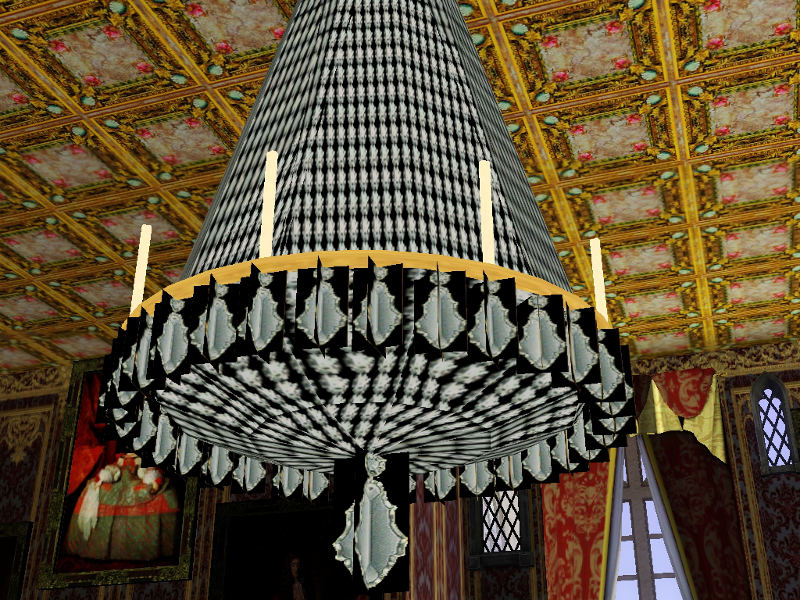
The issue is the parts i want to be trans parent are turning black.

Here is a picture of what it looks like in TSRW

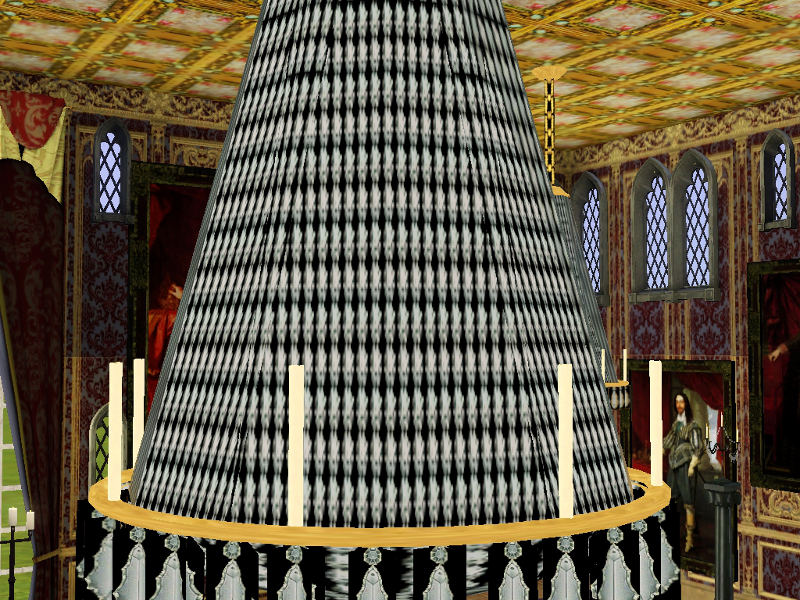
Here is what it looks like in-game

Any idea how i can fix this?
Screenshots
Sockpuppet
#2 Old 23rd Aug 2012 at 10:01 PM Last edited by BloomsBase : 23rd Aug 2012 at 10:27 PM.

Still haven't figured out wat it is that makes a object alpha editible.
Some objects support the change in material settings while others dont.

I made a lamp here: http://www.modthesims.info/showthre...me#startcomment
Feel free to clone it.

edit
Duh, link is dead....
i dont have the file(only a WRK file)
You can clone the combo(post 139) file but before cloning it with tsrw you best delete the outerdome objd(file has 2)

Wat you better do is download the Store Zirkonium chandelier and clone it.
It supports glass and alpha edits(against forum rules to upload it i guess)
http://store.thesims3.com/productDe...male&startAt=15
Forum Resident
#3 Old 23rd Aug 2012 at 10:30 PM
There are also plenty of other game object that use alpha edits to clone, outdoor stuff has a bunch.
Field Researcher
Original Poster
#4 Old 23rd Aug 2012 at 10:44 PM Last edited by TDC95 : 23rd Aug 2012 at 11:56 PM.
So its basically just another object i need to clone thats lets me edit alpha's? I own that chandelier, but will other people have to own it if i use that as my clone? I dont want to use it if you must own the chandelier from the store.

Update

Ok so i cloned as you said but im still getting the black on the chain and hanging crystals
Forum Resident
#5 Old 24th Aug 2012 at 4:56 AM
Go into the mesh tab and click the materials button for the group that that part of the mesh is in. Make sure alpha mask threshold is set to 100 and transparency is set to 1. See what that does. Also double check your alpha channel on your texture.

Quote:
I own that chandelier, but will other people have to own it if i use that as my clone? I dont want to use it if you must own the chandelier from the store.


If you clone a base game object as your starting point, then replace ALL of the meshes and textures with your own, it'll work for everyone. If you start out with an EP/SP object they must have that EP/SP. What object are you basing this off of?
Sockpuppet
#6 Old 24th Aug 2012 at 8:48 AM
You might want to add the alphamap aswell under materials, it does the trick sometimes.

Problem is that people need to patch anyway wether you take a Store, basegame or EP object.
It all depends wat the latest EP is wat you have installed.
Field Researcher
Original Poster
#7 Old 24th Aug 2012 at 2:14 PM
Quote: Originally posted by BloomsBase
You might want to add the alphamap aswell under materials, it does the trick sometimes.

Problem is that people need to patch anyway wether you take a Store, basegame or EP object.
It all depends wat the latest EP is wat you have installed.
What i mean is do other people have to own that store chandelier if i used it as my clone?

I'm thinking the issue might be i didn't group some of the vertexes/faces correctly, because group 0 i think it is holds the alpha texture, ill let you know if the regroup doesn't work.

But i really want to know if i use a store item as clone would the people who download my chandelier need that store item? Or just the same up to date patch as the iem in the store?
Forum Resident
#8 Old 24th Aug 2012 at 4:52 PM
I would highly suggest NOT using the store item as a direct clone. Use a similar base game item then just import all of the textures and meshes. That way anyone can use it.
Sockpuppet
#9 Old 24th Aug 2012 at 4:56 PM
Quote: Originally posted by omegastarr82
I would highly suggest NOT using the store item as a direct clone.


Why is that if i may ask?

Quote: Originally posted by omegastarr82
Use a similar base game item then just import all of the textures and meshes. That way anyone can use it.


IT doesn't matter, people still need to patch to your latest EP watever object you clone.
Forum Resident
#10 Old 24th Aug 2012 at 5:14 PM
Just to avoid any unnecessary complications, store items and modding tools generally don't get along, yes?

Quote:
IT doesn't matter, people still need to patch to your latest EP watever object you clone.


When did this start happening? This is a TSRW thing? Do you mean they just have to be fully patched, which they should be regardless.
Sockpuppet
#11 Old 24th Aug 2012 at 5:49 PM
Didn't know about any complications, as long as you include all necesarry files you should be save.

i could be wrong about patching, someone on simlogical once mentioned it.


As for the transparancy, some objects just can not be enabled.
I wouldn't know wat light to clone that supports it.
I do know you best dont use TSRW to clone a light, it messes up the glow terrible while S3OC doesn't.
Something i reported ages ago but no fix yet.
Field Researcher
Original Poster
#12 Old 24th Aug 2012 at 10:57 PM
Quote: Originally posted by BloomsBase
Didn't know about any complications, as long as you include all necesarry files you should be save.

i could be wrong about patching, someone on simlogical once mentioned it.


As for the transparancy, some objects just can not be enabled.
I wouldn't know wat light to clone that supports it.
I do know you best dont use TSRW to clone a light, it messes up the glow terrible while S3OC doesn't.
Something i reported ages ago but no fix yet.
I used a store chandelier you recommended bloom and as far as using that as my clone I have no issues. The regroup was actually the issue because the texture for the crystals was under group 0 and I added all the parts of the chandelier mesh that are supposed contain the crystals to that group, and that fixed it, I no longer see black and its transparent where it is supposed to be, and all the crystals are working as they should and I planned.

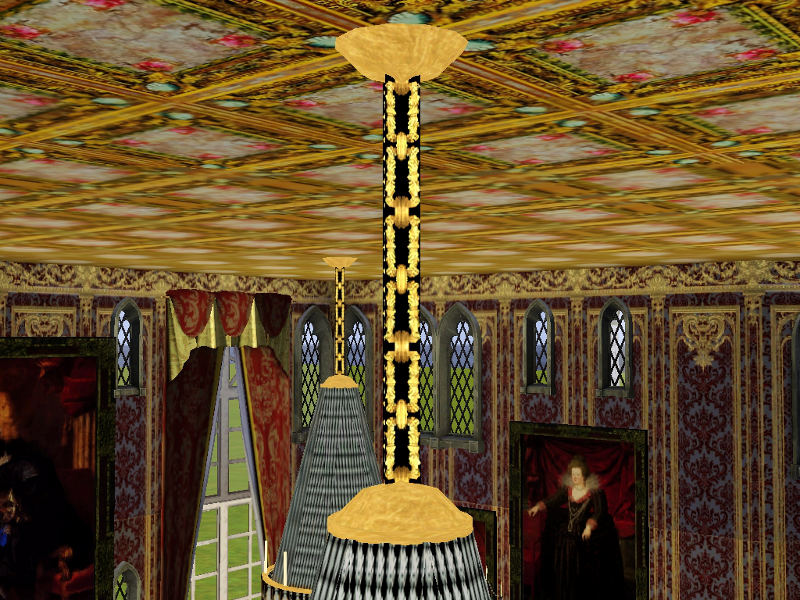
I am having one issue left. As I showed in a picture above the chain is also a texture, but the regroup did not fix the black part on the chain. I think the reason might be since I didn't add the chain to the alpha texture under the mesh tab. The thing is the crystals act as an over lay when I use them as that alpha texture. Is there a way I can add that chain texture to the overlay yet have it still remain color-able?

I would post a picture but internet is crashing at my place, and I have to use my phone. When my internet is back up I can attach the .package file if that will help you understand.

If not being clear enough let me know, phone keyboards don't allow me to be so descriptive.
Sockpuppet
#13 Old 25th Aug 2012 at 9:34 AM
it depends if all your textures are on one file.
The chandelier uses 2 setups, a castable and non castable with diffrent textures.

The crystals are non castable while the rest of the lamp is if im correct.
You should be able to enable the other meshgroups for alpha edits aswell by adding a correct map.

So:
one meshgroup Non castable for the glass with the crystal mesh in it.(glassshader)
it will use a seperate texture(a overlay and specular)

one meshgroup for the rest, castable with the rest of the meshparts(phongshader)
it will use the overlay, mask, mulitplier and specular from the texture tab.

If you cant figure it out upload the file.
Field Researcher
Original Poster
#14 Old 25th Aug 2012 at 6:22 PM
Quote: Originally posted by BloomsBase
it depends if all your textures are on one file.
The chandelier uses 2 setups, a castable and non castable with diffrent textures.

The crystals are non castable while the rest of the lamp is if im correct.
You should be able to enable the other meshgroups for alpha edits aswell by adding a correct map.

So:
one meshgroup Non castable for the glass with the crystal mesh in it.(glassshader)
it will use a seperate texture(a overlay and specular)

one meshgroup for the rest, castable with the rest of the meshparts(phongshader)
it will use the overlay, mask, mulitplier and specular from the texture tab.

If you cant figure it out upload the file.
Internet finally came up today yay here is how epic my chandelier looks

but the chain is still back as i said above

Cant figure out the chain thing. ill upload the .package file and p.m it to you bloom so you can take a look. If you need any textures let me know.
Sockpuppet
#15 Old 27th Aug 2012 at 2:13 PM

This is the best i can do.
If you want the glass more transparant then pull down the diffuse slider in the materials tab
And fiddle a bit with settings and textures cos yours does look better
Although castable stuff never looks so good as a overlay texture(glass is now castable)
Load the old mesh in it if you like it better!

As i said...tsrw made the glow dissapear and only the top floor lights up
Field Researcher
Original Poster
#16 Old 27th Aug 2012 at 6:12 PM
Quote: Originally posted by BloomsBase

This is the best i can do.
If you want the glass more transparant then pull down the diffuse slider in the materials tab
And fiddle a bit with settings and textures cos yours does look better
Although castable stuff never looks so good as a overlay texture(glass is now castable)
Load the old mesh in it if you like it better!

As i said...tsrw made the glow dissapear and only the top floor lights up
Looking good

I found a little fix by making the crystal textures transparent so it will look more realistic. Also i didn't like the main body re-mapping of the textures but the bottom part of the chandelier where the crystals are you did a very nice job and im using that part of the mapping

Thanks again i really appreciate it!

I'm just going to fiddle with the multiplier textures a bit and then ill upload, what i might do is do two variations one with cast-able crystals and a second without

Bloombase= awesome
Veteran Finn
retired moderator
#17 Old 29th Oct 2012 at 10:09 AM
Quote: Originally posted by omegastarr82
Go into the mesh tab and click the materials button for the group that that part of the mesh is in. Make sure alpha mask threshold is set to 100 and transparency is set to 1.
Now how about that! Solved my transparency issue I've been fighting with for two days now :D

Thanksies!
Back to top