Quick Reply
Search this Thread
Test Subject
Original Poster
#1 Old 27th Dec 2012 at 8:08 AM
Default Using fence as railing on ground level stairs?
Hi everyone,

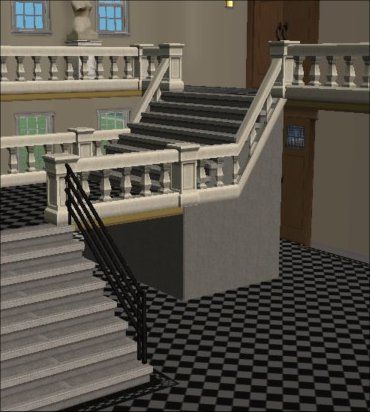
I've been struggling a lot with this one. I've looked into many guides, but they don't seem to address how to customize the railings for the ground level stairs. Here's what I got so far:


After step 7, I'm stumped. I've fiddled around with it for hours, but I'm unable to figure out a way to keep the railing like that without having the ground sunken in. I've drawn out what I'm ideally aiming for in the picture below...


Do you guys know any way around this? I've tried searching for custom railing tools, triangular walls, etc. but no luck. Any help will be much appreciated!

Thanks,
Safa
Beautiful Dinosaur
#2 Old 27th Dec 2012 at 10:12 AM
Have you tried using the Stair Wall Fix from JRW? http://www.modthesims.info/download.php?t=403889 I don't know that it's exactly what you're looking for but it may help you.

Who knows where thoughts come from....? They just appear.
Site Helper
#3 Old 27th Dec 2012 at 2:25 PM
Try turning CFE on again, and then flatten the ground level. If that doesn't work, it's because the game insists on creating a 4-click space between levels. The GridAdjuster (see my profile) should be able to avoid that restriction.
The Great AntiJen
retired moderator
#4 Old 27th Dec 2012 at 3:04 PM
Like this?


It's an exploit of the floor elevation cheat but doesn't work when trying to connect to ground level. As you can see if you look at the lower flight of stairs, I used the regular banisters for the stairs. It works from the landing to the first floor (2nd if you're American) because the game considers both levels of floor tiles to be on the same floor level (even though they're not, obviously). I built this lot ages ago (in fact, I think it was the second university lot I built) and someone may have found a fix since then. I suspect Moo is correct though and the fix for it would be using her Grid Adjuster.

I no longer come over to MTS very often but if you would like to ask me a question then you can find me on tumblr or my own site tflc. TFLC has an archive of all my CC downloads.
I'm here on tumblr and my site, tflc
Test Subject
Original Poster
#5 Old 27th Dec 2012 at 8:54 PM
Quote: Originally posted by Mootilda
Try turning CFE on again, and then flatten the ground level. If that doesn't work, it's because the game insists on creating a 4-click space between levels. The GridAdjuster (see my profile) should be able to avoid that restriction.


What are the values I need to enter into the GridAdjuster if I want to flatten the lot but keep my sloped fencing (step 7)?

Thanks,
Safa

Edit: I tried something with that tool, and now Pleasantview won't open. Yikes!
Site Helper
#6 Old 28th Dec 2012 at 12:26 AM
I don't know why your neighborhood won't load. The GridAdjuster doesn't affect your neighborhood at all, just your lot. Restore from your backup and try again. If it fails the second time, you should probably give me the lot so that I can see what the problem is. You might also want to tell us which values you used.

If you didn't make a backup, you're in luck. The GridAdjuster backs up the lot package with a file extension of .BKP.

To lower just one point on the lot: Count the number of tiles from the front and add 10 for the road. Count the number of tiles from the left. You'll want level 1 only (level 0 is the ground level) and a flat elevation of 0 (since you probably want the railing to touch the ground).
Back to top