Quick Reply
Search this Thread
Test Subject
Original Poster
#1 Old 25th May 2014 at 8:24 PM
Default Crappy Lighting on Multi-story Walls
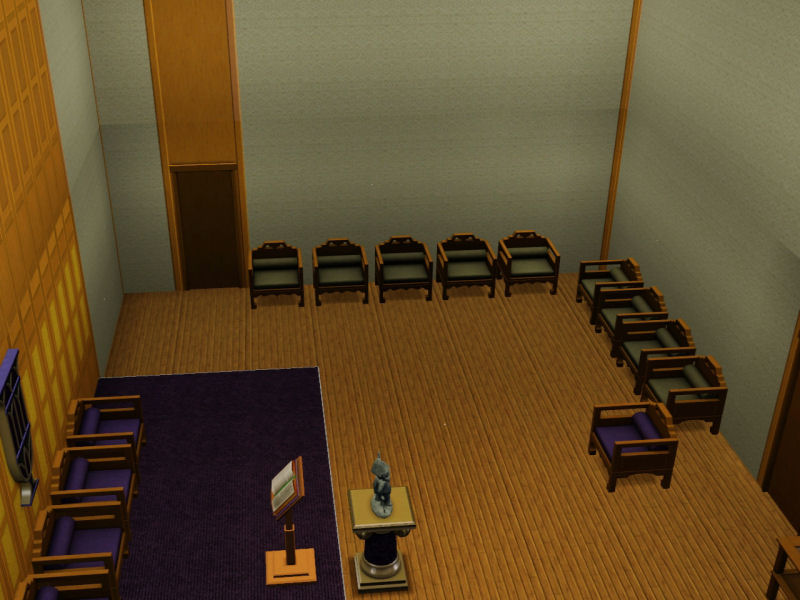
I tried searching to see if anyone else had a complaint about this, but I didn't see anything. I hate how lighting cast on walls get cut off each floor when there are multiple stories on a house. Here's an example of a house I'm working on:


I know the columns look stupid, don't judge...

Does anyone know of a way around it?
Theorist
#2 Old 25th May 2014 at 8:42 PM
Don't know if there's a fix. It's one of the reasons I never build 2+ storey rooms. ~~shrugs~~

Life is short, insecurity is a waste of time. ~Diane Von Furstenburg
You don't get out of life alive. ~Jimmy the Hand

♥ Receptacle Refugee ♥
Test Subject
Original Poster
#3 Old 25th May 2014 at 9:09 PM
I can't help myself, I don't think I've ever built anything without at least a foundation, and foundation is considered a level so the lighting there is also messed up.

I was thinking I could put a second light behind the one I actually want that gave a more evenly lit appearance, but I don't have any in my game at the moment. Does anyone know of cc lighting that looks really even on walls?
Theorist
#4 Old 25th May 2014 at 9:29 PM
What about the invisible lights? I can't remember if they're hidden in buy mode but the invisible ones like the 4x4 and 4x1 should help. I think I've done that before.

Can't find stuff in build and buy mode? http://www.nexusmods.com/thesims3/mods/1/?
Test Subject
Original Poster
#5 Old 25th May 2014 at 10:16 PM
Quote: Originally posted by tizerist
What about the invisible lights? I can't remember if they're hidden in buy mode but the invisible ones like the 4x4 and 4x1 should help. I think I've done that before.


Yeah the ones in debug, now that you've mentioned it I remember using those before too to fix outdoor lighting in a previous town. I tried using them just now and it's not working, it's still casting a huge shadow on the top half of the wall. I swear it worked for me when I used them before, but the town I used them in is now corrupted so I can't look at what I did differently.
Test Subject
Original Poster
#6 Old 25th May 2014 at 10:50 PM
Ew, ok I just added the debug lights on each level in the carport area, and this was the best I could do:


I guess there's an unavoidable seam at the top of each level.
One horse disagreer of the Apocalypse
#7 Old 25th May 2014 at 11:08 PM
Fixed in TS4

"You can do refraction by raymarching through the depth buffer" (c. Reddeyfish 2017)
Lab Assistant
#8 Old 25th May 2014 at 11:38 PM
Another solution over the invisible lights is to drag the bottom wall light all the way to the top and then drag the top wall light all the way down. That way the light will sort of match in both wall levels.
That might not help with the foundation to wall problem, but works for multi-story rooms.

Could also try to use a highrise shell to 'force' a 2-story room. But I've not explored this method too much, and when using regular height walls into these 2 story rooms, a gap in the intersection will be visible.
Also I don't know if you can put shells up in foundations, last time I tried my game crashed…
Test Subject
Original Poster
#9 Old 26th May 2014 at 12:23 AM
Quote: Originally posted by Inge Jones
Fixed in TS4


Stop playing with my emotions.

Quote: Originally posted by Sauzer
Another solution over the invisible lights is to drag the bottom wall light all the way to the top and then drag the top wall light all the way down. That way the light will sort of match in both wall levels.
That might not help with the foundation to wall problem, but works for multi-story rooms.

Could also try to use a highrise shell to 'force' a 2-story room. But I've not explored this method too much, and when using regular height walls into these 2 story rooms, a gap in the intersection will be visible.
Also I don't know if you can put shells up in foundations, last time I tried my game crashed…


Dragging lights for whatever reason doesn't work for me outside, but it does inside. It looks kinda tarded though... I'm afraid to use highrise shells for that reason, my game crashes enough as it is. However you just reminded me that I could use cfe to make one level really tall so that the ugly seams are all at the top, but I don't know about the foundation. I know foundation can only be as tall as a wall, but can you make a foundation shorter?

Edit: Yes you can, but the rest of your house will look like crap. I'll have to play with it more later tonight.
Lab Assistant
#10 Old 26th May 2014 at 12:55 AM
I assumed it would work outside, but now I remember having problems with outdoors lights before.

Well, yes, you can use CFE to make higher floors, however that might not work in your case. In your first picture you are using that matching set of windows, but if you use CFE and make that first floor 2-stories high, you won't be able to use the top window. There's also the indoor space problem, as all your rooms in that floor will be 2-stories high. Works if the rooms are really big, but with smaller rooms…
Sims 3 is just not multi-story friendly, unfortunately.

With the previous patches they allow you to build smaller foundations/walls, almost the size of a platform, or one stair step. I think you need hold Alt when placing the foundation.
Test Subject
Original Poster
#11 Old 26th May 2014 at 5:26 AM
I ended up trying the cfe cheat on just the side of the house where the tall carport is and that worked out fine... Except that the crappy lighting just extends with the ridiculously long wall. What the hell, EA??

Quote:
With the previous patches they allow you to build smaller foundations/walls, almost the size of a platform, or one stair step. I think you need hold Alt when placing the foundation.


I didn't know that, I just tried it and it worked! Learning something new and useful has eased the pain of not finding a workaround for bad lighting.
dodgy builder
#12 Old 26th May 2014 at 12:19 PM
There will always be a difference. You can ctrl+shift click on the lights and adjust intensity of cause, but the difference will always be there. It can be less annoying.


If you use cfe you will end up with less floors, and the twisted walls from cfe will be even more visible. I just try'n use less lights and make them softer by having them further away from the walls, then I use more wall lights and such. If I can I use wall lamps with very little lights themselves, and more of the invisible lights. It's a difficult balance. On the outside I don't really care, it's too much work. Inner rooms are more important in my eyes.
Screenshots
Test Subject
Original Poster
#13 Old 26th May 2014 at 3:11 PM
Yeah the invisible lights do help, and varying intensity of each floor so it looks like it's fading helps. I just wish I could adjust invisible lights individually, but I can at least adjust each floor or room. That's what I did in the last picture.
dodgy builder
#14 Old 26th May 2014 at 6:17 PM
What do you mean adjusting them individually? I do that all the time, it should be possible.
Test Subject
Original Poster
#15 Old 27th May 2014 at 4:50 AM
Quote: Originally posted by Volvenom
What do you mean adjusting them individually? I do that all the time, it should be possible.


I was talking about the light intensity, it's impossible to adjust the debug invisible lights individually because you can't click on them. Unless there's a way to set intensity in build/buy mode...
Scholar
#16 Old 27th May 2014 at 5:03 AM
When I made the Fraternal Lodge, I probably spent 2 days working on the problem with lights. And it only got not horrendous, never good, certainly never great. And it only got not horrendous, because I used the invisible lights...adjusting their intensities, one by one. As you can see, only one section of one wall is ... okay. The rest are not horrendous.


BUT

I have since experimented using the OMSP mod to move those lights around.
I have actually been able to make that seam practically invisible by moving the light itself...one upstairs lowered, and one downstairs raised. You need one and a half lights for every 2 tiles...each level. (3 lights for every 4 tiles...but sometimes you have to move them...so it's never quite an equal space between them.)

It took me only about 4 hours to get one wall working right.

It's a bitch, but it can be done.
Scholar
#17 Old 27th May 2014 at 5:10 AM
Quote: Originally posted by K47H3R1N3
it's impossible to adjust the debug invisible lights individually because you can't click on them. Unless there's a way to set intensity in build/buy mode...


Yes. That's exactly where you can adjust them. In fact, you can adjust all the lights there.

Hover over the light till you see the hand, then ctrl+shift click. Voila - zee menu.
dodgy builder
#18 Old 27th May 2014 at 6:44 AM
tsyokawe: If you use OMSP the downloader needs to have it as well isn't that so? meaning more clutter on the download?

... and I never build with a Sim on the lot.
Scholar
#19 Old 27th May 2014 at 1:17 PM
Quote: Originally posted by Volvenom
tsyokawe: If you use OMSP the downloader needs to have it as well isn't that so? meaning more clutter on the download?

... and I never build with a Sim on the lot.


Yes. The person who downloads the item must also have the omsp package.
Otherwise, any object sitting on one of those squares disappears,
or snaps back to the position it would be in if the package wasn't there.
(I also remember once when I had deleted the omsp package,
little pictures were suspended everywhere on the lot where an omsp square would have been...weird.

But I'm not so sure that the omsp mod clutters anything...it's a package file, not a sims3pack file.
I have a crappy graphics card, but I gotta say, package files haven't clogged up my game the way most simspack files do.

I don't know what you mean about building with a sim on the lot. Once I've built, I've moved sims in to make sure that
there aren't any access problems. I've also used them to upgrade objects or plant harvestables before upload.
Is that what you're talking about? Is doing that a faux pas, or something? No one ever told me...
dodgy builder
#20 Old 27th May 2014 at 2:19 PM
I just read someone saying here that they didn't like Sims3 because they had to have Sims on the lot to build anything.

I build the house, finish it, share and then move a sim in to test if it's working. I have to test the thing of cause. Plant harvestables I do from buydebug, don't need a sim on the lot for that either. Some things I need sims on the lot for though, testing the placement of fogemitters and such. If I need live mode, live is best for pictures of the lot, 2 floor high rooms can't be taken pictures of in build mode.
Scholar
#21 Old 27th May 2014 at 4:31 PM
Quote: Originally posted by Volvenom
I just read someone saying here that they didn't like Sims3 because they had to have
Sims on the lot to build anything.

I build the house, finish it, share and then move a sim in to test if it's working. I have to test the thing of cause.
Plant harvestables I do from buydebug, don't need a sim on the lot for that either. Some things I need sims on the
lot for though, testing the placement of fogemitters and such. If I need live mode, live is best for pictures of the lot,
2 floor high rooms can't be taken pictures of in build mode.


Oh. That wasn't me.

Boyoboy, agreed. You need a sim moved in to take proper screenshots.
In fact, they used to not even accept screenshots taken in build/buy mode.
Once my sim has tested routing and access to interactive objects,
I send her fishing so I can take screenshots before uploading.

The buydebug gives normal plants. Downloads like my botanical garden were deliberately built with perfect plants,
because I didn't think it was realistic for such a place to have crappy yields.
dodgy builder
#22 Old 27th May 2014 at 8:39 PM
I just know enough about this game to make the technical part of it work for the gamer, if I'm happy with building part I'm off to something else. I can survive with a few hours gameplay once in a while to test my creations, but I don't enjoy it
Mad Poster
#23 Old 28th May 2014 at 1:34 AM
This sucks because multi-story lights worked before World Adventures, but then it broke and they never fixed it.

Guess it was out of their league!
dodgy builder
#24 Old 28th May 2014 at 7:50 AM
It turns out they have broken the fogemitters very recently as well, and that's a bigger problem for me. The Sims would be great if it wasn't for the people who made it!
One horse disagreer of the Apocalypse
#25 Old 28th May 2014 at 8:02 AM
Well as a modder I can say that the most gifted coders could not help breaking things as they fixed others because of the very poor overall software architecture policies (or maybe it's just poorly documented/commented - obviously a modder does not get to see the comments anyway) it is dreadfully hard to see what might affect what when you are changing it. For a modder this is less of a problem, because what you don't pick up in testing your users very quickly let you know about and you can have it fixed almost by return of post. As part of a formal development team you can't - you have to wait for a changes request to be raised, for a project manager to schedule in the fixes and budget for them, and to get the budget approved. Anyway it's fairly obvious to me that when new features are added, it's been so hard for the coders to work out what existing code is doing that they often cannot link in to functions that support other features even when it looks like they were meant as a kind of reusable library and you have loads of different functions that do almost the same thing, some not quite as clever as others in how they do it. Obviously my comments are based only on the scripting I can see, which does not include actual rendering algorithms.

"You can do refraction by raymarching through the depth buffer" (c. Reddeyfish 2017)
Page 1 of 2
Back to top