Quick Reply
Search this Thread
Test Subject
Original Poster
#1 Old 13th Sep 2014 at 8:04 PM Last edited by Tolkien : 20th Sep 2014 at 7:24 AM.
Default Hiding the Plumbob mod - possible?
I was wondering if its possible to make a mod to hide the plumbob or is it like hard coded in? Cheats don't do it anymore. I'd really like to remove them for screens/movies as they seem...bigger then before...

I imagine it would be an easy "switch" to trigger "off" if it was moddable - any suggestions how or where I should look? Would it also be in the _GFX resource type file?
Test Subject
#2 Old 13th Sep 2014 at 8:33 PM
Quote: Originally posted by Tolkien
I was wondering if its possible to make a mod to hide the plumbot or is it like hard coded in? Cheats don't do it anymore. I'd really like to remove them for screens/movies as they seem...bigger then before...

I imagine it would be an easy "switch" to trigger "off" if it was moddable - any suggestions how or where I should look? Would it also be in the _GFX resource type file?


There's no need. They actually added the ability to hide the plumbob in a recent patch. It's not done with the hideheadlineeffects command though. Give me just a moment and I will find the associated patch note.
Test Subject
#3 Old 13th Sep 2014 at 8:45 PM
Quote: Originally posted by singsolo
There's no need. They actually added the ability to hide the plumbob in a recent patch. It's not done with the hideheadlineeffects command though. Give me just a moment and I will find the associated patch note.


Okay, either I am going crazy or they attempted to do this, it didn't work, and they took the fact that you could OUT of the patch notes. I could have sworn that I saw this added in the same patch as the "no hover effects" change that removes the highlighting. Now I look at the patch notes, and don't see a mention of it.
Test Subject
Original Poster
#4 Old 13th Sep 2014 at 9:04 PM
Hover effects only effects outlines on objects and sims. Nothing to do with the plumbots...sigh...wish it did!
Eminence Grise
#5 Old 13th Sep 2014 at 9:54 PM
Quote: Originally posted by Tolkien
Hover effects only effects outlines on objects and sims. Nothing to do with the plumbots...sigh...wish it did!


Not a helpful reply but... it's a plumbob, not a plumbot Plumbot is a robot from Into The Future. Plumbob is originally a lead weight used to hold a string at a straight vertical to ensure that a wall is strictly vertical: http://en.wikipedia.org/wiki/Plumb_bob . Because a Sim's mood indicator is shaped roughly like a traditional plumbob, it acquired that name (at least, I assume that's why.) Here's a modern one:
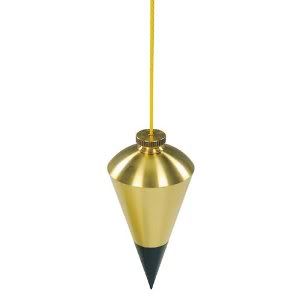


Relevant to modding because if you were gonna search for "plumbob" in the code, gotta know how it's spelled
Test Subject
#6 Old 14th Sep 2014 at 10:06 AM
In the game folder (where the game's executable is) there should be a file called "Default.ini"
Inside you'll see a "[Plumbob]" block with several variables under it; for each plumbob variable they have four sets of numbers. My guess (because of they format, and because I tested it and it seemed to work) is that these sets of numbers are the rgba values for the plumbob's color. If you set the last value for each plumbob variable to "0.00" it should make the plumbobs invisible, and effectively not there.

As for plumbobs in cutscenes, tough luck. I would assume that they are video files, and so if you really wanted to remove the plumbobs you'd have to be familiar with some kind of video aftereffects software.
Test Subject
Original Poster
#7 Old 20th Sep 2014 at 7:23 AM
Quote: Originally posted by ThatUsernameGuy
In the game folder (where the game's executable is) there should be a file called "Default.ini"
Inside you'll see a "[Plumbob]" block with several variables under it; for each plumbob variable they have four sets of numbers. My guess (because of they format, and because I tested it and it seemed to work) is that these sets of numbers are the rgba values for the plumbob's color. If you set the last value for each plumbob variable to "0.00" it should make the plumbobs invisible, and effectively not there.

As for plumbobs in cutscenes, tough luck. I would assume that they are video files, and so if you really wanted to remove the plumbobs you'd have to be familiar with some kind of video aftereffects software.


Jeez I spent so much time looking at files in the docs folder and I totally forgot the basic idea to check the programs folder lol - so thanks for that.

Hmmm...I think your right about not being able to remove them as it probably is an animation feature....

Sigh now if I could just figure out how to make the dialog/thought bubbles STAY on screen when I capture a screenshot without having to enable capture UI.
Back to top