Quick Reply
Search this Thread
Lab Assistant
Original Poster
#1 Old 12th Mar 2017 at 7:20 PM
WCIF small/short eyebrows?
Where can I find short eyebrows? Like Starfire's from Teen Titans, or animal, like in the inumimi pic.
Screenshots
Top Secret Researcher
Lab Assistant
Original Poster
#3 Old 12th Mar 2017 at 8:24 PM
Quote: Originally posted by aisquared
https://www.mtsims-cakestore.com/%E...4%B8%E5%A6%862/


I can't download anything from this link
Top Secret Researcher
#4 Old 12th Mar 2017 at 9:07 PM
Okay. Just copy this link and paste it in your browser then add .zip at the end --> http://www.mtsims-cakestore.com/app...akeup-Eyebrow01
That should work
Alchemist
#5 Old 12th Mar 2017 at 9:52 PM
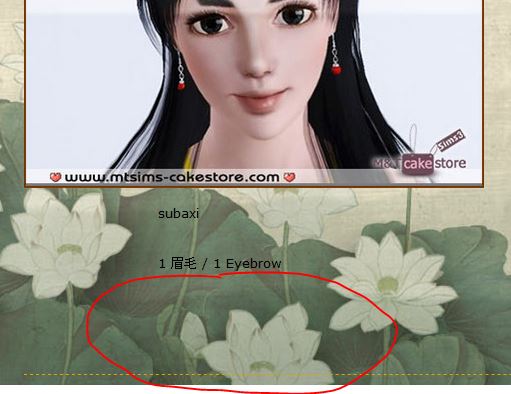
Jesus, I finally realized how to download from that website. The links to stuff are added to images but the images are invisible. Here's the area you should click to download the archives:


And OP, here are the eyebrows in the second pic: Geisha Eyebrows by yenwenz
Screenshots

Tumblr - more downloads! ◾ CC reuploads / creator backupsTS3 CAS Conversion Catalog - for basegame, EP, SP, and Store clothing!
Lab Assistant
Original Poster
#6 Old 12th Mar 2017 at 10:16 PM
Quote: Originally posted by sweetdevil
Jesus, I finally realized how to download from that website. The links to stuff are added to images but the images are invisible. Here's the area you should click to download the archives:


Lol so it was there? xD Thanks for sharing your knowledge! <3

Quote: Originally posted by sweetdevil
And OP, here are the eyebrows in the second pic: Geisha Eyebrows by yenwenz


Yes, I found them and downloaded it but I can't install it it appears as a brown box in my launcher and the install option is greyed out, it won't let me install it and it's not the first time it happened with a .sims3pack file. I don't know why
Alchemist
#7 Old 13th Mar 2017 at 6:04 AM
Quote: Originally posted by DerpyTanuki
Yes, I found them and downloaded it but I can't install it it appears as a brown box in my launcher and the install option is greyed out, it won't let me install it and it's not the first time it happened with a .sims3pack file. I don't know why

I would try converting them to package, maybe they will work that way.

Tumblr - more downloads! ◾ CC reuploads / creator backupsTS3 CAS Conversion Catalog - for basegame, EP, SP, and Store clothing!
Lab Assistant
Original Poster
#8 Old 13th Mar 2017 at 4:38 PM Last edited by DerpyTanuki : 13th Mar 2017 at 5:20 PM.
Quote: Originally posted by sweetdevil
I would try converting them to package, maybe they will work that way.


I downloaded Delphy's Sims 3 Pack Multi-Extracter and it didn't work
Nothing happens with the ones I can't install with the launcher. I tried with some that I already installed and those were perfectly extracted. I already commented in the program's page and I even made another thread some days ago concerning my problem with .sims3pack files but no one answered

http://www.modthesims.info/showthread.php?t=591469
Alchemist
#9 Old 13th Mar 2017 at 9:31 PM
You can't use them in-game at all, even in package format? I confess I've never heard of this issue before, it's probably something super specific so that's why you haven't gotten any replies yet...

Can you try this package version: MEGA link
I tested it in my game and it shows up properly on both male and female Sims.

Edit: just to get this out of the way, you are putting the packages in Mods \ Packages within My Documents, right?

Tumblr - more downloads! ◾ CC reuploads / creator backupsTS3 CAS Conversion Catalog - for basegame, EP, SP, and Store clothing!
Lab Assistant
Original Poster
#11 Old 13th Mar 2017 at 10:41 PM
Quote: Originally posted by sweetdevil
You can't use them in-game at all, even in package format? I confess I've never heard of this issue before, it's probably something super specific so that's why you haven't gotten any replies yet...


What I meant is that the Package Extracter state that it finished converting the file but when I check the extract folder there is nothing at all. No files, be it packages, .sim3pack or anything else. Empty

Quote: Originally posted by sweetdevil
Edit: just to get this out of the way, you are putting the packages in Mods \ Packages within My Documents, right?


The .packages files yes. The .sim3pack in Downloads.
Alchemist
#12 Old 14th Mar 2017 at 10:46 AM
Quote: Originally posted by DerpyTanuki
What I meant is that the Package Extracter state that it finished converting the file but when I check the extract folder there is nothing at all. No files, be it packages, .sim3pack or anything else. Empty

Have you tried changing both the source and destination folders? You have to put the .sims3pack in the source folder, and the .package will be extracted to the destination one (I apologize if this sounds condescending, just trying to take each step and see if there's something wrong anywhere). You should also get a "X files extracted with Y files per second" message at the bottom of the Extractor window.

Did the eyebrows I posted work?

Tumblr - more downloads! ◾ CC reuploads / creator backupsTS3 CAS Conversion Catalog - for basegame, EP, SP, and Store clothing!
Lab Assistant
Original Poster
#13 Old 14th Mar 2017 at 1:12 PM Last edited by DerpyTanuki : 14th Mar 2017 at 5:28 PM.
Quote: Originally posted by sweetdevil
Have you tried changing both the source and destination folders? You have to put the .sims3pack in the source folder, and the .package will be extracted to the destination one (I apologize if this sounds condescending, just trying to take each step and see if there's something wrong anywhere). You should also get a "X files extracted with Y files per second" message at the bottom of the Extractor window.


Yes, I changed the source and destination folder, nothing happens. A message appears at the bottom stating "Done x files at x per second" but I open the folder and there is nothing inside. That happens with the oned I can't install using the launcher. I tried with others that I already installed and that works fine and they are perfectly converted, the packages appears at the destination folder.

It's like the .sims3pack files are corrupted somehow :/ but I tried downloading the files again and they still don't work.

Quote: Originally posted by sweetdevil
Did the eyebrows I posted work?


I haven't tried them, yet.
Screenshots
Back to top