
 Sign in to Mod The Sims
 AL Bohemian Bedskirt & Drape Recolor Override
 AL Bohemian Bedskirt & Drape Recolor Override


boho_1.jpg - width=750 height=479
boho_2.jpg - width=750 height=479
boho_3.jpg - width=750 height=479

The textures that came with this bed are quite unattractive, or at least I think so. They are also not recolorable separately from the bed frame, due to the limitations of having just two recolorable subsets on any object.
So I created a global override, that will replace the textures for the bedskirt and drape. Each frame color has a different fabric color, and each one can be customized by YOU! I chose to just create the fabric override vs replacing the entire mesh because overall file size will be smaller this way. And by using a transparent image you accomplish the same thing as removing it altogether.
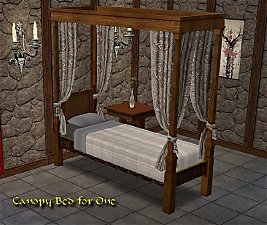
This also overrides the skirt on my daybed and single bed since they are pulling this texture from this bed.
Fabric Color - Frame Color:
- White Satin - Dark Frame
- Medium Linen - Medium Frame
- Light Cream - Light Frame
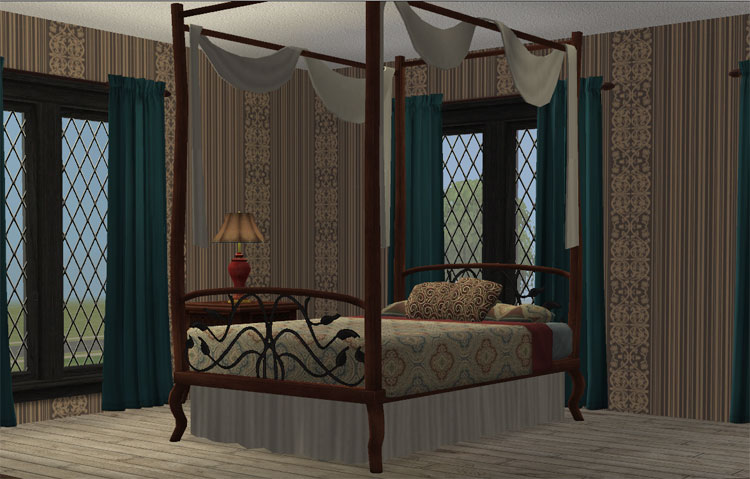
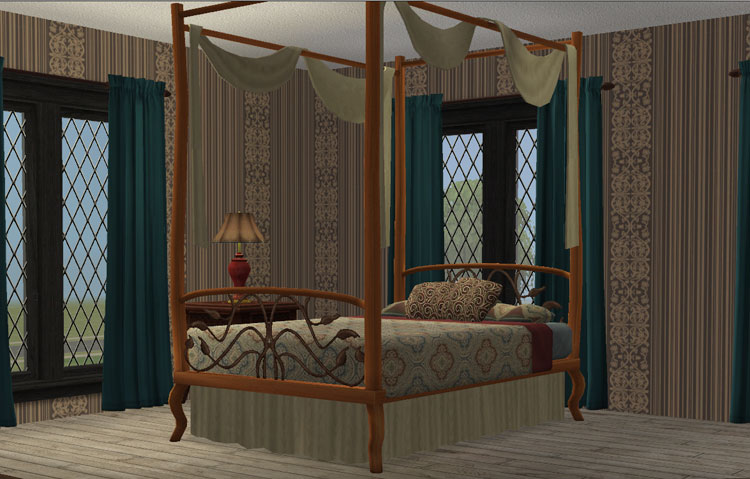
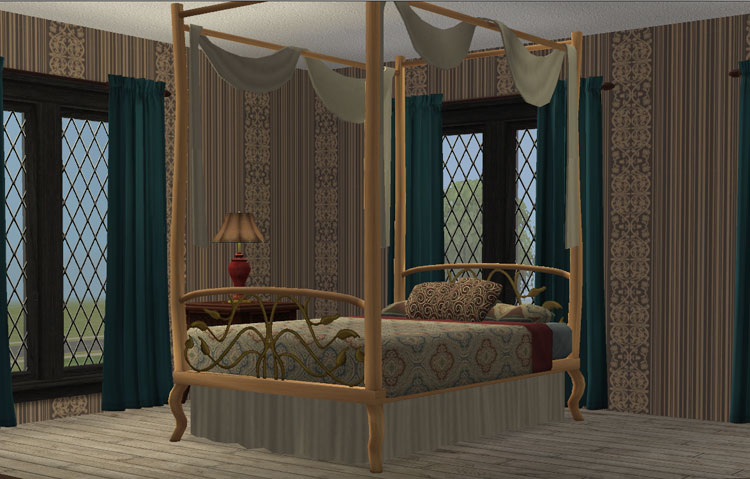
Now if you don't like my textures/colors you can create your own and just replace the textures in this one. I also provided a layered .psd file with the UVMap, displacement layer for the folds, plus a shadow layer to add shadows to the folds. If you more adept at Photoshop, obviously you only need the UVMap. The map is 512x256, but you can easily double that texture (1024x512) for better quality and still use the build DXT options, SimPE will just build you a larger MipMap. And let me tell you, that top valance needs help. The mapping is so tiny.
I would like to thank amythestfenix for letting me know that full transparency will make the skirt and drape disappear. To have this just import a png that is completely transparent. By making it transparent, this will allow you to use your favorite bedskirt and/or canopy instead.
Installation:
Place this in the C:\Users\*userAccount*\Documents\EA Games\The Sims 2\zCEP-EXTRA so that it will be read after the extra for the bohemian bed.
This custom content if it is not clothing, may require a seperate download to work properly. This is available at Colour Enable Package (CEP) by Numenor.
|
bohemianBedDisplacemnt.rar
Download
Uploaded: 30th May 2009, 642.7 KB.
3,874 downloads.
|
||||||||
|
z_HL_bohemianBedSkirtGLOBAL.rar
Download
Uploaded: 30th May 2009, 205.1 KB.
4,327 downloads.
|
||||||||
| For a detailed look at individual files, see the Information tab. | ||||||||
Install Instructions
1. Download: Click the download link to save the .rar or .zip file(s) to your computer.
2. Extract the zip, rar, or 7z file
3. Place in Downloads Folder: Cut and paste the .package file(s) into your Downloads folder:
- Origin (Ultimate Collection): Users\(Current User Account)\Documents\EA Games\The Sims™ 2 Ultimate Collection\Downloads\
- Non-Origin, Windows Vista/7/8/10: Users\(Current User Account)\Documents\EA Games\The Sims 2\Downloads\
- Non-Origin, Windows XP: Documents and Settings\(Current User Account)\My Documents\EA Games\The Sims 2\Downloads\
- Mac: Users\(Current User Account)\Documents\EA Games\The Sims 2\Downloads
- Mac x64:
/Library/Containers/com.aspyr.sims2.appstore/Data/Library/Application Support/Aspyr/The Sims 2/Downloads
Need more information?
- For a full, complete guide to downloading complete with pictures and more information, see: Game Help: Downloading for Fracking Idiots.
- Custom content not showing up in the game? See: Game Help: Getting Custom Content to Show Up.
- If you don't have a Downloads folder, just make one. See instructions at: Game Help: No Downloads Folder.
Loading comments, please wait...


 View with Names
Uploaded: 30th May 2009 at 6:10 PM
Updated: 19th Feb 2022 at 2:56 PM
#al, #bohemian, #bedskirt, #maxis, #maxis match, #luniegamefix
-
by Miche 29th Jan 2005 at 1:33pm
 235
248.5k
70
235
248.5k
70
-
-
-
by samthomas91 10th Jul 2005 at 2:40pm
8
6.6k
1
-
by samthomas91 11th Jul 2005 at 4:24pm
7
6.2k
2
-
by Marhis 26th Feb 2007 at 3:43am
3
10.9k
11
-
3 Maxis Beds Resized (+bonus!)
by Ailias 4th May 2007 at 4:43pm
+3 packs
37 61.3k 105 University
 Nightlife
 Pets
Pets
-
by Fresh-Prince 3rd Jun 2007 at 10:27pm
11
12.9k
21
-
by KiraNWilfort 29th Mar 2008 at 10:03pm
2
7.1k
4
-
by HugeLunatic updated 4th Apr 2018 at 7:39pm
+1 packs
10 20.5k 55 Free Time


-
by HugeLunatic 18th Nov 2021 at 6:43pm
The basic, simple shower from TS3 base game. It has a sliding door (see pic!) and frosted glass. more...
+1 packs
16 14.9k 65 Seasons
-
Zecutine's Step Away With Me Stairs Requires Open
by HugeLunatic 11th Feb 2018 at 11:55pm
Open underneath version of the H&M Zecutine's Step Away With Me Stairs. more...
+1 packs
5 18.8k 38 H&M Fashion
-
by HugeLunatic 3rd Apr 2015 at 11:35pm
I was going to do a set for the beach theme in March, but got too busy with work and more...
13
8.3k
27
-
by HugeLunatic 11th Mar 2010 at 12:24am
Simple Shower The base game simple shower, you know the square one with the horrid 70's waffley glass surrounding it? more...
 113
304.8k
782
113
304.8k
782
-
Late Night - Buyable Mailbox and Trash Chute
by HugeLunatic 3rd Nov 2010 at 7:05pm
This requires Late Night! more...
+1 packs
97 172.7k 275 Late Night
-
by HugeLunatic 15th Nov 2014 at 3:56am
A basic modern easel, designed to match the desk "The Recognizer" in game, but will work in more...
 57
65.1k
331
57
65.1k
331
-
Shutters - Open and Partially Closed Versions
by HugeLunatic 22nd Aug 2008 at 1:20pm
Six sets of shutters for Base, Nightlife, and Open For Business windows. more...
16
18.1k
14
-
by HugeLunatic 27th Apr 2022 at 7:04pm
Just a small but fun object for Spring 22 theme. more...
+1 packs
15 2.8k 26 Mansion and Garden
-
by HugeLunatic 11th Nov 2009 at 9:47pm
One of my favorite sets in The Sims 2 from the IKEA SP. more...
-
by HugeLunatic 26th Aug 2007 at 6:00pm
Vibrant, teen oriented bedroom recolor of the Atomic Age set included in the Pets ep. more...


Packs Needed
| Expansion Pack | |
|---|---|
| Apartment Life |
About Me
Pet Stories || Dog Agility Items? || Castaway Stories || Holy Simoly Extras
4esf Archive || Holy Simoly Archive || CEP-Extras List || Buyable Game Objects
lunie content from GoS/s2a
 Installation of CEP Extras
-the package with pfiles appended to the name will go into your cep extras folder where your game is installed (typically c drive, you do you)
-the other goes in CEP extra folder in documents.
The following locations are what I am aware of, beyond that you'll have to do some searching.
Downloads Folder:
C:\Users\<user>\Documents\EA Games\The Sims 2 Legacy
C:\Users\<user>\Documents\EA Games\The Sims 2 Ultimate Collection
With multiple launchers, the location for your game install will vary.
C:\Program Files\EA GAMES\The Sims 2 Legacy\TSData\Res\Catalog\zCEP-EXTRA
C:\Program Files\EA GAMES\The Sims 2\TSData\Res\Catalog\zCEP-EXTRA
C:\Program Files (x86)\EA GAMES\The Sims 2\TSData\Res\Catalog\zCEP-EXTRA