Quick Reply
Search this Thread
Mad Poster
#7176 Old 2nd Apr 2025 at 1:25 PM
Quote: Originally posted by AndrewGloria
I've just spent two hours decorating a house, and, when I exited the lot to the neighbourhood, the house wasn't there at all!

I don't know how this happens, but it has happened before,and I know what I should have done differently. I built the house originally in my Sim-free building 'hood. It was built to within 1 tile of the lot boundary on three sides, and with the front wall only two tiles from the road, so I had to use the Lot Adjuster. When I had done the basics, and had the exterior roughly looking right, I saved it, and moved it to the lot bin. Then I moved it back to where it had been -- where I'd just built it. But I wanted to use it in my main game, so I opened Veronaville, then opened my Monopolis sub-hood, placed a copy of it there and started decorating it. . . .and you know the rest -- when I saved it and exited to the neighbourhood -- it just wasn't there! What I should have done is quit the game and restarted it before attempting to place it in Monopolis. Much the same thing happened a few years ago with a 2x1 version of the Maxis Ranch house that I was going to use in my New Desconia custom 'hood. It seems that lots that have just been moved to the lot bin are not available to place in other neighbourhoods until you quit and restart the game. At leat that's how it works in my game.

What is extra frustrating is to know that I would have had no problems if I'd just quit and restarted the game. Ever since I got the Dell gaming laptop my game starts in little more than a minute. Why didn't I just do that?


I have had a lot disappeared on me after using the adjuster, but can normally find it again by clicking around in the vicinity or just restarting the game. Always package the lot into a file for yourself, though!
YO!
retired moderator
#7177 Old 2nd Apr 2025 at 9:39 PM
Quote: Originally posted by AndrewGloria
I've just spent two hours decorating a house, and, when I exited the lot to the neighbourhood, the house wasn't there at all!

Oh no! Is the lot file in the neighbourhoods folder? Do you remember what you named the lot? If so try the loadlot cheat (I can't remember what EP that cheat came with, but worth a try?)
Mad Poster
#7178 Old 2nd Apr 2025 at 9:55 PM
Quote: Originally posted by AndrewGloria
I've just spent two hours decorating a house, and, when I exited the lot to the neighbourhood, the house wasn't there at all!

I don't know how this happens, but it has happened before,and I know what I should have done differently. I built the house originally in my Sim-free building 'hood. It was built to within 1 tile of the lot boundary on three sides, and with the front wall only two tiles from the road, so I had to use the Lot Adjuster. When I had done the basics, and had the exterior roughly looking right, I saved it, and moved it to the lot bin. Then I moved it back to where it had been -- where I'd just built it. But I wanted to use it in my main game, so I opened Veronaville, then opened my Monopolis sub-hood, placed a copy of it there and started decorating it. . . .and you know the rest -- when I saved it and exited to the neighbourhood -- it just wasn't there! What I should have done is quit the game and restarted it before attempting to place it in Monopolis. Much the same thing happened a few years ago with a 2x1 version of the Maxis Ranch house that I was going to use in my New Desconia custom 'hood. It seems that lots that have just been moved to the lot bin are not available to place in other neighbourhoods until you quit and restart the game. At leat that's how it works in my game.

What is extra frustrating is to know that I would have had no problems if I'd just quit and restarted the game. Ever since I got the Dell gaming laptop my game starts in little more than a minute. Why didn't I just do that?


I had disappearing lots, setting up Riverbreeze. I accidentally left SimPE open when loading game. Could LotAdjuster left open do same?

I'm secretly a Bulbasaur. | Formerly known as ihatemandatoryregister

Looking for SimWardrobe's mods? | Or Dizzy's? | Faiuwle/rufio's too!
Mad Poster
#7179 Old 3rd Apr 2025 at 5:08 AM Last edited by AndrewGloria : 3rd Apr 2025 at 5:19 AM.
Quote: Originally posted by simsfreq
Oh that is frustrating! I wonder if SimPE would have some record of that lot, and it's still there but not displaying somehow?

You still have a copy in the sim bin, I expect? Even if it's not a decorated copy. It will be quicker to decorate a second time now you have made all the decisions, it just means remembering what you did.
Quote: Originally posted by Justpetro
I have had a lot disappeared on me after using the adjuster, but can normally find it again by clicking around in the vicinity or just restarting the game. Always package the lot into a file for yourself, though!

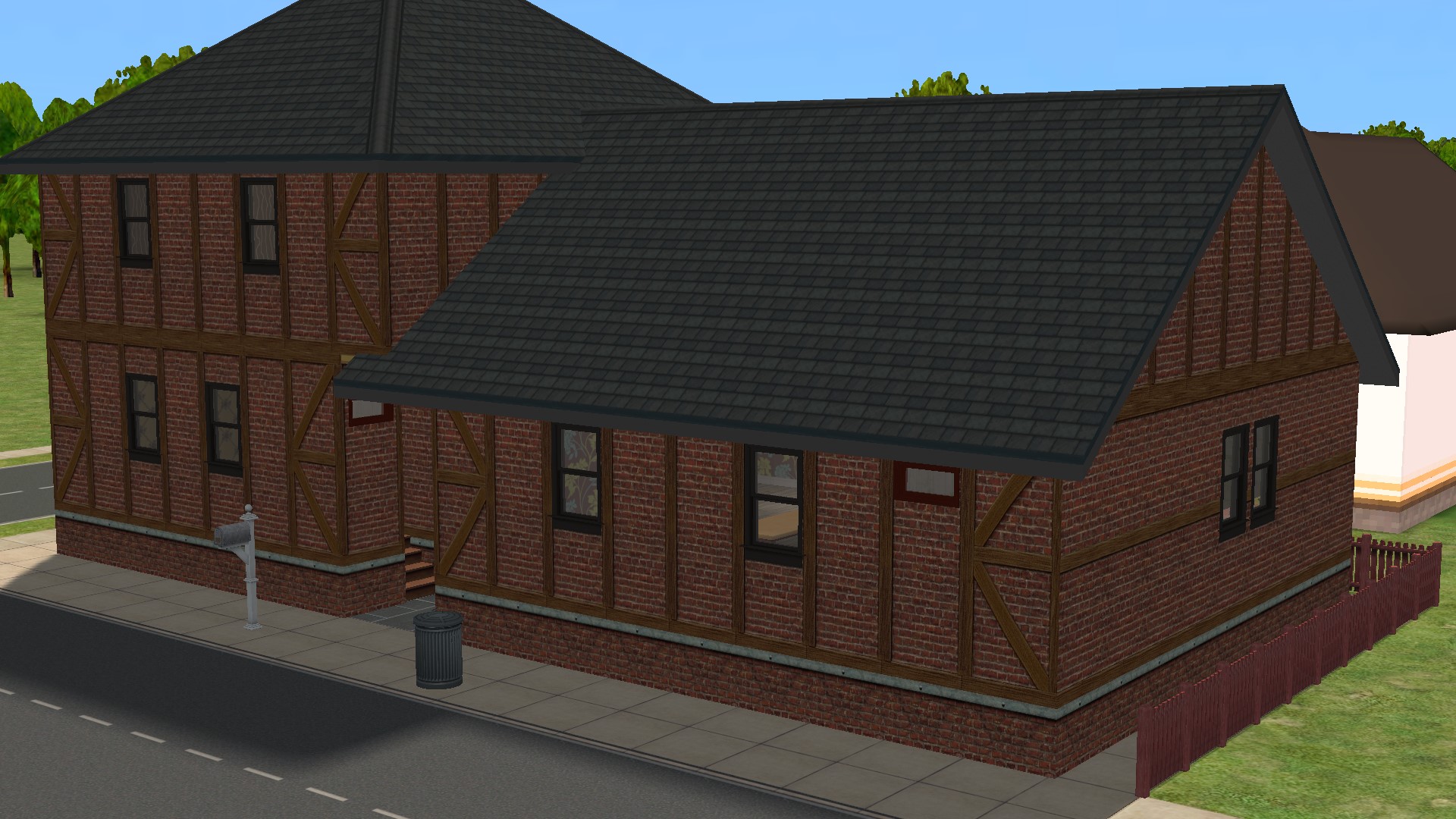
Late last night, I reimported the undecorated version from the Lot Bin, but I did hardly anything with it -- it was getting too late and I was tired. But when I got back to the game this morning, I thought I'd better check things thoroughly before committing myself. After all Monopolis is a suburb of Veronaville, and Veronaville is where many of my best friends live. So it's kind of important to me!! Well, I couldn't see anything wrong in SimPE, but looking in Windows Explorer I could see two versions of the lot in the Veronaville Lots folder. The original lost version was there as N003_Lot443.package, but the newer smaller version with less decoration was there too as N003_Lot444.package. Only this newer version was visible both in SimPE (in the Monopolis sub-hood) and in game. I had made a backup of Veronaville just before starting work on this lot, so I thought the safest thing to do was to revert to this backup. I did that, and then re-imported the undecorated lot from the Lot Bin and redid it. I could still remember more or less how I had done it the first time, so I think most of the internal walls are in more or less in the same places as the original. I must have done something different though, as the new version costs some 500 Simoleons more than the lost version, despite me forgetting the cheap "Wornable" sofa. I may have fitted more windows this time. The wallpaper inside isn’t exactly the same, but it still gives the impression of something last redecorated a long time ago, using the sort of wallpaper fashions that were popular in the 30s to the 50s. I find the effect rather oppressive. This is what it looks like on the outside:
Clearly this is not a new build. I think it must be an older building that was already on the site before Milburn Pennybags started the Monopolis development. It's called 101 Marlborough Street. (Monopolis street names are based on the UK Monopoly board, which uses well-known London street names.) In anticipation of the next round of the contest, I have moved the Stewarts into it, complete with two grown-up children, both girls, one an adult and one still a teen. When you look at their current dwelling, I think you can understand why Jake and Brenda Stewart are looking forward so eagerly to moving to their new §97,000 dream home with a large garden (with potential as a nursery), which Andrew and I hope to have built for them by the end of Round 4.

Quote: Originally posted by simsample
Oh no! Is the lot file in the neighbourhoods folder? Do you remember what you named the lot? If so try the loadlot cheat (I can't remember what EP that cheat came with, but worth a try?)
I didn't know about that cheat. It might indeed have been useful, but of course I've now rebuilt the lot!

Quote: Originally posted by Bulbizarre
I had disappearing lots, setting up Riverbreeze. I accidentally left SimPE open when loading game. Could LotAdjuster left open do same?
I don't think so. The Lot Adjuster expects you to keep it open after restarting the game, as it then shows instructions on how to finish off the adjustment in-game. Moreover I have to say that I respect Mootilda's programming skills more than most people's! Thhough I have to admit the Lot Adjuster includes a Restart button, which causes a crash every time I try to use it.

Thanks everyone for your help!
Screenshots

All Sims are beautiful -- even the ugly ones.
My Simblr ~~ My LJ
Sims' lives matter!
The Veronaville kids are alright.
Mad Poster
#7180 Old 6th Apr 2025 at 6:13 PM
To move everyone out of apartment to modify common areas. Apt building cheats - have to do it 4 times, changes don't carry either.

I'm secretly a Bulbasaur. | Formerly known as ihatemandatoryregister

Looking for SimWardrobe's mods? | Or Dizzy's? | Faiuwle/rufio's too!
Forum Resident
#7181 Old 10th Apr 2025 at 3:23 AM
Moving a lot to the catalog and placing it back down turns off the lights. Which I guess means the actual pet peeve is lights being turned off unless they're placed at night. Looks like Mootilda's Turn On/Off All Lights is back on the menu...

Nice Rachel we're having.
My Simblr! Now actually working!
YO!
retired moderator
#7182 Old 10th Apr 2025 at 12:14 PM
Quote: Originally posted by Yvelotic2001
Looks like Mootilda's Turn On/Off All Lights is back on the menu...

Very handy mod, but I with it had an option to set auto lights too.
Top Secret Researcher
#7183 Old 10th Apr 2025 at 1:23 PM
My autolights somulate on pause, and they turn on/off as they are moved between rooms. They light up in build mode to preview lights at full effect, which might not be for everyone if one often enters build mode to do something as part of play. I can set auto lights one piece at a time.
Mad Poster
#7184 Old 10th Apr 2025 at 2:35 PM
I thought that you could select autolights by clicking on a light?
YO!
retired moderator
#7185 Old 10th Apr 2025 at 5:06 PM
You can, but if you are using mootilda's light mod to build a lot and share it (for example community lot), then if you switch all lights off and share the lot, the lights will always be off unless the player manually click (auto lights> all lights for example) each time they play it.
Test Subject
#7186 Old 10th Apr 2025 at 5:09 PM
On the topic of turning lights on, I don't see mentioned enough the cheat

boolProp allObjectLightsOn true/false

(which is particularly useful when building an unoccupied lot).
Mad Poster
#7187 Old 10th Apr 2025 at 7:03 PM
Quote: Originally posted by simsample
You can, but if you are using mootilda's light mod to build a lot and share it (for example community lot), then if you switch all lights off and share the lot, the lights will always be off unless the player manually click (auto lights> all lights for example) each time they play it.


So, lights don't automatically come on when it gets dark at community lots? I'm sure I've seen that happen.
YO!
retired moderator
#7188 Old 10th Apr 2025 at 9:02 PM
Quote: Originally posted by Charity
So, lights don't automatically come on when it gets dark at community lots? I'm sure I've seen that happen.

Yes they do, but I was replying to Yvelotic2001 when they were mentioning Mootilda's mod which is for use on unoccupied lots. It either switches lights on or off, but doesn't set them back to their default state (auto lights, so that they will come on at dark).
Instructor
#7189 Old 16th Apr 2025 at 2:38 AM
Grrrr - there are so many objects that fit the theme of the shop I'm building but won't go on OFB shelves!!
Mad Poster
#7190 Old 16th Apr 2025 at 2:45 AM
Quote: Originally posted by Pebblerocker
Grrrr - there are so many objects that fit the theme of the shop I'm building but won't go on OFB shelves!!


(I think there are one or two other versions of this, couldn't find them), but maybe this mod can help?
https://modthesims.info/d/137561/cu...-upd-22apr.html
Instructor
#7191 Old 16th Apr 2025 at 3:00 AM
Thank you - I see that I've already thanked Numenor's mod on that page, so I must have taken it back out of the game due to the teleporting restock signs problem. But I might try the tutorial to batch fix some objects I'd really like to use.
Top Secret Researcher
#7192 Old 16th Apr 2025 at 1:02 PM
I think this has to be an OBJd mod because, while you can place an object into an illegal slot, when it comes time to restock, and it is not allowed at that time (the game was closed inbetween), it will not go back. Something could sit on the lot and loop and set the object size all the time (slow).
Lab Assistant
#7193 Old 3rd May 2025 at 4:32 PM
Whenever a sim takes of the thinking cap they ignore every coffee table, side table, table, desk etc and place it on a kitchen cabinet even if the kitchen is at the other end of the house
Mad Poster
#7194 Old 3rd May 2025 at 6:01 PM
Sounds like the coffee cup problem. XD

Ooh and there is a mod for it. http://www.moreawesomethanyou.com/s...pic,5343.0.html
Lab Assistant
#7195 Old 3rd May 2025 at 7:01 PM
Quote: Originally posted by Charity
Sounds like the coffee cup problem. XD

Ooh and there is a mod for it. http://www.moreawesomethanyou.com/s...pic,5343.0.html

Thanks but I think I have enough mods at the moment. Just lost an hour of gameplay as two sims froze in a hot tub and I couldn't get them out.
Mad Poster
#7196 Old 4th May 2025 at 3:18 PM
Quote: Originally posted by Legate
Thanks but I think I have enough mods at the moment. Just lost an hour of gameplay as two sims froze in a hot tub and I couldn't get them out.


There's probably a mod for that. :P
Mad Poster
#7197 Old 4th May 2025 at 4:12 PM
Quote: Originally posted by Legate
Thanks but I think I have enough mods at the moment. Just lost an hour of gameplay as two sims froze in a hot tub and I couldn't get them out.


Moveobjects to remove them from the hot tub, and replace the hot tub? Possibly do a reset on both sims just to be on the safe side. That's what I'd try anyway... (at least if it's an above-ground hot tub). Then check if any mods conflict with hot tubs.
Inventor
#7198 Old 19th May 2025 at 4:40 PM
I hate how sims in relationships don't get memories of their partner's deaths unless they're married. I have lots of sims who live together, are going steady, or are engaged, and it annoys me to no end that only their children mourn them when they die. Like seriously, you've been with this person for years, you think you'd at least acknowledge their death.
Mad Poster
#7199 Old 19th May 2025 at 6:43 PM
Quote: Originally posted by pinkdynamite
I hate how sims in relationships don't get memories of their partner's deaths unless they're married. I have lots of sims who live together, are going steady, or are engaged, and it annoys me to no end that only their children mourn them when they die. Like seriously, you've been with this person for years, you think you'd at least acknowledge their death.


But: in the 'fears' panel, the fear of a significant other's death could be locked if necessary which would be considered grieving, correct?

That is a form of acknowledgement, I would think.

Receptacle Refugee & Resident Polar Bear
"Get out of my way, young'un, I'm a ninja!"
Grave Matters: The funeral podium is available here: https://www.mediafire.com/file/e6tj...albits.zip/file
My other downloads are here: https://www.mediafire.com/?r=wbmnd#myfiles
Inventor
#7200 Old 19th May 2025 at 8:45 PM
Quote: Originally posted by FranH
But: in the 'fears' panel, the fear of a significant other's death could be locked if necessary which would be considered grieving, correct?

That is a form of acknowledgement, I would think.

That's true, but they don't get a memory and they don't mourn like other family members. It's more of an "oops, they're dead, let's cry while the Reaper is here and then carry on like they never existed." They'll mourn if you select the option on the urn, but I like how the children autonomously think of them and start crying throughout the day.
Page 288 of 293
Back to top