
 Sign in to Mod The Sims


#1
 23rd Jun 2012 at 4:46 PM
Last edited by topp : 6th Aug 2024 at 2:47 PM.
Reason: added info about newest integrated GPUs
23rd Jun 2012 at 4:46 PM
Last edited by topp : 6th Aug 2024 at 2:47 PM.
Reason: added info about newest integrated GPUs
23rd Jun 2012 at 4:46 PM
Last edited by topp : 6th Aug 2024 at 2:47 PM.
Reason: added info about newest integrated GPUs
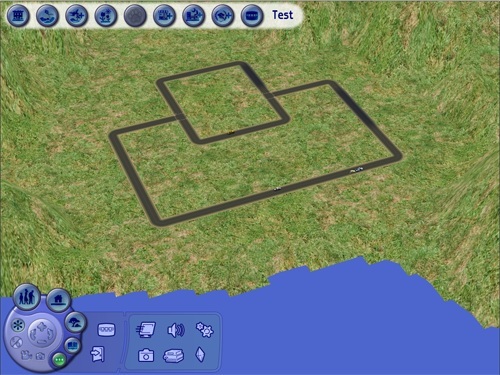
 How to get rid of solid blue water and hay grass terrain from the neighborhood view
 If, however, after following this tutorial, you do notice significant lag, or your fan spinning way faster, or pink/purple/any color flashing, note that this may be because your GPU is not strong enough to handle this. In such case, revert the changes as soon as possible. If you run your game anyway while the system struggles to keep up with the advanced graphics, you may degrade the overall performance of your computer in the long run!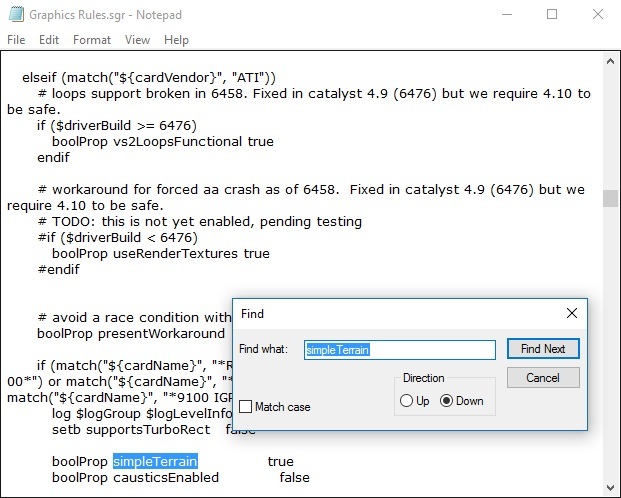
 Hope you find this tutorial useful.
#2
18th Aug 2012 at 2:48 AM
18th Aug 2012 at 2:48 AM

#3
18th Aug 2012 at 5:18 AM
18th Aug 2012 at 5:18 AM
#4
8th Sep 2012 at 9:26 AM
8th Sep 2012 at 9:26 AM


#5
8th Sep 2012 at 5:51 PM
8th Sep 2012 at 5:51 PM
#6
9th Sep 2012 at 12:04 PM
9th Sep 2012 at 12:04 PM

#7
10th Sep 2012 at 1:27 PM
10th Sep 2012 at 1:27 PM
#8
21st Sep 2012 at 8:26 PM
21st Sep 2012 at 8:26 PM

#9
21st Sep 2012 at 10:46 PM
21st Sep 2012 at 10:46 PM
#10
22nd Sep 2012 at 1:00 AM
22nd Sep 2012 at 1:00 AM
#11
22nd Sep 2012 at 8:48 PM
22nd Sep 2012 at 8:48 PM

#12
23rd Sep 2012 at 2:27 AM
Last edited by ttowntallyho : 23rd Sep 2012 at 2:37 AM.
23rd Sep 2012 at 2:27 AM
Last edited by ttowntallyho : 23rd Sep 2012 at 2:37 AM.

#13
23rd Sep 2012 at 12:07 PM
23rd Sep 2012 at 12:07 PM

#14
23rd Sep 2012 at 5:07 PM
23rd Sep 2012 at 5:07 PM
#15
15th Nov 2012 at 10:21 PM
15th Nov 2012 at 10:21 PM
#16
24th Nov 2012 at 9:02 PM
24th Nov 2012 at 9:02 PM


#17
24th Nov 2012 at 9:13 PM
24th Nov 2012 at 9:13 PM
#18
1st Dec 2012 at 8:30 PM
Last edited by BeckyBoo8 : 1st Dec 2012 at 9:29 PM.
1st Dec 2012 at 8:30 PM
Last edited by BeckyBoo8 : 1st Dec 2012 at 9:29 PM.
#19
1st Dec 2012 at 11:10 PM
1st Dec 2012 at 11:10 PM

#20
8th Dec 2012 at 8:20 PM
8th Dec 2012 at 8:20 PM
#21
10th Dec 2012 at 12:40 AM
10th Dec 2012 at 12:40 AM

#22
14th Dec 2012 at 2:45 PM
14th Dec 2012 at 2:45 PM

#23
3rd Jan 2013 at 12:54 PM
3rd Jan 2013 at 12:54 PM
#24
3rd Jan 2013 at 1:13 PM
3rd Jan 2013 at 1:13 PM
#25
4th Jan 2013 at 7:54 PM
4th Jan 2013 at 7:54 PM
|
Page 1 of 4
|
|
|
|