Quick Reply
Search this Thread
Mad Poster
Original Poster
#1 Old 13th Dec 2012 at 12:06 AM
Default Neighbourhood Layout/Design
I'm curious to find out more about how people design their neighbourhoods. I'm not talking about the sims themselves, I'm just talking about what kind of lots (or which specific lots) you like to use, how you decide where to place lots, whether you like to have distinct areas/districts - for example a wealthy area and a poorer area, or a suburban area with lots of housing and a business park area with lots of large businesses, just generally how you like to design your 'hoods. And of course another question is: do you design your 'hoods at all? Do you plan and/or build them in advance or build them up whilst you play your sims?

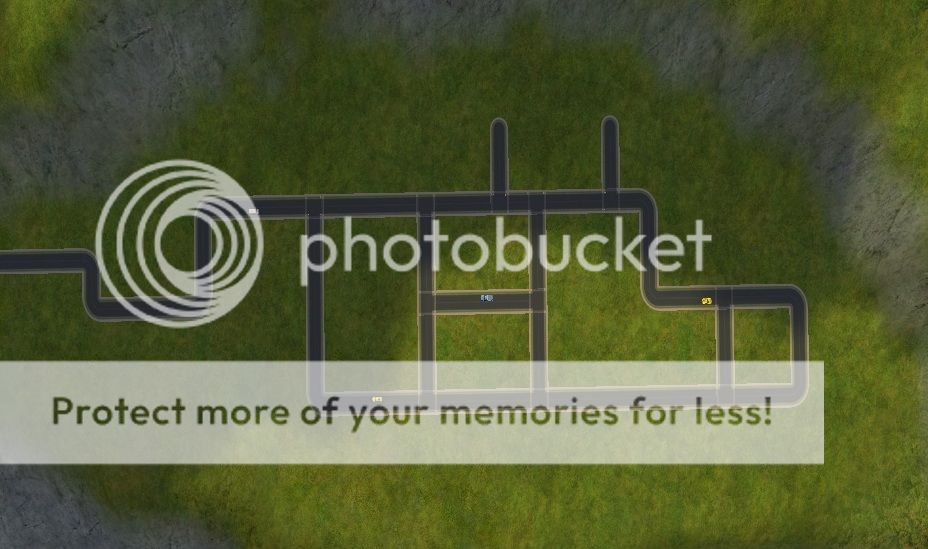
Now, if you want to you can answer this question by writing about your 'hoods and how you designed them. Or, if you feel like it, you can download the image file in this post - the map of a neighbourhood (w_sims' Merrycliff, to be precise) - and write/draw on there to show how you'd lay out a town in that 'hood. It's a smallish 'hood, to make it more manageable. I'll be interested to see what people come up with (if anything!)! :-D

I intend to do it myself - I'm planning a new 'hood using this template and I am currently designing the layout and downloading and building lots to go in it. I want to have it fully built up before I introduce any sims into the 'hood.

Here's the map:


**ETA** There is also a long road leading off to the left, which isn't visible in the picture. You can see it in the Merrycliff upload thread that I linked to above. What, if anything, would you put along there? Farms? Big businesses? Something else? Nothing at all? You tell me! :-)
Scholar
#2 Old 13th Dec 2012 at 12:20 AM
If it were me, id put the community lots in the 2 squares from my the roads right in the middle of the area there, and residential around them. maybe rich neighborhood to the top right, middle class to the right, and poor/ghetto to the left. I wouldn't put anything on the exit road, but that's just me.
Mad Poster
Original Poster
#3 Old 13th Dec 2012 at 12:45 AM
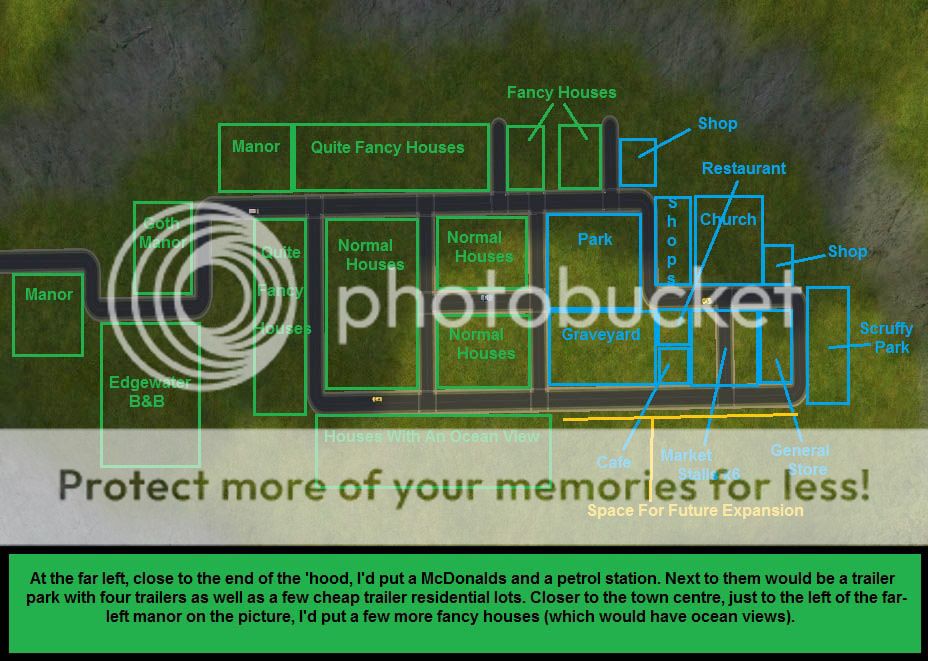
Interesting, Night Racer :-) Mine turned out quite differently!


**ETA** Oh, and I'd probably put a car dealership out by the McDonalds/petrol station/trailer park area too, once I had a sim who could own and run it. The "Scruffy Park" on the far right of the map picture is supposed to be a kind of teen hangout/dodgy make-out spot type of place. Basketball courts, lots of benches, public toilets, run-down little play area that nobody ever takes their kids to, that kind of thing.
Banned
#4 Old 13th Dec 2012 at 12:59 AM
Now that I have the EPs I hardly put any community lots in the main hood - usually a fishing pond, a graveyard (sometimes 1 for townies/NPCs and 1 for playables. I kill A LOT of townies and NPCs. Like at least 50 per neighborhood if I play that neighborhood for 2 or 3 months) and maybe a small store or venue. The rest is for houses. I also have a "start" lot that's the smallest possible just for setting newly created sims up (so I'm not restricted to 25 personality points and can give them some skills. Before the familyfunds cheat it was also to give them money so they weren't dirt poor.) It's also so sims who graduated college can use the hacked wardrobe so they have clothes other than the uglier-than-an-orang-utang's butt ones EAxis gives them. The Downtown neighborhood is for non-owned community lots. The Shopping district is for businesses that are or might be owned.
The Great AntiJen
retired moderator
#5 Old 13th Dec 2012 at 1:09 AM
Little Carping is semi-planned. I've used Moo's terrain replacer more than once.

I no longer come over to MTS very often but if you would like to ask me a question then you can find me on tumblr or my own site tflc. TFLC has an archive of all my CC downloads.
I'm here on tumblr and my site, tflc
Needs Coffee
retired moderator
#6 Old 13th Dec 2012 at 1:16 AM
With a hood that small (I always go for the largest ones with the most roads) I would say the main road is the long one closest to the bottom of the screen so community lots would go along there. Normal or small houses would go in the smaller areas with nicer houses over to the left and top. On the road out I might put a couple of the largest fancier houses and on the outskirts maybe a farm. I tend to have a lot more houses and community lots then could fit into that map.

"I dream of a better tomorrow, where chickens can cross the road and not be questioned about their motives." - Unknown
~Call me Jo~
Banned
#7 Old 13th Dec 2012 at 2:48 AM
^ Yeah, that is a way tinier hood than I'd ever use except maybe for a shopping district or a downtown with no decorations.
Mad Poster
#8 Old 13th Dec 2012 at 3:26 AM
I always do wall-to-wall neighbourhoods nowadays, because it's just so fun to do, albeit a bit tedious. My favourite one before The Great Fuck-Up of August 2012 (which destroyed a lot of my game, making me have to start over from backups) was divided roughly up into a few distinct districts with a major focus on detached homes. I don't have a picture (it's on my other computer) but I can describe it to you.

In the middle was a nature preservation, with parks and somesuchlike, camping/countryside/farming on the North end.

To the South, some nicer residential houses that lead up into Downtown, where most of the major business/commercial things are headquartered. Lots of banks, government/police facilities, skyscraper living, etc.

A bit south from Downtown was Uptown, where all of the boutiques are. It's marginally newer than the other places.

A bit east of Uptown was some old warehouses and facilities that were turned into factory apartments and cool artsy lofts for the boho/hipster crowds.

To the west of Uptown was the Inner City area, lots of poorer families, people trying to make ends meet and failing, an orphanage and some really dangerous streets at night, full of drug dealers and hookers looking for a pickup.

If you kept going west from the Inner City area, you'd end up in the Industrial/Fishing complex, and then you could take the ferry across the water to two places.

The first was the University Campus to the north (and just west of Downtown - you have to drive through some residential areas to get to it, however).

The second, as far West as you can go on the map, across the lake area, was Chinatown, The India Commons, and Japan Boulevard, which was to the south of the University Campus. It has a lot of cultural significance to the city. You can find a lot of cool stuff here from other countries.

To the north of the University Campus was where some McMansions and gated communities thrived.

Even further north, you hit the countryside, lots of trailer parks, camping, etc. That extended over the upper right quarter of the map. It is also home to some boarding schools.

In the upper left quarter, which is due North-East, you would hit some more factories and meat processing facilities, as well as some low-rise apartment blocks and poor/old houses. Drive South from there and you hit residential areas again, slowly getting a bit better by each block.

Needless to say, only about 10% was unutilised space on this map.


Angie/DS | Baby Sterling - 24/2/2014
This account is mostly used by my sons to download CC now, if you see me active, it's probably just them!
Inventor
#9 Old 13th Dec 2012 at 3:35 AM
Not sure about the graveyard right smack in the middle, I'd probably put it where the church is, maybe. But you wouldn't want a restaurant next to a graveyard. Or at least I wouldn't. :p
Mad Poster
#10 Old 13th Dec 2012 at 4:53 AM
Depends on the restaurant, and the graveyard. A tea room adjacent to Arlington National could expect to do good business and fill a real need, but it wouldn't be a big date venue.

I can't answer the question because it starts at the wrong point. I can't start with a map - I have to start with a neighborhood concept. That dictates the map and everything on it.

The concept for Drama Acres involved a mining community; therefore, I needed a mountainous terrain and wound up with the Crystal Springs map. My core families from the mining community lived on the high part of the mountain, the Newsons lived in a farmhouse close enough to the mines that the Newson parents could die during rescue attempts, and Drama Acres proper was a new subdivision down in the flat part of the map. One road leads into the main map, and that was obviously the road leading into the subdivision from the highway, so that needed to be where the commercial properties went. I placed the park (and later the graveyard) midway between the new subdivision and the mining families, and placed only a few houses so the subdivision could be growing throughout the game as I felt like building or needed new houses for new families. The current areas on my map - Entry Way, Downslope, Upslope, and Newsons' Corners - grew organically through game play. I didn't have to plan them.

When I decided to make Widespot, part of the point was that I couldn't flesh it out much - the neighborhood is intended to be shareable and conceived as a bare-bones, minimalist neighborhood with an established, tightly related, but very small population, leaving plenty of room for CAS and family bin sims. So I decided that Widespot was a rural community which recent highway improvements had opened up to new development. To make it as accessible as possible, I decided to limit myself to base-game everything - no custom content at all, no EPs, nothing; anyone who has the game would be able to take Widespot and do as they would with it, just as if it had been developed by Maxis and shipped with the first game. So I went through the maps available in Base Game and settled on Sedona as the most suitable, chose which road would be the highway, and placed the general store and the house of the sim whose active lobbying was behind the new highway improvements. I already had my cast - a hermit with alien offspring, a large family that originally settled in the back of beyond to get away from disapproval of the parents' match, the politician's family, and two families of relatively rich people, a retired sports star escaping the limelight after a scandal, and a criminal mastermind who's going to retire any day now, both with their offspring. The house of the hermit had to be as far away as possible from all the others, so I placed it second, in the remotest part of the valley, and that, in conjunction with the politician's house on the highway, determined the boundaries of the starting township. Once I placed all the residences, I decided to place two more community lots - a swimming pool (near the general store) and a makeout spot (relatively isolated but easy for teens to walk to from the houses that would contain them). Then it was a matter of filling in some blank space with suitable trees and a few landmarks, like the water tower, and that's all folks. Anybody who plays the neighborhood will be able to build the community from there as they see fit.

So when I see a map, I can't tell you what I'd put where - because I don't know yet what elements I'll be placing. Give me a context, and I'll tell you how I'd fill the map. I never fill a map very full ahead of time, though - not only is it tedious, it doesn't leave me room for Better Ideas or building to suit new, unexpected needs.

Ugly is in the heart of the beholder.
(My simblr isSim Media Res . Widespot,Widespot RFD: The Subhood, and Land Grant University are all available here. In case you care.)
Scholar
#11 Old 13th Dec 2012 at 10:40 AM Last edited by Katya Stevens : 13th Dec 2012 at 10:54 AM.
When I start a 'hood, I pick a template and start building around that. I take a quick look at the roads/layout and base ideas on what goes where from that.

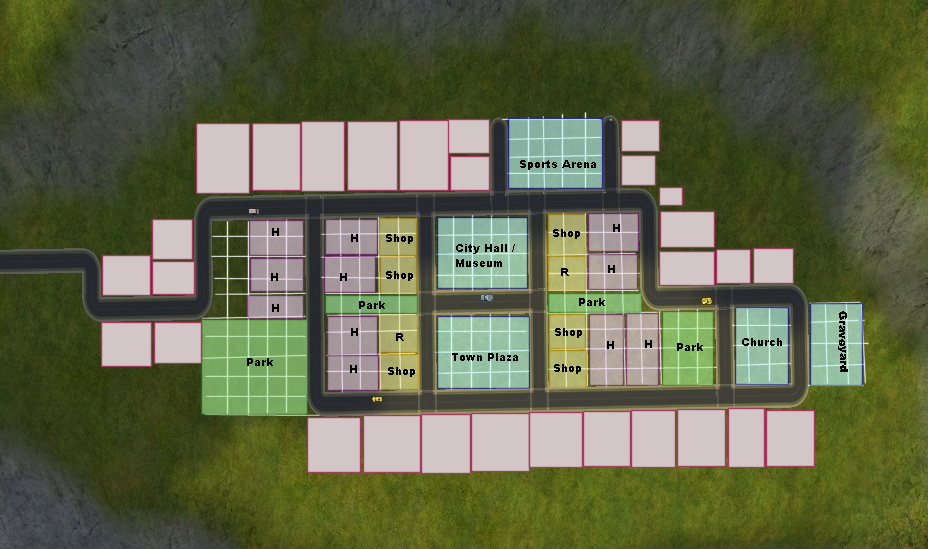
Attached picture using Merrycliff's layout: pink is posh/expensive housing, all along the cliff edge. Yellow/orange is apartments, a fair number of them. Blue is regular housing, the kind of stuff you could buy with a half-decent paycheque and use for families. Purple is community lots. Way, way off to the left I'd imagine is cheap, poorly made housing (far away from the town centre, maybe a couple of cheap community lots on the far end if you have a camera mod which allows you to get there).

If I'm playing long-term and there's opportunity, I look to see how the 'hood could develop over time. I'd imagine the blue section on the right would be taken over by orange (residential in to apartments -- apartments can house more people on the same amount of land) and the blue section which borders on the purple might become purple (residential becoming community, a reflection of larger population either through more business opportunities or needing stuff like a larger graveyard). The residential lots on the far left might become cheaper but a worse place to live, or it could be subject to gentrification and the area around the apartments becomes worse instead (driving businesses away from where they are now and further to the left).

I might plan out where various types of lots will go, but I don't plan out what might go where until I actually start building.

-----

Now on to talking about my own 'hoods The only one I've developed in detail is Cresdale and its associated sub-hoods, and that's because it's so large (the main section, Cresdale; two shopping districts; a custom downtown; a custom university). Rather than trying to fit all types on to one map I used various different maps to get the different types. Cresdale is your typical suburban area, with housing of various prices and some apartment lots (but not too many, at least not yet; I have plans for the future where the Stultz and Storm families currently live to turn those quaint family homes in to apartment lots). Across the river is the 'rich' neighbourhood, large and expensive houses with lots of room between them -- currently the Wegner family live there.

Springvale is my Downtown and is packed wall-to-wall. Tons of apartments ranging from tiny studios to quite large, multi-generational ones. There are some houses, but you do need to be pretty rich to afford to live in one of them (the Lyndhursts live in a house; the Vanderpols live in a large apartment; Luke Lawrence and Rowan Marshalls live in studio apartments). Community lots are mostly pseudo row houses with fake apartments above them.

Danport is my farming community: large but cheap housing, lots of space for expansion (which, given two of Elise's children [twins, I might add] both rolled up the marry off 6 children want, that space is needed). There are some community lots, but they're generally small to suit the needs of a small population. Rather than having a lot of little stores they instead have a mini-mall. Danport also has the university next door, but it doesn't bring as many people/as much money as you'd think. Aside from sims in the university, the only family in the whole of Danport is the Marshalls.

Hillside Bay is a by the sea location, currently housing no families at all. It's posh, rich, and snobby. No apartments at all -- if you want to live there, you need to be able to afford a large house. Well, that's a lie -- there are some small beach huts on the upper right of the map, but those are fiercly held on to by the 'old' locals who dislike the snobby newcomers driving up living costs. The community lots are pretty spaced out, and being right next to the ocean they've got an oceanography/marine biology centre. There's also a large pier (or will be if/when I can get it looking nice in 'hood view) resembling some of the old fashioned piers in places like Blackpool, UK.

Other 'hoods aren't as well-developed, but they've still got some story.
Screenshots
Lab Assistant
#12 Old 13th Dec 2012 at 2:35 PM
I just wanted to say that I played the Merrycliff Terrain once and find it funny I had the church in the exact same spot you're planning on putting it.

The rest of what's marked blue in your picture was my "Old Town" with Tudor-Style houses and a small convenience store.

Where your goth manor is planned to be was my city hall, a café and a small indoor playgound for children...and everything else was basically normal homes. Ah, exception: there was a 50's style diner across the road from the café!

All in all: Merrycliff was too small for me. Though I like small terrains, I ran out of space rather quick.

DasRabennest

~ You can't prove courage without fright ~
Mad Poster
#13 Old 13th Dec 2012 at 3:25 PM
Here is mine:
Townie Place

Make sure you look at the key.

I made sure that I would use the smallest amount of space,as much as possible, for community lots, aka commercial areas, and left the larger position of the map for homes. You will notice that I didn't include some side of roads, because I'm not sure whether I will be using it as a residential or commercial area.

The original terrain map was of Alpinloche, but since it wasn't spacious as Driftwood, I changed it, thanks to Moo's tool.

Until, I have approx. 50+ families/households in this neighborhood, excluding subhoods (I only have one college, which is empty ATM).

I might change it in the future before I choose to add a shopping district.

Now, I used to place lots, with a space of a 1x1 lot between each one, but that seemed to be a waste of space, so all lots are are now placed without any space between them. I make sure not to put a lot, at a corner street, + or T-intersection, due to neighborhood deco being an eyesore. I try to separate and leave as much space as possible between community lots and residential lots, for privacy reasons .

Here is my advice to everyone: there is no need to build a mansion for one of your rich sims on a lot larger than 3x4 or 4x3, trust, houses on these lots can be huge enough to be homes of millionaires. This way, you will space in your neighborhood. Also, flatten areas near roads, using the terrain tool cheat, this will hep you in using your lots in them most efficient way as possible.

Now, if you look at my pic up, you will notice that a Mary-Go-Round in the middle that's ap rk I made in them idde of the residential area, since all lots are as long as x4 max. So there is a lot of pace in the middle of the rectangle, so, using neighborhood deco, I built a park, using the alleys that came with AL, some trees, alleys with chairs and without, flowers, birds, etc... gives a homey/cozy feeling/effect.

Alos, since my neighborhood is based on the lives of townies, and most npcs and townies, like the garden club, hobby instructors and pets are generated from a neighborhood with the Driftwood terrain.
Screenshots
Mad Poster
Original Poster
#14 Old 13th Dec 2012 at 7:59 PM
I'm thoroughly enjoying reading about how you all design/plan your neighbourhoods (or not!) :-) It's interesting to see that everyone has different ideas about how to lay out the Merrycliff terrain. Saturnfly, you're right, I'll swap the locations of the church and the graveyard, I think :-)

Peni, I completely agree with you on the idea that it's necessary to have an idea about the background story/concept for a neighbourhood in order to plan the layout. I always have an idea in mind when I start a new 'hood.

It's interesting to see how many of you only like to play large terrained 'hoods - I'm the opposite, I prefer small 'hoods. If I have a particular idea for a 'hood I sometimes play really really small ones with no more space to build or expand. Like this one, for example.....

The background story/canon for this neighbourhood required a very small island terrain, with a very limited number of homes and businesses. Inspired by joandsarah77's Bed & Breakfast, Apple Grove Island is a well established tourist destination, with a holiday cottage to let and a B&B (with one bedroom). People come from all over to visit the island, mainly for the chance to visit Vivian Westlake's famous salon and Darren Dreamer's café/gallery but also to spend time at the spa and enjoy the peace and quiet of island life. People also love to visit for the Apple Fayre, which is held every year on the 3rd day of Autumn - before the island became so popular with tourists it was a farming community with several orchards which produced a specific variety of apple, the Gaela apple. The island has a mere 8 permanent homes and most of the residents own their own businesses. There are always tourists on the island and the residents enjoy making them welcome and making sure they enjoy their stay - and encouraging them to spend their money, of course!

As well as the 8 permanent homes and the holiday home, there is a salon, a spa, a café/gallery, a restaurant, a boutique clothing store, a grocery store, a newsagents/Post office, a small park and a fishing hole. And a complete lack of space to expand!
Mad Poster
#15 Old 13th Dec 2012 at 11:51 PM
I like to play a lot on community lots, and because of this my hoods usually have a lot of community palces, sometimes significantly more than playable families. I have coloured and labelled the different lots, the unlabelled ones are expandable space. Also, most of the purple lots labelled as houses could eventually be tranformed into community lots should I ever need the space. On the road that goes away I would put a farm or two.


Instructor
#16 Old 14th Dec 2012 at 12:09 AM
I always have a poor district, a middle class district, and a rich district. Recently I got into the densely populated look where lots are closed together. Here is my current iteration of Sedona (I almost always name my hoods 'Sedona' or 'Europa' for the opening camera drift):

I downoaded the sc4 terrain off this site (can't remember which one) and modified it because I hate when Islands don't have some type of connecting road or bridge. The top left up on the hill is the poor district. the middle section is the middle/upper class development with some of Mootilda's Moos Mews (or something) as community lots along the back road on the lower level. I am still working on filling in that blank area in the bottom left, and I have an idea for the empty lot to fill up that space.

Edit: I like small hoods, too!
Scholar
#17 Old 14th Dec 2012 at 12:34 AM
I go for a large map when I can, simply because I feel too hemmed in with a small map. Sometimes this leads to the odd situation of having six houses and a commercial tower occupied in the middle of the map and just empty fields for what feels like miles around - even if that's not really the concept intended. Step forward, Nehankori Enclave. It'll make sense later, I hope (it's a modified BACC, where I'm not trying to do the challenge but taking a lot of the rules to give a feeling of area development over time).

Generally, I have a concept, some key Sims and some lots that need to be present. I don't bother with districts or even many non-occupied lots in the beginning, though in the largest maps I will note convenient ways of dividing the area for the purpose of estimating the passage of time. Usually only 1-2 maps will make me think "that's just right for my concept!" Then I place the necessary lots and Sims. Further buildings are constructed at need.
Scholar
#18 Old 14th Dec 2012 at 12:53 AM
This is my current main hood, which ive terrain replaced at least 4 times since I originally made it. Im currently in the process of remodeling it, so its still somewhat of a WIP.
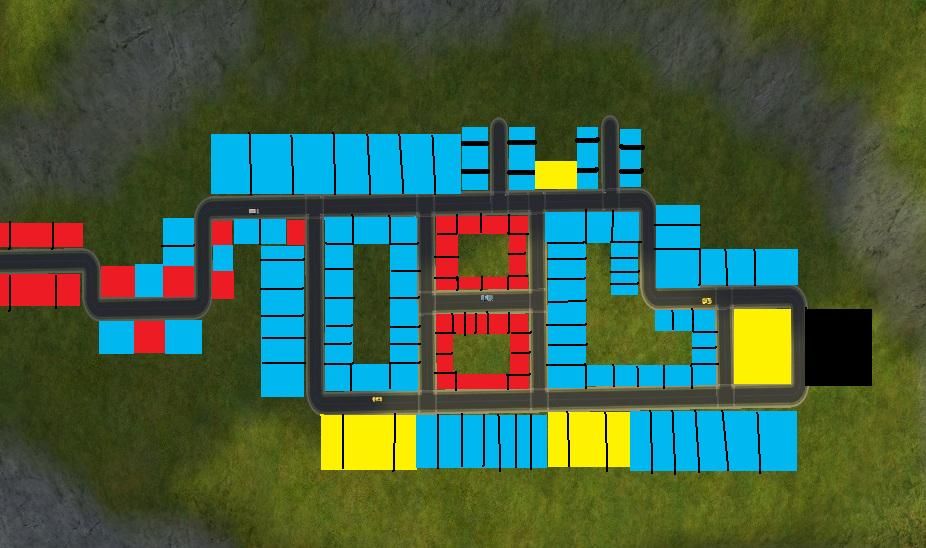
the green on the top part is the high wealth area ($100,000+ lot value) the red is poor/starter (up too $25,000), the yellow is upper middle class (45,000-60,000) the dark blue is going to be well off ( 75,000-90,000), pink is apartments, turquoise is commercial lots, and the black in the corner is the cemetery.


I normally figure out where I want things to go and its layout by looking at the basic road layout, and what just comes to me, what makes sense. Some streets i picture as side residential streets, and others major roads. I wish it was possible to have different road textures in the sims 2.
#19 Old 14th Dec 2012 at 1:58 AM
Because i've been playing sim city 4 for awhile i decided to try to incorporate what i've learned in there to the map so it's a bit more realistic then what i would have normally gone for in the old days where everything would just be residential and recreational/business were in the shopping/downtown. Red is business, Blue is residential, Yellow is recreational and the black is the cemetery. Now because the map looks small the lots are 2x2 for the corner lots and the rest are 1x1/1x2/1x3 at the largest. It would be how I would picture it working given the map size restraint vs max density allowed. Some of the business would also have overhead apartments to optimize space use as well. The two short streets near the top would be for starter condos for singles only.

#20 Old 14th Dec 2012 at 3:29 AM Last edited by CrèmedelaCrème : 14th Dec 2012 at 7:28 PM.
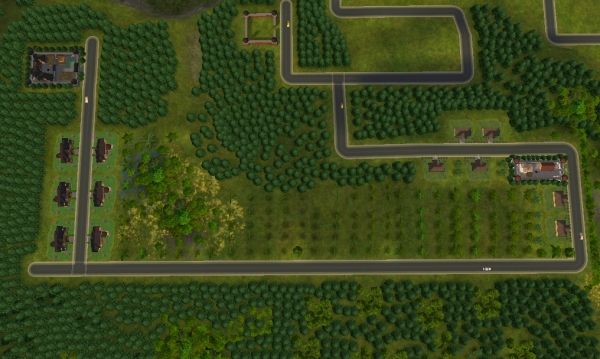
Default Briney Fjord


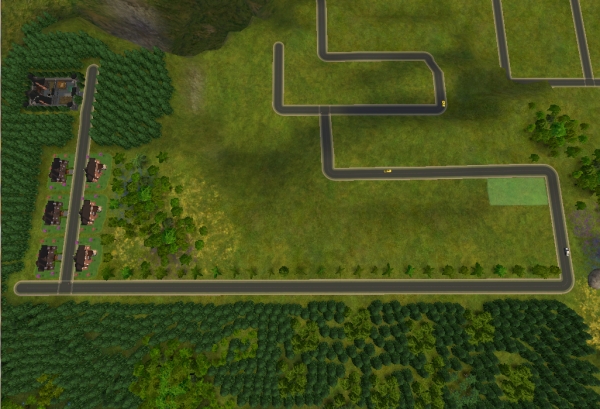
Briney Fjord has a medieval set-up. The big lot that you see right there on the lefthand side is Castle Briney, and the six smaller lots are for commoners. Briney Fjord has a fjord dividing the terrain, but luckily, the residents can meet each other by means of the bridge. The side of the fjord that you are looking at is the "residential side". The residential side holds all the upper-class manorhouses, estate countryhouses, rural farms, and commoners' houses. On the other side of the fjord, I am going to plan out a relatively large business district with mostly community lots and a couple of posh residential lots for my business owners with high capital. Briney Fjord is actually a sub-neighborhood of Veronaville, based on the template by the same name. When I am done with building, I think I am going to add in the families. The commoners would be townies/NPC's from Veronaville. The gentry would be the Montys and Capps. The nobles would be the Summerdreams. And the royalty is going to be a created family.


Here is a picture of Briney Fjord, still in development.
Lab Assistant
#21 Old 16th Jan 2017 at 4:24 PM
Quote: Originally posted by lauratje86
I'm thoroughly enjoying reading about how you all design/plan your neighbourhoods (or not!) :-) It's interesting to see that everyone has different ideas about how to lay out the Merrycliff terrain. Saturnfly, you're right, I'll swap the locations of the church and the graveyard, I think :-)

Peni, I completely agree with you on the idea that it's necessary to have an idea about the background story/concept for a neighbourhood in order to plan the layout. I always have an idea in mind when I start a new 'hood.

It's interesting to see how many of you only like to play large terrained 'hoods - I'm the opposite, I prefer small 'hoods. If I have a particular idea for a 'hood I sometimes play really really small ones with no more space to build or expand. Like this one, for example.....

The background story/canon for this neighbourhood required a very small island terrain, with a very limited number of homes and businesses. Inspired by joandsarah77's Bed & Breakfast, Apple Grove Island is a well established tourist destination, with a holiday cottage to let and a B&B (with one bedroom). People come from all over to visit the island, mainly for the chance to visit Vivian Westlake's famous salon and Darren Dreamer's café/gallery but also to spend time at the spa and enjoy the peace and quiet of island life. People also love to visit for the Apple Fayre, which is held every year on the 3rd day of Autumn - before the island became so popular with tourists it was a farming community with several orchards which produced a specific variety of apple, the Gaela apple. The island has a mere 8 permanent homes and most of the residents own their own businesses. There are always tourists on the island and the residents enjoy making them welcome and making sure they enjoy their stay - and encouraging them to spend their money, of course!

As well as the 8 permanent homes and the holiday home, there is a salon, a spa, a café/gallery, a restaurant, a boutique clothing store, a grocery store, a newsagents/Post office, a small park and a fishing hole. And a complete lack of space to expand!


i like this can i download it somewhere?
Instructor
#22 Old 16th Jan 2017 at 4:42 PM
I don't think and just throw lots wherever when I need them... All my sims live on a single street right now, and some of them have the same house design. I named my town "Apology."

Am I doing this wrong? XD

P.S.: How can you play with apartments? They're so expensive!
Mad Poster
#23 Old 16th Jan 2017 at 7:20 PM
If you're having fun, you're not doing it wrong.

How expensive apartments are is relative. You can control how expensive they are to a certain extent if you build your own, and just like in real life, sims can club together to afford their rent. If you play vanilla, apartments are a good way to drain income from sims you don't want to be too rich, since rent money vanishes into the ether and doesn't increase the value of the lot; but then there's the glitch that makes unmodded apartments a windfall when you move out. If you mod income, especially with no $20K handout, renting is a much more realistic option than owning for new graduates.

The more you play, the more possibilities become feasible.

Ugly is in the heart of the beholder.
(My simblr isSim Media Res . Widespot,Widespot RFD: The Subhood, and Land Grant University are all available here. In case you care.)
Instructor
#24 Old 16th Jan 2017 at 11:36 PM
Quote: Originally posted by Peni Griffin
but then there's the glitch that makes unmodded apartments a windfall when you move out.

I do not know what that means. Could you please explain?
Mad Poster
#25 Old 17th Jan 2017 at 12:06 AM
When a sim moves from an apartment, there's an error in the coding that reimburses him for all the furniture, fixtures, and equipment that the landlord provided. This can be a substantial sum! I once moved a graduate with the standard $20K in and out of an apartment complex which I had made inexpertly, hence the immediate move-out; and her net worth went up by over $10K, even though it was only a one-bedroom apartment.

Ugly is in the heart of the beholder.
(My simblr isSim Media Res . Widespot,Widespot RFD: The Subhood, and Land Grant University are all available here. In case you care.)
Page 1 of 2
Back to top