
 Sign in to Mod The Sims
 *Cheap Sofa Recolors*
 *Cheap Sofa Recolors*
SCREENSHOTS


00.JPG - width=535 height=395
01.JPG - width=464 height=362
02.JPG - width=415 height=365
03.JPG - width=420 height=386
04.JPG - width=412 height=383
Downloaded 1,304 times
291 Thanks
10 Favourited
13,033 Views
Say Thanks!
Thanked!

Hey It's new  MY object recolors..I finally learned!!!!
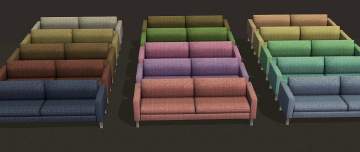
Enjoy these 4 recolors of the cheapest sofa...hope it'll come in handy in making starters :P
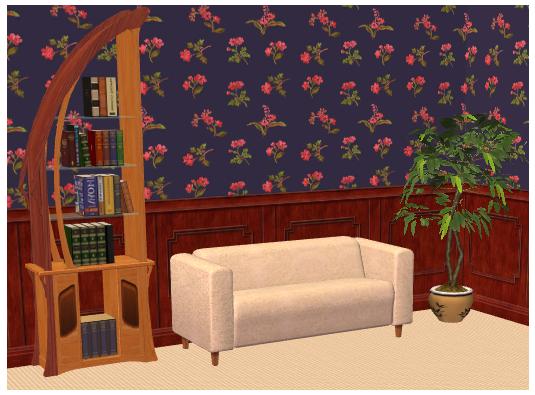
Comments appreciated and thanks toomore recolors are on the way....
 MY object recolors..I finally learned!!!!
Enjoy these 4 recolors of the cheapest sofa...hope it'll come in handy in making starters :P
Comments appreciated and thanks too
more recolors are on the way....
Advertisement:
This is a Maxis Recolour which means that it is a recolour of an item that already exists in your game. Please check the Pack requirements to see which game pack it recolours.
This custom content if it is not clothing, may require a seperate download to work properly. This is available at Colour Enable Package (CEP) by Numenor.
|
Cheap Sofa Recolors.rar
Download
Uploaded: 26th Mar 2008, 288.6 KB.
3,097 downloads.
|
||||||||
| For a detailed look at individual files, see the Information tab. | ||||||||
Install Instructions
Basic Download and Install Instructions:
1. Download: Click the download link to save the .rar or .zip file(s) to your computer.
2. Extract the zip, rar, or 7z file
3. Place in Downloads Folder: Cut and paste the .package file(s) into your Downloads folder:
Need more information?
1. Download: Click the download link to save the .rar or .zip file(s) to your computer.
2. Extract the zip, rar, or 7z file
3. Place in Downloads Folder: Cut and paste the .package file(s) into your Downloads folder:
- Origin (Ultimate Collection): Users\(Current User Account)\Documents\EA Games\The Sims™ 2 Ultimate Collection\Downloads\
- Non-Origin, Windows Vista/7/8/10: Users\(Current User Account)\Documents\EA Games\The Sims 2\Downloads\
- Non-Origin, Windows XP: Documents and Settings\(Current User Account)\My Documents\EA Games\The Sims 2\Downloads\
- Mac: Users\(Current User Account)\Documents\EA Games\The Sims 2\Downloads
- Mac x64:
/Library/Containers/com.aspyr.sims2.appstore/Data/Library/Application Support/Aspyr/The Sims 2/Downloads
Need more information?
- For a full, complete guide to downloading complete with pictures and more information, see: Game Help: Downloading for Fracking Idiots.
- Custom content not showing up in the game? See: Game Help: Getting Custom Content to Show Up.
- If you don't have a Downloads folder, just make one. See instructions at: Game Help: No Downloads Folder.
Advertisement:
Loading comments, please wait...
Author


Download Details
Packs:
None, this is Sims 2 base game compatible!
Uploaded: 25th Mar 2008 at 8:46 PM
Updated: 26th Nov 2008 at 11:39 PM by whitesiren
Uploaded: 25th Mar 2008 at 8:46 PM
Updated: 26th Nov 2008 at 11:39 PM by whitesiren
Style:
– Contemporary
Room:
– Living
: Living Room
Maxis Flags:
– Not Applicable
Tags
Other Download Recommendations:







More downloads by lidiqnata:
See more







About Me
[size=3]*Edit 2022*[/size]
[size=5]Re-upload of everything created by me has started at [color=#fa2742]Lidiqnata sims 2[/color][/size]
[size=5]Visit my [color=#fa2742]Patreon[/color] if you wish to support this process.[/size]
[size=5]Re-upload of everything created by me has started at [color=#fa2742]Lidiqnata sims 2[/color][/size]
[size=5]Visit my [color=#fa2742]Patreon[/color] if you wish to support this process.[/size]